
Disclosure: VPNFin is reader-supported. If you buy a VPN through links on this page, we may earn a commission at no extra cost to you. This never affects our ratings — here’s our full disclosure.
ExpressVPN on Mac changed a great deal in 2026, and plenty of guides have not caught up. ExpressVPN’s Mac release notes say split tunnelling is now available on macOS 11 and later, letting you choose which apps connect directly. The same release added post-quantum WireGuard, a command-line tool and rules that connect or disconnect the VPN by network. Some guides updated as recently as July still say split tunnelling is unavailable on modern macOS.
There is also a choice to make before you install. Top10VPN notes that ExpressVPN’s separate Mac App Store client lacks the advanced kill switch, split tunnelling and some auto-connect options, and advises using the app from ExpressVPN’s website.
ExpressVPN on Mac: The Short Answer
Download the Mac app from ExpressVPN’s website, not the Mac App Store, if you want every feature. You will need an activation code from ExpressVPN’s setup page.
Split tunnelling now works on macOS 11 and later, per ExpressVPN’s release notes, for apps and IP addresses.
Turn on the Internet Kill Switch and auto-connect. ExpressVPN’s Mac guide lists both, and our kill switch guide explains why they matter. Our ExpressVPN review covers the service.
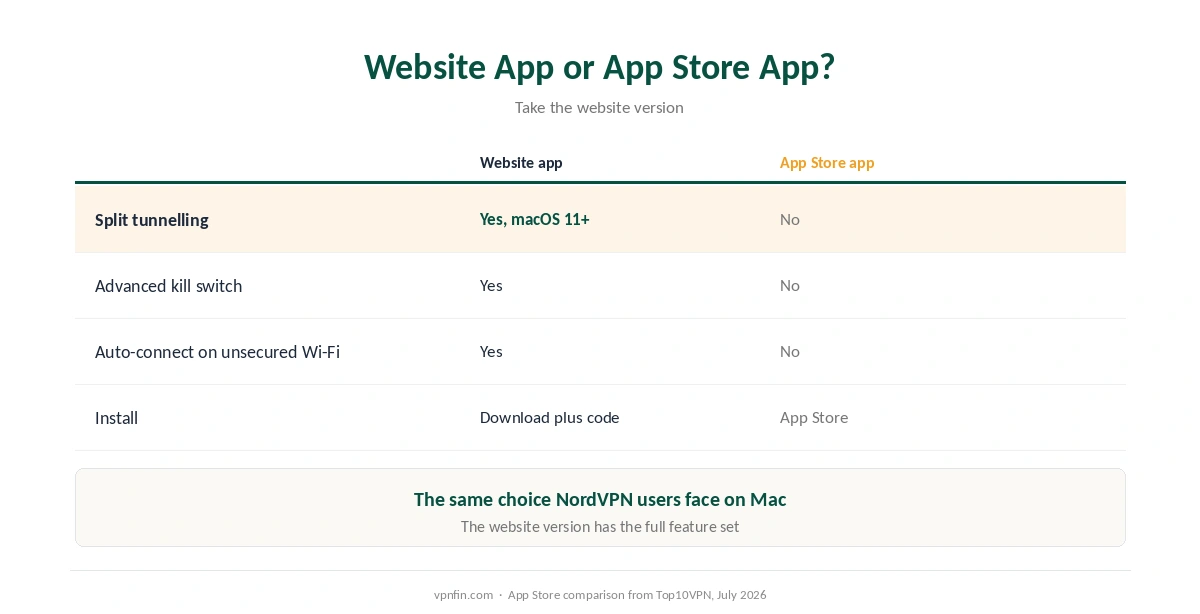
Website App or App Store App?
| Website app | Mac App Store app | |
|---|---|---|
| Split tunnelling | Yes, macOS 11+ | No, per Top10VPN |
| Advanced kill switch | Yes | No, per Top10VPN |
| Auto-connect on unsecured Wi-Fi | Yes | No, per Top10VPN |
| Install | Download plus activation code | App Store |
Take the website version. Top10VPN’s advice is to stick with the standalone application from ExpressVPN’s site. This mirrors the choice NordVPN users face, as our NordVPN on Mac guide explains.
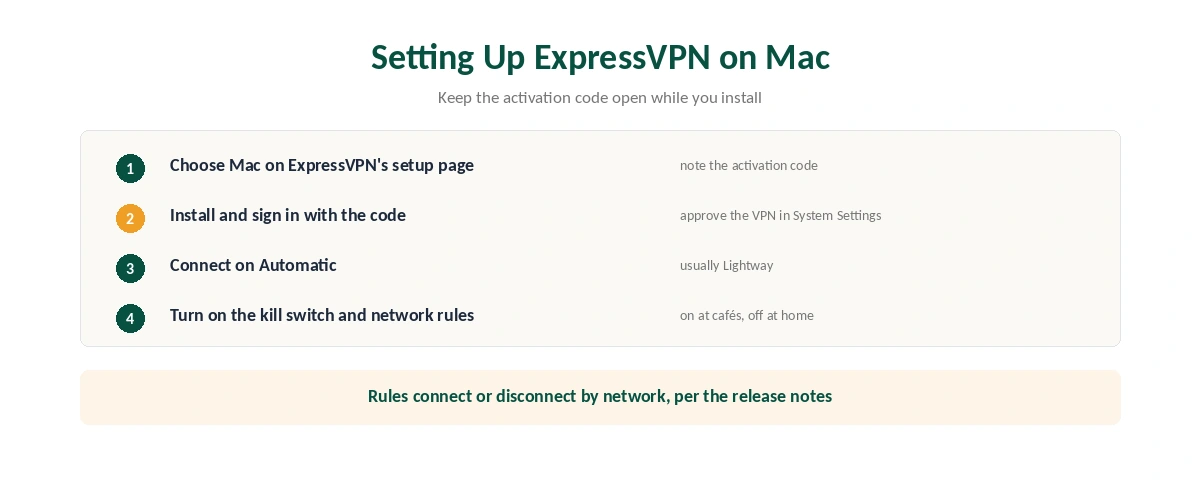
Setting Up ExpressVPN on Mac
| Step | What to do | Note |
|---|---|---|
| 1 | Go to ExpressVPN’s setup page and choose Mac | Keep the activation code visible |
| 2 | Download and install the app | Website version |
| 3 | Sign in with the activation code | Approve the VPN in System Settings |
| 4 | Connect; leave the protocol on Automatic | ExpressVPN usually picks Lightway |
| 5 | Turn on the Internet Kill Switch | In the app’s settings |
| 6 | Set auto-connect and network rules | Connect on untrusted networks |
Network rules are new and useful in ExpressVPN on Mac. ExpressVPN’s release notes describe rules that connect or disconnect the VPN automatically depending on the network you join, so a laptop can stay off the VPN at home and on it in cafés. Our public Wi-Fi guide explains why that matters.
What Is New in 2026
| Feature | What it does | Source |
|---|---|---|
| Split tunnelling | Chosen apps and IPs skip the VPN | Release notes, macOS 11+ |
| Post-quantum WireGuard | Protocol alongside Lightway and OpenVPN | Release notes |
| expressvpnctl | Control the VPN from the terminal | Release notes |
| Network automation | Connect or disconnect by network | Release notes |
| Dedicated IP | Works on Mac once activated on mobile | Release notes |
One thing is still missing from ExpressVPN on Mac. Lightway Turbo, ExpressVPN’s fastest protocol, remains Windows-only, Top10VPN notes. Our protocol comparison covers the alternatives.
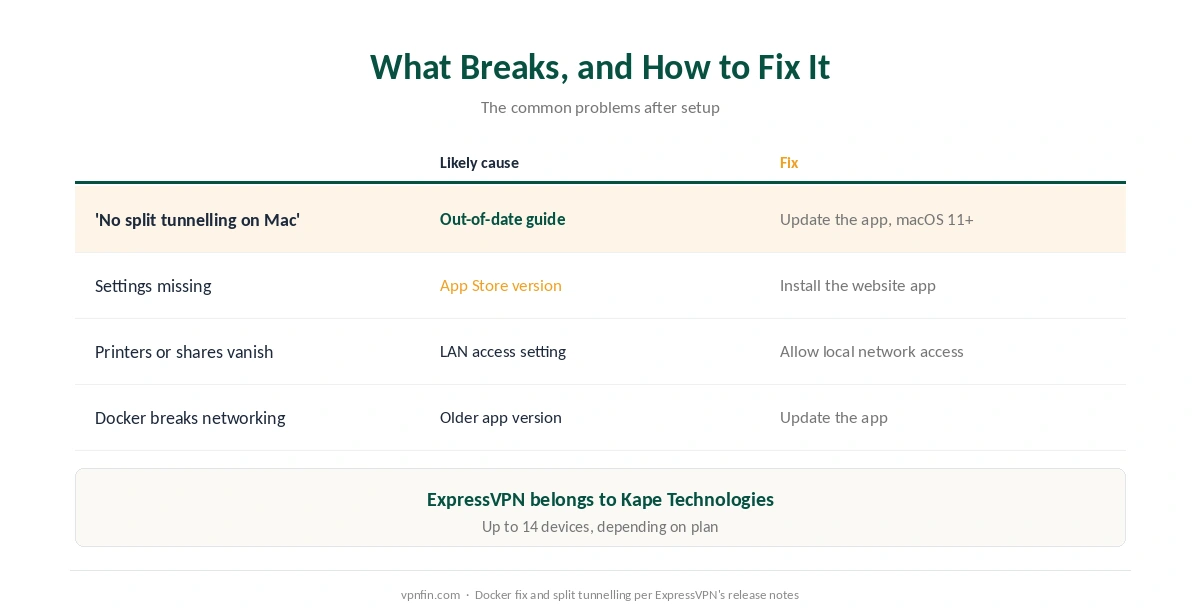
What Breaks, and How to Fix It
A guide says split tunnelling does not exist on your Mac. It is out of date; update the app, since ExpressVPN’s release notes add it for macOS 11 and later. Our split tunnelling guide explains the idea.
You installed from the App Store and settings are missing. Uninstall it and use the website version.
Printers or shared folders disappear. ExpressVPN’s Mac guide includes a section on reaching printers and shared folders on your local network; check that setting, then confirm the tunnel with our guide to checking a VPN.
Docker breaks networking. A recent update fixed Docker containers disrupting networking while connected, the release notes say, so update the app. Our troubleshooting guide covers other connection failures.
Other Devices and Alternatives
The same account covers iPhone and Android TV, as our ExpressVPN on iPhone guide and our ExpressVPN on Android TV guide explain.
Comparing Mac apps? Our Surfshark on Mac guide covers a rival that added split tunnelling in February; Surfshark and NordVPN share a parent, Nord Security. Our guide to turning off a VPN on Mac covers disconnecting, and our DNS leak guide the check to run after changes.
How We Research
The 2026 changes come from ExpressVPN’s Mac release notes and its March 2026 blog post, the setup steps from its macOS support page, and the App Store comparison and Lightway Turbo note from Top10VPN. One guide claiming split tunnelling is unavailable came from a company selling a rival tool, and contradicts ExpressVPN’s own notes. We name each source where used; all were read on 26 September 2026. We did not test on a Mac ourselves. Our full approach lives on the About Us page.
ExpressVPN on Mac FAQ
Yes, on macOS 11 and later, according to ExpressVPN’s release notes. You can exclude apps and IP addresses from the VPN.
Top10VPN advises against it: the App Store client lacks split tunnelling, the advanced kill switch and some auto-connect options. Use the website version.
Not yet. Top10VPN notes Lightway Turbo is Windows-only for now.
Lightway, OpenVPN and, since 2026, post-quantum WireGuard, per ExpressVPN’s release notes.
Yes. The expressvpnctl command-line tool lets you control and automate the VPN.
The Verdict
ExpressVPN on Mac is far more capable in 2026, with split tunnelling, post-quantum WireGuard and network rules.
Install the website version rather than the App Store one, and ignore older guides that say split tunnelling is missing. The service belongs to Kape Technologies.