Disclosure: VPNFin is reader-supported. If you buy a VPN through links on this page, we may earn a commission at no extra cost to you. This never affects our ratings — here’s our full disclosure.
Can you use a VPN on an Onn 4K streaming box? Yes. Walmart’s Onn devices run Google TV, which is built on Android TV, so Android TV VPN apps install from Google Play. The model you own matters, though: the 2026 Onn 4K Pro has 32GB of storage, Wi-Fi 6 and an Ethernet port, but that port runs at only 100 Mbps, smarttvs.org notes, while the cheapest Onn 4K has just 8GB of storage, Walmart lists.
This page compares the Onn models for VPN use, covers setup, and explains the speed limits worth knowing.
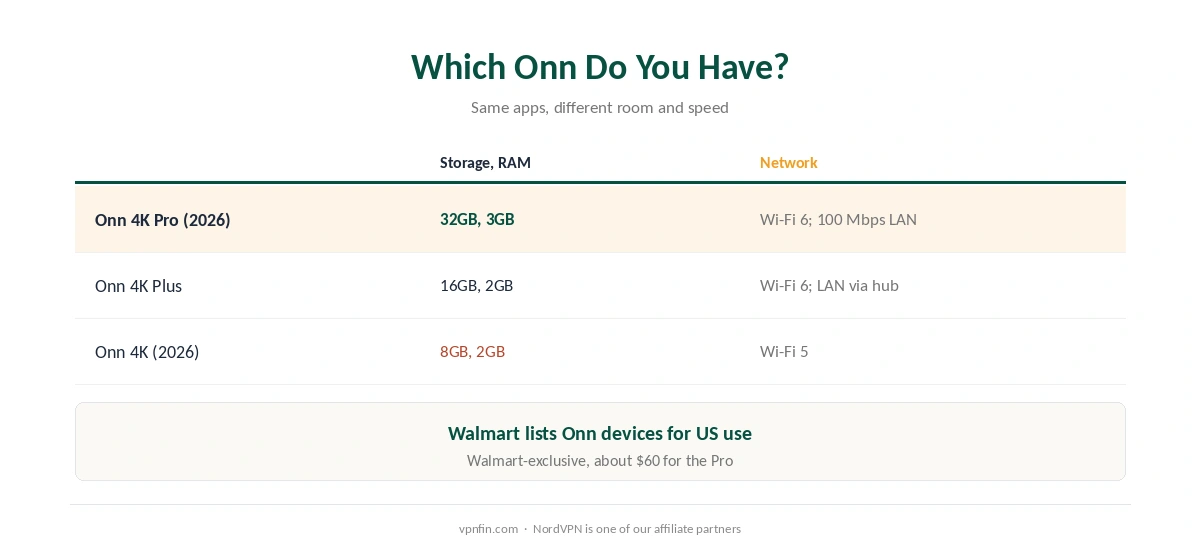
VPN for Onn 4K: Which Model Do You Have?
| Model | Storage, RAM | Network |
|---|---|---|
| Onn 4K Pro (2026) | 32GB, 3GB | Wi-Fi 6; 100 Mbps Ethernet |
| Onn 4K Plus | 16GB, 2GB | Wi-Fi 6; Ethernet via USB-C hub |
| Onn 4K (2026) | 8GB, 2GB | Wi-Fi 5 |
All run the same VPN apps. What differs is room and speed: an 8GB model fills quickly, so a VPN app competes with streaming apps for space. Compared with the 2024 model, the 2026 Pro dropped from 4GB to 3GB of RAM, smarttvs.org notes, still ample for a VPN.
Walmart sells Onn boxes for US use. Its listings mark the devices as US-compatible only; the VPN apps themselves aren’t affected, but taking one abroad isn’t what Walmart designs them for.
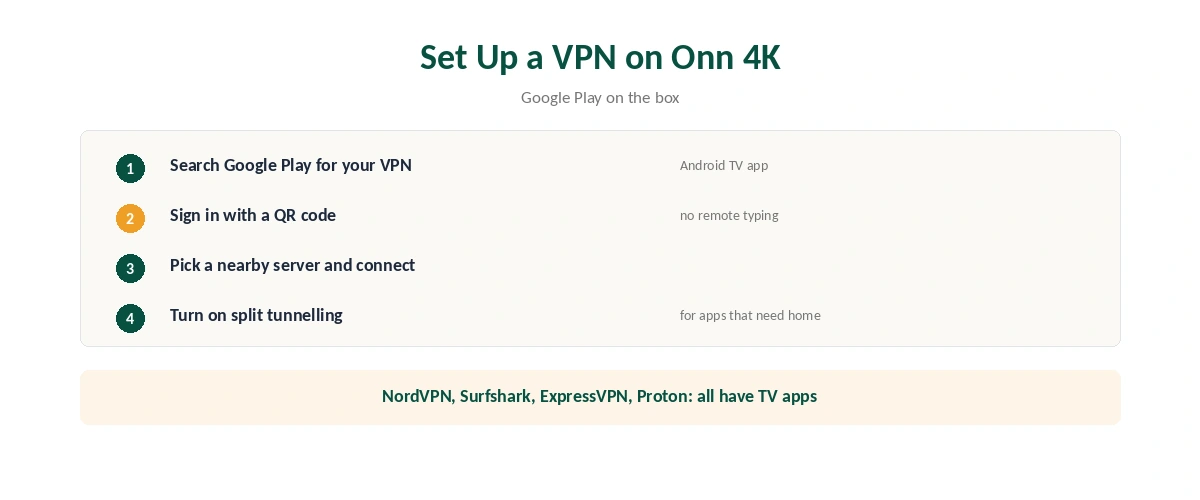
How to Set Up a VPN on Onn 4K
| Step | What to do |
|---|---|
| 1 | Open Google Play on the Onn box |
| 2 | Search for your VPN and install the Android TV app |
| 3 | Sign in, ideally with a QR code from your phone |
| 4 | Pick a nearby server and connect |
| 5 | Turn on split tunnelling for apps that need your normal connection |
When you set up a VPN for Onn 4K, QR sign-in avoids typing with the remote, and NordVPN, Surfshark, ExpressVPN and Proton VPN all have Android TV apps, as our Google TV Streamer guide covers in more detail. Surfshark and NordVPN share a parent, Nord Security.
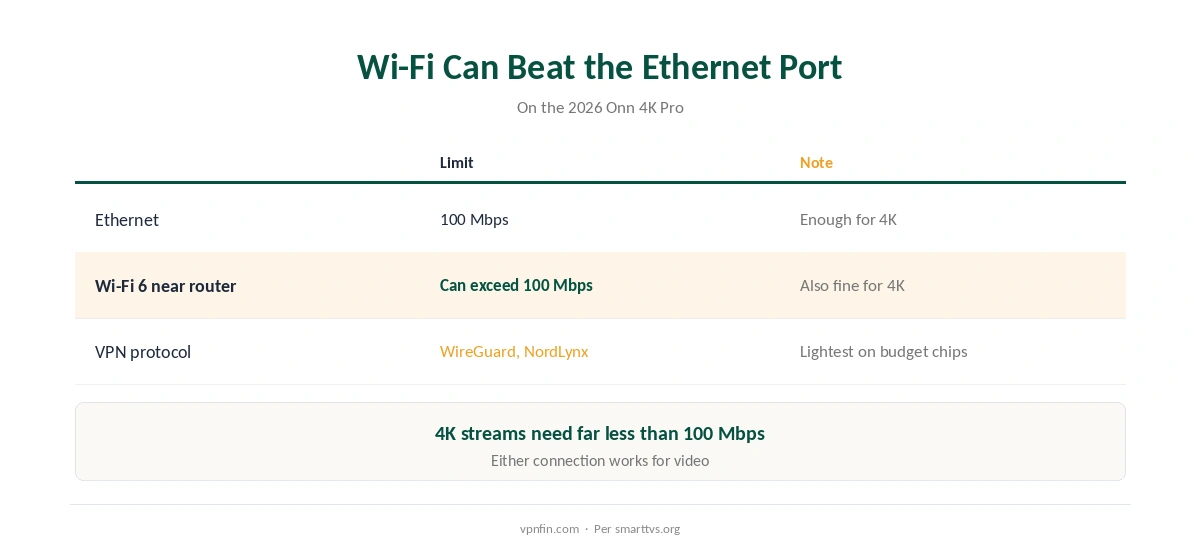
Speed: Wi-Fi Can Beat the Ethernet Port
The Pro’s Ethernet port tops out at 100 Mbps. On a fast home connection, Wi-Fi 6 near the router can be quicker, and a VPN adds its own overhead, as our speed guide explains. 4K streams need far less than 100 Mbps, so either works for video, as our Netflix guide notes for streaming.
Pick WireGuard or NordLynx for a VPN for Onn 4K. Lightweight protocols suit budget chips, as our encryption guide explains for devices without heavy hardware.
If the VPN Misbehaves
Clear the VPN app’s cache first, then switch protocol or reinstall, as our Android fix guide explains; Google TV boxes behave like Android here. If one streaming app fails only with the VPN on, exclude it with split tunnelling. To switch the VPN off entirely, see our TV VPN off guide.
Choosing a VPN App for Onn 4K
Onn 4K boxes run Google TV, so any VPN with an Android TV app in the Play Store should install. Check three things first. Does the app appear in the store on your box? Is WireGuard supported for speed? Does it offer split tunnelling so local apps can skip the VPN?
NordVPN, Surfshark, Proton VPN, CyberGhost and PureVPN all publish Android TV apps. Our Surfshark Android TV guide and NordVPN Android TV guide cover two; NordVPN and Surfshark share an owner, Nord Security.
Storage and Memory
Budget streaming boxes have limited storage and memory. Keep only the apps you use, clear the cache of streaming apps now and then, and restart the box if the VPN app becomes slow to connect.
If the box struggles with both a VPN and 4K streaming, lower the stream quality or run the VPN on your router instead, as our router setup guide explains.
Remote-Friendly Setup
Typing passwords with a remote is slow. Many VPN apps let you sign in with a code shown on the TV and confirmed on your phone. Use that where offered, then set the app to connect when the box starts.
When the Box Is Not Enough
Some budget boxes struggle with encryption and 4K at once. If the picture stutters, try a closer server first. Then switch to WireGuard if you are not already on it. If it still struggles, move the VPN to your router. Our router or device guide compares the two approaches.
A Quick Rule
App in the Play Store on your box? Install it and turn on WireGuard. Box struggling with 4K? Choose a closer server, then consider the router. Local apps misbehaving? Use split tunnelling. Test streaming at your usual viewing times before the refund window closes.
How We Research
Onn 4K Pro specs come from smarttvs.org, AFTVnews and Android Authority; the Onn 4K Plus and Onn 4K from Walmart’s listings; app availability from our Google TV Streamer research. AFTVnews’ report on the 2026 Pro is here. We read all sources on 28 September 2026. NordVPN is one of our affiliate partners. Our full approach lives on the About Us page.
VPN for Onn 4K FAQ
Yes. Onn devices run Google TV, so Android TV VPN apps install from Google Play.
The 2026 Onn 4K Pro, with 32GB of storage and Wi-Fi 6. The 8GB Onn 4K works but fills up quickly.
Its Ethernet port is limited to 100 Mbps, so strong Wi-Fi 6 can be faster. Either is enough for 4K.
NordVPN, Surfshark, ExpressVPN and Proton VPN all have Android TV apps that run on Google TV.
Walmart sells Onn devices for US use only, according to its listings.
The Verdict
A VPN for Onn 4K installs like any Google TV app; the 2026 Pro is the best Onn for it.
Mind the 100 Mbps Ethernet port and the 8GB model’s limited storage, and use a lightweight protocol.