
Disclosure: VPNFin is reader-supported. If you buy a VPN through links on this page, we may earn a commission at no extra cost to you. This never affects our ratings — here’s our full disclosure.
When Surfshark keeps disconnecting, its support team starts in an unusual place: the protocol, not the server. Surfshark’s article on connection interruptions asks you to try every protocol first, then other locations, then the apps that might be fighting for control of your network. This guide follows that order and adds the checks for phones and routers. Our page on Surfshark on Sky Broadband covers the connection fixes on Sky’s network and the Sky Go rules.
If the app never connects in the first place, that is a different fault, and our Surfshark not connecting guide covers it. This page is about a connection that works and then drops.
Step 1: Try Every Protocol
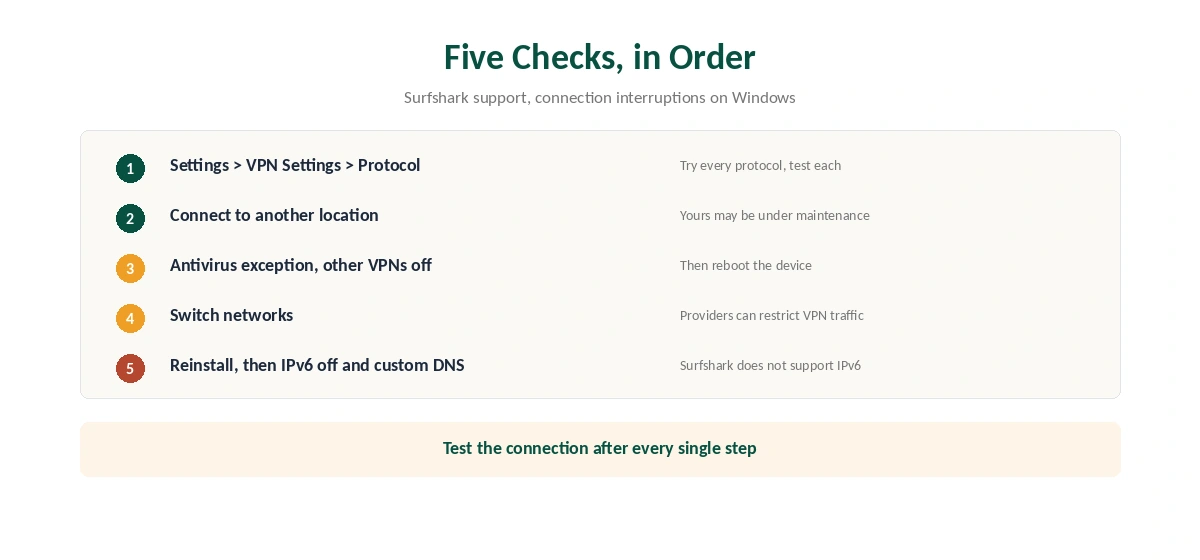
Open Settings in the Surfshark app, then VPN Settings, then Protocol. The default is Automatic. Surfshark’s Windows article asks you to try each protocol in turn, testing the connection after every switch.
Surfshark makes WireGuard its first speed suggestion on computers. OpenVPN over TCP, by contrast, can pass networks that interfere with UDP traffic. Our WireGuard vs OpenVPN page explains why the two behave differently. If Surfshark keeps disconnecting with every protocol, move on to the server.
Step 2: If Surfshark Keeps Disconnecting, Change the Location
Next, connect to a different server. Surfshark’s article notes that the one you use may be under maintenance, which looks like a random drop from your side. Pick a nearby location rather than the same city again.
Step 3: Why Surfshark Keeps Disconnecting Because of Other Apps
Surfshark’s support warns that some apps take over network control. Antivirus software is the common case, so add an exception for Surfshark or switch the antivirus off briefly to test. Also, remove or disable any other VPN on the device, then reboot.
Routers count too. Surfshark suggests removing parental or security controls on the router while you test. Our general VPN drop guide covers router causes common to every provider.
Step 4: Switch Networks, Then Reinstall
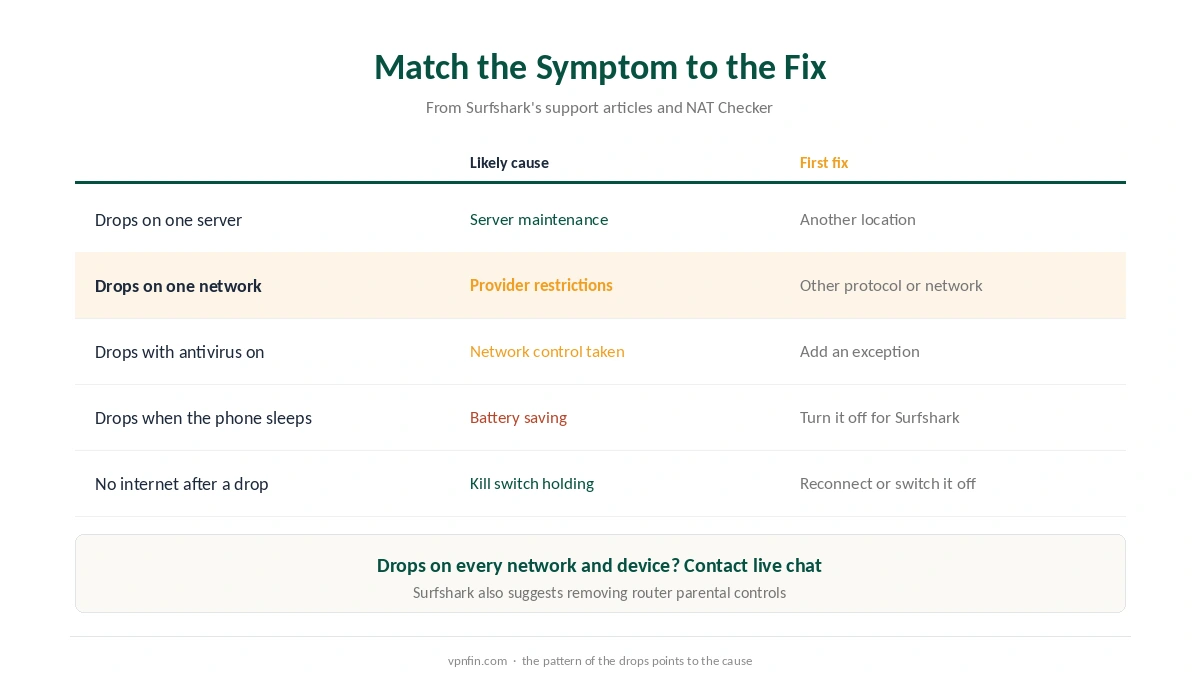
If Surfshark keeps disconnecting on one network only, the problem probably sits there. Surfshark notes that some internet providers apply restrictions, so test on mobile data or another Wi-Fi. If the drops follow you everywhere, reinstall the app.
Two more settings matter on Windows. Surfshark does not support IPv6, so disable it in the adapter settings if your network uses it. Surfshark also mentions custom DNS as a way to steady an unstable connection. Our DNS leak guide explains how to check the result.
Phones: Battery Saving and Small Packets
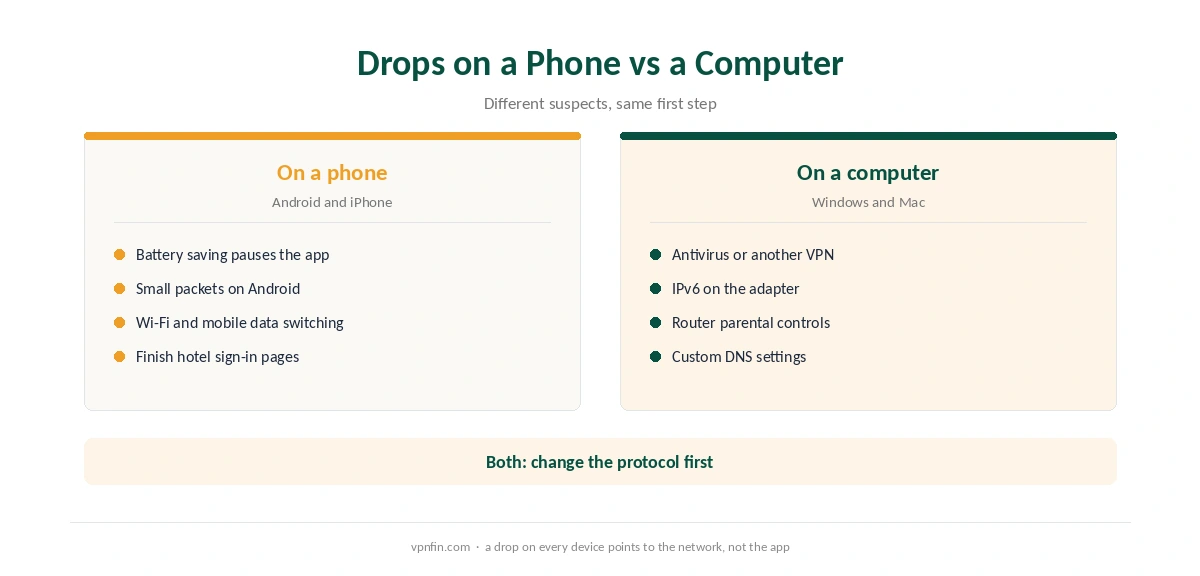
On Android, Surfshark’s speed article lists two extra settings that also affect stability. First, turn off battery-saving mode, which can pause the app in the background. Second, try Small packets, which reduces the size of each packet and may help on unstable mobile networks.
When Surfshark keeps disconnecting on an iPhone, Low Power Mode and Wi-Fi switching are the usual suspects. Our Surfshark iPhone guide covers that app. For system settings, our iPhone VPN troubleshooting page and Android VPN troubleshooting page list the system settings.
Keep the Kill Switch On
While Surfshark keeps disconnecting, the kill switch decides what happens in each gap. With it on, apps lose the internet rather than falling back to your normal connection. NAT Checker notes a side effect: after a failed attempt, the kill switch keeps the internet closed until you reconnect or turn it off. Our kill switch guide explains that behaviour.
Hotel and campus Wi-Fi add one more trap. Finish the sign-in page before you connect, or the tunnel will fail again and again. Then confirm the tunnel on our VPN test page.
When to Contact Support
If nothing helps, contact Surfshark’s live chat with your app version, platform, protocol and the networks you tried. If the service stays unusable within 30 days of your first purchase, read our Surfshark refund guide. For slow speeds rather than drops, see our Surfshark speed guide. Device setup sits in our Surfshark Windows guide.
Router Controls and Custom DNS
Surfshark’s Windows article notes that parental or security controls on the router can interrupt the connection. If drops happen on every device at home, check the router first. It also suggests trying a custom DNS setting, since some provider DNS servers cause trouble.
Surfshark does not support IPv6, its support notes. Networks that rely heavily on IPv6 can cause drops.
How We Research
This page draws on Surfshark’s support articles on unstable connections, slow speeds and connection failures, plus NAT Checker’s notes on the kill switch. We cross-checked these sources against each other, and where they conflict or something can’t be verified, we say so in the text rather than guessing. We read every source on 5 October 2026. The main source we relied on is Surfshark’s article on connection interruptions. Our full approach lives on the About Us page.
Surfshark Keeps Disconnecting FAQ
Surfshark’s support names the protocol, a server under maintenance, interfering apps such as antivirus or other VPNs, network restrictions and router controls. Test each one in turn.
Surfshark asks you to try every protocol on your network. OpenVPN over TCP can pass networks that interfere with UDP, so include it in the test.
No. Surfshark’s Windows article says it does not support IPv6, so disable IPv6 on the adapter if your network uses it.
Battery-saving mode can pause the app. Turn it off for Surfshark, and try the Small packets setting on unstable mobile networks.
No. A drop follows a working connection. If the app never connects, follow our Surfshark not connecting guide.
The Verdict
Most Surfshark drops trace back to the protocol, the server or another app on the device. Work through Surfshark’s order, test after each change, and keep the kill switch on while you do. Phones need the battery setting checked as well.