
Disclosure: VPNFin is reader-supported. If you buy a VPN through links on this page, we may earn a commission at no extra cost to you. This never affects our ratings — here’s our full disclosure.
NordVPN and Prime Video worked together in Comparitech’s July and August 2026 tests, and Cybernews counted NordVPN among only three of the VPNs it tested that worked consistently across Prime Video regions. Amazon detects VPN traffic actively, though, and Cybernews warns that results change as Amazon updates its detection.
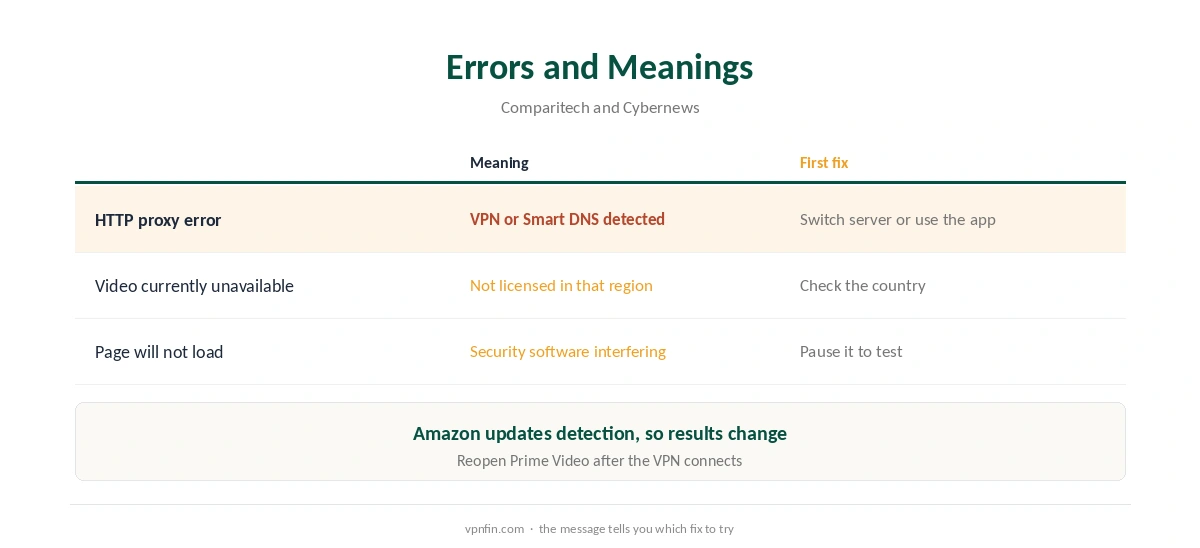
Prime Video Errors and What They Mean
Comparitech explains that the HTTP proxy error means Amazon detected a VPN or a Smart DNS service. A second message, this video is currently unavailable, appears when a title is not licensed in the region you appear to be in.
Cybernews adds that security software can also block Prime Video from loading, so test with it paused if errors persist.
Fixing NordVPN and Prime Video Errors
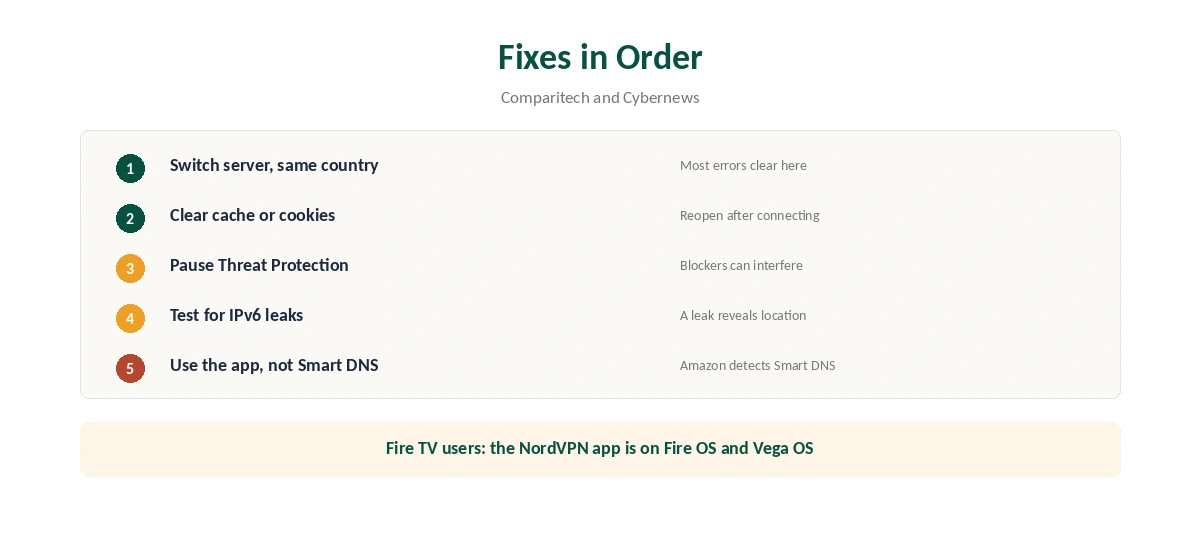
First, switch to another server in the same country. Second, clear Prime Video’s cache or your browser cookies, and reopen the app after the VPN connects. Third, if you use Threat Protection or another blocker, pause it for Prime Video, as our NordVPN ad blocker guide explains.
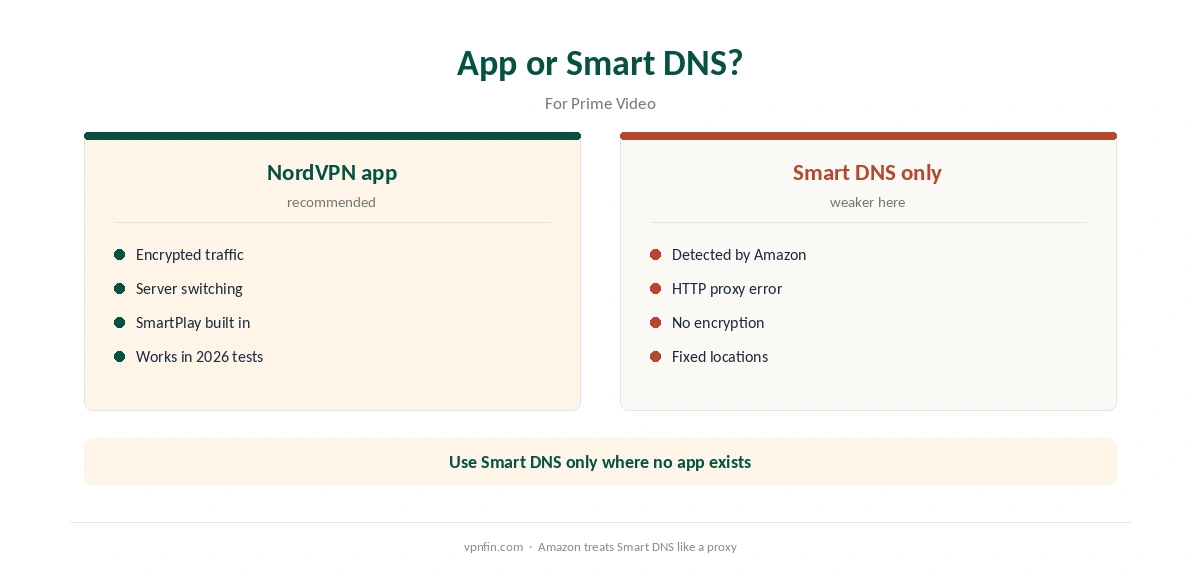
Fourth, test for leaks with our IPv6 leak guide. If you use Smart DNS rather than the app, switch to the app, since Amazon detects Smart DNS too; our NordVPN Smart DNS guide explains the difference.
NordVPN and Prime Video on Fire TV
Prime Video runs on Amazon’s own Fire TV, where the NordVPN app works on both Fire OS and Vega OS sticks, as our NordVPN Firestick guide explains. Our Prime Video VPN guide compares other providers.
Other Services
The same fixes apply elsewhere. Our Netflix guide and Paramount Plus guide cover two more services.
Our streaming hub collects them all, and our NordVPN Japan guide covers Japanese Prime Video. For a smart TV without apps, our smart TV guide explains the router route. Each guide repeats the same first fix: switch servers.
Check the connection with our VPN test page before streaming. Our NordVPN speed guide helps if 4K buffers.
Test within the refund window, as our refund guide explains. NordVPN belongs to Nord Security, which also owns Surfshark.
Prime Video on Fire TV and Smart TVs
Fire TV devices are Amazon’s own. NordVPN runs on both Fire OS and Vega OS sticks, as our NordVPN Firestick guide explains. Connect NordVPN first, then open Prime Video. If the catalogue does not change, clear the Prime Video app’s data in the Fire TV settings and sign in again.
On smart TVs without a NordVPN app, Smart DNS is tempting. But Comparitech notes that Amazon detects Smart DNS as well as VPNs and shows the HTTP proxy error. A router running NordVPN is the more reliable route, as our NordVPN router guide explains.
Choosing a Server
Cybernews notes that Amazon actively detects VPN traffic and that results change over time. Start with a server in the country of the catalogue you want, then switch city if you see the proxy error. Avoid hopping across many servers in a few minutes, since each failed attempt adds nothing.
Security software can also stop Prime Video loading, Cybernews adds. If pages fail rather than showing an error, pause other security tools briefly to test.
Picture Quality and Speed
Prime Video adjusts quality to your connection. A slow route therefore shows up as a soft picture rather than an error. Pick a nearby server within the country you need and keep NordLynx as the protocol. Our NordVPN speed guide covers measuring your baseline.
Run a speed test with and without the VPN on the same device. If both are slow, the line is the limit. If only the VPN test is slow, a different server should help.
What a VPN Does Not Change
A VPN changes the address Amazon sees. It does not change the country of your Amazon account, your payment method or which titles Amazon has licensed in each country. If a title shows as currently unavailable, Comparitech explains, it is not licensed in the region you appear to be in. No server fix will change that.
Testing Before a Long Plan
Comparitech’s July and August 2026 tests found NordVPN working with Prime Video. But Cybernews stresses that results shift as Amazon updates its detection. Test with your own account, on your own devices, before committing to a two-year plan.
NordVPN’s 30-day refund window covers that test, as our NordVPN refund guide explains. Try at least two countries and two devices. Note which servers work, to build a fallback list for when one gets blocked.
Keep a dated note of servers that worked. The next block then costs you a minute instead of an evening. Recheck it monthly, because blocks rotate.
How We Research
This page draws on Prime Video VPN guides and tests from Cybernews and Comparitech. We cross-checked these sources against each other, and where they conflict or something can’t be verified, we say so in the text rather than guessing. We read every source on 5 October 2026. The main source we relied on is Comparitech’s Prime Video proxy guide. Our full approach lives on the About Us page.
NordVPN and Prime Video FAQ
Yes, in Comparitech’s July and August 2026 tests. Cybernews also counted it among the few VPNs that worked consistently.
Amazon detected a VPN or Smart DNS service, according to Comparitech. Switch servers or use the app.
The title is not licensed in the region you appear to be in.
Security software can block Prime Video, Cybernews notes. Pause it for the site to test.
Amazon detects Smart DNS too, so the NordVPN app is the more reliable route.
The Verdict
NordVPN and Prime Video work well in current tests. Use the app rather than Smart DNS, switch servers on errors, and pause blockers if playback fails.