
Disclosure: VPNFin is reader-supported. If you buy a VPN through links on this page, we may earn a commission at no extra cost to you. This never affects our ratings — here’s our full disclosure.
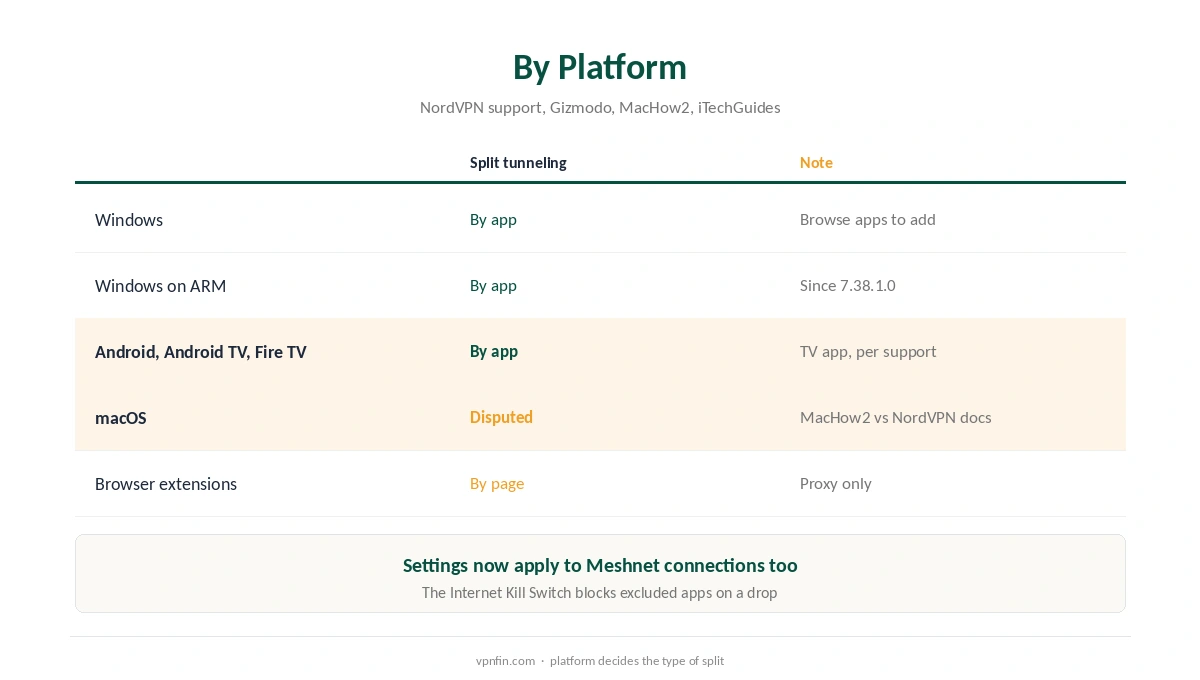
NordVPN split tunneling lets chosen apps skip the VPN while everything else stays protected. NordVPN’s support describes it on Windows and in the Android TV app, Gizmodo confirms it in the TV app, and the browser extensions split by web page instead. On macOS, sources disagree, and on Windows the Internet Kill Switch overrides it.
Where NordVPN Split Tunneling Works
Windows users pick apps from a list of open programs, with Browse apps to add others, NordVPN’s support says. ARM-based Windows PCs gained the feature in app version 7.38.1.0. For Android and Android TV, the support page explains that selected apps stay outside the VPN.
On macOS, MacHow2 reported in June 2026 that modern macOS versions lack native NordVPN split tunneling, while NordVPN’s own instructions list macOS. Check your app’s settings. Our split tunnelling explainer covers the concept.
NordVPN Split Tunneling on Fire TV and Android TV
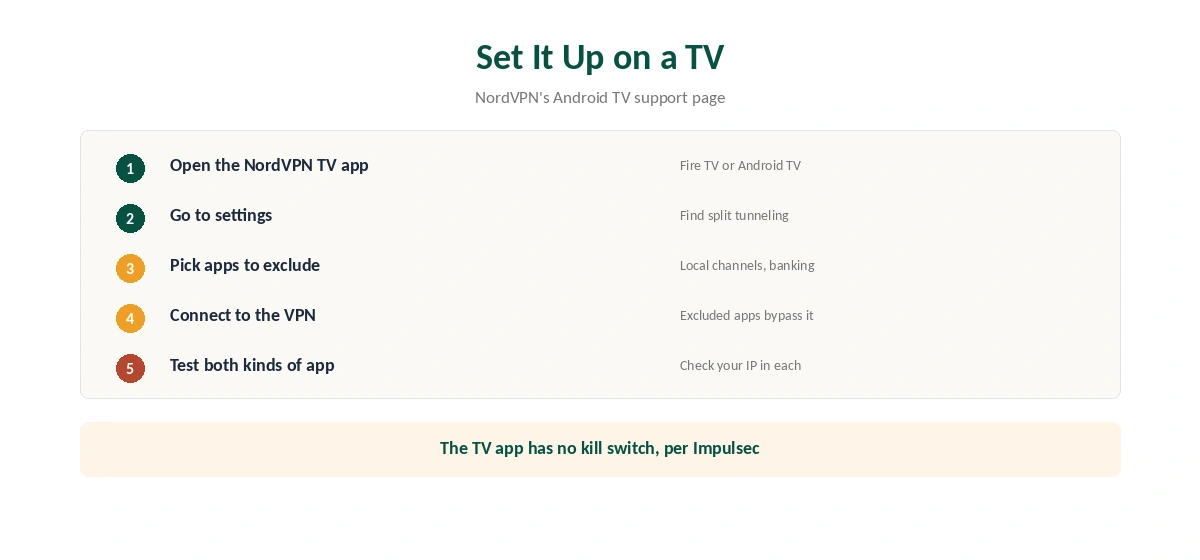
NordVPN’s Android TV support page lists split tunneling among the TV app’s settings, and Gizmodo confirms it. Fire TV devices run Android, and NordVPN’s support covers both. Open the app’s settings, find split tunneling, and pick the apps to exclude, such as a local channel app.
Our NordVPN Firestick guide and Android TV guide show the app. Note that the TV app has no kill switch, Impulsec reports.
Split Tunneling vs the Kill Switch
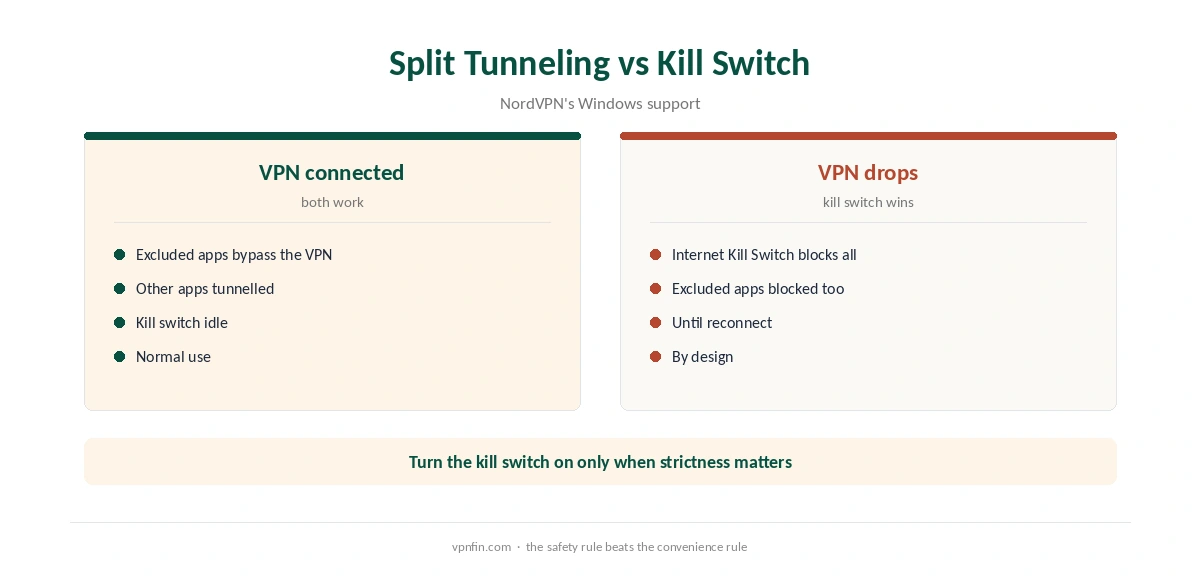
NordVPN’s support is clear: the Internet Kill Switch takes priority. If the VPN drops, it blocks every app, even the ones you excluded. Turn the kill switch on only when strict protection matters more than the excluded apps, as our kill switch guide explains.
When It Is Not Working
NordVPN’s Windows support suggests resetting the app, reinstalling it, and then resetting the network, which erases saved Wi-Fi passwords. Our NordVPN Windows guide covers the app.
Split tunneling now applies to Meshnet connections too, NordVPN’s Android release notes say; our Meshnet guide explains Meshnet. In the browser, our Firefox guide covers page-based splitting. NordVPN belongs to Nord Security, which also owns Surfshark.
Common NordVPN split tunneling uses include banking apps that block VPN addresses and local streaming. Our Mac guide covers the macOS question, and our refund guide explains the test window.
Phones follow the Android steps; our iPhone guide covers iOS, where options differ. Our Spotify guide shows one app worth excluding. Our streaming hub covers local services.
What to Exclude
Good candidates for exclusion are apps that dislike VPN addresses or need your real location. Banking apps often challenge VPN logins. Local streaming apps may need your home region. Work tools sometimes block foreign IPs.
Keep the list short. Every excluded app uses your real IP and skips the encryption. If an app handles anything sensitive, leave it inside the tunnel.
Split Tunnelling in the Browser
NordVPN’s browser extensions work differently from the apps. They split by website rather than by app, so you can exclude individual sites from the proxy. Our NordVPN Firefox guide covers the Firefox add-on, and our Chrome guide covers Chrome.
Testing Your Split
After setting it up, check both kinds of app. Open an excluded app that shows your location, then an included one. The excluded app should show your real country, the included one the VPN server’s country.
In a browser that stays inside the tunnel, our VPN test page confirms the address. Repeat the check after app updates, since settings can reset.
Games and Split Tunnelling
Gamers often exclude the game itself when ping rises, while keeping the browser and chat inside the tunnel. Our NordVPN Fortnite guide and Valorant guide show that approach. Remember that the Internet Kill Switch still blocks excluded apps if the VPN drops.
Split Tunnelling and Meshnet
NordVPN’s Android release notes say split tunnelling settings now apply to Meshnet connections too. If you exclude an app, it also stays outside Meshnet routing. That matters when you route traffic through a home computer while travelling.
Check the excluded list after setting up Meshnet. An app you excluded for banking will not reach your home network through Meshnet either. Our NordVPN Meshnet guide covers the setup, and our split tunnelling explainer covers the general idea. Review the list once a month, since apps you no longer use may still be excluded.
If split tunnelling stops working after an update, NordVPN’s Windows support suggests resetting the app, then reinstalling it. A network reset is the last step, since it erases saved Wi-Fi passwords. Before resetting, export or note your excluded apps, so you can restore the list in a minute afterwards.
How We Research
This page draws on NordVPN’s split tunneling and kill switch support articles, its Android TV page and release notes, plus Gizmodo, Impulsec, MacHow2 and iTechGuides. We cross-checked these sources against each other, and where they conflict or something can’t be verified, we say so in the text rather than guessing. We read every source on 5 October 2026. The main source we relied on is NordVPN’s Android TV support page. Our full approach lives on the About Us page.
NordVPN Split Tunneling FAQ
Yes, on Windows and Android, including the Android TV app, and by web page in the browser extensions.
NordVPN’s support lists it in the TV app, which covers Fire TV and Android TV devices.
Sources disagree. MacHow2 says not natively on modern macOS; NordVPN’s instructions list macOS. Check the app.
The Internet Kill Switch has priority and blocks all apps, according to NordVPN’s support.
Yes. NordVPN’s Android release notes say the settings now apply to Meshnet connections too.
The Verdict
NordVPN split tunneling works by app on Windows, Android and TV apps, and by page in the browser. Remember that the kill switch overrides it, and check macOS yourself.