
Disclosure: VPNFin is reader-supported. If you buy a VPN through links on this page, we may earn a commission at no extra cost to you. This never affects our ratings — here’s our full disclosure.
Proton VPN smart TV support depends on the TV’s system. Proton has apps for Android TV, Google TV, Fire TV, including Vega OS since September 2026, and Apple TV. Samsung and LG TVs run no VPN apps, Gizmodo’s 2026 testing notes, and Proton has no Smart DNS, so those sets need a router. In Gizmodo’s test, Proton opened 10 of the 14 it tried, with Hulu, Disney+, Pluto TV and ITVX blocking it.
This guide covers which TVs work, the setup on each and the free plan’s limits.
Which TVs Work With Proton VPN Smart TV Apps
Android TV and Google TV sets need Android 8 or later, Proton’s support pages say. Fire TV sticks run either the Fire OS app or the Vega OS app. Apple TV needs tvOS 17 and a paid plan. Our Proton VPN Android TV guide and Firestick guide cover each.
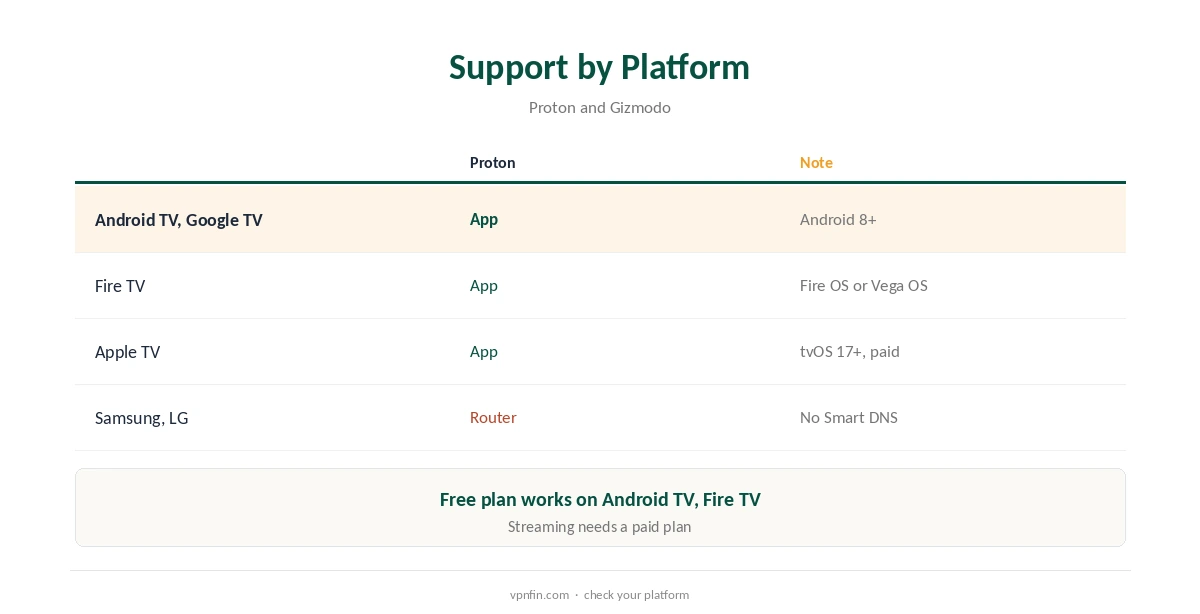
Samsung and LG
Tizen and webOS run no VPN apps, and Proton offers no Smart DNS, Gizmodo notes. A router with a Proton WireGuard config covers these sets, as our Proton VPN router guide explains.
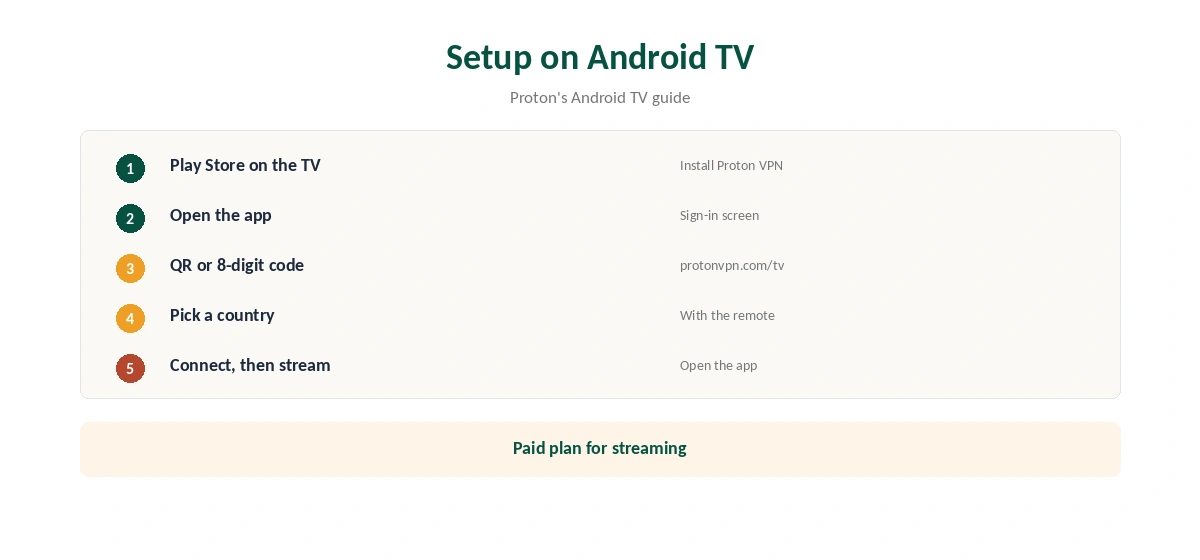
Setup on Android TV
Install Proton VPN from the Play Store on the TV. Sign in with the QR code or an eight-digit code entered at protonvpn.com/tv. Pick a country with the remote and connect, then open the streaming app.
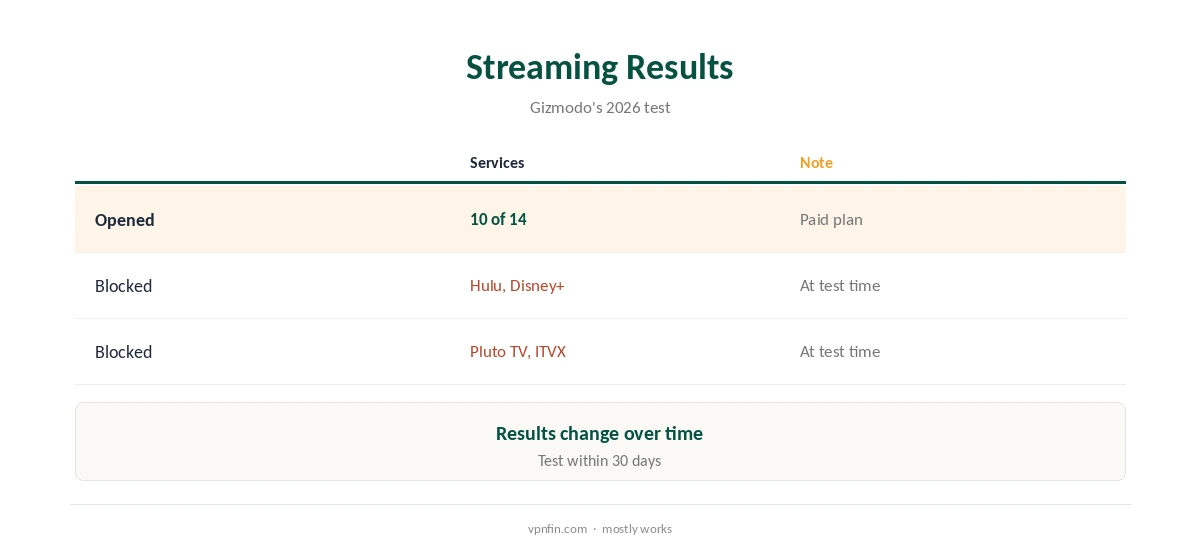
Streaming Results
Gizmodo saw 10 of the 14 it tried open, with Hulu, Disney+, Pluto TV and ITVX blocking Proton. Streaming support is for paid plans, Proton’s support pages say. Our Netflix VPN guide compares providers.
Proton VPN Smart TV Setup on Fire TV
Fire OS sticks use Proton’s Android TV build from the Amazon Appstore; Vega OS sticks use a separate Vega app, available since 17 September 2026. Our Vega OS VPN guide explains which sticks run Vega.
Apple TV
The Apple TV app needs tvOS 17 and a paid plan, and signs in with a code at protonvpn.com/appletv. Our Proton VPN Apple TV guide walks through it.
Google TV Streamer and Nvidia Shield
Both run Android TV, so Proton’s TV app installs from the Play Store. Our Google TV Streamer guide and Nvidia Shield guide cover each device.
Several TVs
Each TV counts as a device on VPN Plus’s 10. A router covers all TVs as one device, which helps large homes.
Is a Proton VPN Smart TV Setup Worth It?
On Android TV, Google TV, Fire TV and Apple TV, yes, with a paid plan for streaming. On Samsung and LG, it depends on whether you will set up a router.
Testing Within the Refund
Proton allows a full refund within 30 days of the original purchase, once per user, our tables record. Test the services you watch on your own TV within that window.
Proton VPN Smart TV Troubleshooting
If the TV app will not connect, update it, sign out and back in, and try another country. On Android TV, Proton’s support pages note the free plan works but streaming support needs a paid plan.
Privacy
Proton’s five Securitum audits in our table cover the same no-logs policy on TVs as on phones and computers.
Who It Suits
Owners of Android TV, Google TV, Fire TV and Apple TV devices suit Proton well. Samsung and LG owners need a router or a provider with Smart DNS.
Keeping It Updated
Turn on automatic app updates on the TV. After an update, check the server and sign-in state before streaming.
Several Profiles
A shared family TV can stay signed in to one Proton account while phones use their own apps on the same plan.
Speed
TV sticks and older smart TVs have modest processors, so test speed with and without the VPN. NordVPN’s Fire TV guidance notes that a stick’s Wi-Fi often limits speed more than the VPN, and that an Ethernet adapter helps; the same applies with Proton. Test a nearby server first, then a wired connection.
Quick Rule
Android, Google, Fire or Apple TV: install the app. Samsung or LG: use a router or a provider with Smart DNS. Test the services you watch before the refund window closes.
Kill Switch on TVs
Check the TV app’s settings for a kill switch and turn it on where offered, since TV builds carry fewer options than desktop apps.
Free Plan on TVs
The free plan installs and works on Android TV and Fire TV, but streaming is for paid plans, and the Apple TV app needs a paid plan. Gizmodo notes Proton leaves bandwidth uncapped.
Alternatives for Samsung and LG
Gizmodo found NordVPN’s SmartPlay changes the streaming location through DNS settings with no app, which suits Samsung and LG owners without a router. Our smart TV VPN guide compares options.
How We Research
This page draws on Gizmodo’s 2026 smart TV testing, Proton’s Android TV, Vega OS and Apple TV support pages and our Proton tables. We cross-checked these sources against each other, and where they conflict or something can’t be verified, we say so in the text rather than guessing. We checked time-sensitive figures, including prices in US dollars, on 8 October 2026. The main source we relied on is Gizmodo’s smart TV VPN test. Our full approach lives on the About Us page.
Proton VPN Smart TV FAQ
Yes, on Android TV, Google TV, Fire TV and Apple TV.
Not directly; use a router, since Proton has no Smart DNS.
On Android TV and Fire TV, but streaming needs a paid plan.
Hulu, Disney+, Pluto TV and ITVX, per Gizmodo.
With a QR code or an eight-digit code at protonvpn.com/tv.
The Verdict
Proton VPN smart TV coverage is broad on Android, Google, Fire and Apple TV. Samsung and LG owners need a router, or a provider with Smart DNS.