
Disclosure: VPNFin is reader-supported. If you buy a VPN through links on this page, we may earn a commission at no extra cost to you. This never affects our ratings — here’s our full disclosure.
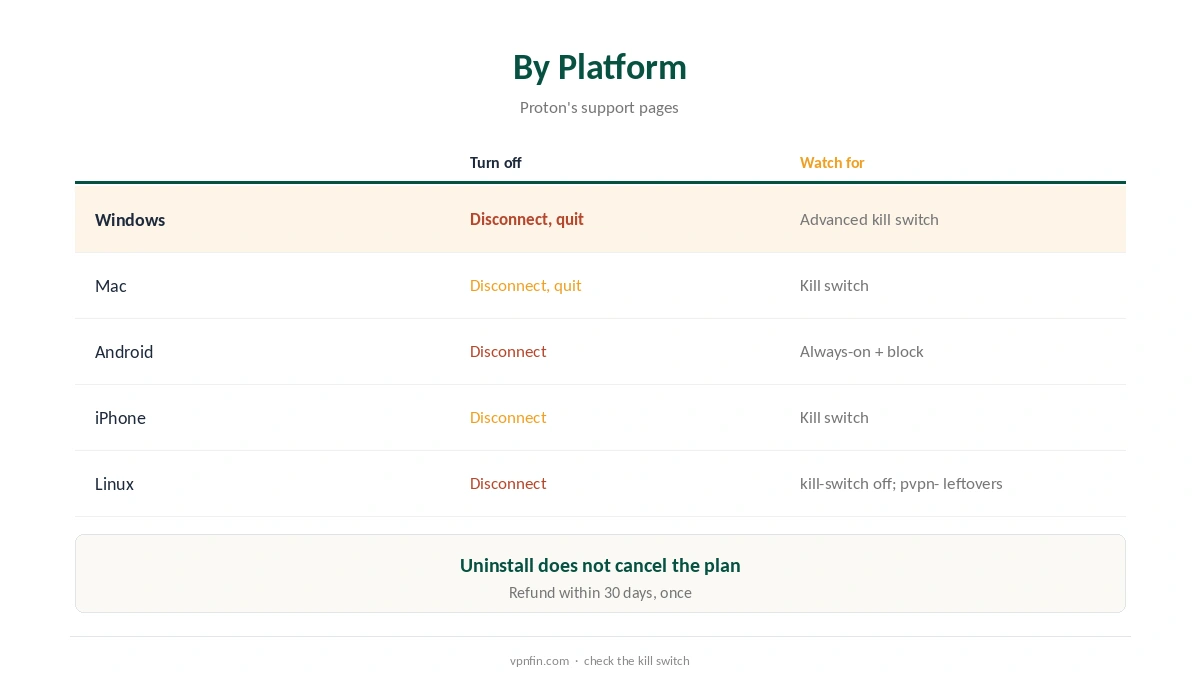
To turn off Proton VPN, disconnect in the app, but check the kill switch first: if it stays on, your internet may stop working. Proton’s Advanced kill switch on Windows and Linux only allows internet access through Proton, and stays active even after a restart, its support pages say. On Android, Always-on VPN with Block connections without VPN works the same way. Turn those off before you quit or uninstall.
This guide covers disconnecting, the kill switch catch and clean removal on each platform.
How to Turn Off Proton VPN Quickly
Open the app and press Disconnect. On Windows and Mac, you can also quit from the system tray or menu bar after disconnecting. On iPhone and Android, disconnect in the app; the VPN toggle in system settings works too.
The Kill Switch Catch
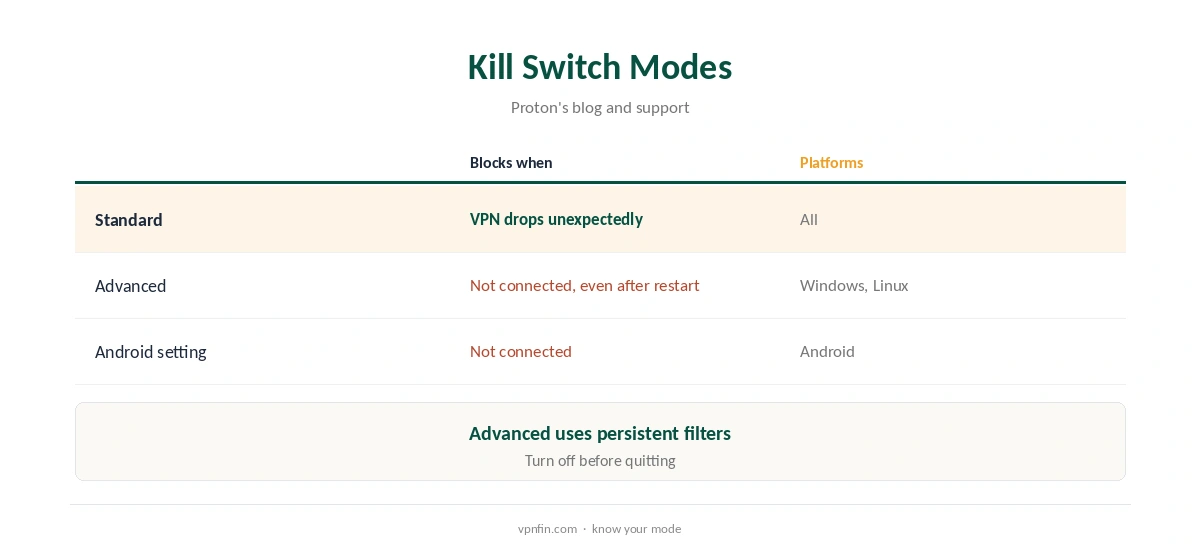
The standard kill switch blocks traffic only when the VPN drops unexpectedly. The Advanced kill switch, on Windows and Linux, blocks all internet unless you are connected to Proton, uses persistent Windows Filtering Platform filters, and survives a restart, Proton’s blog explains. Turn it off in the app’s kill switch settings before disconnecting for good.
Android
On Android, Proton’s kill switch works through the system’s Always-on VPN and Block connections without VPN settings. Turn both off in Android’s VPN settings, then disconnect. Our guide to turning off a VPN on Android shows where the settings live.
Linux
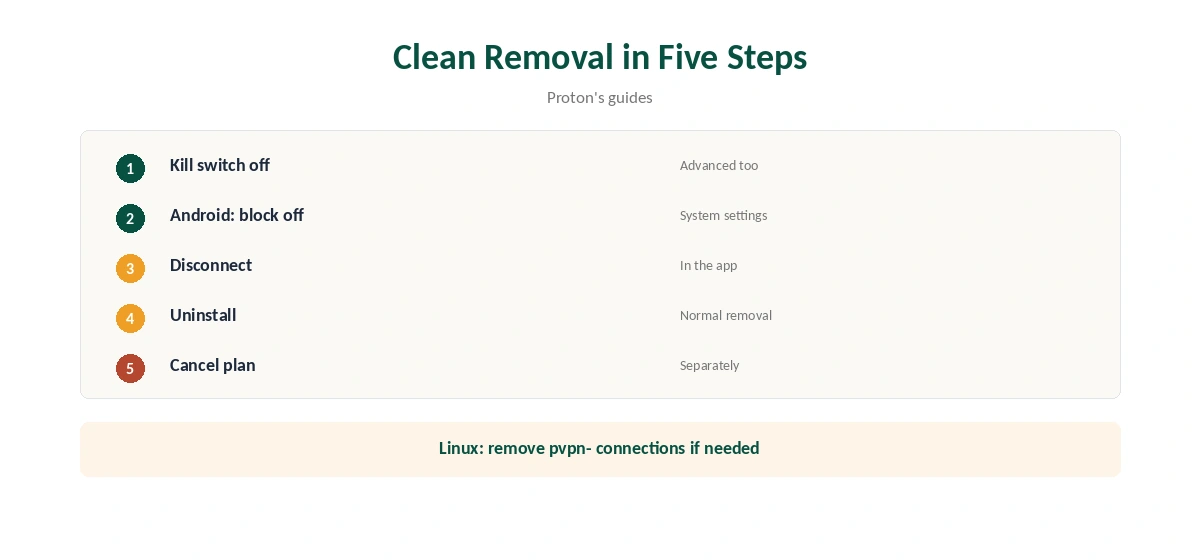
In the Linux command line app, run protonvpn config set kill-switch off. If you already uninstalled the app with the kill switch on, Proton’s guide says to delete leftover NetworkManager connections whose names start with pvpn-, such as pvpn-killswitch, using nmcli.
How to Turn Off Proton VPN on iPhone and Mac
Disconnect in the app. If the kill switch is on, turn it off in settings before quitting, so the device does not wait for a reconnection. Our iPhone guide covers the system toggle.
Pausing Instead
If you only need a break, disconnect without uninstalling. The app keeps your settings, and reconnecting takes one click.
Split Tunnelling Instead
If one app misbehaves with the VPN, exclude it with split tunnelling rather than turning everything off. On Windows, split tunnelling now works with the kill switch, as our Proton VPN Windows guide explains.
Routers
If Proton runs on your router, disable the VPN profile in the router’s admin console. Our Proton VPN router guide covers supported firmware.
How to Turn Off Proton VPN Auto-Connect
If the app reconnects by itself, check its settings for auto-connect or connect-on-startup options and turn them off. On Android, Always-on VPN also reconnects automatically until you turn it off.
Checking It Is Off
After disconnecting, open our VPN test page and confirm your own address shows. If pages do not load at all, a kill switch is still active.
Disconnecting vs Quitting
Disconnecting ends the tunnel but leaves the app running, ready to reconnect. Quitting closes the app; with a standard kill switch, quit only after disconnecting, so the app does not treat the exit as a dropped connection.
Several Devices
Turning off Proton on one device does not affect the others on your plan. Each app has its own kill switch setting.
Linux Command Line
The Linux command line app also disconnects with its own command; check protonvpn –help for the version you run, then turn off the kill switch with protonvpn config set kill-switch off.
Why the Kill Switch Exists
The kill switch stops your real IP and DNS queries leaking if the tunnel drops, Proton explains. Turn it off only when you mean to stop using the VPN.
Quick Rule
Need a break: disconnect. Leaving for good: turn off the kill switch, disconnect, uninstall, then cancel the plan. Each step matters, and the kill switch comes first. Our guide to cancelling Proton VPN covers downgrade, credit and the refund step.
Proton VPN on TVs
On Android TV and Fire TV, disconnect in the app, then remove it from the TV’s app settings if needed. Our Proton VPN Android TV guide covers the TV app.
Browser Extension
The Chrome or Firefox extension disconnects from its own menu, and you can disable it in the browser’s extensions page. Our Proton VPN Chrome guide covers it.
Reinstalling Later
If you reinstall, sign in again and recheck the kill switch, since a fresh install may start with defaults rather than your old settings.
Uninstalling
Turn off the kill switch, disconnect, then uninstall as you would any app. On Windows, Android Police notes the TAP-ProtonVPN network adapter can be removed in Device Manager if it remains. Our Windows guide and Mac guide cover each system.
Cancelling the Subscription
Turning off or uninstalling does not cancel a paid plan. Proton’s terms allow a full refund within 30 days of the original purchase, once per user, as our Proton VPN refund guide explains.
How We Research
This page draws on Proton’s kill switch support page and blog, its Linux guide as quoted on the Manjaro forum, Android Police and our Proton tables. We cross-checked these sources against each other, and where they conflict or something can’t be verified, we say so in the text rather than guessing. We checked time-sensitive figures, including prices in US dollars, on 8 October 2026. The main source we relied on is Proton’s kill switch guide. Our full approach lives on the About Us page.
How to Turn Off Proton VPN FAQ
The Advanced kill switch or Android’s Block connections setting is still on.
In the kill switch settings of the Windows and Linux apps.
Turn off Always-on VPN and Block connections without VPN.
No; cancel the subscription separately.
Delete leftover pvpn- connections with nmcli.
The Verdict
To turn off Proton VPN cleanly, switch off the Advanced kill switch or Android’s block setting first, then disconnect or uninstall. Cancel any paid plan separately.