
Disclosure: VPNFin is reader-supported. If you buy a VPN through links on this page, we may earn a commission at no extra cost to you. This never affects our ratings — here’s our full disclosure.
IPVanish for Android offers WireGuard, OpenVPN and IKEv2, a kill switch, and split tunnelling by app or domain, Tom’s Guide found, plus a Connect on Android Startup switch. Google Play users can start a seven-day free trial on yearly plans, VPNOverview reports. Every plan covers unlimited devices, and the same account works on IPVanish’s Fire TV and Android TV app.
This guide covers setup, the trial, each setting, Android’s own always-on options, TVs and pricing.
IPVanish for Android Setup
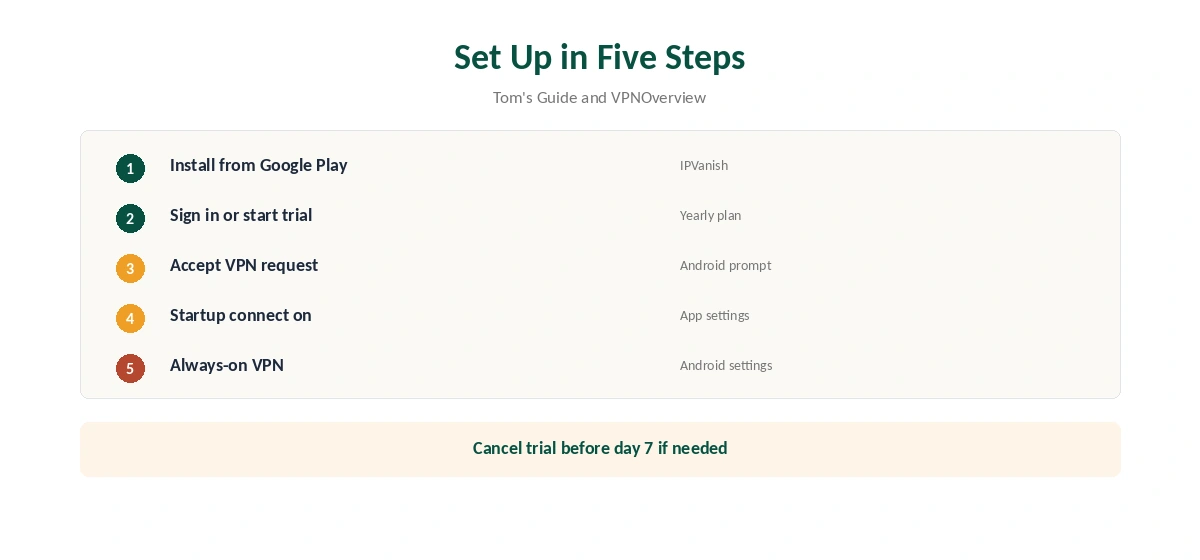
Install IPVanish from Google Play, open it and sign in, or start the free trial on a yearly plan. Accept Android’s VPN connection request, choose a location and connect. Pick a nearby server for everyday browsing; Top10VPN measured about 93 Mbps on a 100 Mbps line on nearby IPVanish servers.
Then turn on Connect on Android Startup in the app’s settings, Tom’s Guide notes, so the VPN starts with the phone. That way you are protected even before you remember to open the app. Our Android VPN guide compares other providers’ Android apps.
The Seven-Day Trial
The trial applies to yearly plans bought through Google Play, VPNOverview reports. It converts to a paid subscription unless you cancel in Google Play, under Payments and subscriptions, before day seven. Uninstalling the app does not cancel it.
The 30-day website refund does not cover store purchases, VPNOverview notes. TechRepublic found the trial account also signs in on a computer, so the week covers a laptop too. Our IPVanish free guide compares the trial with the refund window.
Split Tunnelling by App or Domain
The Android app splits traffic by app or by domain, Tom’s Guide found, in exclude mode: chosen apps or websites bypass the VPN while everything else stays protected. Security.org routed chosen apps outside the tunnel without issue in its testing.
Exclude a banking app that rejects VPN addresses, or a local streaming service. Domain splitting helps when only a website, not a whole app, needs your real location. Our split tunnelling guide explains when excluding traffic makes sense.
Kill Switch and Always-On
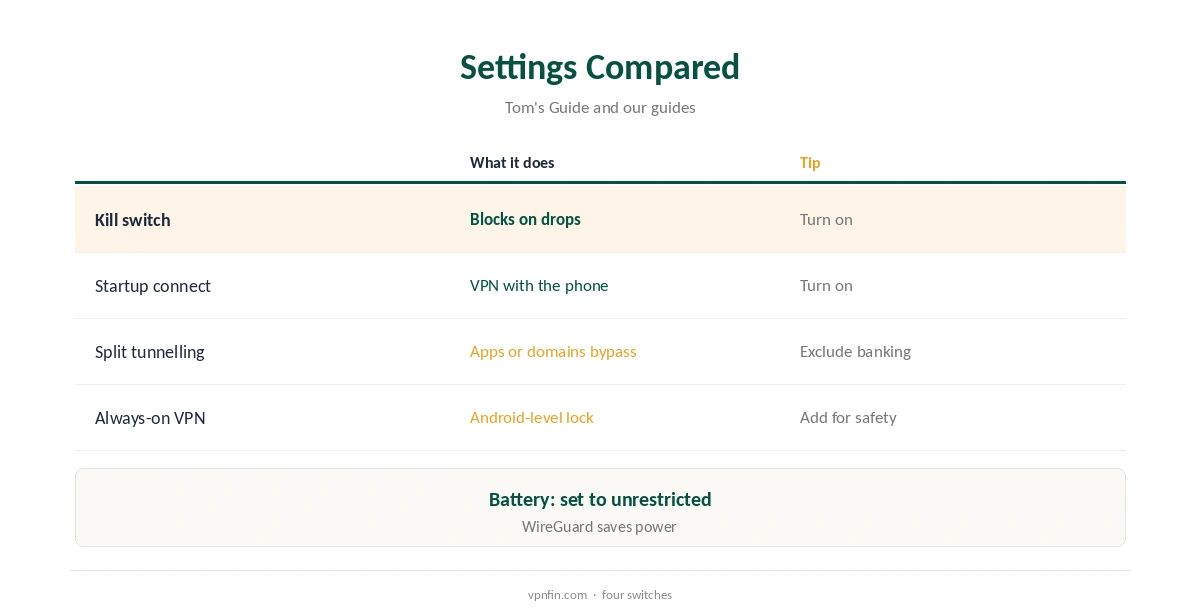
IPVanish’s apps include a kill switch, which Security.org found cut connections within a second on desktop. On Android, you can add the system’s own protection as a second layer: turn on Always-on VPN and Block connections without VPN in Android’s VPN settings.
Battery savers on some phones close VPN apps in the background; set IPVanish’s battery use to unrestricted if it drops. Both layers together mean a dropped tunnel never sends traffic in the clear. Our kill switch guide explains both layers.
Protocols on a Phone
WireGuard is the fast, battery-friendly choice. OpenVPN helps on networks that block WireGuard, and IKEv2 reconnects quickly when the phone moves between Wi-Fi and mobile data, which suits commuting.
TheBestVPN’s 2026 battery test found WireGuard used far less power than OpenVPN over two hours of streaming. Our VPN battery guide covers the figures.
Fire TV and Android TV
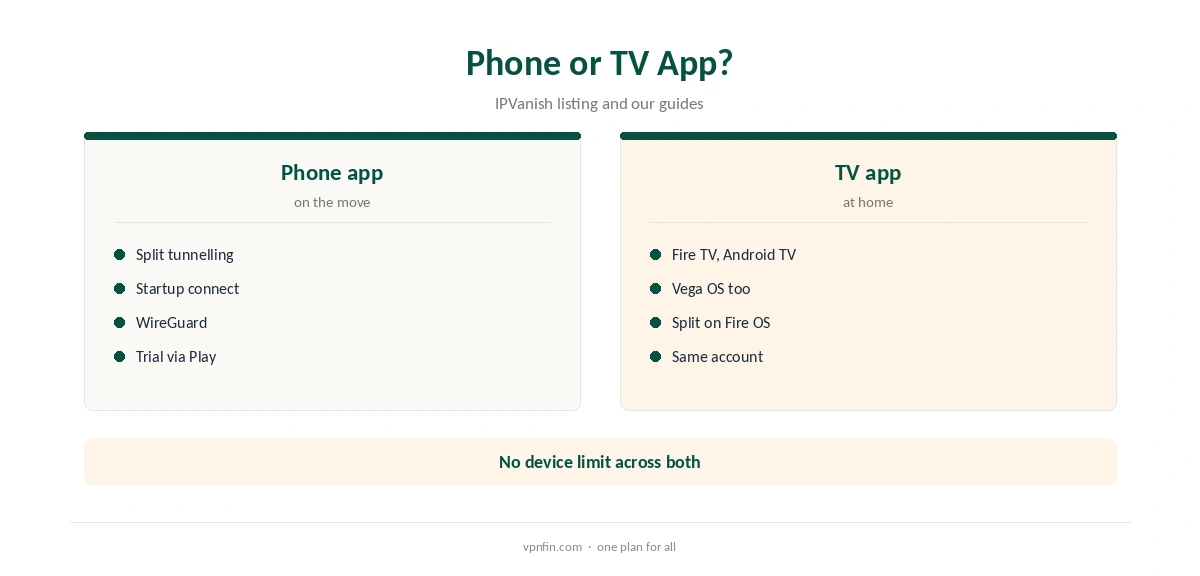
IPVanish’s TV app runs on Fire TV and Android TV, its store listing shows, and IPVanish was among the first VPNs on Amazon’s Vega OS. Split tunnelling on TV is available on Fire OS devices; the Vega OS app lists WireGuard and one-tap Default Location for now.
One account covers the phone and every TV in the house, since there is no device limit. Sign in with the same details on each. Our IPVanish Firestick guide covers TV setup.
Streaming on Android
VPNOverview reached Netflix, Hulu, Prime Video, Max, Disney+ and BBC iPlayer with IPVanish in 2026, while VPNpro found its streaming access inconsistent. Results on a phone follow the same servers as on desktop.
If a streaming app shows your home library, force-close it, switch server in the same country and reopen it. Clearing the app’s cache in Android’s settings can also help. Our Netflix VPN guide explains why services block some servers.
Price and Privacy
The two-year plan costs $57.22 for the first 24 months and renews at $89.99 a year, VPNOverview lists. Store prices may differ from the website, and the 30-day website refund does not apply to store purchases. Plans include unlimited devices and IPVanish’s SOCKS5 proxy, VPNOverview notes, though the proxy matters more on a computer than a phone. Our guide to IPVanish on Chromecast covers the app on Google TV, a router for older models.
IPVanish has two audits in our table and owns its servers, Top10VPN notes; its parent, Ziff Davis, also owns StrongVPN. Our IPVanish price guide compares every plan.
Removing It
Cancel any Google Play subscription in the store first; uninstalling does not cancel it. Then turn off Always-on VPN if you enabled it, and uninstall the app. Check the address on our VPN test page afterwards to confirm the phone is back on its normal connection. Our guide to IPVanish on Chromebook covers the Android app, and why there is no VPN extension.
Our guide to turning off a VPN on Android shows where Android keeps those settings.
How We Research
This page draws on Tom’s Guide’s, VPNOverview’s and Security.org’s IPVanish reviews, IPVanish’s TV store listing, TheBestVPN’s battery test and our IPVanish tables. We cross-checked these sources against each other, and where they conflict or something can’t be verified, we say so in the text rather than guessing. We checked time-sensitive figures, including prices in US dollars, on 8 October 2026. The main source we relied on is Tom’s Guide’s IPVanish review. Our full approach lives on the About Us page.
IPVanish for Android FAQ
It does, on Google Play, with WireGuard, OpenVPN and IKEv2.
Seven days on yearly plans through Google Play.
By app or domain, in exclude mode.
Turn on Connect on Android Startup.
IPVanish’s TV app runs on Fire TV and Android TV.
The Verdict
IPVanish for Android combines a seven-day trial, split tunnelling by app or domain and unlimited devices. Add Android’s always-on setting and pick WireGuard.