
Disclosure: VPNFin is reader-supported. If you buy a VPN through links on this page, we may earn a commission at no extra cost to you. This never affects our ratings — here’s our full disclosure.
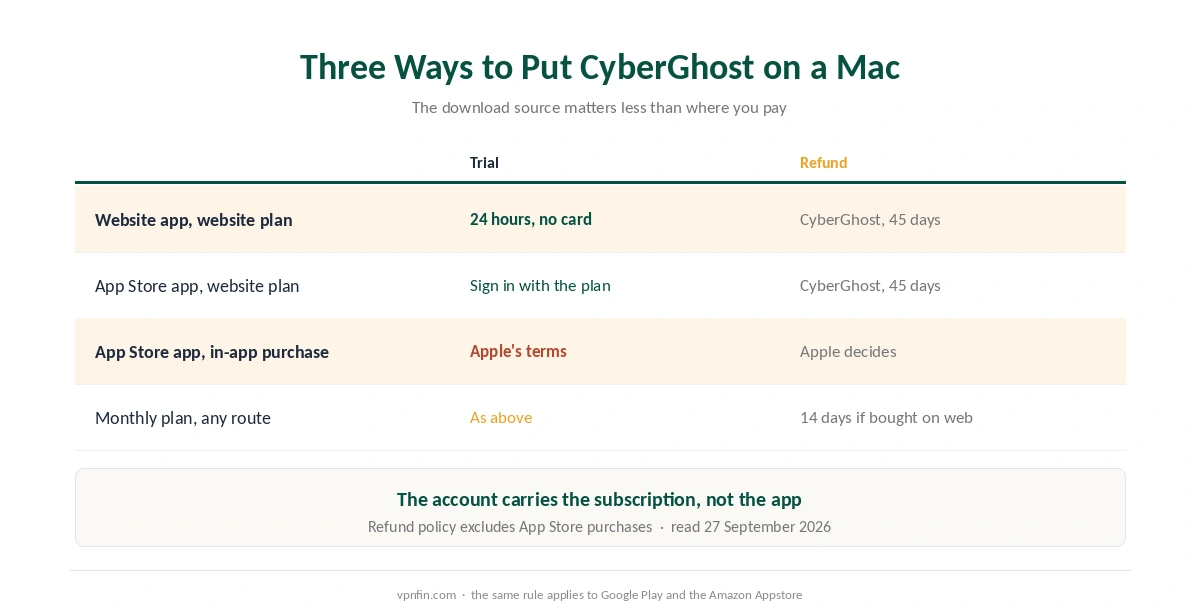
CyberGhost Mac support reaches a long way back. The app runs on every macOS release from High Sierra (10.13) to Tahoe (26), on Intel and Apple silicon alike. You can also try it for 24 hours without a card. The real choices are where you download it and where you pay, because those two steps decide your refund rights.
This guide covers both routes, the macOS permission that blocks first connections, and what the Mac app lacks next to CyberGhost’s Windows version.
Is CyberGhost Good on Mac?
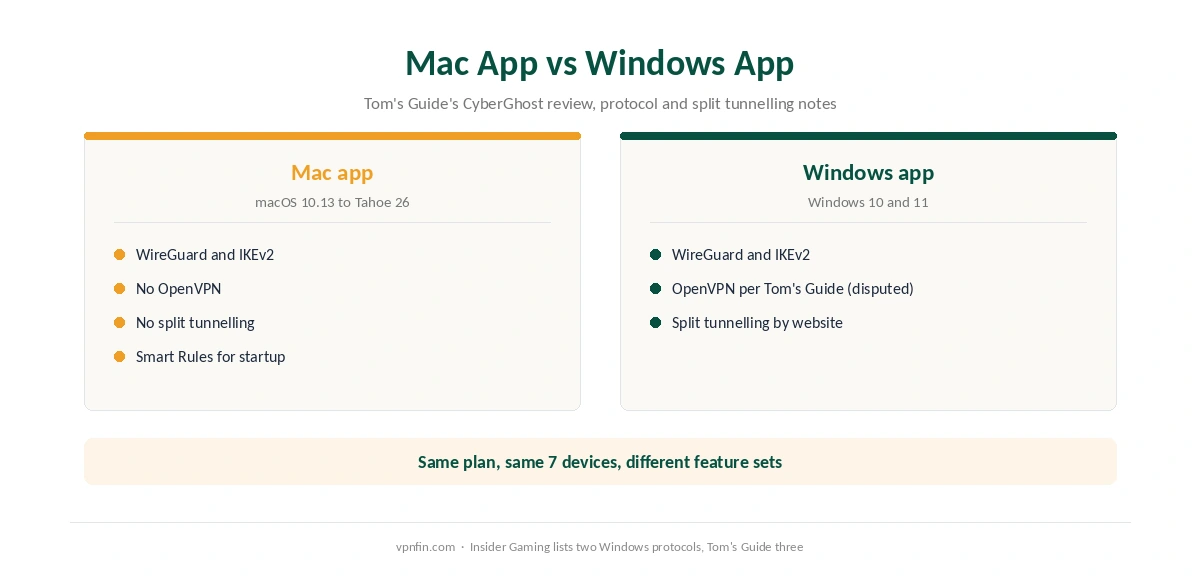
For everyday privacy, yes. The Mac app offers WireGuard and IKEv2, according to Tom’s Guide, along with Smart Rules for startup behaviour and streaming servers. Its gaps are split tunnelling and OpenVPN, which the Windows app handles differently. So a Mac user who needs either feature should read the comparison below first.
Website Download or Mac App Store
CyberGhost’s Mac page offers two installs: a download from its own site or the App Store version. The difference is mostly about billing. The 24-hour trial comes from the website route, and CyberGhost’s trial page says it needs no card. Gizmodo describes the steps: install the app, create an account, then press Activate Free Trial in CyberGhost’s email.
The App Store route works differently. If you subscribe inside that app, Apple bills you, and CyberGhost’s refund policy excludes App Store purchases. As a result, Apple decides any refund. A plan bought on the website, by contrast, keeps the 45-day window. You can still sign in to the App Store app with a website plan, because the account carries the subscription.
Our CyberGhost free trial guide compares the trial on each platform, and our CyberGhost refund guide covers the website request.
How to Set Up CyberGhost on Mac
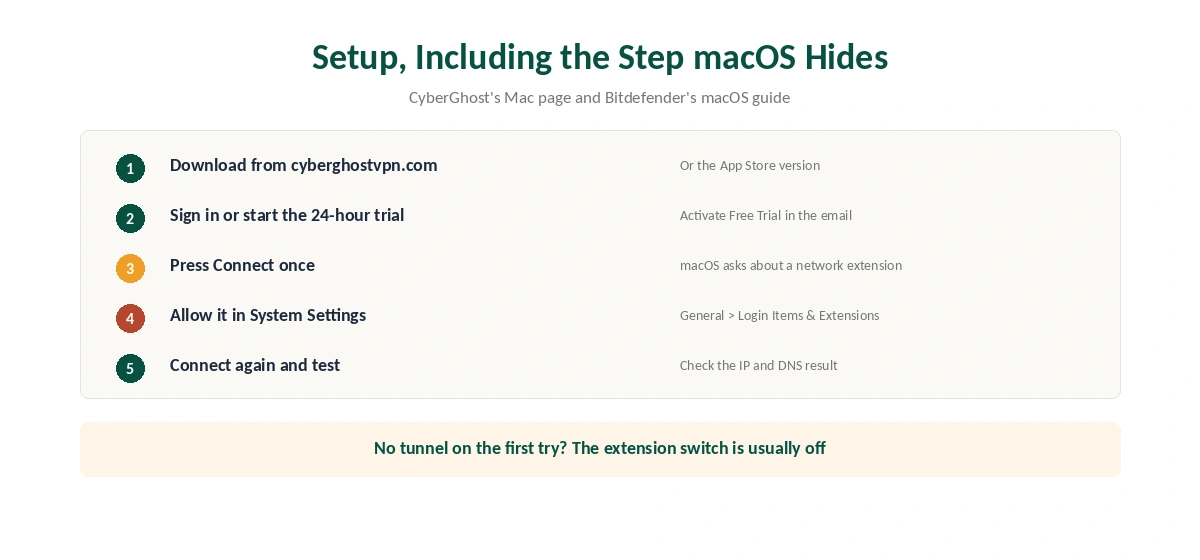
First, download the installer from CyberGhost’s site and open it. Then sign in, or start the 24-hour trial. When you press Connect the first time, macOS asks you to allow a network extension. Approve it, or the app cannot build the tunnel.
On Sequoia and Tahoe, the switch lives in System Settings, then General, then Login Items and Extensions, then Network Extensions, according to Bitdefender’s support guide. Turn the CyberGhost toggle on and enter your administrator password. After that, connect again and check the result on our VPN test page.
CyberGhost Mac App vs the Windows App
CyberGhost does not build the same app twice. In Tom’s Guide’s review, the macOS app offers WireGuard and IKEv2, while Windows adds OpenVPN. Insider Gaming, however, lists only two Windows protocols. Split tunnelling follows the same pattern: Android has it by app and Windows by website, but the Mac app has neither.
For most Mac users, WireGuard covers daily use. Still, OpenVPN on TCP can help on networks that block other protocols, so a hotel or campus network may favour a different app. Our WireGuard vs OpenVPN page explains the trade-off, and our split tunnelling guide covers why the feature is rarer on Apple systems.
The Mac app does include Smart Rules, which set what happens at startup and on connection. CyberGhost also lists IP leak protection and RAM-only servers. Our CyberGhost Windows guide details the extra Windows options.
CyberGhost Mac Problems and Fixes
If the app connects but nothing loads, look at other network tools first. MacPaw reported that some Little Snitch versions blocked the internet on Tahoe, and the same applies to any network filter. Update or remove the filter, then remove its entry under System Settings, Network, VPN and Filters.
If the first connection fails, the network extension is probably off, so return to Login Items and Extensions. Also, apps you deleted can leave extensions behind; remove those from the Network Extensions list. For Sequoia specifically, Apple’s 15.0.1 update fixed a clash between some VPNs and iMessage or FaceTime, so keep macOS current.
Our Mac VPN troubleshooting page covers these steps in order. If you suspect a leak, test the browser first with our WebRTC leak guide. Then check the resolver with our DNS leak guide.
What CyberGhost Costs on a Mac
CyberGhost’s Mac page showed $2.19 a month on 5 October 2026 for the 26-month plan, billed $56.94. On the same day, the iOS page ran $1.99, billed $51.74. After 26 months, the plan renews yearly at the first bill, which works out near $4.75 a month on the higher grid.
The 6-month plan costs $41.94, and the monthly plan costs $12.99 with a 14-day refund window instead of 45. One plan covers 7 devices, so a MacBook and an iPhone share it easily; our CyberGhost iPhone guide covers the phone side.
| Provider | Renewal price | Per month | Tier |
|---|---|---|---|
| NordVPN | $139.08/yr | ~$11.59 | Basic |
| Surfshark | ~$79/yr | ~$6.58 | Starter |
| ExpressVPN | $99.95/yr | ~$8.33 | Basic |
| CyberGhost | $56.94/yr | ~$4.75 | 2-year |
| PureVPN | $47.95/yr | ~$4.00 | Standard, 2-year (1-year renews $57.95) |
| IPVanish | $89.99/yr | ~$7.50 | Essential |
| Windscribe | ~$69/yr | ~$5.75 | Pro |
| Proton VPN | ~$83.88/yr | ~$6.99 | VPN Plus |
| Mullvad | ~$65/yr | ~$5.40 | flat, no tiers |
| Norton VPN | $79.99/yr | ~$6.67 | Standard |
| Hotspot Shield | ~$95.99/yr | ~$8.00 | Premium annual |
| Astrill | $300 every 2 yrs | ~$12.50 | 2-year, same at renewal |
Who Should Use CyberGhost on Mac
CyberGhost on Mac suits owners of older Macs, since support reaches back to High Sierra. It also suits anyone who wants a 24-hour trial without a card, and households that need one plan across Apple and Windows devices. Our guide to PureVPN on Mac covers unlock WireGuard, live without split tunnelling.
Who Should Choose Another Mac VPN
Choose another app if you need split tunnelling or OpenVPN on the Mac itself. Our NordVPN Mac guide and ExpressVPN Mac guide cover two alternatives. Ownership matters too: CyberGhost belongs to Kape Technologies, a London-based company that also owns ExpressVPN and Private Internet Access.
On the other hand, CyberGhost has an audit record. Our VPN audit tracker lists CyberGhost’s three Deloitte audits (2022, 2024 and Q4 2025). For a broader comparison, see our Mac VPN guide.
How We Research
This page draws on CyberGhost’s Mac download page, trial page and refund policy, Tom’s Guide’s CyberGhost review and Gizmodo’s trial walkthrough. We also used Bitdefender’s and MacPaw’s macOS notes. We cross-checked these sources against each other, and where they conflict or something can’t be verified, we say so in the text rather than guessing. We checked time-sensitive figures, including prices in US dollars, on 5 October 2026. That day, CyberGhost showed two price grids on different pages. The main source we relied on is CyberGhost’s Mac download page. Our full approach lives on the About Us page.
CyberGhost on Mac FAQ
CyberGhost’s Mac page lists High Sierra (10.13) through Tahoe (26), on both Intel and Apple silicon Macs, including MacBook, iMac, Mac mini, Mac Pro and Mac Studio.
Yes. CyberGhost offers 24 hours on macOS without a card. Install the app, create an account, then press Activate Free Trial in CyberGhost’s email.
Tom’s Guide reports that it does not. CyberGhost offers split tunnelling by app on Android and by website on Windows.
Either works with a website plan. However, a subscription bought inside the App Store app falls under Apple’s refund rules, not CyberGhost’s 45-day guarantee.
The likely cause is the network extension. Turn it on in System Settings, General, Login Items and Extensions, Network Extensions, then connect again.
The Verdict
CyberGhost on a Mac is easy to start, thanks to the 24-hour trial and broad macOS support. Its limits are the missing split tunnelling and OpenVPN, which matter only on difficult networks. Download from the website, pay on the website and approve the network extension, and the app should just work.