
Disclosure: VPNFin is reader-supported. If you buy a VPN through links on this page, we may earn a commission at no extra cost to you. This never affects our ratings — here’s our full disclosure.
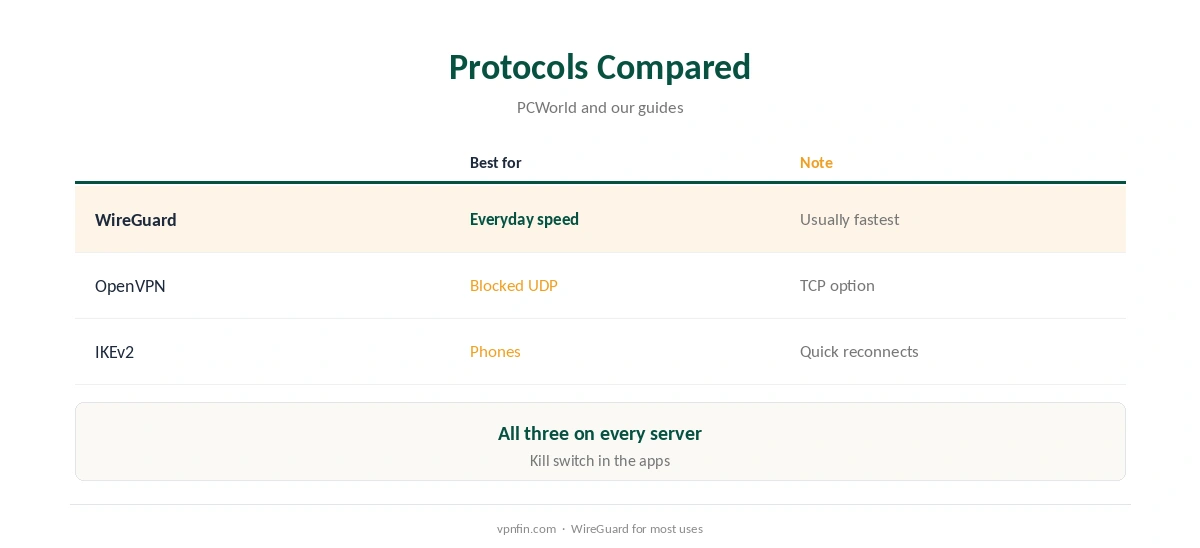
PrivadoVPN WireGuard support covers every server, PCWorld notes, alongside OpenVPN and IKEv2. In the apps you choose it in the protocol settings, and the free plan uses the same apps, so free users can try it within their 10 GB. TechRadar found PrivadoVPN’s new kill switch passed its stress tests, which matters on any protocol. On Linux there is no app; Premium users follow manual guides.
This guide covers when to use WireGuard, how to switch and when another protocol fits better.
Why Choose WireGuard
WireGuard is newer, leaner and usually faster than OpenVPN. It suits streaming, gaming and everyday browsing, and roams well between networks on phones. Our WireGuard vs OpenVPN guide explains the differences.
Switching to PrivadoVPN WireGuard
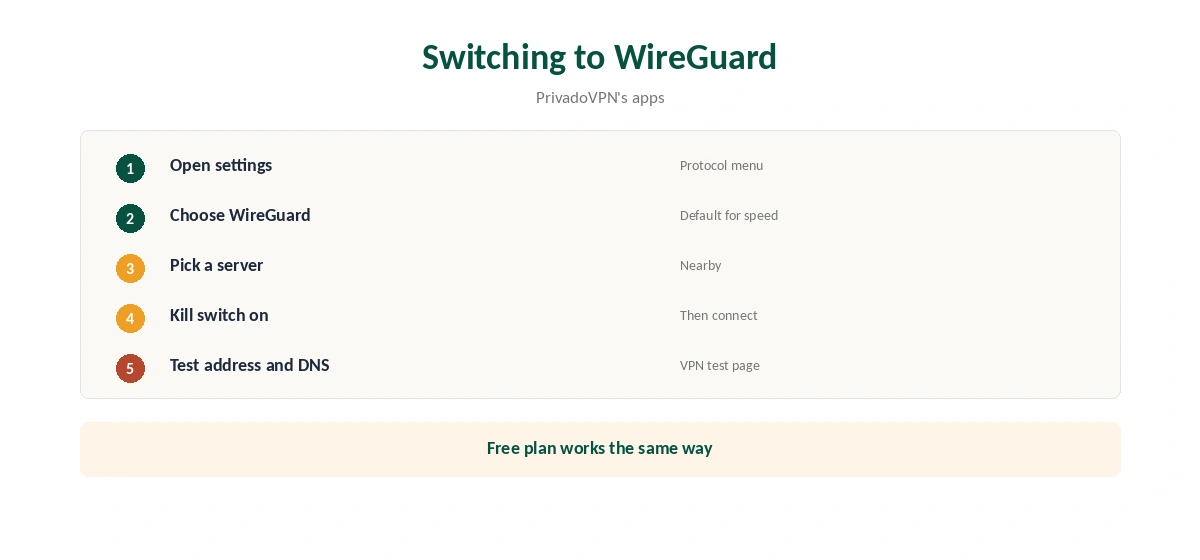
Open PrivadoVPN’s settings, choose WireGuard as the protocol, pick a server and connect. Keep the kill switch on. Our PrivadoVPN for PC guide covers the desktop settings.
When to Switch Away
Some networks block WireGuard’s UDP traffic. Switch to OpenVPN over TCP there, as our PrivadoVPN OpenVPN guide explains. On phones that change networks often, IKEv2 is the other option worth testing.
Free Plan and WireGuard
The free plan uses the same apps and protocols, with 10 GB a month at full speed on one device, then slower servers. WireGuard’s efficiency helps that allowance last. Our PrivadoVPN free guide covers the limits.
PrivadoVPN WireGuard for Streaming
Low overhead helps HD and 4K streams. TechRadar’s 2026 testing reported PrivadoVPN reaching Netflix in the US, UK, Australia and Japan. Connect before opening the streaming app, and reopen it if the library looks wrong.
Gaming
WireGuard’s lower overhead usually means less added latency than OpenVPN. Pick a nearby location and test ping in your game with the VPN on and off. Our gaming VPN guide explains what a VPN can and cannot do for games.
Phones
WireGuard roams well between Wi-Fi and mobile data, so it suits phones too. Test it against IKEv2 on a walk between networks and keep the smoother one. Our PrivadoVPN Android guide covers the phone app.
A Quick Rule
Everyday, streaming and gaming? PrivadoVPN WireGuard. Network blocks UDP? OpenVPN over TCP. Phone dropping on network changes? Try IKEv2.
Battery and Data
WireGuard’s lean design tends to use less overhead than OpenVPN, which helps the free plan’s 10 GB last a little longer. Watch the data counter in the app if you stay on the free plan.
Troubleshooting
If WireGuard will not connect, try another location, then switch to OpenVPN to check whether the network blocks UDP. Reinstall the app if settings look wrong after an update.
Several Devices
Premium covers 10 devices, PCWorld notes. Each can use WireGuard independently, so a phone, laptop and TV can all connect at once.
Is PrivadoVPN WireGuard Fast Enough?
For streaming and browsing on a typical home line, yes. On long routes, any protocol slows; choose the nearest location and test. Our guide to VPN speed explains why distance matters.
Checking for Leaks
After switching to PrivadoVPN WireGuard, run our WebRTC leak guide in your browser. Protocol choice does not stop browser leaks, so test once after any change.
Keeping It Updated
App updates can reset protocol choices. After updating, confirm the protocol is still WireGuard and the kill switch is still on, then reconnect.
Public Wi-Fi
On café and hotel networks, connect before signing in to anything. WireGuard’s quick reconnection helps when the signal drops. Our public Wi-Fi guide explains the risks.
Quick Check
After choosing WireGuard, open our test page, then run a speed test. Switch to OpenVPN and repeat, so you know how much faster WireGuard is on your line. Note both results for later.
Routers
We found no PrivadoVPN router guide in the sources we read. If you want WireGuard on a router, check its help centre for manual configs first, or choose a provider that documents router setups.
Fire TV and Android TV
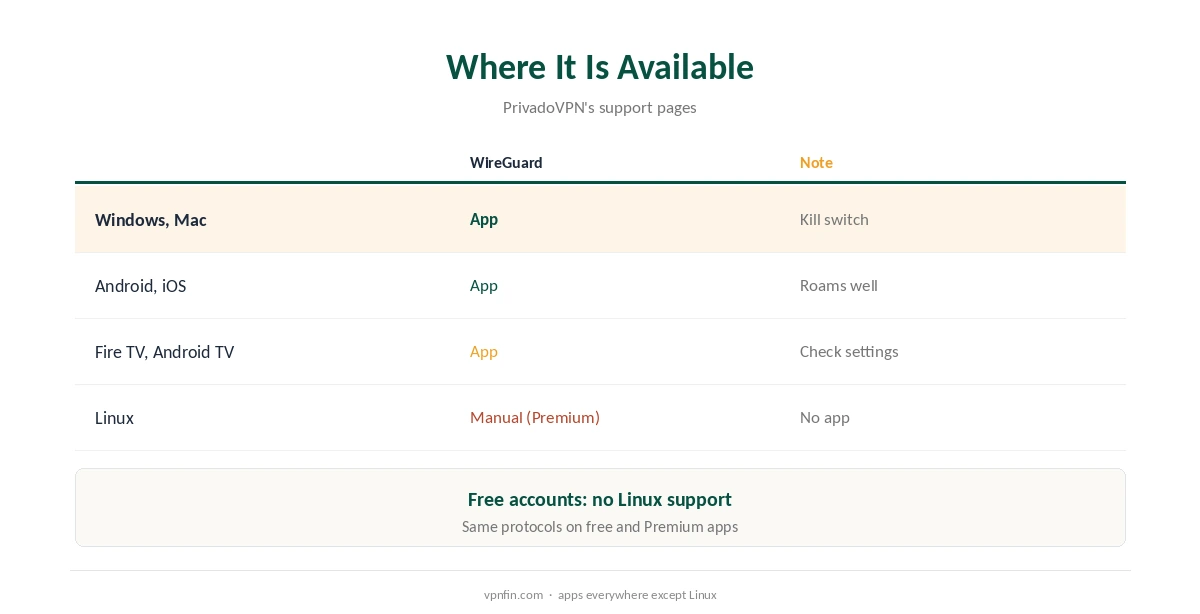
The TV apps use the same protocol settings. Pick WireGuard in settings for streaming, as our PrivadoVPN Firestick guide explains.
Testing on the Free Plan
Free users can compare WireGuard and OpenVPN within the 10 GB allowance before deciding whether Premium is worth paying for, using the same apps and settings.
Linux
PrivadoVPN has no Linux app in the sources we read. Premium users get CLI and Network Manager guides, and free accounts get no Linux support, its help centre says. Our PrivadoVPN Linux guide covers the setup.
Checking the Connection
After switching, confirm the address with our VPN test page and run our DNS leak guide.
Privacy Record
Our audit table records no independent audit for PrivadoVPN, though VPNOverview describes its no-logs policy as audited, so the sources disagree. It moved its legal base to Iceland on 1 May 2026, Wikipedia notes. Our PrivadoVPN safety guide weighs the evidence.
How We Research
This page draws on PCWorld’s and TechRadar’s PrivadoVPN reviews, PrivadoVPN’s Linux support article and our PrivadoVPN tables. We cross-checked these sources against each other, and where they conflict or something can’t be verified, we say so in the text rather than guessing. We checked time-sensitive figures, including prices in US dollars, on 7 October 2026. The main source we relied on is TechRadar’s PrivadoVPN review. Our full approach lives on the About Us page.
PrivadoVPN WireGuard FAQ
It does, on every server, per PCWorld.
Yes; the free plan uses the same apps and protocols.
When a network blocks UDP; use OpenVPN over TCP.
Premium users follow manual guides; there is no Linux app.
TechRadar found the kill switch passed its stress tests.
The Verdict
PrivadoVPN WireGuard is the everyday default: fast, on every server and available on the free plan. Switch to OpenVPN only where networks block it.