
Disclosure: VPNFin is reader-supported. If you buy a VPN through links on this page, we may earn a commission at no extra cost to you. This never affects our ratings — here’s our full disclosure.
Your VPN works at home. You land, connect to the hotel network, and it sits on “connecting” until you give up.
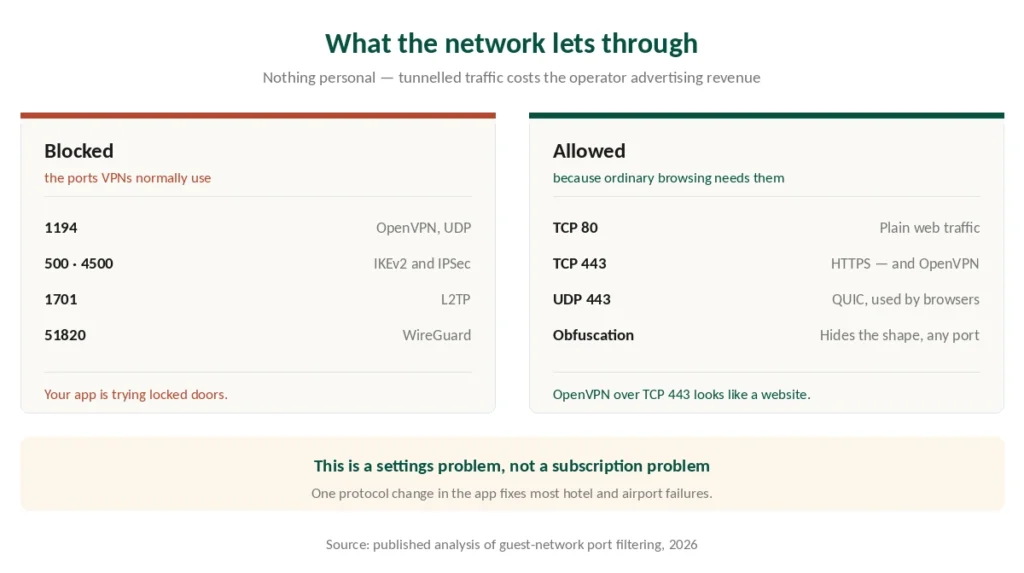
The provider is fine. The port is blocked. Most guest networks in 2026 permit TCP 80, TCP 443 and UDP 443, and block the ports VPN protocols normally use: 1194, 500, 4500, 1701 and 51820. Your app is trying doors that were locked before you arrived.
That makes this a settings problem rather than a subscription problem, and the fix takes about a minute. This guide covers that first, then the captive portal sequence, then what actually needs a VPN abroad — which is less than the marketing suggests.
The Short Answer
Switch to OpenVPN over TCP on port 443. It looks like ordinary web traffic and passes networks that block everything else.
Log into the captive portal before connecting, not after. The VPN will block the sign-in page otherwise.
Turn off auto-connect on your devices before you travel. Rejoining saved network names is how people end up on the wrong hotel Wi-Fi. Our page on CyberGhost and HBO Max covers HBO Max’s travel rules, the setup and location errors. A travel router protects every device in a hotel room at once, as our Aircove review explains for Aircove Go. Frequent travellers can compare audited options in our JamboVPN alternatives guide.
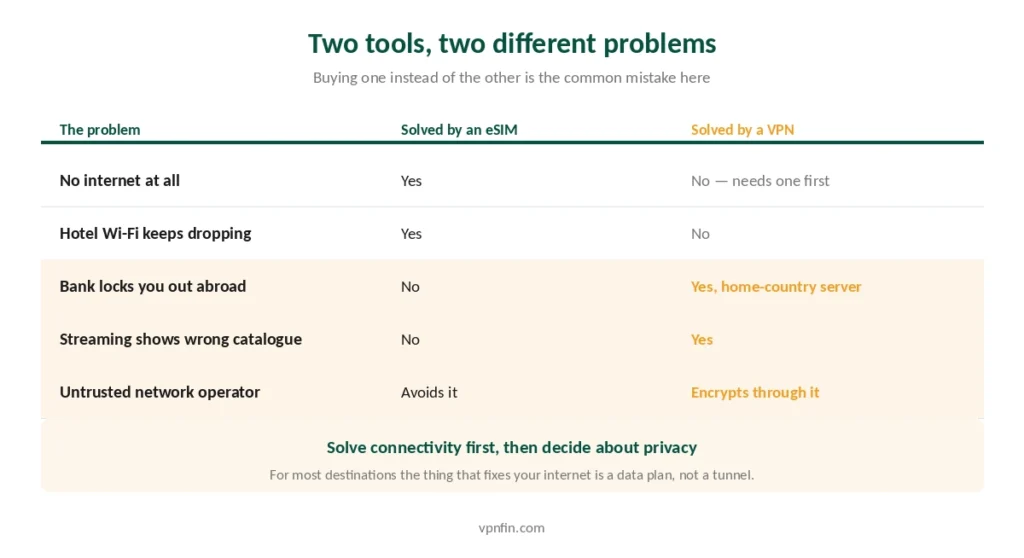
And solve connectivity first. An eSIM gives you internet; a VPN protects internet you already have. They are not alternatives.
Why It Fails on Hotel and Airport Networks
Four causes, in the order they are likely.
Blocked ports. Guest networks allow TCP 80, TCP 443 and UDP 443 for ordinary browsing, and block 1194, 500, 4500, 1701 and 51820 — which are OpenVPN, IKEv2, L2TP and WireGuard respectively. Nothing personal; those ports look like tunnelling and tunnelling costs the operator advertising revenue.
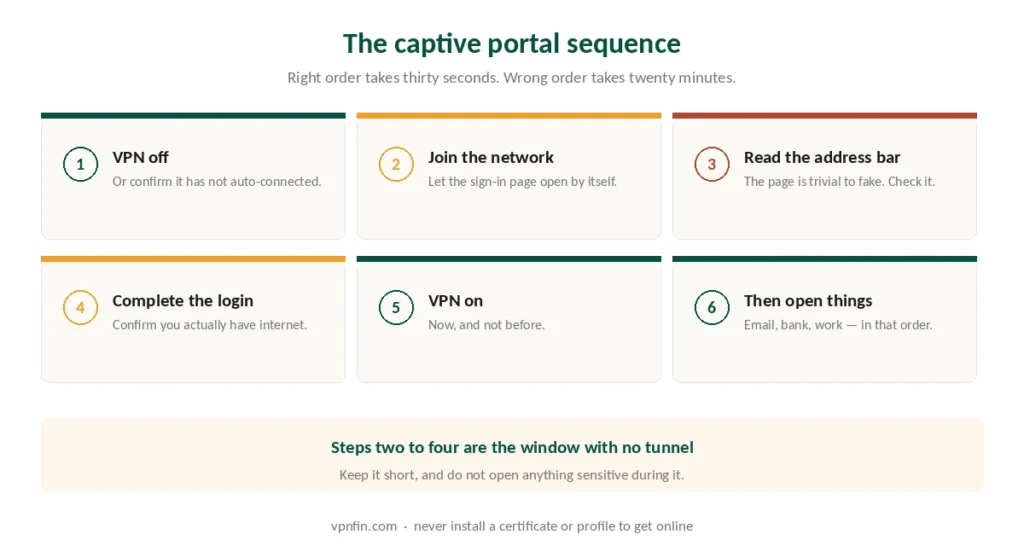
The captive portal. The sign-in page must load before the network grants access. If your VPN connects automatically, it blocks that page, and the network blocks the VPN. Neither side gives way.
Deep packet inspection. Some networks look at the shape of traffic rather than the port, and cut handshakes that resemble a tunnel.
Congestion. Airports at peak hours and hotels in the evening produce packet loss and jitter, and VPN connections degrade faster than plain traffic under those conditions. Short trips suit pay-once passes, which our JamboVPN review covers.
The Fix, in Order
First: change protocol to OpenVPN over TCP. In app settings, select OpenVPN and TCP rather than automatic. That puts you on port 443, which the network has to allow because it is also HTTPS. Slower than WireGuard, and it connects — our protocol guide explains why this one property keeps OpenVPN alive.
Second: try your provider’s obfuscation mode. Proton calls it Stealth, Surfshark calls it Camouflage, NordVPN has NordWhisper. These disguise the traffic itself rather than changing the port. Our guide to Surfshark in the USA covers US server cities, privacy at home and access abroad.
Third: switch to mobile data. An eSIM or your phone’s hotspot bypasses the guest network entirely. Ten megabits that work beat thirty that do not.
⚠️ If it still fails, run through our troubleshooting guide — the causes there apply anywhere, and step three covers exactly this.
The Captive Portal Sequence
Get the order right and this takes thirty seconds. Get it wrong and you will spend twenty minutes on it.
- Disconnect the VPN — or make sure it has not auto-connected
- Join the hotel network and let the sign-in page open
- Check the address bar before typing anything
- Complete the login, then confirm you have internet
- Connect the VPN
- Only then open your email, bank or work systems
⚠️ Steps 2 to 4 are a window where you are on an untrusted network with no tunnel. Keep it short, and do not open anything sensitive during it — the risks on public Wi-Fi are concentrated in exactly those seconds.
⚠️ The sign-in page is worth reading rather than clicking through. It is trivial to copy, guests expect to see one, and almost nobody checks the address before entering a room number and surname. Never install a certificate or profile to get online.
What Actually Needs a VPN Abroad
Being straight about this is more useful than selling you something.
Your bank is the real problem, and a VPN is the solution rather than the cause. A login from another country triggers fraud systems, sometimes faster than a VPN login does. Connecting to a server in your home country makes the session look normal — our banking guide covers the whole calculation, including why a DNS leak abroad is worse than one at home.
Your streaming subscriptions follow the country you appear to be in. Paid-for services show a different catalogue or refuse entirely, and a home-country server restores them, as our streaming guide explains. Live television goes further and swaps your local channels for the ones where you landed.
Untrusted networks are genuinely riskier abroad, because data protection law differs and hotel networks have been targeted for years.
⚠️ What does not need a VPN is the trip itself. For most destinations — Japan, Korea, Europe, most of Southeast Asia — the thing that fixes your internet is an eSIM, not a tunnel. Published analysis puts it bluntly: much of the “you absolutely need a VPN abroad” advice is China-specific content applied to everyone. Solve connectivity first, then decide about privacy.
Before You Leave
Five minutes at home saves an hour in the hotel lobby.
Install and test the VPN before departure. Some networks block app-store downloads, and some countries restrict access to provider websites. Run the leak tests while you still have a connection you control. A new travel VPN needs testing first, as our JamboVPN safety check explains.
Turn off automatic Wi-Fi connection and forget saved public networks. Phones rejoin network names, not networks, and a cloned name is the easiest attack in this category.
Tell your bank you are travelling. Most offer a travel notice in the app, it takes a minute and it costs nothing.
Note which countries restrict VPN use. Rules differ and change; check the current position for your destination before you go rather than after you arrive. Turkey is the case worth reading in full, because the law there targets providers rather than travellers.
Russia is the other one to read first. The rules there reach the advertiser and the search rather than the traveller, and most services simply do not connect.
Italy deserves a look for a different reason. Nothing there restricts a traveller, but several providers now execute a national blocking list, so a handful of domains fail regardless of what you subscribed to.
Spotify has a rule written specifically for travellers. A free account works abroad for fourteen days, Premium travels further, and a home-country server keeps your library and pricing exactly as they were. Our page on CyberGhost and Spotify covers privacy and travel rather than cheaper Premium.
Dutch television is the awkward case. NPO Start comes back with a Dutch server, Videoland wants a Dutch card, and Ziggo GO wants a cable contract at a Dutch address.
⚠️ Download your protocol fallback in advance. If you plan to use OpenVPN TCP, confirm your app has it before you are somewhere it is the only option.
The Picks
NordVPN — fastest in CNET’s testing at 2.9% average download loss, with NordWhisper for restrictive networks and Smart DNS for hotel televisions. Ten devices, six published audits. Renewal reaches $139.08 a year, the steepest we track, as our renewal price table shows. Our NordVPN review covers the rest.
Proton VPN — the Stealth protocol is the most reliable option we know of on networks that block tunnels, and the free tier has no data cap, which makes it a reasonable second device for travel. Five published annual audits. Our Proton VPN review has the detail.
Surfshark — unlimited devices, so a phone, a laptop, a tablet and a partner’s phone run on one subscription. Camouflage mode handles restrictive networks. Around $79 a year on renewal. Our Surfshark review sets it against the others.
ExpressVPN — the widest streaming access and MediaStreamer for devices that cannot run an app. Renewal is $99.95 a year. Our ExpressVPN review covers the audit record.
When a Travel Router Earns Its Place
Three situations, and outside them you can skip it.
The hotel limits you to one device. A travel router appears as a single device, and everything connects behind it.
You travel with a streaming stick. Chromecast, Fire Stick and Apple TV cannot complete a captive portal login on their own, and a router bridges that gap. Our guide to VPN for Digital Nomads covers home banking, local law and a travel router.
You want every device covered without configuring each one. Install the VPN on the router and it applies to whatever connects — our router guide covers compatible firmware. Our guide to Surfshark and Spotify covers privacy and travel, not cheaper Premium.
⚠️ Check the OpenVPN requirement before buying. Some providers have retired OpenVPN entirely, which leaves older router firmware without an option.
Heading somewhere specific? Our destination guides cover what works, what is blocked and what the law says:
- East and Southeast Asia: China, Hong Kong, Taiwan, Singapore, Vietnam, Thailand, Malaysia and the Philippines
- Middle East and North Africa: the UAE, Saudi Arabia, Israel, Iran and Egypt
- Elsewhere: Russia, Ukraine, Pakistan, Nigeria, Venezuela, Chile and New Zealand
Troubleshooting: our fix guides cover a VPN not working on hotel Wi-Fi.
Check local rules before you go: Canada, Israel and the Netherlands have their own pages, as do Taiwan, the Philippines and Venezuela. Taking Starlink Roam with you? See our Starlink guide.
How We Research
This guide draws on published technical analyses of guest-network port filtering and captive portal behaviour, provider documentation on obfuscation protocols, reporting on hotel network security, and our own reviews and platform guides — cross-checked and verified at publication. We don’t run our own tests on hotel networks, and we do not publish country-by-country instructions for circumventing restrictions, because rules change and the consequences fall on the traveller rather than on us. Our full approach lives on the About Us page.
Travel VPN FAQ
Usually the ports. Guest networks allow TCP 80, TCP 443 and UDP 443 while blocking 1194, 500, 4500, 1701 and 51820 — the ports OpenVPN, IKEv2, L2TP and WireGuard use. Switching to OpenVPN over TCP puts you on port 443, which the network has to permit.
Disconnect the VPN first, join the network, complete the sign-in page, confirm you have internet, then connect the VPN. If the VPN connects automatically it blocks the portal page, and the network blocks the VPN. Check the address bar before entering any details.
Less often than the advice suggests. What most trips need is connectivity, which an eSIM provides. A VPN helps with three specific things abroad: keeping your bank from flagging the login, restoring streaming subscriptions you already pay for, and protecting you on untrusted networks.
Generally yes, because mobile data is not a shared local network and there is no sign-in page to impersonate. It does not encrypt your app traffic, though — that is a separate job. The two tools solve different problems and do not replace each other.
Yes, connected to a server in your home country. Banks distrust foreign addresses more than they distrust VPNs, so a domestic server makes the login look normal. File a travel notice with your bank as well, since that costs nothing and prevents most lockouts.
The Verdict
When it fails in a hotel, change the port before you change the provider. OpenVPN over TCP 443 solves most of these, because the network cannot block the port that carries ordinary browsing.
Log into the portal first, connect second. That order is the whole trick, and the seconds in between are the ones to keep short.
Sort out connectivity separately. An eSIM gives you internet abroad; a VPN protects internet you already have. Buying one instead of the other is the most common mistake in this category.
And set it up at home. Every part of this is easier on a connection you control than in a lobby at midnight.