
Disclosure: VPNFin is reader-supported. If you buy a VPN through links on this page, we may earn a commission at no extra cost to you. This never affects our ratings — here’s our full disclosure.
Learning how to turn off a VPN takes one tap. Two things make it confusing anyway: the internet often appears to break afterwards, and on iPhones especially the VPN has a habit of switching itself back on within minutes. Whether you should switch it off at all is a separate question, and for most people the answer is no.
Both have simple explanations, covered below. But first, the distinction that causes most of the confusion.
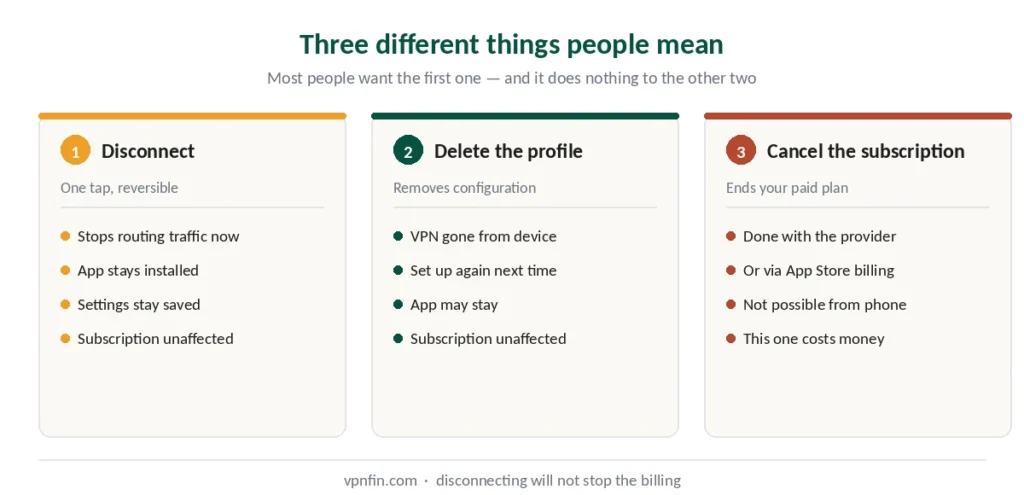
Three Different Things People Mean
Disconnecting stops routing your traffic through the VPN right now. Your app, settings and subscription stay exactly as they were. One tap, reversible instantly.
Deleting the profile removes the VPN configuration from your device. You’ll need to set it up again next time. Your subscription is untouched.
Cancelling the subscription ends your paid plan. This happens with the provider or through your App Store billing — it cannot be done from the VPN settings on your phone.
Most people asking how to turn off a VPN want the first one. If you actually want to stop paying, disconnecting achieves nothing — our free trial guide covers how refunds and cancellations really work.
How to Turn Off a VPN on iPhone and iPad
The reliable way: open your VPN app and tap the disconnect or power button. This closes the connection properly and is what the provider intends.
The quick way: Settings → the VPN toggle near the top, below Wi-Fi and Bluetooth. Tap it off.
⚠️ On iPhone the quick way often doesn’t stick, because of a setting covered in the next section.
To remove the configuration entirely: Settings → General → VPN & Device Management → VPN → tap the ⓘ next to your configuration → Delete VPN.
The simplest removal of all: delete the VPN app. Long-press its icon, tap Delete App, confirm. On iOS this removes the configuration profile automatically — no extra steps.
How to Turn Off a VPN on Android
In the app: open it and tap disconnect. Same as iOS, and the recommended route.
In settings: Settings → Network & Internet → VPN. Tap your VPN, then disconnect.
⚠️ On many Android phones you can see a third-party VPN in settings but not switch it off there — the toggle only shows status. Use the app.
To remove it: same menu, select the VPN, choose Forget or Delete VPN profile.
How to Turn Off a VPN on Windows
In the app: open your VPN client and click disconnect.
In settings: press Windows + I → Network & Internet → VPN → select your connection → Disconnect.
To remove: in the same menu, click Remove below the VPN name after disconnecting. ⚠️ That removes the connection, not everything the client installed — what stays behind and how to clear it is a longer story on Windows than on any other system.
How to Turn Off a VPN on Mac
In the app: click disconnect, same as everywhere.
In settings: System Settings → VPN in the sidebar → toggle off beside the service. Scroll if you cannot see it, since Apple gives VPN its own pane rather than nesting it inside Network.
To remove: press the Info button beside the service, then choose Remove Configuration. ⚠️ That removes the connection rather than everything the app installed — the order you do it in decides whether the network extension comes away with it.
Browser Extensions
If you’re using a VPN browser add-on rather than a full app, the system settings won’t show it at all. Find the extension icon in your browser toolbar, click it, and toggle the power button off.
⚠️ Browser VPNs only cover browser traffic. If you have both an extension and a desktop app, turning off one leaves the other running — which is why switching off the Chrome extension often changes nothing at all.
Why It Turns Itself Back On
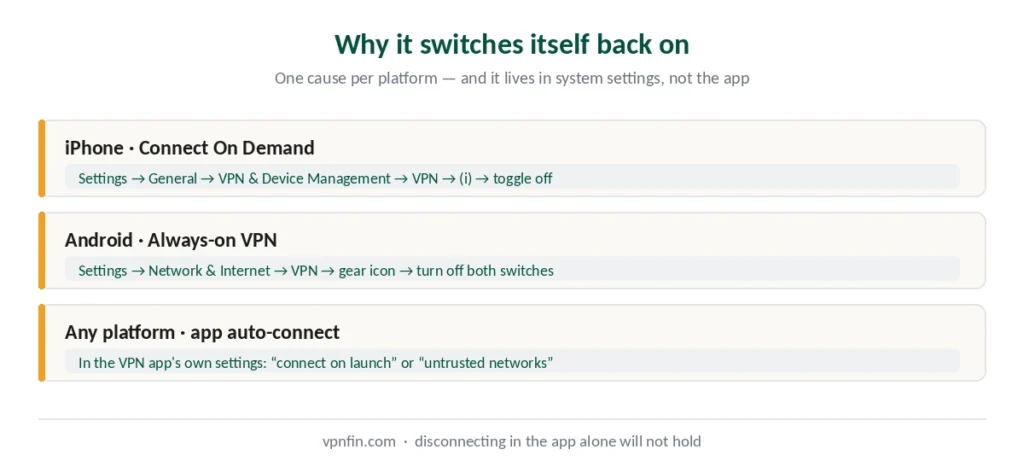
This is the single most common complaint, and it has one cause on each platform.
On iPhone: Connect On Demand. This iOS feature automatically reconnects the VPN whenever the device notices it isn’t connected. Turn it off: Settings → General → VPN & Device Management → VPN → tap the ⓘ next to your profile → toggle Connect On Demand off. If it still comes back, there are three separate switches on an iPhone and your app may call the third one something unexpected.
Without that step, every disconnect lasts until the next time your phone changes networks.
On Android: Always-on VPN. Often paired with a second setting called Block connections without VPN. Find both under Settings → Network & Internet → VPN → the gear icon next to your VPN, and switch them off. Those two settings are Android’s built-in kill switch, so leaving them on is usually the better default — though the second one also cuts your internet when you disconnect on purpose.
On any platform: the app’s own auto-connect. Most VPN apps have a “connect on launch” or “auto-connect on untrusted networks” option. Check the app’s settings if the system-level fixes don’t hold.
Why the Internet Died After You Turned It Off
You disconnect, and suddenly nothing loads at all. The instinct is to reconnect the VPN just to get online, which works — and leaves you no wiser.
The cause is the kill switch. It exists to cut your internet if the VPN drops unexpectedly, protecting you from leaking traffic. It cannot always tell the difference between a crash and you disconnecting deliberately, so it blocks everything either way.
The fix: open your VPN app, turn the kill switch off, then disconnect. Order matters. On Windows it matters more, because removing the client leaves adapters and firewall rules behind that block traffic on their own.
⚠️ Remember to turn it back on afterwards. A VPN without a kill switch exposes your real IP the moment the connection drops — and five tests confirm whether your protection is actually working.
⚠️ The mirror image of this is worth knowing too. A kill switch that stays armed after the app reconnects leaves you connected with no internet at all, which looks like a network fault and is not one.
When You Can’t Turn It Off At All
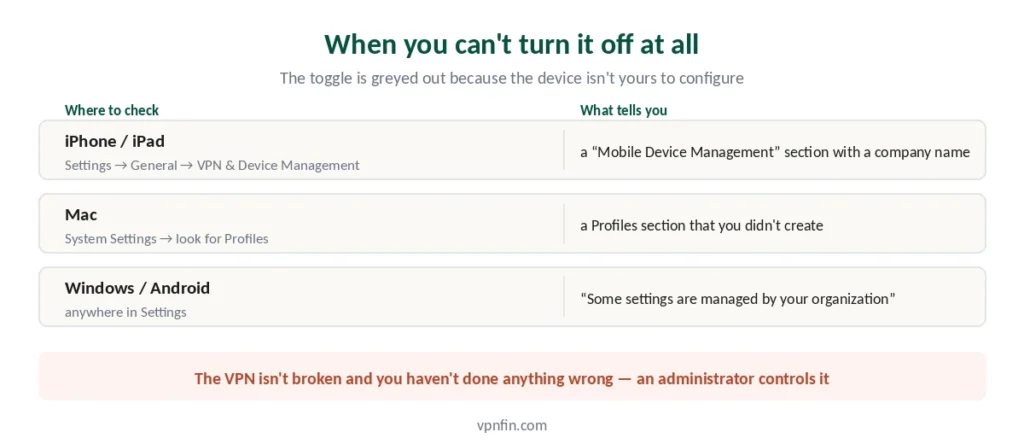
If the toggle is greyed out or the VPN reappears no matter what you do, your device may not be yours to configure.
How to check on iPhone: Settings → General → VPN & Device Management. If you see a section labelled Mobile Device Management with a company or school name, that configuration belongs to them.
On Mac: look under System Settings → General → Device Management. Older versions keep the same thing under System Preferences → Profiles.
And if no device shows a VPN at all, check the router. A VPN configured there has no switch on your phone, and turning it off has its own order of operations — get it wrong and every device in the house goes offline together.
On Windows or Android: a message reading “Some settings are managed by your organization.”
In those cases the VPN isn’t broken and you haven’t done anything wrong — an administrator controls it, and only they can change it.
A second possibility is that the switch is not on this device. Amazon’s newest streaming sticks cannot install a VPN app at all, so if nothing appears in the app list the tunnel is coming from elsewhere. Televisions are their own case, because Samsung and LG sets cannot run VPN apps and what looks like one is usually a DNS entry.
One more possibility on iPhone: what looks like a VPN might be iCloud Private Relay, an iCloud+ feature that encrypts DNS and Safari traffic. It isn’t a VPN and lives in a different place: Settings → your name → iCloud → Private Relay.
When You Shouldn’t Turn It Off
Three situations where the inconvenience is worth tolerating.
On public Wi-Fi. Airport, hotel and café networks are where a VPN does the most work — not against the password-stealing scenario the ads describe, but against metadata exposure, evil twin networks and DNS hijacking. Our guide on whether you need a VPN covers what’s actually still a risk in 2026.
While torrenting. BitTorrent broadcasts your IP to every peer in the swarm. Disconnecting mid-transfer exposes it immediately.
In countries with restrictions. Where access is monitored or filtered, turning the VPN off changes what’s visible about your connection. Our legality guide covers where that applies.
A better alternative in most cases: split tunnelling. It lets specific apps bypass the VPN while everything else stays protected — useful for banking apps that reject VPN traffic, or local network devices like printers. Most providers we rank include it.
Guides for more platforms: Apple TV, Chromebook and Linux. Using Microsoft’s browser VPN? See turning off Edge Secure Network.
How We Research
This guide draws on published documentation from device manufacturers and VPN providers, alongside technical guides from named sources including Security.org, Bitdefender and provider help centres — cross-checked and verified at publication. Menu paths reflect current OS versions and may differ slightly on older releases. Our full approach lives on the About Us page.
Turning Off a VPN FAQ
Open your VPN app and tap disconnect — that is the reliable method. The quicker route is Settings, then the VPN toggle near the top. If it switches itself back on within minutes, go to Settings → General → VPN & Device Management → VPN, tap the ⓘ next to your profile, and turn off Connect On Demand.
On iPhone it is Connect On Demand, an iOS feature that reconnects the VPN whenever it notices you are not connected. On Android it is Always-on VPN, usually found alongside a setting called Block connections without VPN. Both live in system settings rather than the VPN app, which is why disconnecting in the app alone does not hold.
Your kill switch is still active and blocking traffic, because it cannot tell the difference between a crash and you disconnecting on purpose. Open the VPN app, turn the kill switch off, then disconnect — in that order. Turn it back on afterwards, since a VPN without one exposes your real IP if the connection drops.
No. Disconnecting stops routing traffic through the VPN, and even deleting the configuration profile only removes the connection from your device. Your paid plan continues either way. Cancelling has to happen with the provider directly or through your App Store or Google Play billing.
Your device is probably managed by an employer or school through Mobile Device Management. Check Settings → General → VPN & Device Management on iPhone, or look for “Some settings are managed by your organization” on Windows and Android. If a company or school name appears, only their administrator can change the configuration.
On your home network, usually yes. On public Wi-Fi it exposes your metadata — which sites you contact, when, and how much data moves — to anyone on the same network. While torrenting it exposes your IP address to every peer immediately. Split tunnelling is often the better answer: it lets specific apps bypass the VPN while everything else stays protected.
The Short Version
Open the app, tap disconnect. That covers it on every platform, and it’s more reliable than the system settings.
If it reconnects on its own, turn off Connect On Demand on iPhone or Always-on VPN on Android. If the internet dies afterwards, your kill switch is doing its job — disable it first, disconnect second, then turn it back on.
And if the toggle is greyed out, the device is managed by someone else. That one you can’t fix from your end.