
Disclosure: VPNFin is reader-supported. If you buy a VPN through links on this page, we may earn a commission at no extra cost to you. This never affects our ratings — here’s our full disclosure.
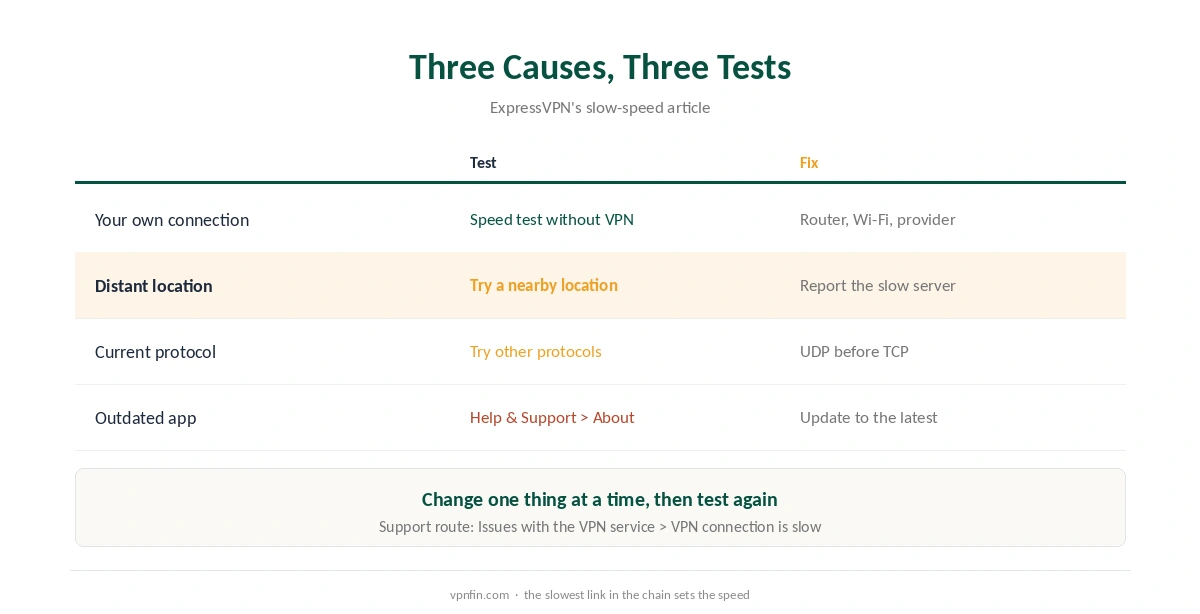
If ExpressVPN is slow, its support article narrows the cause to three things: a slow internet connection where you are, a server location far from you, or the protocol in use. That list makes diagnosis quick, because each cause has one test.
This guide walks through the three in order, then covers what to send support if speed stays low.
Cause 1: Your Own Connection
Disconnect ExpressVPN and run a speed test, then connect and test again on the same device. Comparitech describes the same check: a small drop is normal because of extra routing and encryption. If the plain connection is slow too, the VPN cannot fix it.
Our guide to VPN speed loss explains how much loss is normal. Fix the Wi-Fi or contact your provider before you change any ExpressVPN setting.
Cause 2: Why ExpressVPN Is Slow on a Distant Location
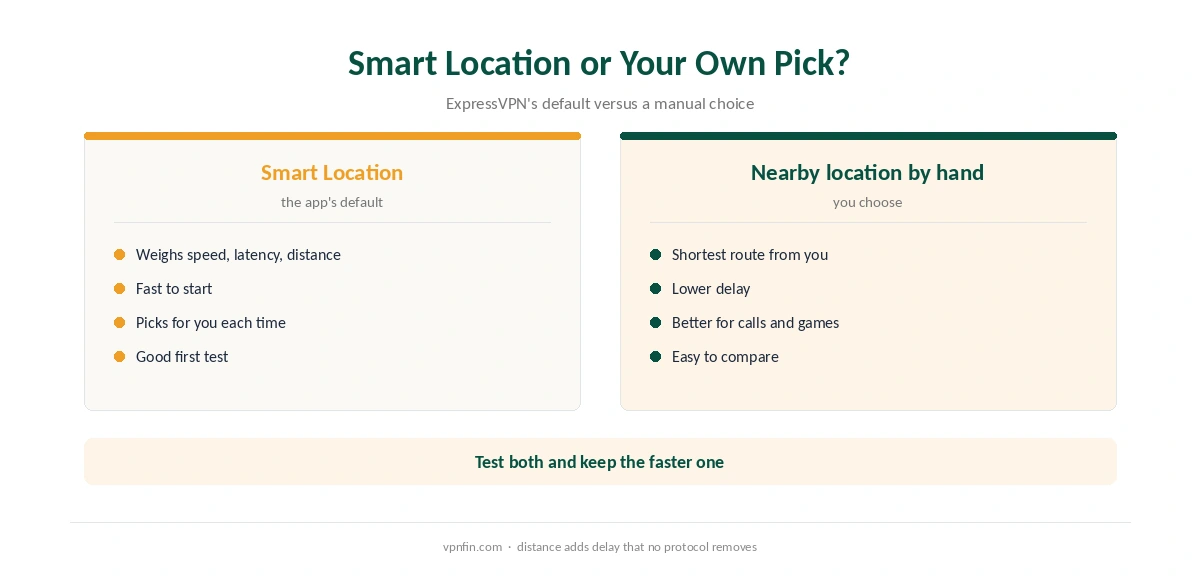
If ExpressVPN is slow on a far server, distance is the reason. ExpressVPN’s article suggests connecting to a different location and reporting the slow one. Smart Location, the app’s default pick, chooses by download speed, latency and distance, according to ExpressVPN as quoted by Comparitech. Even so, a nearby location chosen by hand is worth a test.
For calls and games, delay matters more than download speed. Our gaming VPN guide covers that side.
Cause 3: The Protocol
With the protocol set to Automatic, ExpressVPN usually picks Lightway, according to its support pages. If speeds stay low, try the others. On Windows, the setting sits under the Profile tab, VPN Protocol; on phones, under the VPN tab, Protocol.
In general, UDP versions run quicker than TCP, which trades speed for reliability. WireGuard arrived in the apps in August 2025 with post-quantum protection, according to Tom’s Guide. Our WireGuard vs OpenVPN page explains the trade-offs.
Before Any of That: Update the App
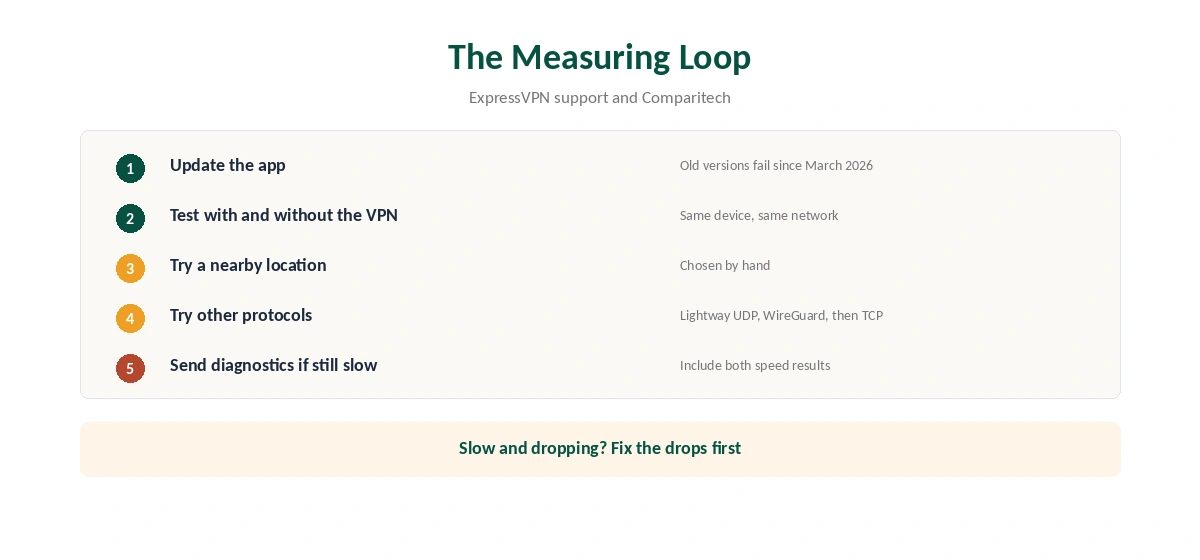
ExpressVPN’s speed article starts with the latest version. That matters more than usual in 2026: after the certificate change on 31 March, old apps stopped connecting at all. Check your version under Help and Support, then About. Our ExpressVPN Windows guide and ExpressVPN Mac guide show where updates sit.
If ExpressVPN Is Slow and Unstable
An unstable link tests slow, so fix drops first with our ExpressVPN disconnection guide. For a connection that fails entirely, see our ExpressVPN not connecting guide.
If ExpressVPN stays slow, contact support from the app: choose Issues with the VPN service, then VPN connection is slow, and attach the diagnostic information. Include your speed results with and without the VPN. If ExpressVPN is slow only on hotel or school Wi-Fi, our hotel Wi-Fi guide and school Wi-Fi guide cover network limits.
Refund and Alternatives
New users can ask for a refund within 30 days, as our ExpressVPN refund guide explains. If you are comparing options, our ExpressVPN vs Surfshark and ExpressVPN vs Proton VPN pages cover two alternatives. ExpressVPN belongs to Kape Technologies, which also owns CyberGhost and Private Internet Access.
Smart Location
Comparitech notes that ExpressVPN’s Smart Location picks a server based on download speed. It is a sensible default, but it is not always the fastest for your current task. If speeds disappoint, choose a nearby location by hand and compare.
Lightway and Other Protocols
ExpressVPN’s support says Automatic protocol usually means Lightway. Lightway is built for speed, as our Lightway vs WireGuard page explains. If a network handles UDP badly, try Lightway’s TCP option before older protocols.
Contacting Support
ExpressVPN’s support asks for diagnostics when speed problems persist. In the app, choose the issue category for slow connections and send the diagnostic information. Include a speed test with and without the VPN.
Your Own Connection
ExpressVPN names a slow internet connection at your location as one of three causes. Test without the VPN first. If the base speed is low, no server change will fix it.
Keeping the App Updated
ExpressVPN’s first step for slow speeds is to install the latest version. Updates improve protocols and server selection. On phones, check the app store; on computers, the app usually prompts you.
If the problem started after an update, reinstalling can clear old settings. Our ExpressVPN disconnection guide covers related stability fixes, including Network Lock. Note the version number before and after, so support can see what changed if the problem returns.
Our ExpressVPN review covers speed results from independent tests.
How We Research
This page draws on ExpressVPN’s slow-speed and connection articles, Comparitech’s speed guide and Tom’s Guide’s notes on WireGuard and the certificate change. We cross-checked these sources against each other, and where they conflict or something can’t be verified, we say so in the text rather than guessing. We read every source on 5 October 2026. The main source we relied on is ExpressVPN’s slow-speed article. Our full approach lives on the About Us page.
Slow ExpressVPN FAQ
ExpressVPN’s support names three causes: a slow connection where you are, a distant server location and the protocol in use. Test each in that order.
Automatic usually picks Lightway, per ExpressVPN’s support. UDP versions are generally quicker than TCP, so test Lightway UDP and WireGuard on your network.
It weighs download speed, latency and distance, according to ExpressVPN. A nearby location chosen by hand is still worth testing.
In the app, choose Issues with the VPN service, then VPN connection is slow, and send the diagnostic information.
An old app may not connect at all since the March 2026 certificate change. Update to the current version first.
The Verdict
ExpressVPN’s own list keeps slow-speed diagnosis short: your connection, the distance and the protocol. Update the app, measure with and without the VPN, then change one of the three at a time.