
Disclosure: VPNFin is reader-supported. If you buy a VPN through links on this page, we may earn a commission at no extra cost to you. This never affects our ratings — here’s our full disclosure.
NordVPN on Kodi works by running the VPN on the device, not inside Kodi. Kodi is a media player with no VPN of its own, so you install NordVPN on the Fire TV Stick, Android TV box, computer or Raspberry Pi that runs it. Every add-on then uses the tunnel.
NordVPN on Kodi by Device
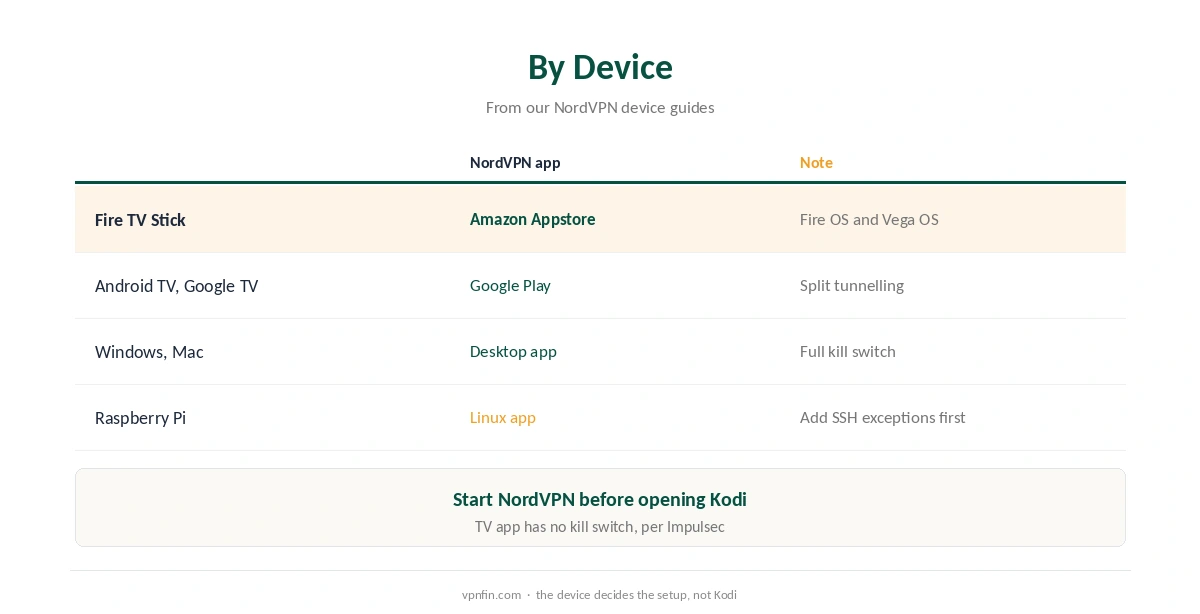
On a Fire TV Stick, install NordVPN from the Amazon Appstore; it runs on Fire OS and on the newer Vega OS sticks, as our NordVPN Firestick guide explains. On Android TV and Google TV, use Google Play; our Android TV guide covers the app.
Computers work the same way: run the desktop app on Windows, Mac or Linux before opening Kodi. On a Raspberry Pi running Kodi, the Linux app works, but add SSH exceptions first, as our Raspberry Pi guide explains.
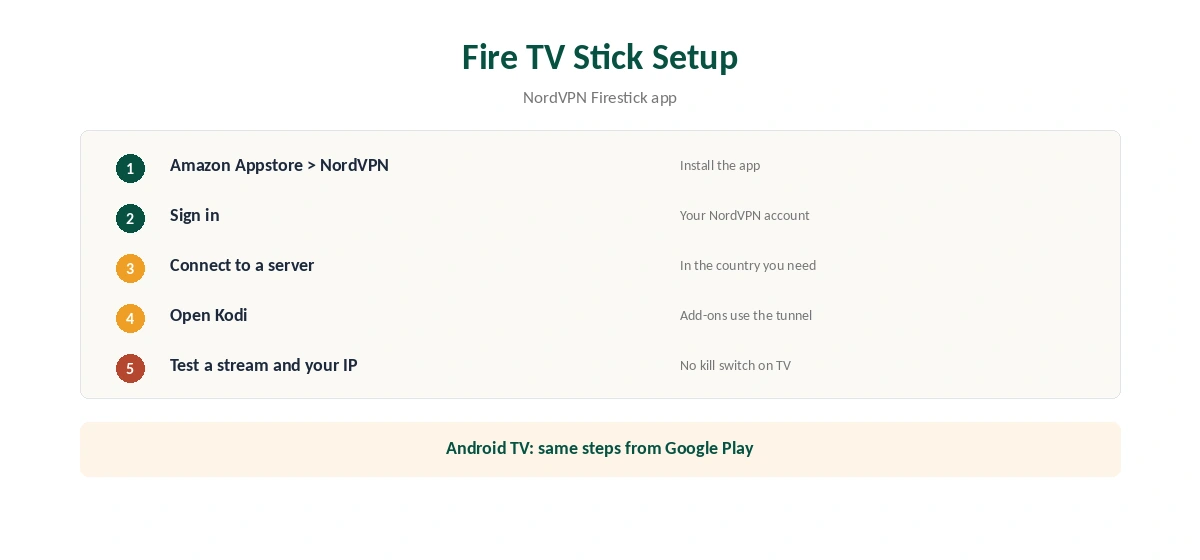
Set Up NordVPN on Kodi via a Fire TV Stick
Install NordVPN from the Amazon Appstore and sign in. Connect to a server in the country whose content you need. Then open Kodi; its add-ons now reach the internet through NordVPN.
Note one limit on TVs: Impulsec reports that NordVPN’s Android TV app has no kill switch, so a drop exposes your IP until it reconnects. Our kill switch guide explains where it exists.
Split Tunnelling for Kodi
Gizmodo notes that NordVPN’s Android TV app includes split tunnelling. That lets you send Kodi through the VPN while other apps, such as a local streaming service, use your normal connection. Our split tunnelling guide explains the trade-off.
Kodi Add-Ons and the Law
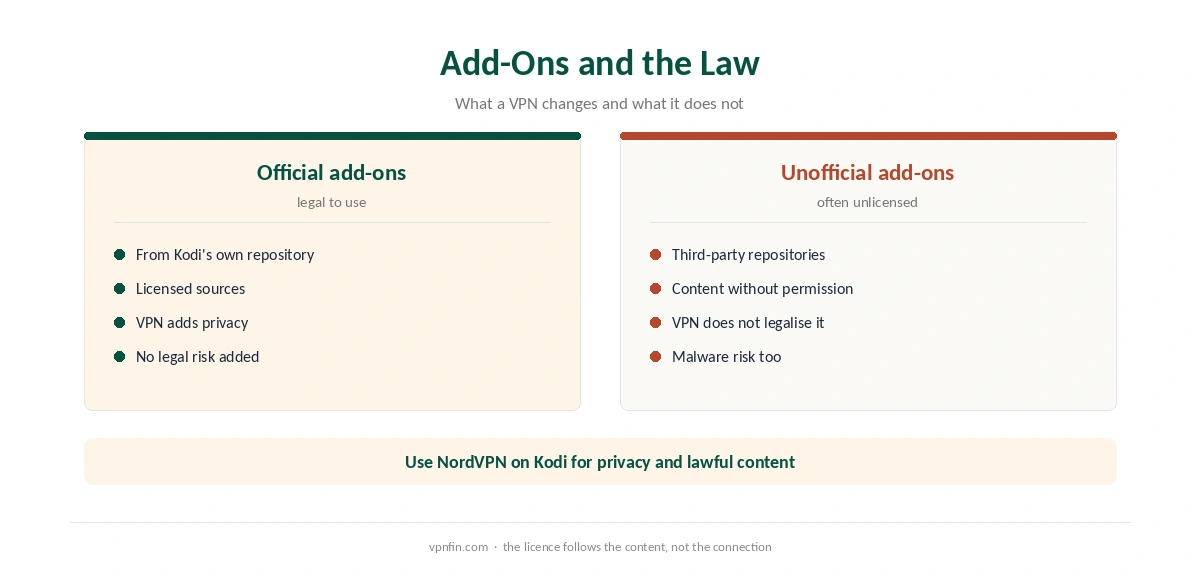
Kodi itself is legal, and so are its official add-ons. Some unofficial add-ons stream content without the rights holder’s permission, and a VPN does not make that legal. Use NordVPN on Kodi for privacy and for services you have the right to watch.
Speed and Streaming
If streams buffer, choose a nearer server, as our NordVPN speed guide explains. For mainstream services, our NordVPN streaming hub covers what works. Our Kodi VPN guide compares other providers.
Kodi boxes running Linux use the desktop app, as our NordVPN Linux guide explains. Kodi-only systems may not run the app, so check yours first. Test the result before streaming.
Check that the tunnel works with our VPN test page. Our IPv6 leak guide covers one more test, and our refund guide explains the 30-day window. NordVPN belongs to Nord Security, which also owns Surfshark.
Choosing a Location for Kodi
Kodi itself does not care where you connect. The add-ons and the services behind them do. For a service tied to your home country, connect there. For general privacy, the nearest location gives the best speed.
Live streams are the most sensitive to distance. If a live add-on stutters while on-demand video plays smoothly, the server is probably too far or too busy. Try a closer city first.
Add-On Safety
Unofficial Kodi repositories carry a malware risk as well as a legal one. A VPN encrypts traffic, but it does not scan what an add-on installs. Stick to the official Kodi repository and trusted sources.
NordVPN’s Threat Protection blocks known malicious domains while the VPN is connected, as our NordVPN ad blocker guide explains. It is a useful layer, not a guarantee.
When the VPN Drops
On Android TV and Fire TV, Impulsec reports that NordVPN’s TV app has no kill switch. If the connection drops while Kodi streams, traffic continues on your real IP until NordVPN reconnects.
Auto-connect reduces that gap by reconnecting quickly. For full protection on a Kodi box, a router running NordVPN keeps the device behind the tunnel even if the app is not running. Our NordVPN router guide covers the setup.
Kodi on Phones and Tablets
Kodi also runs on Android phones and tablets. There, the NordVPN Android app covers Kodi like any other app, and Android’s system setting can block traffic outside the VPN. Mark NordVPN as always-on in the VPN settings for the strongest protection.
Kodi on a Raspberry Pi
Some people run Kodi on a Raspberry Pi. NordVPN’s Linux app supports Raspberry Pi OS, as our NordVPN Raspberry Pi guide explains. Kodi-only systems may not run the app, so check yours before buying.
Whatever device runs Kodi, test the setup once with our VPN test page in a browser on the same device. Then start a stream and confirm it plays smoothly. Repeat after Kodi or NordVPN updates, since settings can change between versions. If a stream fails only with the VPN on, try another server before changing Kodi’s settings, since add-on sources sometimes block specific VPN addresses. Our PureVPN on Kodi page goes into running it on the device and routing only Kodi.
How We Research
This page draws on our NordVPN device research for Fire TV, Android TV and Raspberry Pi, plus Gizmodo and Impulsec. We cross-checked these sources against each other, and where they conflict or something can’t be verified, we say so in the text rather than guessing. We read every source on 5 October 2026. The main source we relied on is Gizmodo’s Android TV VPN guide. Our full approach lives on the About Us page.
NordVPN on Kodi FAQ
You do not need one. Install NordVPN on the device that runs Kodi, and all add-ons use the tunnel.
Install NordVPN from the Amazon Appstore, connect, then open Kodi.
Impulsec reports the Android TV app has none, so a drop can expose your IP briefly.
Kodi and its official add-ons are legal. A VPN does not make unlicensed streams legal.
On Android TV, yes, with split tunnelling in the NordVPN app.
The Verdict
NordVPN on Kodi means installing the VPN on the device that runs Kodi. Use split tunnelling if you need local services too, and stick to content you have the right to watch.