
Disclosure: VPNFin is reader-supported. If you buy a VPN through links on this page, we may earn a commission at no extra cost to you. This never affects our ratings — here’s our full disclosure.
PureVPN on Roku needs a workaround, because Roku devices have no VPN support and no VPN apps. VPNAlert describes the two routes that work: a router running PureVPN, or a Windows PC sharing its PureVPN connection as a hotspot. Both leave the Roku itself untouched; the VPN sits upstream.
One Roku rule matters as much as the setup. Gizmodo notes that the Roku channel store is tied to your Roku account country, so a VPN changes what installed apps show, but it does not add channels from another region.
Why Roku Needs a Workaround
Roku OS has no VPN client and no store apps from VPN providers. NordVPN’s support confirms the same for its own service. You also cannot change DNS on the device itself, Gizmodo notes. That rules out the Smart DNS trick some TVs allow.
Cybernews adds a further quirk: some Roku models use Google’s DNS servers regardless of the router’s settings. That matters for DNS-based tools, but a full VPN on the router or hotspot carries all traffic and avoids the issue.
PureVPN on Roku Through a Router
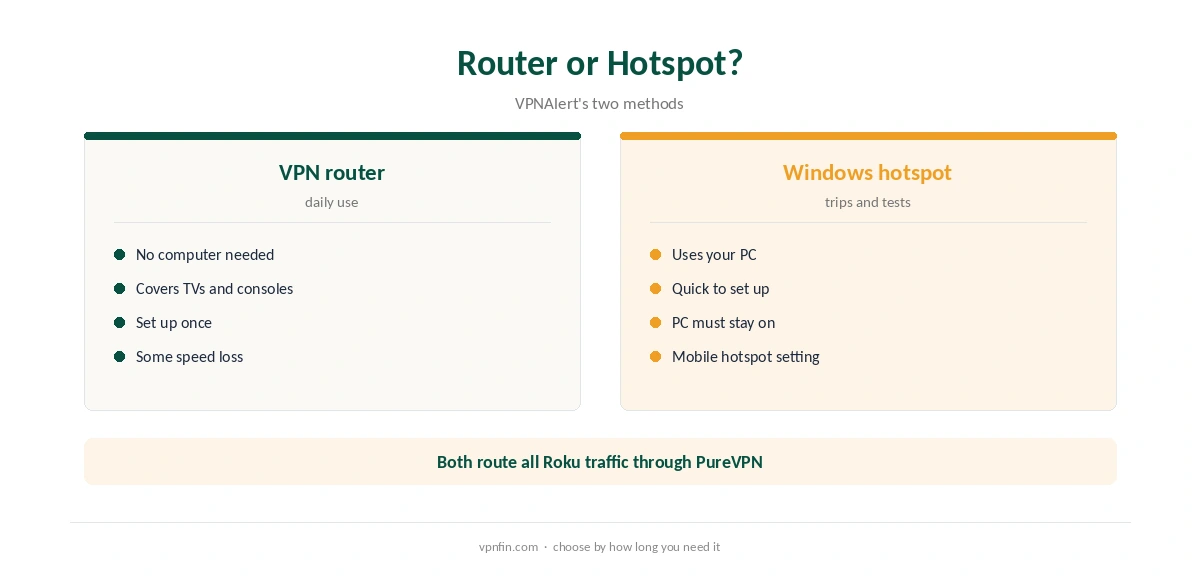
A router running PureVPN is the permanent option. Set up PureVPN on a supported router, as our PureVPN router guide explains, and our router setup guide covers compatible models. Then connect the Roku to that router’s Wi-Fi in Roku’s network settings. Every app on the Roku then uses PureVPN’s location.
The router route also covers other devices without VPN apps, such as smart TVs and consoles. The trade-off is that everything on that router shares one location.
PureVPN on Roku Through a Windows Hotspot
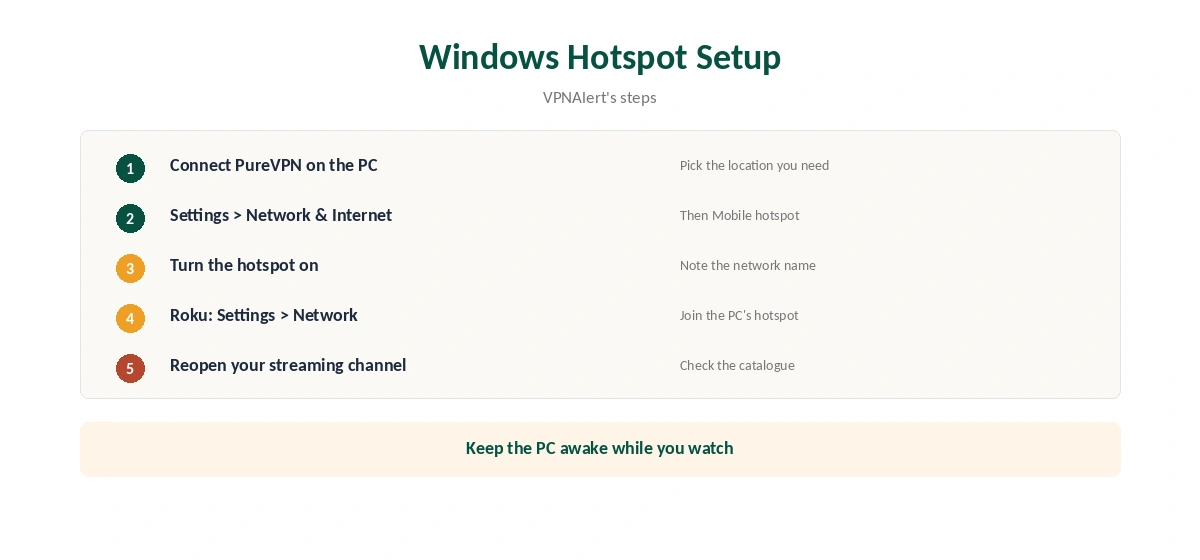
Without a VPN router, a Windows PC can share its connection. VPNAlert’s steps: connect PureVPN on the PC, open Settings, Network and Internet, Mobile hotspot, and turn it on. Then connect the Roku to that hotspot from Roku’s network settings.
The PC must stay on and connected while you watch. That makes the hotspot a good fix for a trip or a test, and the router the better answer for daily use. Our PureVPN Windows guide covers the desktop app.
What a VPN Can and Cannot Change on Roku
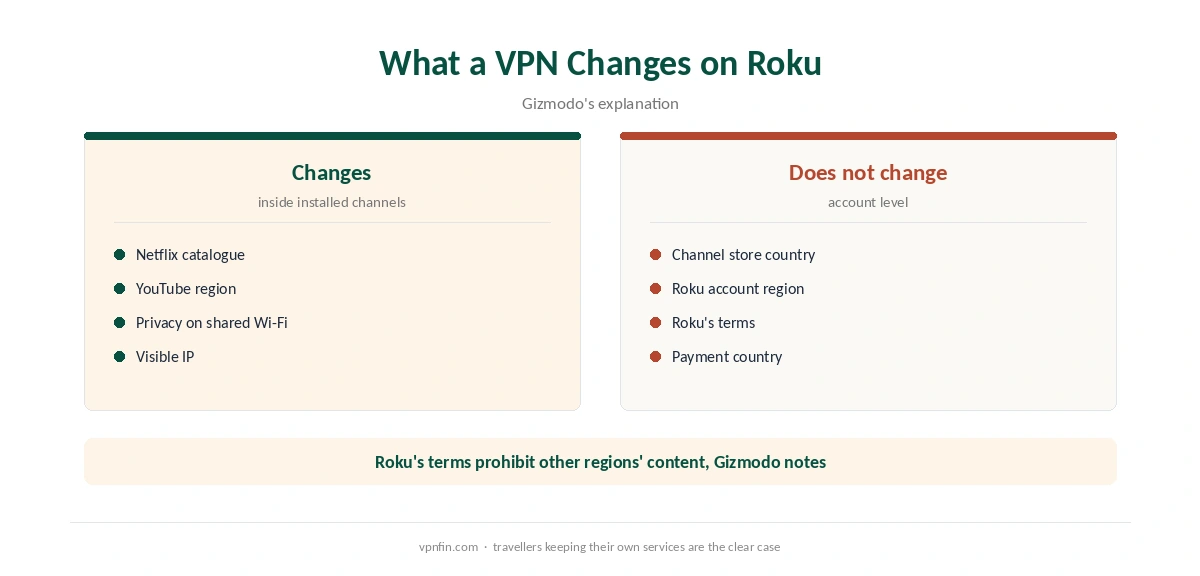
Gizmodo explains the limit. A VPN changes the catalogue inside channels you already have, such as Netflix or YouTube, but the Roku channel store follows your Roku account country. Adding channels from another region means a second Roku account and a device reset. Gizmodo also notes that Roku’s terms prohibit accessing other regions’ content.
So the clean use case is a traveller keeping access to their own services, or someone adding privacy on a shared network. Our Roku VPN guide compares other providers’ routes.
Roku TVs and Streaming Sticks
Roku also runs inside many TVs from brands such as TCL and Hisense, sold as Roku TV models. They use the same operating system, so the same limits apply: no VPN app, no DNS change on the set, and the router or hotspot route. Our PureVPN smart TV guide covers TVs on other platforms.
If you want an app on the TV itself, a Fire TV Stick plugged into the same set can run PureVPN directly, as our PureVPN Firestick guide explains. One option is to keep the Roku for local channels and use the stick when you need the VPN. That avoids changing the whole home network.
What PureVPN Costs
On 5 October 2026, PureVPN’s order page listed the Standard 2-year plan at $58.20 for the first 27 months, renewing at $47.95 a year. A separate deals page showed $58.05 for the same term with a $54.95 renewal, so the page you buy from changes the renewal by seven dollars a year. Check the renewal line at checkout.
One plan covers 10 devices, and a router counts as one of them. PureVPN offers a 31-day money-back guarantee, as our PureVPN refund guide explains, so you can test the setup on your own hardware before committing.
| Provider | Renewal price | Per month | Tier |
|---|---|---|---|
| NordVPN | $139.08/yr | ~$11.59 | Basic |
| Surfshark | ~$79/yr | ~$6.58 | Starter |
| ExpressVPN | $99.95/yr | ~$8.33 | Basic |
| CyberGhost | $56.94/yr | ~$4.75 | 2-year |
| PureVPN | $47.95/yr | ~$4.00 | Standard, 2-year (1-year renews $57.95) |
| IPVanish | $89.99/yr | ~$7.50 | Essential |
| Windscribe | ~$69/yr | ~$5.75 | Pro |
| Proton VPN | ~$83.88/yr | ~$6.99 | VPN Plus |
| Mullvad | ~$65/yr | ~$5.40 | flat, no tiers |
| Norton VPN | $79.99/yr | ~$6.67 | Standard |
| Hotspot Shield | ~$95.99/yr | ~$8.00 | Premium annual |
| Astrill | $300 every 2 yrs | ~$12.50 | 2-year, same at renewal |
Keeping Streams Smooth
Choose a location close to you within the country whose catalogue you need, since a router’s processor and a distant server both cost speed. Gizmodo measured a router setup below a direct computer connection in its NordVPN test, so expect some loss.
If a channel shows the wrong region, close it and reopen it after the VPN connects. Confirm the connection from a phone on the same network with our VPN test page.
For other providers’ setups, see our NordVPN Roku guide and Surfshark Roku guide; both brands belong to Nord Security. Our DNS leak guide covers one more check. PureVPN belongs to Gaditek, which absorbed Ivacy in 2024.
Before buying, our PureVPN trial guide covers the 7-day paid trial. Test the router or hotspot route on your own Roku within that time. Note which channels change and which stay the same.
How We Research
This page draws on VPNAlert’s PureVPN Roku guide, Gizmodo’s Roku VPN guide, Cybernews and NordVPN’s Roku support article, plus PureVPN’s pricing pages. We cross-checked these sources against each other, and where they conflict or something can’t be verified, we say so in the text rather than guessing. We checked time-sensitive figures, including prices in US dollars, on 5 October 2026. PureVPN showed two price grids on different pages that day. The main source we relied on is VPNAlert’s PureVPN Roku guide. Our full approach lives on the About Us page.
PureVPN on Roku FAQ
No. Roku has no VPN apps. Use a router running PureVPN or a Windows hotspot.
No. The channel store follows your Roku account country, Gizmodo notes.
Not on the device itself, which does not allow DNS changes, and some models use Google’s DNS regardless.
It works, but the PC must stay on. A router suits daily use better.
Router setups lost some speed in Gizmodo’s NordVPN test; pick a nearby location to limit it.
The Verdict
PureVPN on Roku works through a router or a Windows hotspot, not an app. It changes catalogues inside installed channels, not the Roku channel store, so it suits travellers and privacy on shared networks.