
Disclosure: VPNFin is reader-supported. If you buy a VPN through links on this page, we may earn a commission at no extra cost to you. This never affects our ratings — here’s our full disclosure.
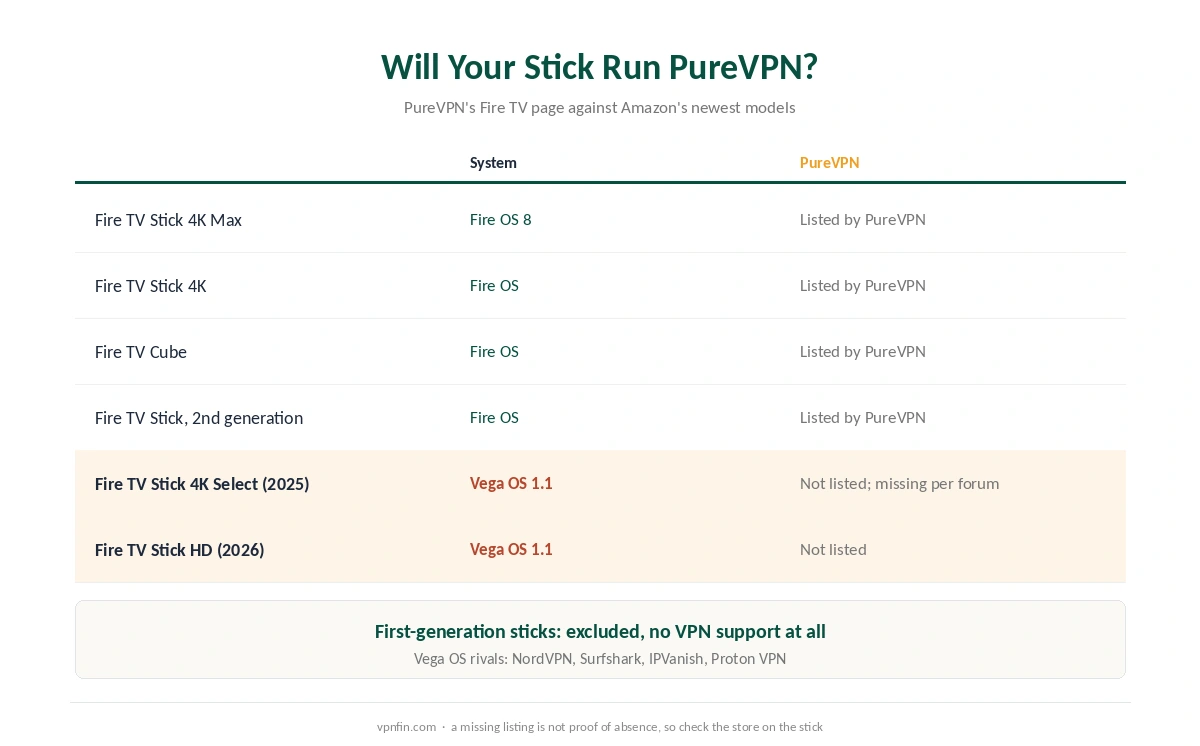
The PureVPN Firestick app documents a feature that is easy to miss on a TV: split tunnelling, so one streaming app can leave the VPN while the rest stay inside. The catch sits elsewhere. PureVPN’s compatibility page names Fire OS sticks only, and a buyer on Amazon’s forum could not find the app on a Fire TV Stick 4K Select. So check your stick’s system before you pay.
This guide covers the models PureVPN names, the setup, the split tunnelling modes and the price after the first term.
Is PureVPN Good on a Firestick?
On a Fire OS stick, it is a capable choice. PureVPN publishes a native app in the Amazon Appstore, and its support pages document split tunnelling on Fire TV. One plan covers 10 devices. However, PureVPN does not list Vega OS or the 4K Select, so owners of Amazon’s newest sticks should look elsewhere for now.
Which Fire TV Sticks the PureVPN Firestick App Supports
PureVPN’s Fire TV page, read on 5 October 2026, names the second-generation Fire TV Stick, the Fire TV Stick 4K, the 4K Max and the Fire TV Cube. It excludes the first-generation stick, which cannot run VPN services. Older models with outdated software may need a manual update first.
The page does not mention Vega OS. In April 2026, a buyer on Amazon’s community forum reported that the app was missing on a 4K Select. The reply noted that Amazon’s own page did not list PureVPN as compatible. vpnonline reached the same conclusion in July. We found no later statement from PureVPN.
Several rivals did ship Vega apps. NordVPN, Surfshark, IPVanish and Proton VPN all publish them, and NordVPN and Surfshark share an owner, Nord Security. Our NordVPN Firestick guide and Proton VPN Firestick guide cover two of them.
To check your own stick, open Settings, then My Fire TV, then About. Fire OS means the PureVPN app should appear in the store; Vega OS means it probably will not.
How to Install PureVPN on Firestick
To install PureVPN on a Firestick, press Find on the home screen and search for PureVPN. Then select the official app and choose Get. When it finishes, open it from Apps and Channels or straight from the store page.
Next, sign in. On Android TV, PureVPN uses a six-digit code that you confirm on another device, according to VPNAlert. We could not confirm the same flow on Fire TV, so keep your username and password ready. Finally, accept the Fire TV prompt that allows a VPN connection and press Connect.
PureVPN Firestick Split Tunnelling
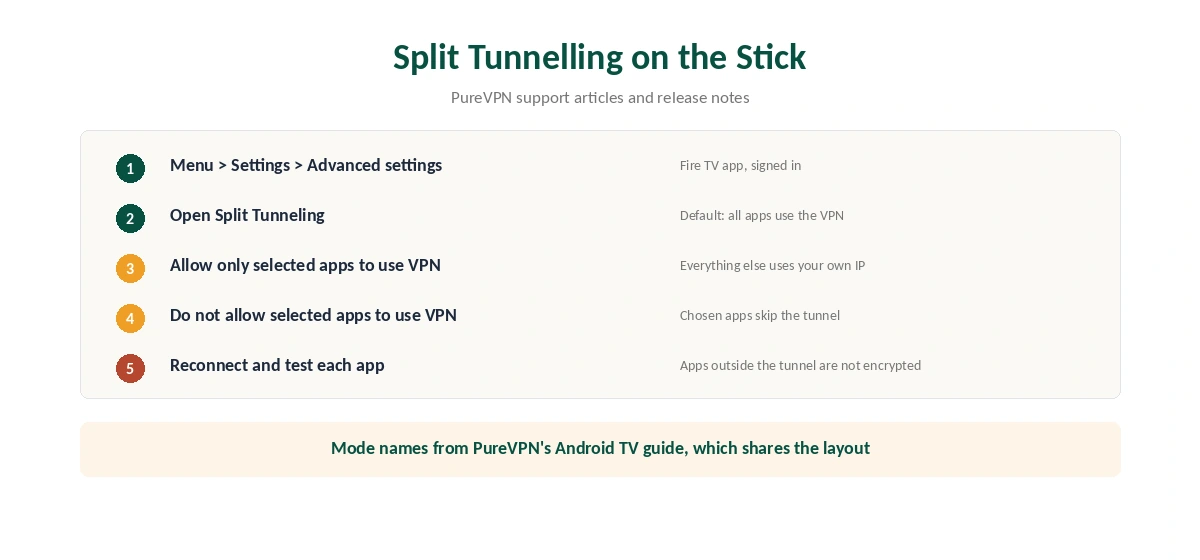
This is the feature that sets the app apart. PureVPN’s release notes announced split tunnelling for the Firestick app, and its support article places the setting under Settings, then Advanced settings. By default, every app uses the VPN.
Two other modes exist, following PureVPN’s Android TV guide, which shares the layout. The first sends only chosen apps through the VPN. The second keeps chosen apps out of it. For example, a local catch-up app can stay on your home connection while another service uses a foreign server.
Remember the trade-off: the VPN does not encrypt traffic outside the tunnel. Our split tunnelling explainer covers when that matters. For comparison, we could not confirm the same option in the app our CyberGhost Firestick guide covers.
PureVPN Firestick Problems and Fixes
If the app is missing from the Appstore, the stick is probably a Vega model or a first-generation one. No setting changes that. A VPN on the router is the workaround, and our router setup guide explains it.
If the app connects but a stream fails, clear the streaming app’s cache under Settings, Applications, Manage Installed Applications, then pick another server. If the tunnel drops, PureVPN’s own fix is to turn off automatic protocol selection and try another protocol, with Connect to Fallback switched on.
Also, check the Wi-Fi: a stick behind the TV often has a weak signal. Our Firestick troubleshooting page lists the checks in order, and turning the VPN off helps rule it out.
What PureVPN Costs on a Firestick
On 5 October 2026, PureVPN’s order page listed the Standard 2-year plan at $2.15 a month, billed $58.20 for 27 months. It then renews at $47.95 a year, about $4.00 a month. That renewal is about 1.9× the intro rate after 27 months.
A separate 2-year deal page showed different figures that day: $58.05 for 27 months, renewing at $54.95. We print both, because the renewal differs by $7.00 a year. The 1-year plan costs $40.80 for 16 months and the monthly plan $12.95. Our PureVPN price breakdown runs the longer totals.
| Provider | Renewal price | Per month | Tier |
|---|---|---|---|
| NordVPN | $139.08/yr | ~$11.59 | Basic |
| Surfshark | ~$79/yr | ~$6.58 | Starter |
| ExpressVPN | $99.95/yr | ~$8.33 | Basic |
| CyberGhost | $56.94/yr | ~$4.75 | 2-year |
| PureVPN | $47.95/yr | ~$4.00 | Standard, 2-year (1-year renews $57.95) |
| IPVanish | $89.99/yr | ~$7.50 | Essential |
| Windscribe | ~$69/yr | ~$5.75 | Pro |
| Proton VPN | ~$83.88/yr | ~$6.99 | VPN Plus |
| Mullvad | ~$65/yr | ~$5.40 | flat, no tiers |
| Norton VPN | $79.99/yr | ~$6.67 | Standard |
| Hotspot Shield | ~$95.99/yr | ~$8.00 | Premium annual |
| Astrill | $300 every 2 yrs | ~$12.50 | 2-year, same at renewal |
The Trial and the Refund Rules
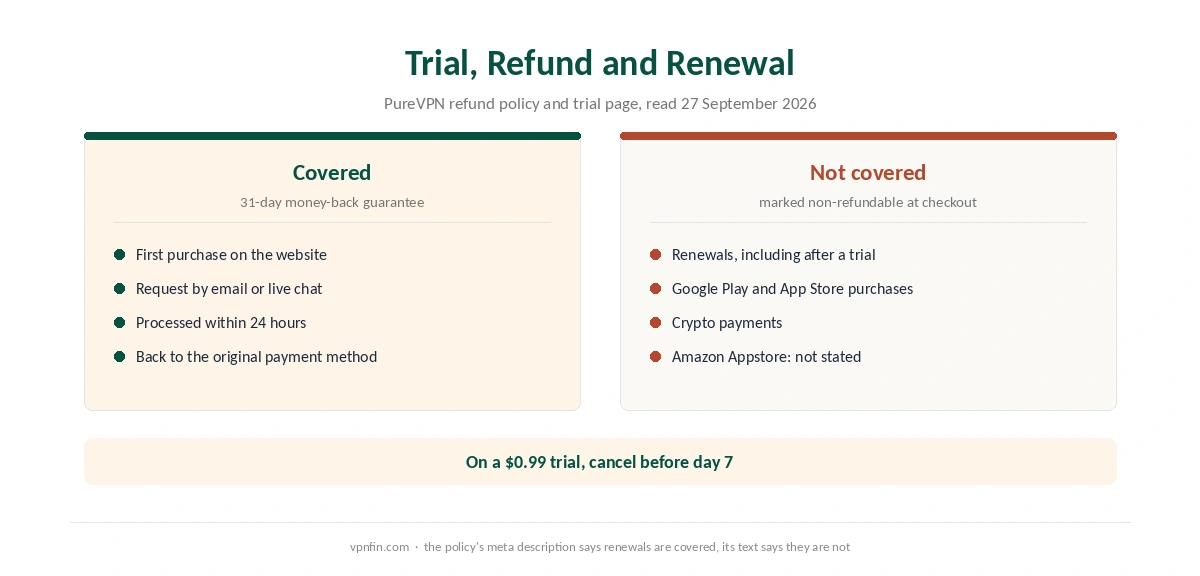
PureVPN sells a 7-day trial for $0.99 on its website, and it rolls into a paid plan unless you cancel. Its refund policy offers 31 days on first purchases, with renewals excluded. That exclusion covers the plan the trial turns into, so cancel before day 7 if you are unsure.
The policy also marks Google Play and App Store purchases as non-refundable. It does not name the Amazon Appstore, and we could not confirm how PureVPN treats it. For a PureVPN Firestick setup, buying on the website keeps the 31-day window clear. Our PureVPN trial guide and PureVPN refund guide cover both steps.
Who Should Use PureVPN on a Firestick
PureVPN on a Firestick suits owners of Fire OS sticks who want split tunnelling on the TV. It also suits large households, since 10 devices fit on one plan. In addition, the low renewal rate helps anyone who plans to keep the service past the first term. For running it on the device and routing only Kodi, see our page on PureVPN on Kodi.
Who Should Skip It
Skip it if you own a Fire TV Stick 4K Select or the 2026 Stick HD, because PureVPN lists neither. Ownership is the other question. PureVPN belongs to GZ Systems Limited, registered in the British Virgin Islands and part of the Gaditek group, which also absorbed Ivacy in 2024. Our VPN ownership map shows the wider picture, and our Firestick VPN comparison covers other options.
How We Research
This page draws on PureVPN’s Fire TV page, its split tunnelling articles and release notes, and its refund policy. We also read Amazon’s community forum, vpnonline’s guide and Windows Forum’s Vega report. We cross-checked these sources against each other, and where they conflict or something can’t be verified, we say so in the text rather than guessing. We checked time-sensitive figures, including prices in US dollars, on 5 October 2026. PureVPN’s order page and its separate 2-year deal page showed different Standard prices that day. The main source we relied on is PureVPN’s Fire TV download page. Our full approach lives on the About Us page.
PureVPN on Firestick FAQ
PureVPN does not list it. A buyer on Amazon’s forum could not find the app on a 4K Select in April 2026, and vpnonline found no Vega OS support in July. Check the Appstore on the device before paying.
Yes. PureVPN’s release notes added it to the Firestick app, and the setting sits under Settings, Advanced settings. By default, every app uses the VPN.
PureVPN names the second-generation Fire TV Stick, the Fire TV Stick 4K, the 4K Max and the Fire TV Cube. The first-generation stick does not support VPN apps.
Not on the plan the trial turns into. PureVPN’s policy excludes renewals after a trial, so cancel before day 7. First purchases get 31 days.
The Standard 2-year plan renews at $47.95 a year on PureVPN’s order page. A separate deal page showed $54.95, so check the renewal line at checkout.
The Verdict
On a Fire OS stick, PureVPN offers documented split tunnelling, which we could not confirm in CyberGhost’s TV app. It also renews cheaply. Yet the missing Vega listing rules out Amazon’s newest sticks, and the trial’s refund rule needs care. Check About, buy on the website and cancel a trial in time. For TV boxes, our PureVPN Android TV guide covers that app.