
Disclosure: VPNFin is reader-supported. If you buy a VPN through links on this page, we may earn a commission at no extra cost to you. This never affects our ratings — here’s our full disclosure.
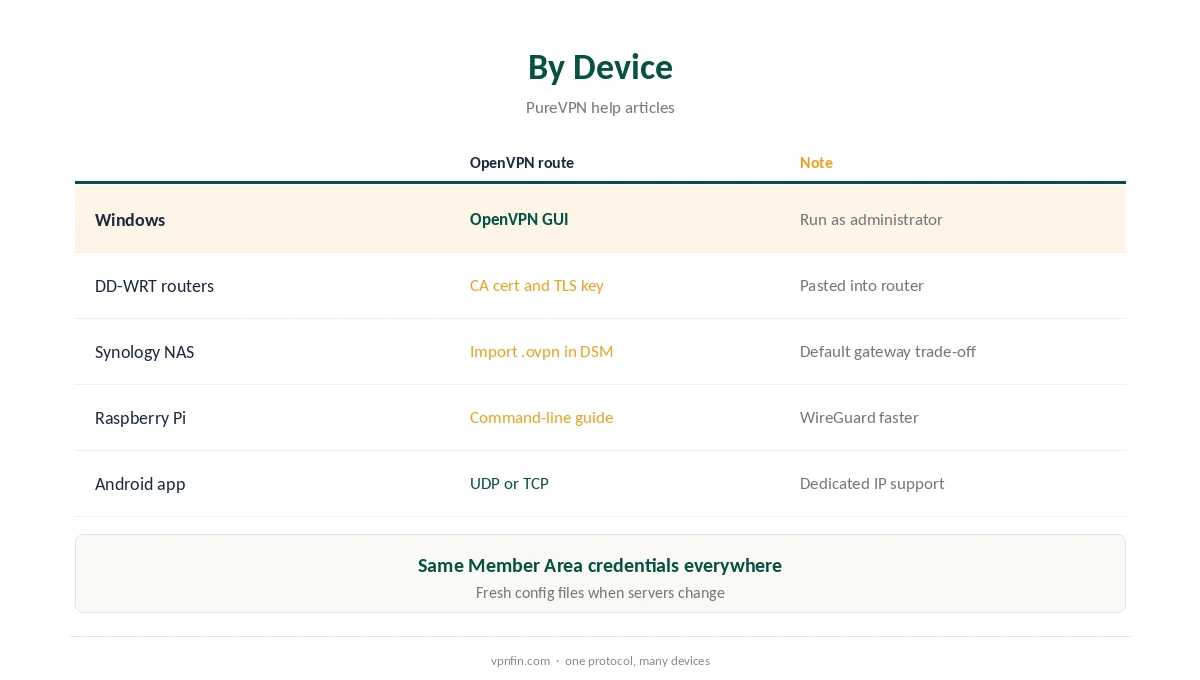
PureVPN OpenVPN runs in two forms. The apps offer it as UDP and TCP, and PureVPN’s help centre documents manual setups with OpenVPN GUI on Windows, plus configuration files for routers, Synology NAS units and Raspberry Pi. Manual setups use the VPN credentials from the Member Area. PureVPN’s Android notes add that dedicated IPs connect over OpenVPN too.
This guide covers when to pick OpenVPN, the Windows manual steps, other devices, and UDP versus TCP.
When to Choose OpenVPN
In the comparisons we have read, WireGuard is the faster option, as our PureVPN WireGuard guide explains. OpenVPN earns its place on networks that block WireGuard, on routers whose firmware supports only OpenVPN, and in manual setups where a configuration file is the simplest route.
In the iPhone app, PureVPN lists UDP and TCP alongside WireGuard and IKEv2. On Windows, the protocol tab offers automatic selection, as our PureVPN Windows guide explains.
Finding Your Manual Credentials
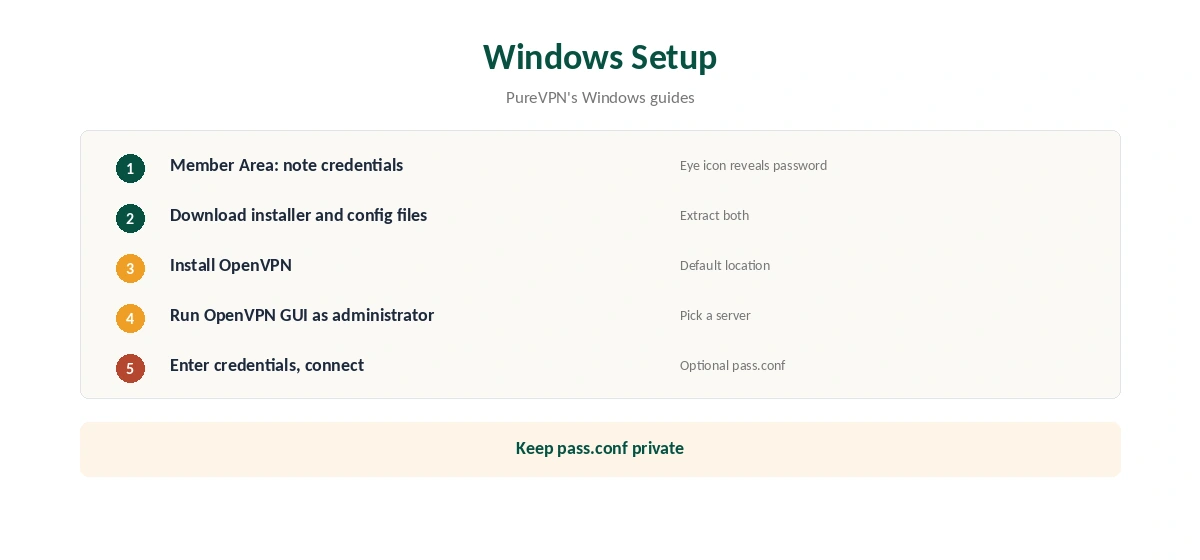
Every manual setup starts in the PureVPN Member Area. Log in with your email and password, note the VPN username shown there, and click the eye icon to reveal the VPN password, as PureVPN’s guides describe. Those manual credentials go into the device, not your email address.
PureVPN OpenVPN Setup on Windows
PureVPN’s Windows guides give the steps. Download PureVPN’s OpenVPN installer and its OpenVPN configuration files from the links in the guide, and extract them. Install OpenVPN, then run OpenVPN GUI as administrator.
Pick a server from the GUI’s list and enter your manual credentials when prompted. To avoid typing them each time, PureVPN’s Windows 7 guide describes saving them in a pass.conf file in the OpenVPN config folder, C:Program FilesOpenVPNconfig. Keep that file private, since it holds your VPN password.
Routers, NAS and Linux
PureVPN’s DD-WRT guide uses OpenVPN with the CA certificate and TLS key pasted into the router, as our PureVPN router guide explains. On Synology, you import a .ovpn file in DSM’s VPN client, covered in our PureVPN Synology guide.
Raspberry Pi users can follow PureVPN’s OpenVPN command-line guide, with WireGuard as the faster alternative, as our PureVPN Raspberry Pi guide shows.
UDP or TCP?
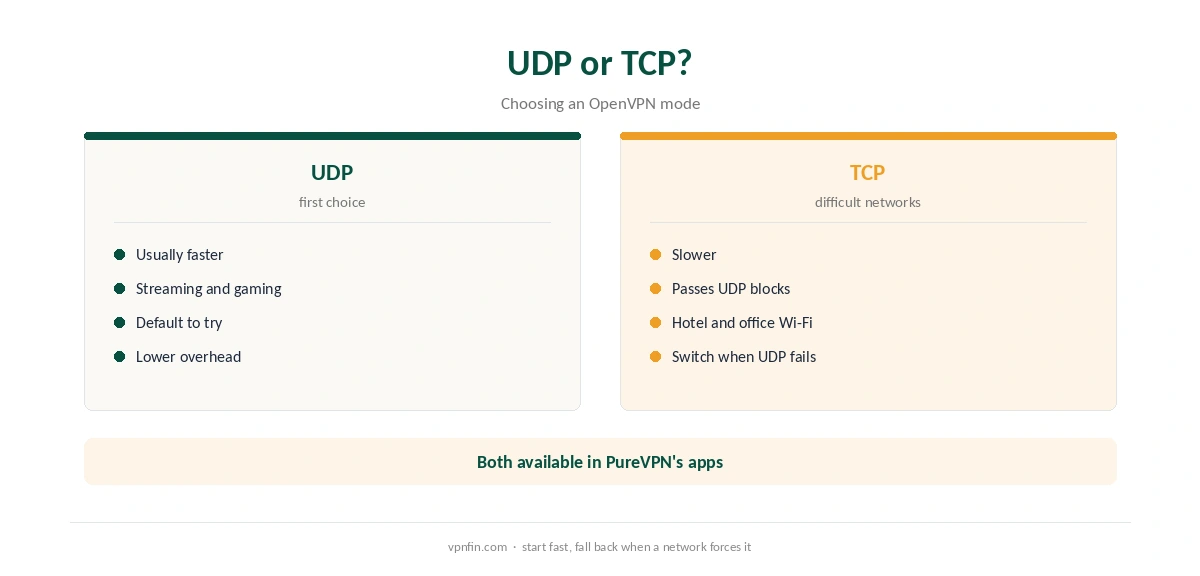
In the protocol guides we have read, UDP is the faster mode and suits streaming and gaming. TCP is slower but gets through networks that disrupt UDP, such as some hotel and office Wi-Fi. Start with UDP and switch to TCP when a network causes drops.
Our WireGuard vs OpenVPN page explains the wider trade-off between protocols.
Dedicated IPs and OpenVPN
PureVPN’s Android release notes say you can connect to a dedicated IP over OpenVPN in the app. If a dedicated IP fails on WireGuard, try OpenVPN before contacting support. Our PureVPN dedicated IP guide explains the add-on.
OpenVPN on Restrictive Networks
OpenVPN over TCP can pass through networks that block other VPN traffic, since it can run on the same port as secure web traffic. That makes it the fallback for hotel, school and office networks. Our obfuscation guide explains how disguised traffic gets past stricter filters.
PureVPN OpenVPN on Linux
PureVPN’s Linux apps offer WireGuard and an automatic protocol choice, as our PureVPN Linux guide explains. Manual OpenVPN suits distributions the apps do not cover, using the same Member Area credentials and configuration files as Windows. Keep the files in one folder per location, and replace them when PureVPN updates its server list.
What a Manual Setup Gives Up
OpenVPN GUI and router setups lack the app’s kill switch, split tunnelling and Shortcuts. If the tunnel drops, traffic falls back to your normal connection, as our kill switch guide explains. Use manual OpenVPN where the app cannot run, and the app everywhere else.
Fixing Common Errors
In a manual setup, an authentication failure points to the wrong credentials: use the Member Area username and password, not your email. If a server stops responding, download a fresh configuration bundle, since servers change. Run OpenVPN GUI as administrator, or Windows may block it from changing routes.
What PureVPN Costs
On 5 October 2026, PureVPN’s order page listed the Standard 2-year plan at $58.20 for the first 27 months, renewing at $47.95 a year. A separate deals page showed $58.05 for the same term with a $54.95 renewal. The page you buy from changes the renewal by seven dollars a year, so check the renewal line at checkout.
One plan covers 10 devices, and PureVPN offers a 31-day money-back guarantee, as our PureVPN refund guide explains.
| Provider | Renewal price | Per month | Tier |
|---|---|---|---|
| NordVPN | $139.08/yr | ~$11.59 | Basic |
| Surfshark | ~$79/yr | ~$6.58 | Starter |
| ExpressVPN | $99.95/yr | ~$8.33 | Basic |
| CyberGhost | $56.94/yr | ~$4.75 | 2-year |
| PureVPN | $47.95/yr | ~$4.00 | Standard, 2-year (1-year renews $57.95) |
| IPVanish | $89.99/yr | ~$7.50 | Essential |
| Windscribe | ~$69/yr | ~$5.75 | Pro |
| Proton VPN | ~$83.88/yr | ~$6.99 | VPN Plus |
| Mullvad | ~$65/yr | ~$5.40 | flat, no tiers |
| Norton VPN | $79.99/yr | ~$6.67 | Standard |
| Hotspot Shield | ~$95.99/yr | ~$8.00 | Premium annual |
| Astrill | $300 every 2 yrs | ~$12.50 | 2-year, same at renewal |
Related Guides
For comparison, see our NordVPN OpenVPN guide and Surfshark OpenVPN guide; both brands belong to Nord Security. Our PureVPN IKEv2 guide covers the built-in alternative. PureVPN belongs to Gaditek, which absorbed Ivacy in 2024.
How We Research
This page draws on PureVPN’s manual setup guides for Windows, its DD-WRT, Synology and Raspberry Pi guides, its Android release notes and PureVPN’s pricing pages. We cross-checked these sources against each other, and where they conflict or something can’t be verified, we say so in the text rather than guessing. We checked time-sensitive figures, including prices in US dollars, on 6 October 2026. PureVPN showed two price grids on different pages on 5 October 2026. The main source we relied on is PureVPN’s Windows manual setup guide. Our full approach lives on the About Us page.
PureVPN OpenVPN FAQ
Yes, as UDP and TCP in the apps, and through manual configuration files.
The manual username and password from the Member Area, not your email.
Install PureVPN’s OpenVPN package, extract the files, run OpenVPN GUI as administrator and enter your credentials.
PureVPN’s guide describes a pass.conf file in the OpenVPN config folder. Keep it private.
UDP first for speed; TCP when a network disrupts UDP.
The Verdict
PureVPN OpenVPN is the dependable fallback for difficult networks, routers and NAS units. Use the manual credentials, run OpenVPN GUI as administrator, and prefer WireGuard in the apps.