
Disclosure: VPNFin is reader-supported. If you buy a VPN through links on this page, we may earn a commission at no extra cost to you. This never affects our ratings — here’s our full disclosure.
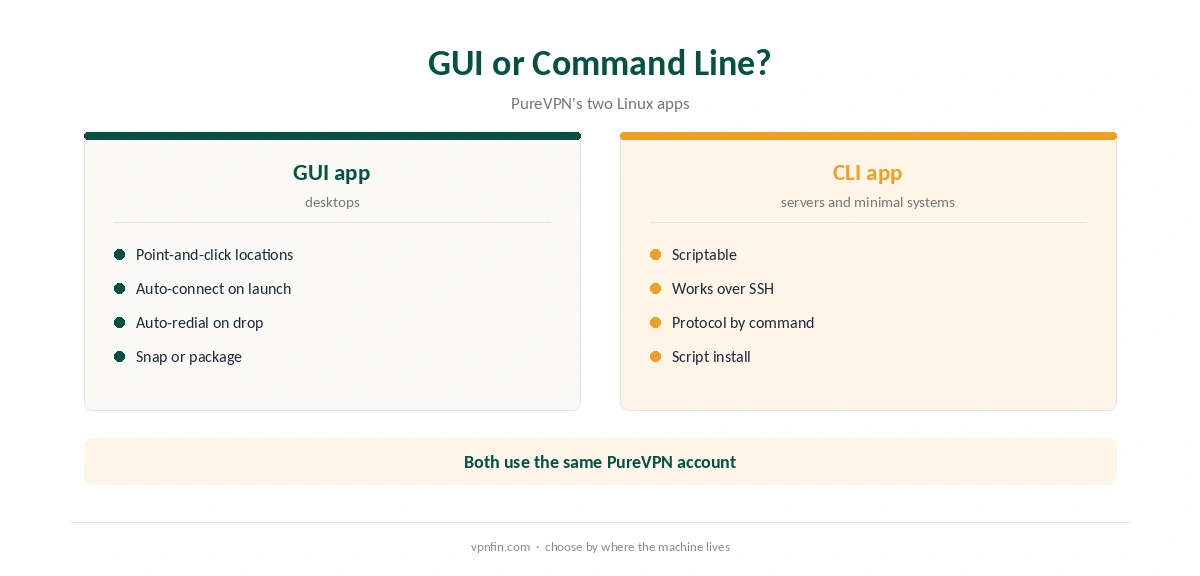
Linux PureVPN users get two official apps: a graphical app and a command-line app. PureVPN’s help centre covers both, plus manual guides for distributions such as Fedora, Arch, Mint, Kali, Rocky and Alma. The GUI app is also on the Snap Store, last updated in December 2025, with WireGuard, 88-plus locations and automatic reconnection.
This guide covers installing each app, the commands worth knowing, and the settings that keep the connection stable.
Installing the Linux PureVPN GUI App
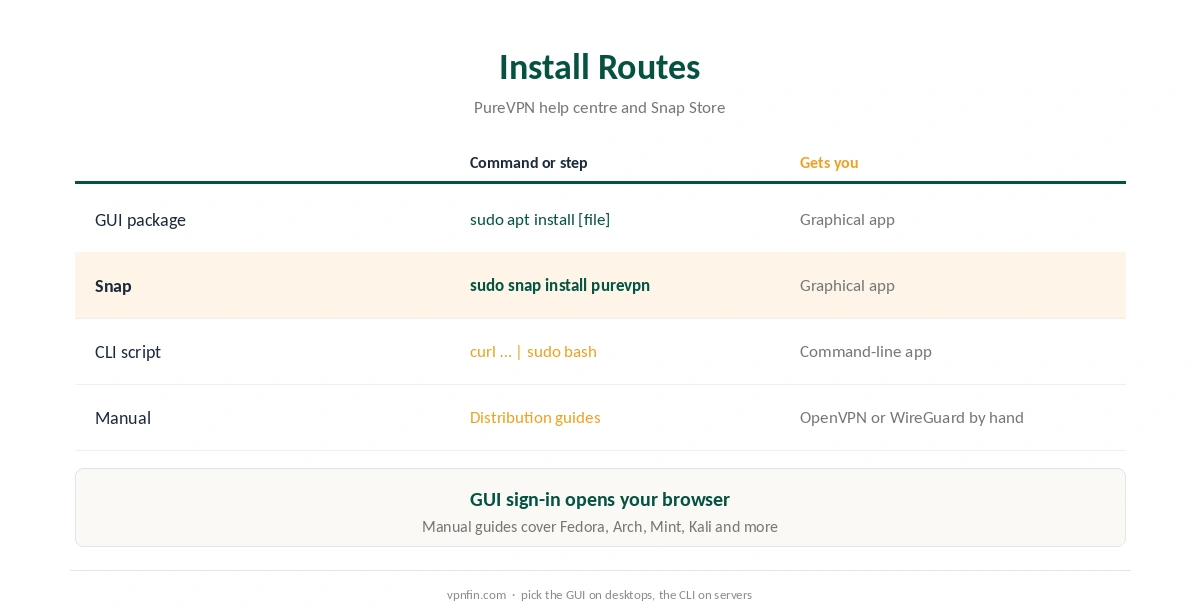
PureVPN’s help centre gives two routes. Download the package from PureVPN’s site and install it with the graphical installer, or run sudo apt install with the package’s filename. When the app first launches, it opens your browser to sign in, then returns to the app logged in.
On any distribution with Snap, sudo snap install purevpn installs the same GUI, according to the Snap Store listing. The listing names WireGuard, a choice of servers within each location, Auto-Redial on Disconnect and Auto-Connect on Launch.
Installing the Command-Line App
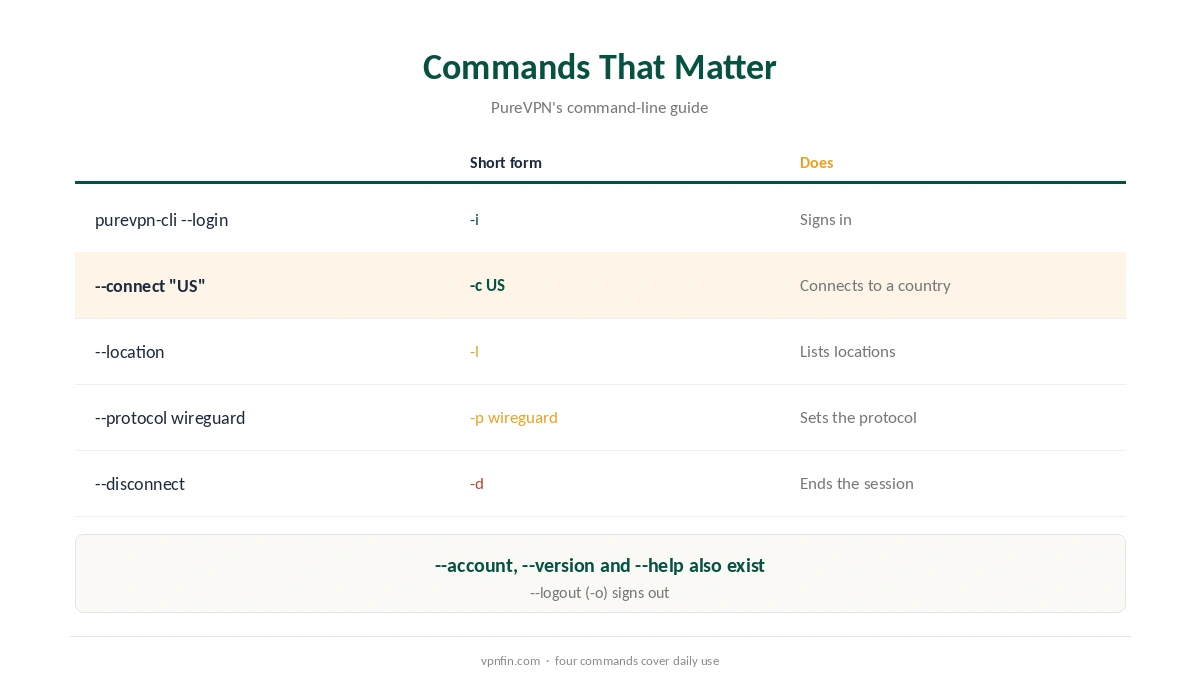
For servers and minimal desktops, PureVPN’s help centre installs the command-line app with a script fetched by curl and piped to bash, then adds its folder to your PATH. Sign in with purevpn-cli –login, and connect with purevpn-cli –connect followed by a country name or code, such as US or DE.
Running a script from the internet with root rights deserves care. Read it first, and only take it from PureVPN’s own help centre. The Linux PureVPN CLI then works over SSH as well.
Linux PureVPN Commands Worth Knowing
PureVPN’s guide lists purevpn-cli –location to see locations. The –protocol command views or sets the protocol, such as auto or wireguard, and –account shows account details. The –disconnect and –logout commands end the session, and –version and –help show the app version and options.
Short forms exist too: -c to connect, -l for locations, -p for protocol and -d to disconnect. Our WireGuard vs OpenVPN page explains the protocol choice.
Keeping the Connection Stable
PureVPN’s Linux help section includes articles on disabling IPv6 and changing the MTU value, two common fixes for leaks and drops. Our IPv6 leak guide explains why IPv6 matters.
Auto-Redial on Disconnect in the GUI reconnects after a drop. For a stricter setup, our kill switch guide explains the trade-off, and our Linux VPN off guide covers disconnecting cleanly.
Manual Setups on Other Distributions
If neither app suits your system, PureVPN’s help centre has manual guides. They cover OpenVPN on Rocky Linux, WireGuard on Linux in general, and step-by-step setups for Fedora, Arch, Mint, Kali, Manjaro, Alma and others. A manual setup uses NetworkManager or the OpenVPN client instead of PureVPN’s app.
Manual connections lack the app’s extras, such as auto-redial and the location list. They suit routers, headless boxes and distributions the apps do not support. For most desktops, the GUI app is simpler.
Whichever Linux PureVPN route you choose, check the connection afterwards with our VPN test page.
Add-Ons: Port Forwarding and Dedicated IP
The Snap Store listing names port forwarding and a dedicated IP as paid add-ons. Port forwarding helps when you host services or seed heavily; our port forwarding guide explains when it matters. A dedicated IP avoids shared-address blocks, as our dedicated IP guide shows.
What PureVPN Costs
On 5 October 2026, PureVPN’s order page listed the Standard 2-year plan at $58.20 for the first 27 months, renewing at $47.95 a year. A separate deals page showed $58.05 for the same term but a $54.95 renewal, so the page you buy from changes the renewal by seven dollars a year. Check the renewal line at checkout.
PureVPN covers 10 devices on one plan and offers a 31-day money-back guarantee, as our PureVPN refund guide explains. The 7-day paid trial is covered in our PureVPN trial guide. For a Linux machine used alongside phones and laptops, 10 devices is usually enough for one household.
| Provider | Renewal price | Per month | Tier |
|---|---|---|---|
| NordVPN | $139.08/yr | ~$11.59 | Basic |
| Surfshark | ~$79/yr | ~$6.58 | Starter |
| ExpressVPN | $99.95/yr | ~$8.33 | Basic |
| CyberGhost | $56.94/yr | ~$4.75 | 2-year |
| PureVPN | $47.95/yr | ~$4.00 | Standard, 2-year (1-year renews $57.95) |
| IPVanish | $89.99/yr | ~$7.50 | Essential |
| Windscribe | ~$69/yr | ~$5.75 | Pro |
| Proton VPN | ~$83.88/yr | ~$6.99 | VPN Plus |
| Mullvad | ~$65/yr | ~$5.40 | flat, no tiers |
| Norton VPN | $79.99/yr | ~$6.67 | Standard |
| Hotspot Shield | ~$95.99/yr | ~$8.00 | Premium annual |
| Astrill | $300 every 2 yrs | ~$12.50 | 2-year, same at renewal |
Updating and Removing the App
Snap installs update automatically in the background, which keeps the GUI current without any effort. Package installs update when you download and install a newer package from PureVPN’s site. The command-line app shows its version with purevpn-cli –version, which helps when comparing against PureVPN’s release notes.
To remove the app, use the same tool you installed it with: snap remove for a Snap install, or your package manager for a package install. Sign out first with purevpn-cli –logout on the command-line app, so the session ends cleanly.
Related Guides
Our Linux VPN guide compares other providers, and our NordVPN Linux guide shows a rival app with a GUI since 2025. PureVPN belongs to Gaditek, which absorbed Ivacy in 2024.
Our PureVPN review covers audits and features, and our PureVPN Chrome guide covers the browser extension for quick location changes.
How We Research
This page draws on PureVPN’s Linux help centre articles for the GUI and command-line apps, its Snap Store listing and its pricing pages. We cross-checked these sources against each other, and where they conflict or something can’t be verified, we say so in the text rather than guessing. We checked time-sensitive figures, including prices in US dollars, on 5 October 2026. PureVPN showed two price grids on different pages that day. The main source we relied on is PureVPN’s Linux command-line guide. Our full approach lives on the About Us page.
PureVPN on Linux FAQ
Yes: a GUI app, available as a package or on the Snap Store, and a command-line app.
Run sudo snap install purevpn, according to the Snap Store listing.
Sign in with the short form purevpn-cli -i, then connect with purevpn-cli -c and a country name or code, such as US.
Yes. Set it with purevpn-cli -p wireguard, or in the GUI’s protocol settings.
Its help centre includes guides for Fedora, Arch, Mint, Kali, Rocky, Alma and others.
The Verdict
Linux PureVPN support is solid: a GUI app for desktops, a command-line app for servers, and manual guides for many distributions. Read install scripts before running them, and set WireGuard for speed.