
Disclosure: VPNFin is reader-supported. If you buy a VPN through links on this page, we may earn a commission at no extra cost to you. This never affects our ratings — here’s our full disclosure.
A PureVPN Raspberry Pi setup is documented in PureVPN’s own help centre, with guides for WireGuard and OpenVPN from the command line. The WireGuard guide uses the standard WireGuard tools on Debian: install them, download a configuration file from the Member Area, and bring the tunnel up with one command. One detail catches people out: the WireGuard file expires five minutes after you generate it if you do not connect.
This guide covers the WireGuard steps, the OpenVPN fallback, keeping SSH access, and using the Pi as a VPN gateway.
What You Need
PureVPN’s WireGuard guide was written for Debian 11, the base of Raspberry Pi OS Bullseye. You need a PureVPN account, a Pi with network access, and a terminal, either on the Pi or over SSH. The setup commands need root access.
PureVPN also lists guides for OpenVPN on the command line and for the Raspberry Pi desktop, plus a separate article on disconnecting PureVPN from the Pi’s command line.
PureVPN Raspberry Pi Setup With WireGuard
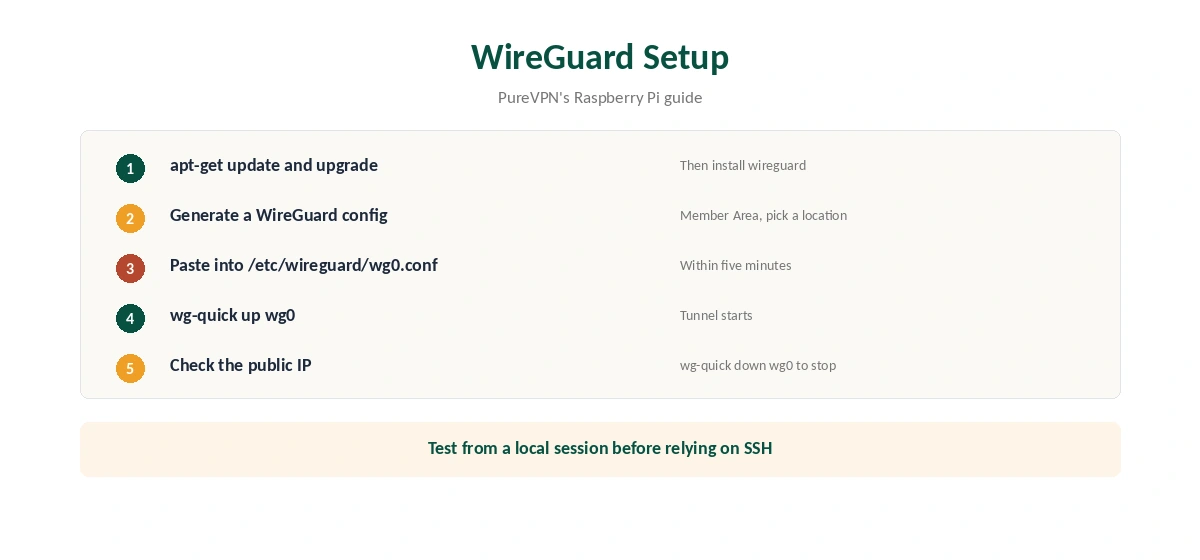
First, update the system and install WireGuard with apt-get, as PureVPN’s guide shows. Then log in to the Member Area and generate a WireGuard configuration for the location you want. Act quickly: PureVPN says the file expires five minutes after generation if it is not used, and you would need a new one.
Create the file /etc/wireguard/wg0.conf with a text editor and paste the configuration into it. Save it, then start the tunnel with wg-quick up wg0. To stop it, run wg-quick down wg0. Our PureVPN WireGuard guide explains the protocol on other devices.
OpenVPN as a Fallback
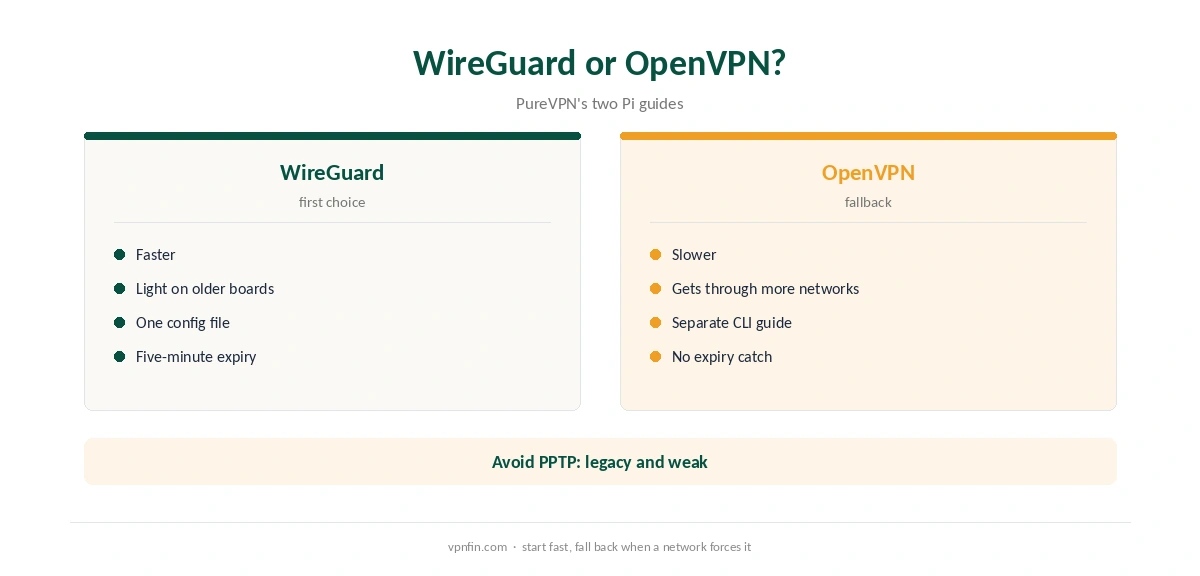
PureVPN’s help centre also has an OpenVPN command-line guide for the Pi. OpenVPN is slower than WireGuard, especially on older boards, but it gets through networks that block WireGuard’s traffic. Use it when WireGuard will not connect.
Skip the PPTP guide unless nothing else works. TorGuard’s Synology guide calls PPTP a legacy protocol, and it is weaker than both alternatives. Our WireGuard vs OpenVPN page covers the trade-offs.
Keeping SSH Access
If you manage the Pi over SSH, test the tunnel from a local session first. Bringing up a VPN can change routing and cut the SSH connection you are using. Keep a keyboard and screen nearby, or a second way in, until the setup proves stable.
Our NordVPN Raspberry Pi guide shows how another provider handles the same lockout risk with an allowlist.
PureVPN Raspberry Pi Updates
Keep a PureVPN Raspberry Pi setup current with the usual apt commands. WireGuard updates arrive through the system, not through PureVPN. If the tunnel stops working after an update, generate a fresh configuration in the Member Area and replace wg0.conf. Our PureVPN Linux guide covers PureVPN’s own Linux apps, which suit desktop Linux machines.
Starting the Tunnel at Boot
WireGuard’s standard tools can start a tunnel automatically at boot through the system’s service manager. That suits a Pi running unattended, such as a download box. Test a reboot while you can still reach the Pi locally, so a mistake does not lock you out.
Client or Server?
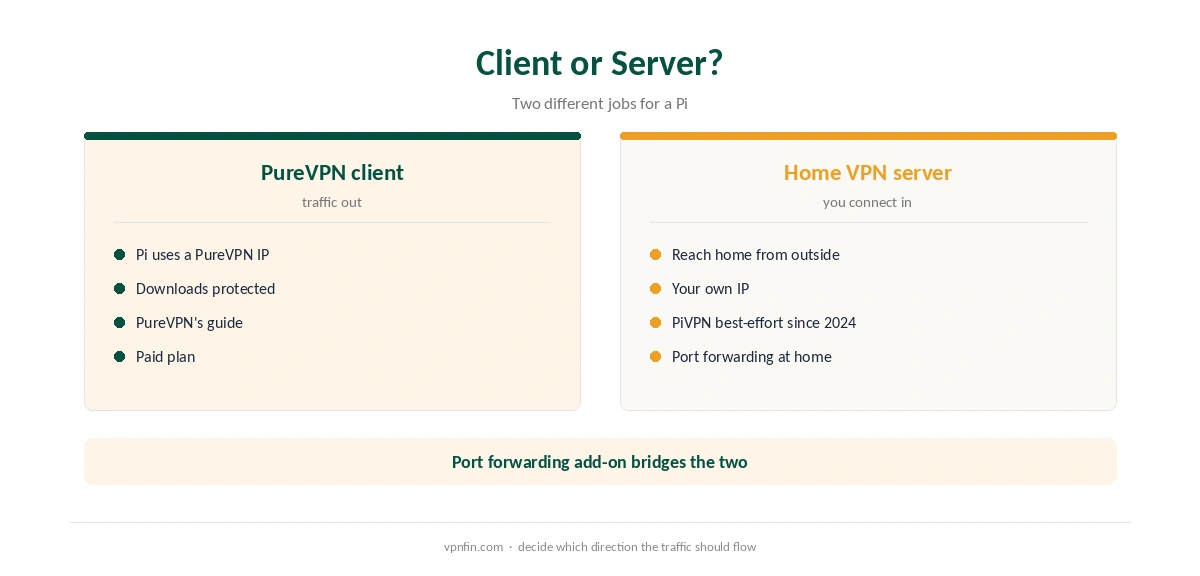
The PureVPN setup makes the Pi a client: its traffic leaves through PureVPN. A home VPN server is a different job, letting you reach home from outside, as our Raspberry Pi VPN server guide explains. PiVPN, a popular tool for that job, moved to best-effort maintenance in April 2024. Our port forwarding guide explains why hosting needs open ports.
If you want both, a PureVPN port forwarding add-on with a dedicated IP can open ports through the VPN, as our PureVPN dedicated IP guide explains.
Using the Pi as a Gateway
A Pi running PureVPN can route other devices through it, much like a VPN router. That takes extra Linux networking work beyond PureVPN’s guide. For most homes, a router with built-in VPN support is simpler, as our PureVPN router guide explains.
What PureVPN Costs
On 5 October 2026, PureVPN’s order page listed the Standard 2-year plan at $58.20 for the first 27 months, renewing at $47.95 a year. A separate deals page showed $58.05 for the same term with a $54.95 renewal. The page you buy from changes the renewal by seven dollars a year, so check the renewal line at checkout.
One plan covers 10 devices, and a Raspberry Pi counts as one of them. PureVPN offers a 31-day money-back guarantee, as our PureVPN refund guide explains.
| Provider | Renewal price | Per month | Tier |
|---|---|---|---|
| NordVPN | $139.08/yr | ~$11.59 | Basic |
| Surfshark | ~$79/yr | ~$6.58 | Starter |
| ExpressVPN | $99.95/yr | ~$8.33 | Basic |
| CyberGhost | $56.94/yr | ~$4.75 | 2-year |
| PureVPN | $47.95/yr | ~$4.00 | Standard, 2-year (1-year renews $57.95) |
| IPVanish | $89.99/yr | ~$7.50 | Essential |
| Windscribe | ~$69/yr | ~$5.75 | Pro |
| Proton VPN | ~$83.88/yr | ~$6.99 | VPN Plus |
| Mullvad | ~$65/yr | ~$5.40 | flat, no tiers |
| Norton VPN | $79.99/yr | ~$6.67 | Standard |
| Hotspot Shield | ~$95.99/yr | ~$8.00 | Premium annual |
| Astrill | $300 every 2 yrs | ~$12.50 | 2-year, same at renewal |
Testing the Connection
After wg-quick up wg0, check the public IP from the Pi with a command-line request to an IP service. It should show a PureVPN address. Our VPN test page explains what to look for. A manual WireGuard tunnel has no kill switch, so a drop exposes traffic until you bring it back up, as our kill switch guide explains.
Our Raspberry Pi VPN guide compares other providers. PureVPN belongs to Gaditek, which absorbed Ivacy in 2024.
How We Research
This page draws on PureVPN’s Raspberry Pi help articles, including its WireGuard command-line guide, the PiVPN project pages, TorGuard’s notes on PPTP and PureVPN’s pricing pages. We cross-checked these sources against each other, and where they conflict or something can’t be verified, we say so in the text rather than guessing. We checked time-sensitive figures, including prices in US dollars, on 6 October 2026. PureVPN showed two price grids on different pages on 5 October 2026. The main source we relied on is PureVPN’s Raspberry Pi WireGuard guide. Our full approach lives on the About Us page.
PureVPN Raspberry Pi FAQ
Yes. PureVPN’s help centre has WireGuard and OpenVPN command-line guides for the Pi.
It expires five minutes after generation if unused, PureVPN says. Generate a new one.
Run wg-quick up wg0 to connect and wg-quick down wg0 to disconnect.
Avoid it. PPTP is a legacy protocol, weaker than WireGuard and OpenVPN.
As a gateway, with extra networking work. A VPN router takes less setup.
The Verdict
A PureVPN Raspberry Pi setup is quick with WireGuard: install the tools, paste a fresh configuration and run one command. Generate the file only when you are ready, keep OpenVPN as a fallback, and protect your SSH access.