
Disclosure: VPNFin is reader-supported. If you buy a VPN through links on this page, we may earn a commission at no extra cost to you. This never affects our ratings — here’s our full disclosure.
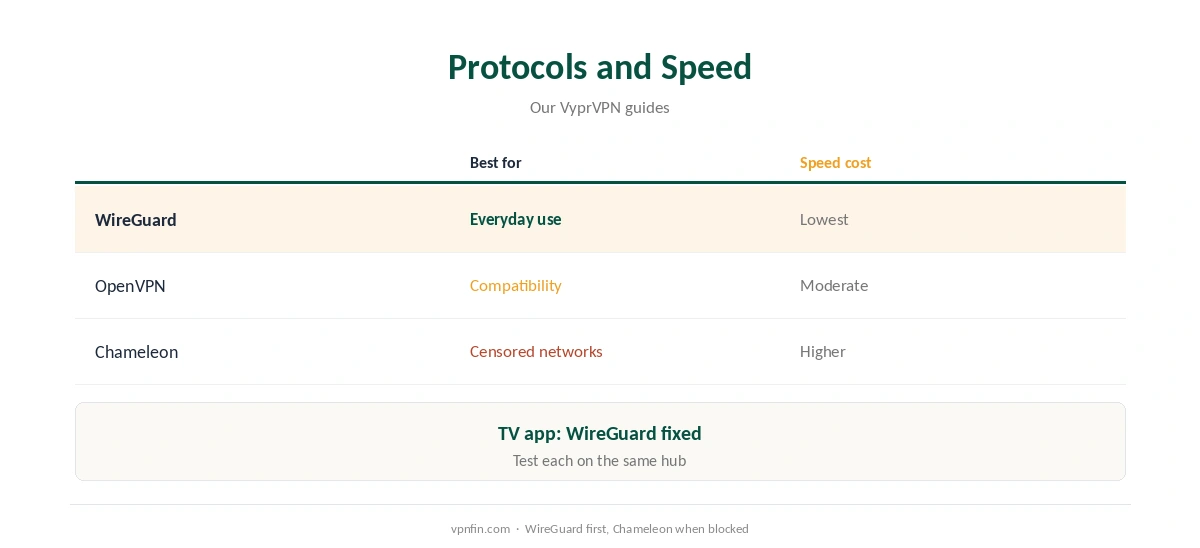
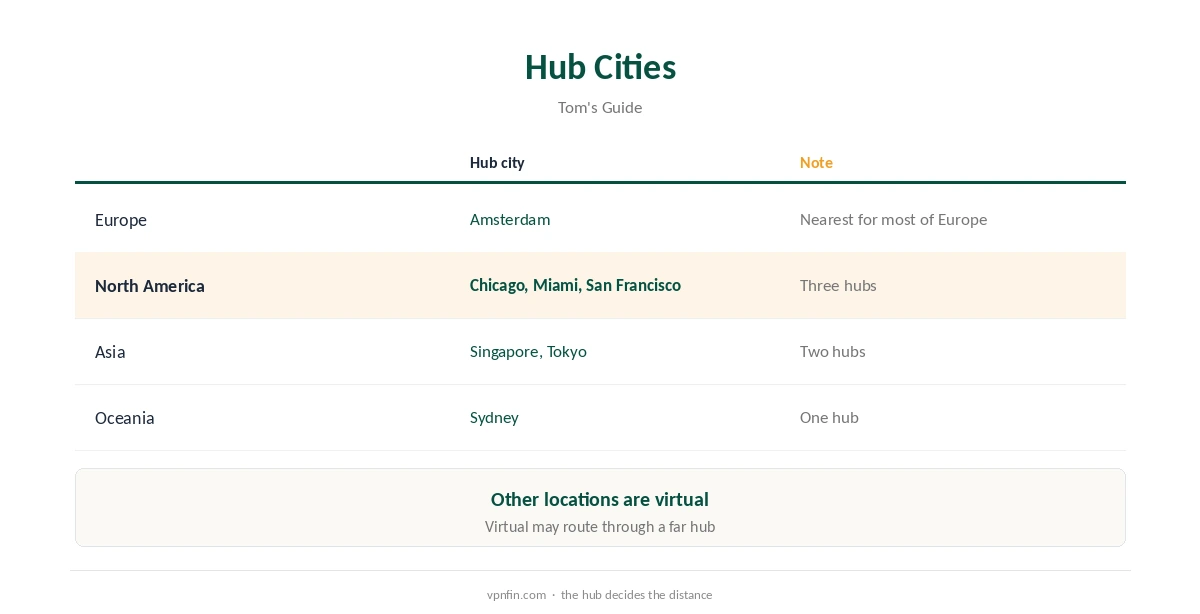
When VyprVPN is slow, distance is the usual cause. Tom’s Guide traced VyprVPN’s servers to seven hubs, Amsterdam, Chicago, Miami, San Francisco, Singapore, Sydney and Tokyo, with other locations virtual. A virtual location may route through a far-off hub, adding delay. Protocol choice matters too: Chameleon disguises traffic for censored networks, which costs some speed, while WireGuard is the lighter choice. Our guide to VyprVPN WireGuard covers setup, protocols and when to use Chameleon.
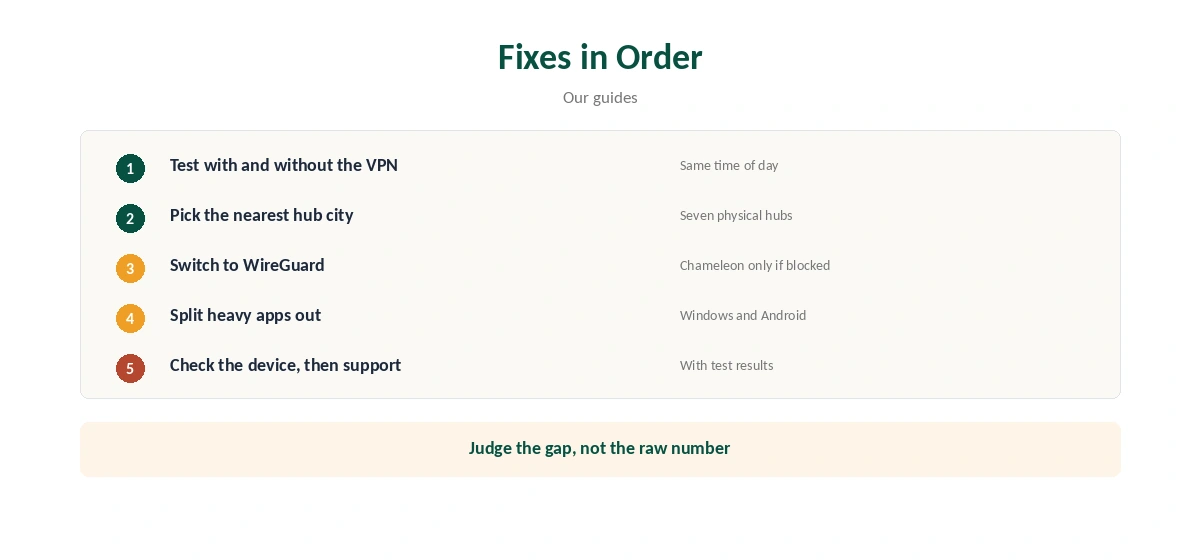
This guide covers the fixes in order, from a baseline test to support.
Step One: Test Without the VPN
Run a speed test with VyprVPN off, then on, at the same time of day. If the connection is slow without the VPN, the problem is your network. A VPN always costs some speed, as our guide to VPN speed explains, so judge the gap, not the raw number.
When VyprVPN Is Slow: Pick a Hub City
Since the hardware sits in seven hubs, choose the hub closest to you, or to the service you use. A server labelled with your own country may be virtual and route through a distant hub. Test two nearby hubs and keep the faster one.
Step Three: Switch Protocol
VyprVPN offers WireGuard, OpenVPN and Chameleon. Use WireGuard for everyday speed. Switch to Chameleon only on networks that block VPNs, since its disguise adds overhead. Our WireGuard vs OpenVPN guide and obfuscation guide explain the trade-offs. Our page on VyprVPN OpenVPN covers the apps, Ubuntu and DD-WRT setups.
Step Four: Use Split Tunnelling
On Windows and Android, Connection Per App lets you keep heavy apps such as game launchers or cloud backups outside the VPN. SafetyDetectives kept torrent speeds fast while streaming by splitting traffic. Our split tunnelling guide explains the idea.
Step Five: Check the Device
Wi-Fi interference, old routers and busy laptops slow any VPN. Try a wired connection, close background downloads and restart the device. On a Fire TV, VyprVPN’s TV app fixes the protocol to WireGuard, so device and distance are the levers, as our VyprVPN Firestick guide explains.
VyprVPN Slow on Mobile
Phones switch between Wi-Fi and mobile data, and each switch forces a reconnect. WireGuard reconnects quickly, so it suits phones. Battery savers can also slow or stop VPN apps in the background; exclude VyprVPN from them on Android. Our Android VPN troubleshooting guide covers more fixes.
Streaming Buffering
Buffering often comes from the distance between the hub and the streaming service’s servers. Choose a hub in the same region as the service, such as Chicago or Miami for US services. Lower the stream quality briefly to confirm speed is the cause. Our Netflix VPN guide covers how services detect VPNs.
Gaming Lag
A VPN adds a step between you and game servers, so some extra ping is normal. Use Connection Per App to keep the game outside VyprVPN, or pick the hub nearest the game’s servers. Our gaming VPN guide explains what a VPN can and cannot do for games.
Is VyprVPN Slow Compared With Rivals?
Larger networks give more nearby servers, which often helps speed. Surfshark and NordVPN run many physical locations, while VyprVPN’s hardware sits in seven hubs, Tom’s Guide found. If you live far from all seven, a VyprVPN slow connection may be the network’s shape rather than a fixable setting.
A Quick Rule
Nearest hub, WireGuard, heavy apps outside the tunnel. If it is still slow at every hour, contact support within 30 days of your first purchase.
After a VyprVPN Update
App updates can reset protocol and server choices. If VyprVPN feels slow after an update, check the protocol is back on WireGuard and the hub is the one you chose. Restart the app, then run the speed test again.
Testing Speed Properly
Run three tests on each hub, at the same time of day, and note the median. One test can mislead, since home networks vary minute to minute. Compare the results against the same test without VyprVPN to see the real cost of the tunnel. Our VPN test page confirms the address before each run.
Torrent Speeds
For downloads, a nearby hub city matters most. Bind your torrent client to the VPN and check that no other app is competing for bandwidth. Our VyprVPN torrenting guide covers the setup.
When to Contact Support
If every hub is slow at every hour, contact VyprVPN’s support with your speed test results with and without the VPN, your protocol and hub city. VyprVPN gives 30 days to ask for a refund on your first purchase. For DD-WRT setup with OpenVPN, see our page on VyprVPN on a Router.
VyprVPN’s Record
Our audit table records one VyprVPN audit, by Leviathan Security in 2018, before Certida LLC of Texas bought the service from Golden Frog in 2023. It operates from the US, inside the Five Eyes. Our VPN audit tracker explains why recent audits matter.
How Others Handle Speed
Our NordVPN slow guide and Surfshark slow guide cover two larger networks; NordVPN and Surfshark share an owner, Nord Security.
How We Research
This page draws on Tom’s Guide’s VyprVPN review, SafetyDetectives’ May 2026 review, VyprVPN’s TV support pages and our VyprVPN guides and audit table. We cross-checked these sources against each other, and where they conflict or something can’t be verified, we say so in the text rather than guessing. We checked time-sensitive figures, including prices in US dollars, on 7 October 2026. The main source we relied on is Tom’s Guide’s VyprVPN review. Our full approach lives on the About Us page.
VyprVPN Slow FAQ
Usually distance to one of its seven hubs, the protocol, or your own network.
WireGuard for everyday use; Chameleon trades speed for disguise.
Tom’s Guide traced servers to seven hubs, with other locations virtual.
Yes, by keeping heavy apps outside the VPN on Windows and Android.
Within 30 days of your first purchase.
The Verdict
A slow VyprVPN connection usually improves with a nearby hub city and WireGuard. Use Chameleon only when a network blocks VPNs, and keep heavy apps outside the tunnel.