
Disclosure: VPNFin is reader-supported. If you buy a VPN through links on this page, we may earn a commission at no extra cost to you. This never affects our ratings — here’s our full disclosure.
PureVPN Disney Plus access worked in Wizcase’s 2026 review, which found PureVPN’s optimised Disney Plus servers reliable. Comparitech has also reported periods when Disney blocked PureVPN, so the result is not permanent. Disney’s own help pages name VPNs as a cause of error 73, the location error you see when a block happens.
This guide covers the setup, what error 73 means, the fixes in order, and a difference between PureVPN’s Mac and Windows apps.
PureVPN Disney Plus Setup
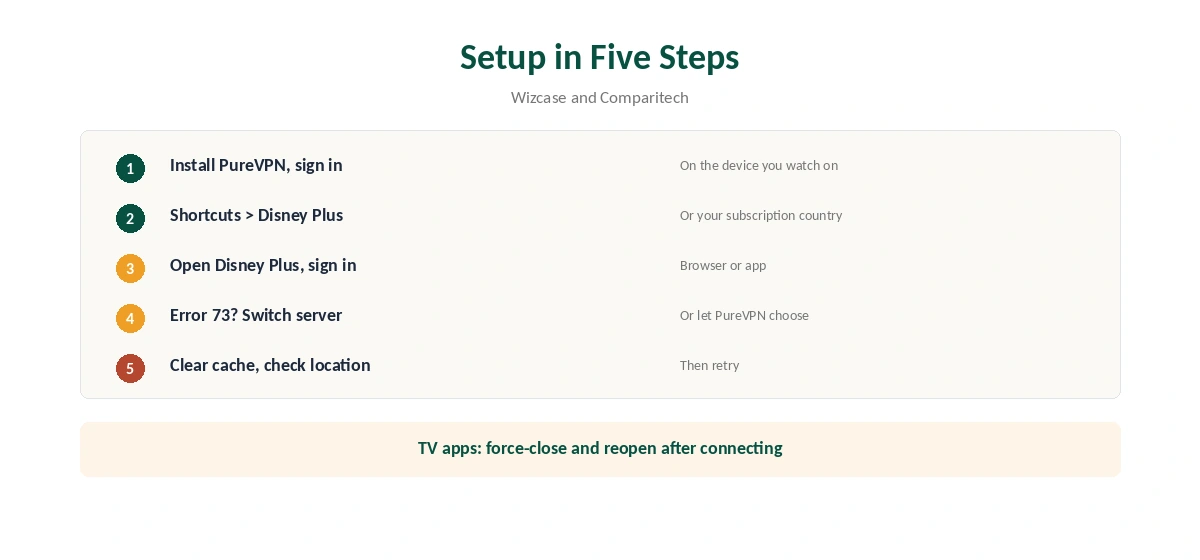
Install PureVPN on the device you watch on and sign in. Open the Shortcuts section, which Wizcase describes as servers dedicated to specific streaming services, and choose Disney Plus. Or connect to a server in the country of your subscription.
Then open Disney Plus and sign in. Comparitech also suggests letting PureVPN pick the best available streaming server automatically if a manual choice fails.
What Error 73 Means
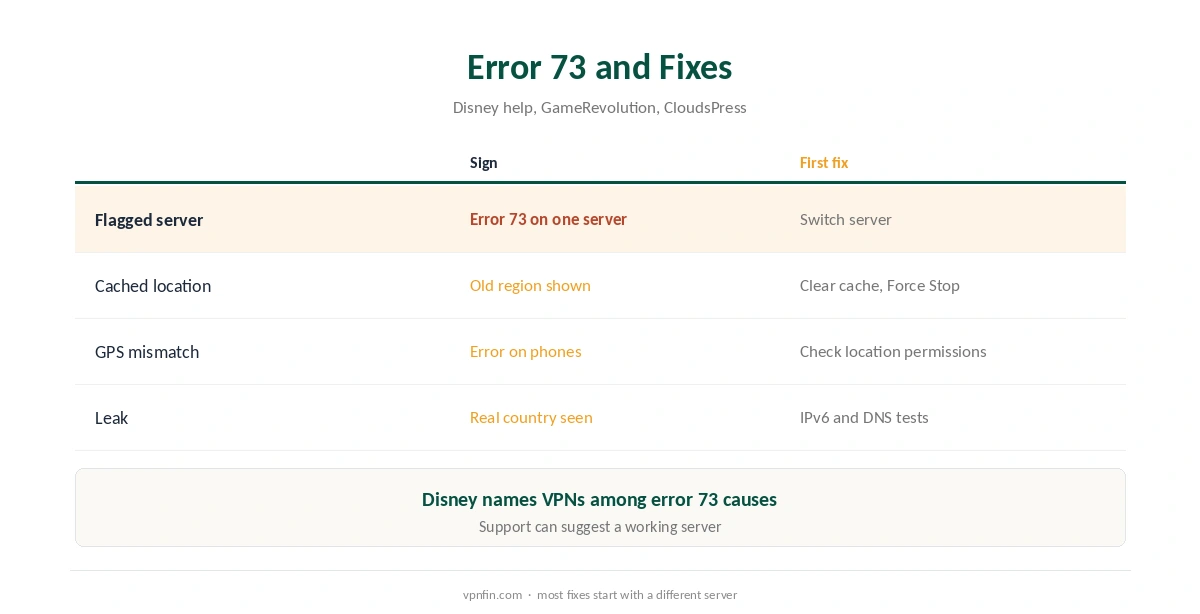
Error 73 appears when Disney Plus thinks you are somewhere it is not available. GameRevolution explains it as a disagreement between your real location and the one your device reports. Disney’s help pages list a VPN or IP anonymiser among the causes.
A Sky community thread from August 2026 shows the same pattern: a TV app returned error 73 while the advice was to turn the VPN off on that device. With PureVPN, the first fix to try is a different server rather than giving up.
Fixes in Order
First, switch to another Disney Plus server or let PureVPN choose one. Second, clear the app’s cache or the browser’s cookies, as Comparitech advises. On Android TV and Fire TV, CloudsPress gives the path: open the apps list, choose Disney Plus, and Force Stop it.
Third, check location permissions. Disney Plus uses location services to verify where you are, so a phone’s GPS can contradict the VPN. Fourth, test for leaks with our IPv6 leak guide and DNS leak guide. Fifth, ask PureVPN’s support for a currently working server.
Mac or Windows App?
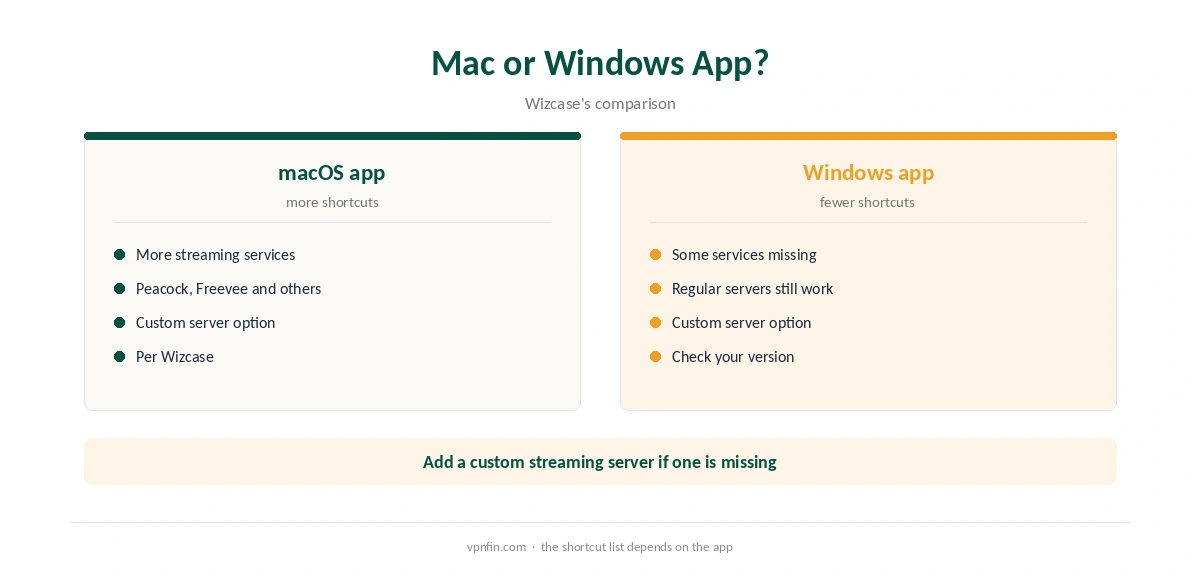
Wizcase found PureVPN’s macOS app offers more streaming shortcuts than the Windows app, with some services missing on Windows. If you watch on a computer and the Disney Plus shortcut is missing, check the Mac app or add a custom streaming server, which Wizcase notes is possible. Our PureVPN Mac guide covers the app.
Disney Plus on TVs and Sticks
On Fire TV and Android TV, run PureVPN on the same device as Disney Plus, as our PureVPN Firestick guide and Android TV guide explain.
Apple TV has a native PureVPN app, covered in our PureVPN Apple TV guide. Samsung and LG TVs need a router, as our PureVPN smart TV guide explains.
TV apps cache location stubbornly. Connect first, then force-close the app and reopen it.
Watching on a Phone or Tablet
Phones and tablets share GPS with apps, which can contradict the VPN. If Disney Plus shows error 73 only on a phone, check the app’s location permission and the phone’s location setting. Then close the app fully and reopen it after PureVPN connects.
Testing Before You Commit
Results change as Disney updates its blocks. Test PureVPN Disney Plus access on the devices you actually use, within the 31-day refund window. Note which servers work, so you have a fallback list. Our PureVPN trial guide explains the 7-day paid trial as another option, and our VPN test page confirms the connection first.
Choosing a Server Country
Disney Plus libraries differ by country. Connect to the country where your subscription is registered for your usual library while travelling. Other libraries may not match your account, and some titles follow the account region rather than the IP address. If a title is missing, check whether it is licensed in your home country at all.
Disney Plus and Hulu
Disney Plus and Hulu are moving closer together. If you watch both, test each through PureVPN, since their checks differ. Our PureVPN Hulu guide covers Hulu’s own rules.
What PureVPN Costs
On 5 October 2026, PureVPN’s order page listed the Standard 2-year plan at $58.20 for the first 27 months, renewing at $47.95 a year. A separate deals page showed $58.05 for the same term with a $54.95 renewal. The page you buy from changes the renewal by seven dollars a year, so check the renewal line at checkout.
One plan covers 10 devices. PureVPN offers a 31-day money-back guarantee, as our PureVPN refund guide explains, which leaves time to test streaming on your own devices.
| Provider | Renewal price | Per month | Tier |
|---|---|---|---|
| NordVPN | $139.08/yr | ~$11.59 | Basic |
| Surfshark | ~$79/yr | ~$6.58 | Starter |
| ExpressVPN | $99.95/yr | ~$8.33 | Basic |
| CyberGhost | $56.94/yr | ~$4.75 | 2-year |
| PureVPN | $47.95/yr | ~$4.00 | Standard, 2-year (1-year renews $57.95) |
| IPVanish | $89.99/yr | ~$7.50 | Essential |
| Windscribe | ~$69/yr | ~$5.75 | Pro |
| Proton VPN | ~$83.88/yr | ~$6.99 | VPN Plus |
| Mullvad | ~$65/yr | ~$5.40 | flat, no tiers |
| Norton VPN | $79.99/yr | ~$6.67 | Standard |
| Hotspot Shield | ~$95.99/yr | ~$8.00 | Premium annual |
| Astrill | $300 every 2 yrs | ~$12.50 | 2-year, same at renewal |
Related Guides
Our Disney Plus VPN guide compares providers, and our NordVPN Disney Plus guide looks at a rival’s results. For Netflix’s proxy error, see our PureVPN Netflix guide. PureVPN belongs to Gaditek, which absorbed Ivacy in 2024.
How We Research
This page draws on Wizcase’s 2026 PureVPN review, Comparitech’s PureVPN Disney Plus guide, GameRevolution and CloudsPress on error 73, a Sky community thread and PureVPN’s pricing pages. We cross-checked these sources against each other, and where they conflict or something can’t be verified, we say so in the text rather than guessing. We checked time-sensitive figures, including prices in US dollars, on 6 October 2026. PureVPN showed two price grids on different pages on 5 October 2026. The main source we relied on is Wizcase’s PureVPN review. Our full approach lives on the About Us page.
PureVPN Disney Plus FAQ
Wizcase found its optimised servers reliable in 2026, though Comparitech has reported periodic blocks.
A location error. Disney names a VPN or IP anonymiser among the causes.
Switch server, clear the cache, check location permissions, test for leaks, then ask support.
Wizcase found the Mac app has more streaming shortcuts. Add a custom server or use a regular one.
Yes. Run PureVPN on the Fire TV, then force-close and reopen Disney Plus.
The Verdict
PureVPN Disney Plus access works with the optimised servers in recent tests, but blocks happen. Switch servers, clear the cache and check location permissions before contacting support.