
Disclosure: VPNFin is reader-supported. If you buy a VPN through links on this page, we may earn a commission at no extra cost to you. This never affects our ratings — here’s our full disclosure.
Switching it off takes one click. The confusing part comes afterwards, when your IP address does not change, or a site still thinks you are somewhere else, or the thing reappears on your other laptop a week later.
All three have the same root. A Chrome VPN extension is a proxy, and it only ever covered the browser. That is not our characterisation — NordVPN describes its own extension that way on the page where it sells it. Our page on FastestVPN on Chrome covers the proxy extension, its ad blocker and its limits.
So the click is easy. Knowing what the click actually changed is the useful part.
How Do You Turn Off a VPN on Chrome?
Click the extension’s icon in the toolbar and switch it off. If the icon is hidden, click the puzzle-piece button to find it. To disable it properly, type chrome://extensions in the address bar, find the extension and turn its toggle off. Choose Remove instead if you want it gone rather than paused.
The Three Ways to Switch It Off
Each does something slightly different, so pick by what you want.
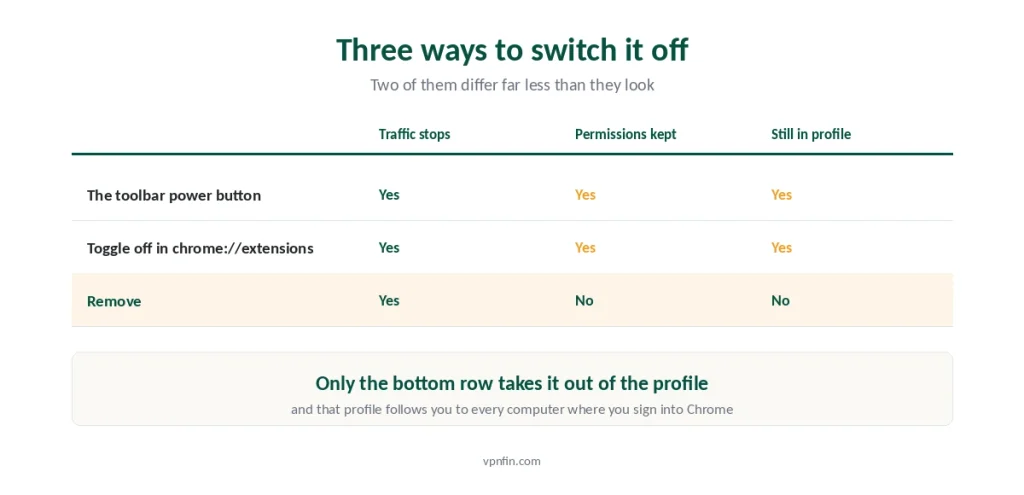
The toolbar icon. Click it, then use the extension’s own power button. This disconnects but leaves the extension installed and running.
The extensions page. Go to chrome://extensions and switch the toggle off. Chrome now treats the extension as disabled, and it stops touching your traffic.
Remove. On the same page, click Remove and confirm. This deletes it from the profile.
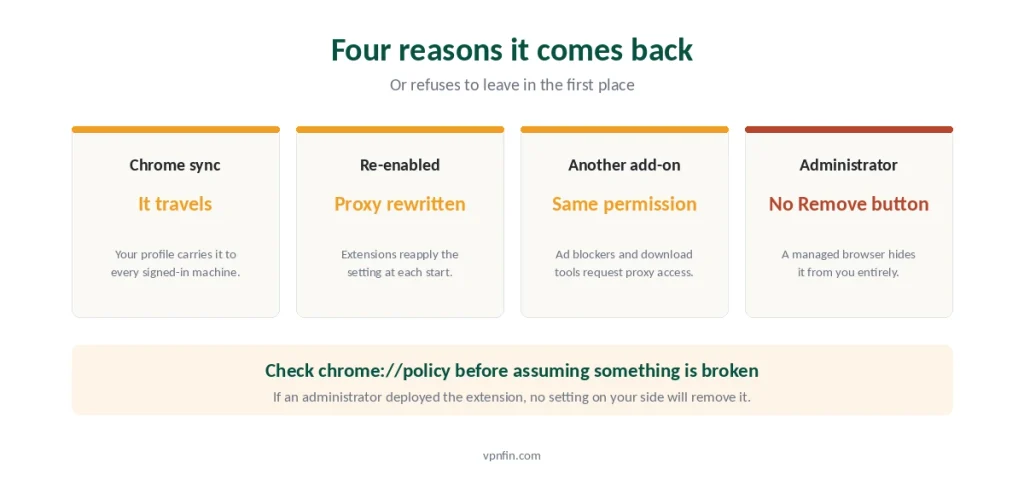
⚠️ Removing is the reliable option if the proxy keeps coming back. Extensions can reapply their proxy setting each time Chrome starts, so a disabled one that gets re-enabled by accident puts everything back exactly as it was.
Disabling Is Not Removing
Worth separating, because the difference has consequences people meet later.
A disabled extension keeps its permissions. They stay listed against it, and re-enabling restores them without asking again.
It stays in your Chrome profile. That profile syncs across every machine where you sign in with the same Google account.
So it reappears elsewhere. Turn it off on the work laptop, sign in on the home desktop, and there it is — enabled, because you never disabled it on that machine.
⚠️ If you want it gone, remove it and check the other computers. Signing out of Chrome does not undo a sync that already happened. The pattern echoes the always-on switch on Android: the thing you turned off is not the thing turning it back on.
The Part Everyone Misses
Here is the fact that resolves most of the confusion, and vendors state it plainly in their own documentation.
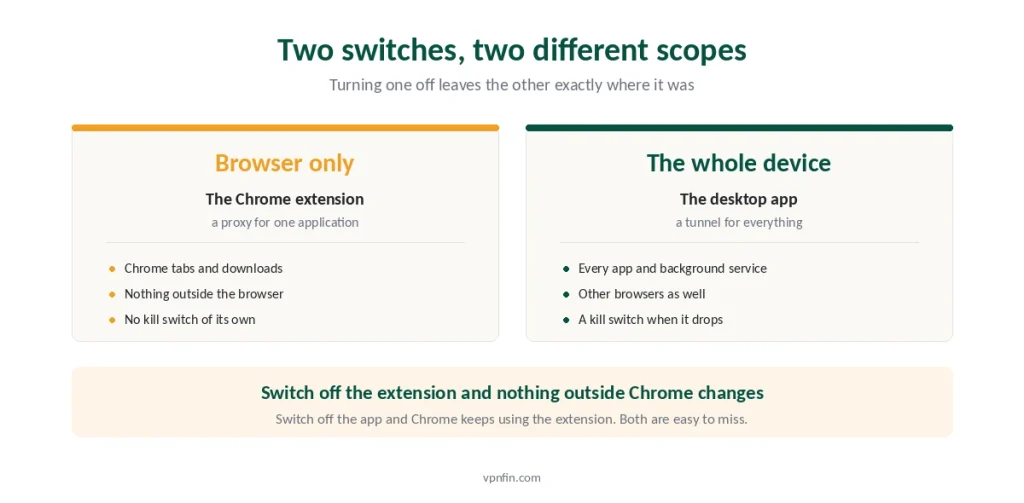
The extension is a proxy. It routes what happens inside Chrome and nothing else. Your email client, your torrent client, your system updater, every other browser on the machine — none of them go through it.
So turning it off changes only Chrome. If your IP still looks foreign afterwards, a desktop VPN app is running and the extension was never the thing doing it. The full comparison of the two covers a third category as well, where the exit node is another user’s computer.
And the reverse trips people up more often. You disconnect the desktop app, assume you are unprotected, and Chrome quietly keeps using the extension. Two separate switches, two separate scopes.
⚠️ This is also the honest limit of a browser VPN. What a VPN actually hides is narrow to begin with, and a proxy that covers one application narrows it further. For a café network the app is the tool that matters — our public Wi-Fi guide sets out what is genuinely at risk there.
When the Proxy Setting Survives
Sometimes you remove the extension and Chrome still behaves as though something is intercepting traffic. Check rather than guess.
Look at the effective configuration. Type chrome://net-internals/#proxy in the address bar. It shows what Chrome is actually using rather than what the settings screen claims.
On Windows, check the system too. Open Command Prompt and run netsh winhttp show proxy. A clean machine answers with direct access and no proxy server.
Then restart Chrome. Proxy control released by an extension does not always take effect until the browser restarts.
⚠️ If a proxy still shows after all that, another extension is holding it. Ad blockers, download managers and privacy tools request the same permission. Disable them one at a time rather than all at once, since that tells you which one it is.
If You Never Installed It
A fair share of people arrive at this question because something appeared without their involvement.
Check whether an administrator put it there. Open chrome://policy. If your work or school manages the browser, the extension may show as installed by your administrator, and Chrome removes the Remove button entirely.
Check what came bundled with something else. Free download managers and PDF tools have a long history of arriving with a proxy extension attached.
Read the permissions before you decide. On chrome://extensions, click Details, then look at the site access. A proxy extension needs to read and change your data on the sites you visit, which is a great deal of access to hand to a free product.
⚠️ That permission is the real cost of a free browser VPN. Only three free tiers are worth trusting anywhere, and a service with no paid product still has to earn money somehow.
The Opposite Problem Nobody Warns About
Sometimes the extension is not on when you think it is, and Chrome does not announce it.
Google finished removing Manifest V2 extensions in July 2025. Extensions built on the old framework stopped loading for every user rather than only for some.
Older VPN add-ons were part of that. Anything that never migrated simply does not run now, and the icon does not always make that obvious. Our guide to Proton VPN for Chrome covers a free extension, and what it leaves out.
⚠️ So verify rather than trust the icon, in either direction. Five checks confirm what is actually happening, and they take about ten minutes. This is the same reasoning we apply to kill switches: an indicator reports an intention rather than a measurement.
Before You Turn It Off for Good
Usually the reason points at a better answer than removal.
If a site started blocking you, proxy addresses get flagged faster than VPN server ranges. Switching locations often clears it, and streaming platforms change their blocks monthly.
If pages load slowly, a browser proxy adds a hop like anything else. We cover how much speed you actually lose, and the honest figure is smaller than the complaints suggest.
If it stopped connecting, that is a different problem with a different fix — our troubleshooting guide works through the causes in order.
And if you switched it on and forgot why, that is a fair reason to stop. We answer the do-I-need-one question honestly rather than commercially.
On a Chromebook, the VPN may sit in ChromeOS rather than the browser; our Chromebook guide covers that. ExpressVPN users can see what its Chrome extension does.
How We Research
This guide follows Chrome’s documented routes for managing extensions and inspecting the effective proxy configuration, Google’s published timetable for retiring Manifest V2 extensions, and providers’ own descriptions of what their browser add-ons do — including NordVPN’s statement that its Chrome extension acts as a proxy covering browser traffic only. We don’t run our own speed tests. Where a behaviour depends on your Chrome profile or on an administrator’s policy rather than on a setting you control, we say so. The same job on other devices follows different rules on each, and both Windows and Mac leave more behind than Chrome does. Our full approach lives on the About Us page.
Turning Off a VPN on Chrome FAQ
Click the extension’s icon in the toolbar and use its power button, or type chrome://extensions in the address bar and switch the toggle off. Click Remove on the same page if you want it deleted rather than paused. Removing is more reliable when a proxy keeps returning.
A disabled extension stays in your Chrome profile and keeps its permissions, so re-enabling it restores everything without asking again. It also syncs to other computers where you sign in with the same Google account. Removing deletes it from the profile entirely.
Because a desktop VPN app is probably running as well. A Chrome extension is a proxy that covers browser traffic only, so switching it off changes nothing elsewhere on the machine. Check your system tray or menu bar for a separate VPN application.
Open chrome://net-internals/#proxy to see the configuration Chrome is actually using, then restart the browser, since released proxy control does not always apply immediately. If a proxy persists, another extension may hold the same permission — disable them one at a time.
An administrator probably installed it through policy. Open chrome://policy to check. When a browser is managed by an employer or school, Chrome hides the Remove button for extensions deployed that way, and only the administrator can take them off.
The Short Version
Click the extension icon, or open chrome://extensions and switch the toggle off. That is the whole operation.
Remove it rather than disable it if you want it gone. A disabled extension keeps its permissions and syncs to every machine where you use the same Chrome profile.
Remember what it covered. A Chrome VPN extension is a proxy for the browser, so turning it off changes nothing outside Chrome — and turning off a desktop app changes nothing inside it.
If a proxy still shows afterwards, check chrome://net-internals/#proxy, restart the browser, and look at your other extensions before blaming this one.
And if you cannot remove it at all, open chrome://policy. An administrator installed it, and only they can take it away.