
Disclosure: VPNFin is reader-supported. If you buy a VPN through links on this page, we may earn a commission at no extra cost to you. This never affects our ratings — here’s our full disclosure.
Most advice for this problem assumes something is broken. Usually nothing is.
Your phone is shutting the app down deliberately, because an operating system built to protect battery life treats a program that holds a connection open all day as exactly the kind of thing to stop. Providers know this well enough to publish support articles about it — when a VPN company’s troubleshooting page is about how to stop Android killing its app, the fault is not really in the app.
So the useful question is not what the app says when it drops. It is when it drops, because that splits the causes in two.
Why Does My VPN Keep Disconnecting?
On a phone, usually battery management. The system suspends background apps to save power, and phone manufacturers layer their own restrictions on top of Android’s. On a computer the cause is more often network instability or a loaded server. Note whether drops happen with the screen off or while you are actively using it — that single detail narrows it down immediately.
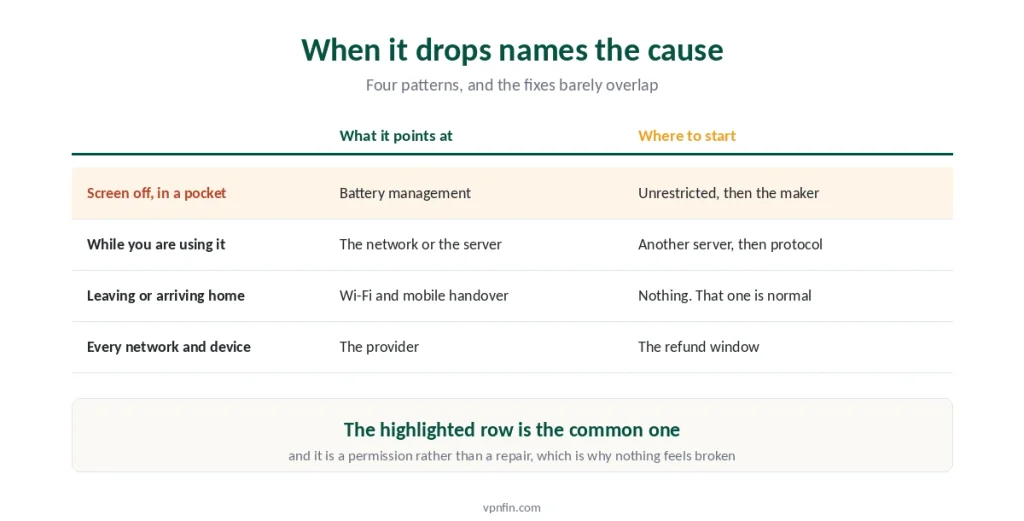
When It Drops Tells You Why
Spend thirty seconds on this before changing any settings.
Screen off, phone in your pocket. Battery restrictions, or a network timer that closed while nothing was moving. Both live in the next section.
While you are actively using it. Network instability, an overloaded server, or a protocol your connection handles badly.
Exactly when you leave the house or arrive somewhere. Your phone switched between Wi-Fi and mobile data. The tunnel has to rebuild, and that is normal rather than a fault.
On every network and every device. Then it is the provider, and no setting on your side changes that.
⚠️ Write down which one matches before you start. The fixes barely overlap, and trying all of them at once is how people spend an evening on a problem with a two-minute answer.
If It Drops With the Screen Off
This is the common case, and the fix is a permission rather than a repair.
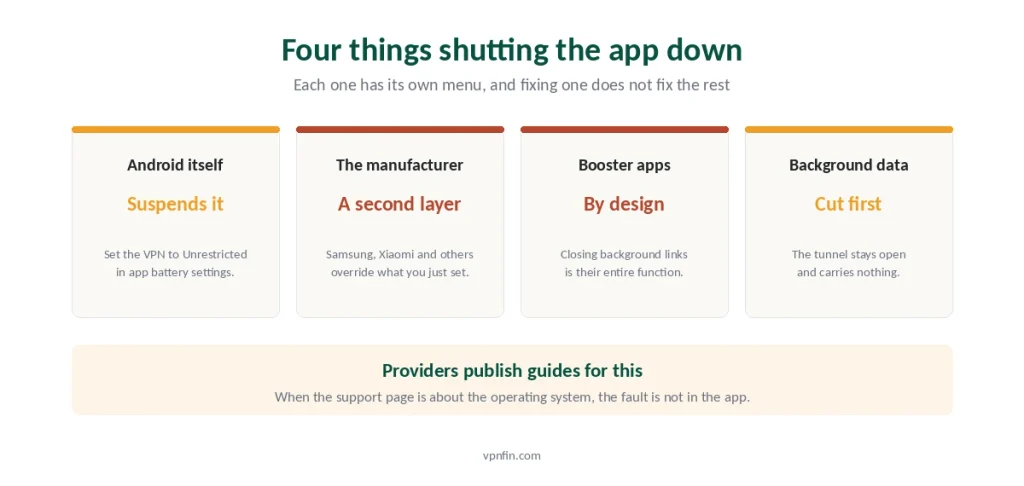
Exempt the app from battery optimisation. On Android, open Settings, find Apps, select your VPN, then Battery, and set it to Unrestricted. The wording differs by manufacturer, and the setting always exists somewhere.
Then check the manufacturer’s own layer. Samsung, Xiaomi, Huawei, Oppo, Vivo and others add power management above what Android does, with separate menus that override the setting you just changed. Look for anything named auto-start, protected apps, or sleeping apps, and put your VPN on the permitted side of it.
Uninstall any booster. RAM cleaners, game boosters and battery savers from third parties close background connections on purpose. That is their entire function.
Allow background data during power saving. Some phones cut background traffic before they cut the app itself, which produces a tunnel that stays open and carries nothing.
⚠️ The reason this is so common is worth stating plainly. A VPN is unusual software: it must run permanently, hold a connection, and wake regularly. Everything else on a phone is designed to do the opposite. Android’s own kill switch settings survive this better than any app-level equivalent, which is why they are worth turning on regardless.
If It Drops While You Are Using It
Different cause, different list.
Change the server before anything else. Load and misconfiguration both produce intermittent drops, and most apps show a load percentage. Pick one under half.
Change the protocol next. Some networks handle long-lived UDP connections badly. OpenVPN over TCP is slower and far more stubborn, which is the trade that separates the two protocols.
Use a cable if you have one. A Wi-Fi drop lasting a fraction of a second is invisible to you and fatal to a tunnel.
Check the signal, not the bars. A weak connection that still shows full bars produces exactly this pattern, and moving one room changes it.
⚠️ Drops on public networks are often deliberate. Hotels, schools and workplaces filter VPN traffic, and what looks like instability is a filter winning slowly. What these networks can actually see is narrower than the marketing suggests, but their ability to interfere is real.
The Timer Problem Nobody Mentions
This one explains the specific pattern of dropping only when idle, and almost no consumer guide covers it.
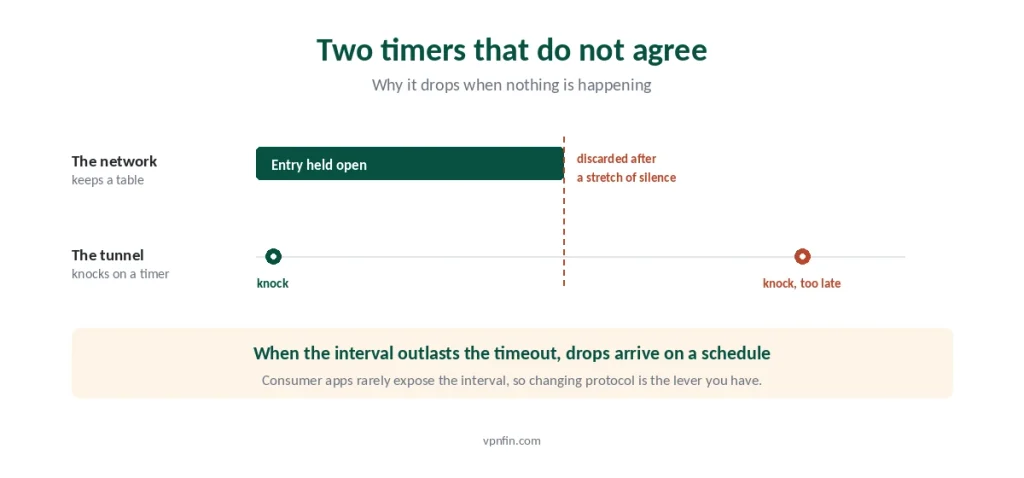
Your router and your carrier both keep a table. When your device opens a connection, they hold a temporary entry so replies can find their way back.
Those entries expire in silence. If nothing moves for a while — sometimes under a minute — the entry is discarded to make room.
The tunnel then talks to a door that closed. Its next packet arrives, nothing recognises it, and the connection is declared dead.
Keepalive exists for this, sending a tiny packet at intervals purely to hold the door open. When the interval is longer than the timeout, drops happen on a schedule.
⚠️ Most consumer apps do not expose the setting, which leaves the same lever as before: change protocol, since implementations differ in how often they knock. If your client does expose a keepalive value, shorter is the direction that helps.
Auto-Reconnect Is Not a Fix
Worth saying plainly, because it is the first thing everyone recommends.
It hides the drop rather than preventing it. The tunnel still fails; the app rebuilds it fast enough that you stop noticing.
And there is a gap. Between the drop and the reconnection, traffic can leave your device outside the tunnel. On a phone that gap happens while the screen is off, which is exactly when you are not watching.
So turn on the kill switch as well. It blocks traffic during the gap, which is the part auto-reconnect leaves open. Testing whether yours actually fires takes about three seconds and is worth doing once.
⚠️ Enable both, in that order. Auto-reconnect for convenience, kill switch for the thing convenience conceals. And if the kill switch stays armed after a reconnection, you get connected with nothing loading, which is a different problem with a different fix.
On a Computer It Is Usually Something Else
Laptops rarely have the battery problem in the same form, and the causes shift.
Sleep and wake breaks tunnels. Closing the lid suspends the network, and not every client recovers cleanly on waking.
Antivirus and firewalls interfere intermittently. A rule that inspects traffic can time the tunnel out under load without blocking it outright. Our guide to NordVPN Keeps Disconnecting covers what to check first, second and third.
Windows updates change network settings. Feature updates in particular re-enable behaviour that clients had configured around — the Windows guide covers what gets reset.
And on an iPhone the pattern is different again. iOS reconnects aggressively rather than dropping, which produces the opposite complaint — a VPN that will not stay off rather than one that will not stay on.
When It Is the Provider
Sometimes you have done everything right.
Test across networks and devices. If it drops on home Wi-Fi, on mobile data, on a laptop and on a phone, the pattern points away from your setup entirely. Our guide to ExpressVPN Keeps Disconnecting covers protocol, location, network switching.
Check whether one server is the culprit. The same server failing for days while others hold is a straightforward answer. Our guide to Proton VPN keeps disconnecting covers Android battery settings, the iOS sleep bug and protocol fixes.
Free services drop more, for a structural reason. Capacity costs money, and a service with no paying customers has none to spend — only three free tiers are worth trusting at all.
⚠️ A refund window is the right tool here. Every provider we rank offers at least thirty days, which is long enough to find out whether the problem follows you to a different service. Our broader troubleshooting guide covers the other two symptoms, and speed complaints are a separate matter rather than a mild version of this one.
Troubleshooting: our fix guides cover a VPN not working on Android, iPhone and Mac.
How We Research
This guide draws on provider support documentation about mobile power management — including published articles on preventing Android from shutting VPN apps down — alongside network engineering material on NAT table timeouts and keepalive intervals, and manufacturer documentation on background app restrictions. Menu names differ between Android versions and between manufacturers, so we describe what to look for rather than a single path. We don’t run our own speed tests, and where a fix depends on a setting your client may not expose, we say so. Turning a VPN off deliberately has its own complications on each platform, covered separately. Our full approach lives on the About Us page.
VPN Disconnection FAQ
Because the system is shutting the app down to save battery. Set your VPN to unrestricted in battery settings, then check your manufacturer’s separate power menu — Samsung, Xiaomi, Huawei and others add restrictions above Android’s own, with different names and their own override.
Yes, and providers publish support articles about it. A VPN has to run permanently and hold a connection open, which is exactly the behaviour phone power management exists to stop. Exempting the app usually resolves screen-off disconnections without changing anything in the VPN itself.
Because a network timer closed. Your router and your carrier keep temporary entries so replies can find their way back, and those expire when nothing moves. The tunnel then sends a packet to a door that shut. Changing protocol often changes how often it knocks.
Yes, but not on its own. It hides the drop rather than preventing it, and traffic can leave your device unprotected between the failure and the reconnection. Enable the kill switch alongside it, since that blocks traffic during exactly the gap auto-reconnect papers over.
When it drops across several networks and several devices. That pattern rules out your settings. A single server failing for days while others hold is also straightforward. Refund windows exist for this — thirty days is long enough to see whether the problem follows you.
The Short Version
Note when it drops first. Screen off points at battery management. While you are using it points at the network or the server. Everywhere, on everything, points at the provider.
For screen-off drops: set the app to unrestricted in battery settings, then find your manufacturer’s separate power menu and exempt it there too. Remove any booster app while you are at it.
For drops in use: change the server, then the protocol. A cable removes the whole category on a laptop.
For drops only when idle: a network timer is closing before the tunnel knocks again. Changing protocol is usually the only lever a consumer app gives you. Our page on Surfshark keeps disconnecting covers Surfshark’s own order of fixes for dropped connections.
And turn on the kill switch alongside auto-reconnect, because the second one hides a gap the first one closes. Our page on CyberGhost keeps disconnecting covers MTU, protocol and battery fixes for drops.