
Disclosure: VPNFin is reader-supported. If you buy a VPN through links on this page, we may earn a commission at no extra cost to you. This never affects our ratings — here’s our full disclosure.
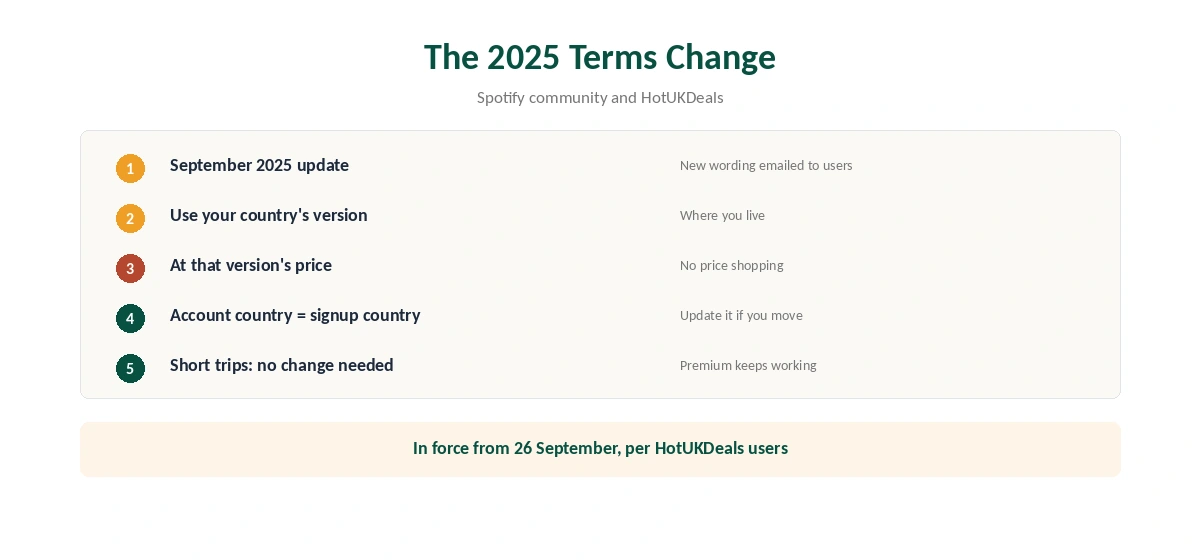
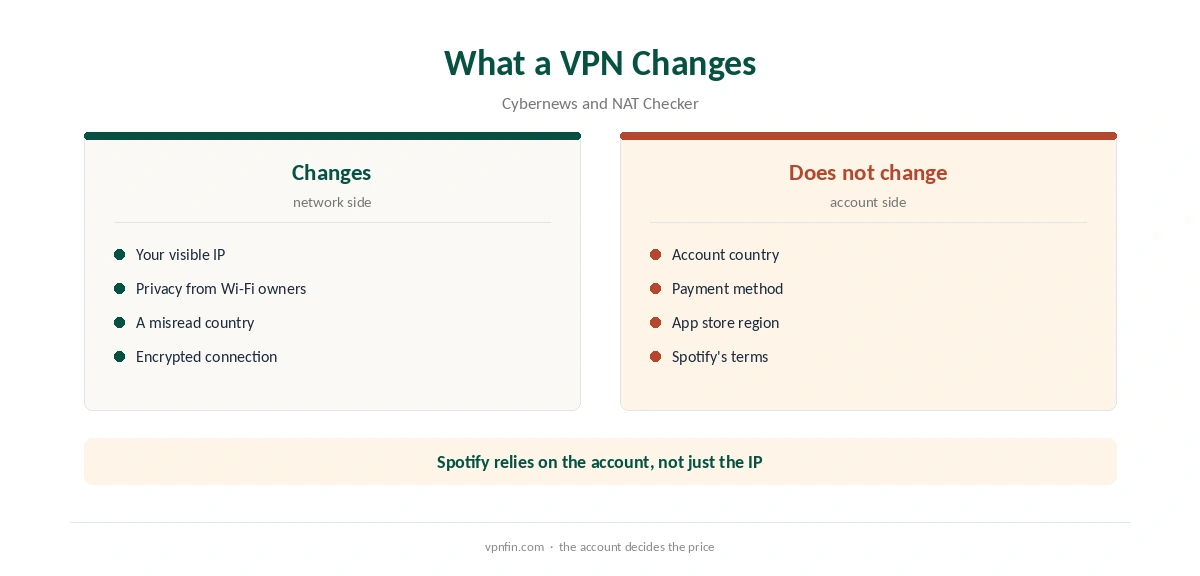
NordVPN Spotify use is simpler than for video, because Spotify ties almost everything to your account rather than your IP. Its terms, updated in September 2025, say you may only use the version of Spotify offered in your country of residence, at that version’s price. A VPN changes your IP, not your account country or payment method, Cybernews notes.
NordVPN Spotify Use Under Spotify’s Terms
Users on Spotify’s community forum and HotUKDeals quoted the new wording after the September 2025 update: you may only access the version of the service available where you live, at the price set for it. Spotify’s community guidance adds that your account country is where you signed up, and you update it if you move.
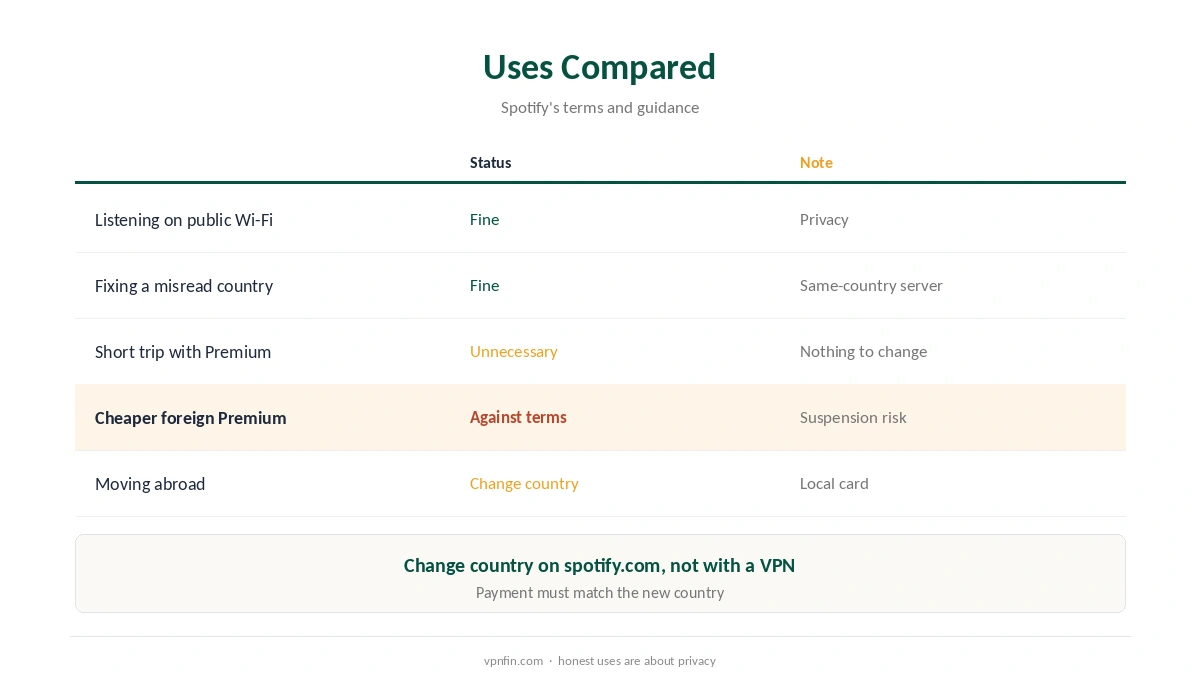
Using a VPN to get another country’s lower price breaks those terms, Cybernews warns, and risks suspension. We do not recommend it.
What NordVPN Does for Spotify
NordVPN Spotify use still has honest purposes. It hides your listening from public Wi-Fi operators, as our public Wi-Fi guide explains. NAT Checker adds a practical one: if Spotify misreads your country from your IP, connecting to a server in the same country can fix it.
For short trips with Premium, Spotify’s community guidance says you need to change nothing. Our NordVPN YouTube guide covers a service with a similar Premium policy.
Moving Country Properly
If you move, change the country on Spotify’s website: open your account page, choose Edit profile, then Country or region, NAT Checker explains. Premium then needs a payment method issued in the new country. No VPN is needed for that, and none can replace the local card. Our page on Surfshark and Spotify covers privacy and travel rather than cheaper Premium.
Speed and Devices
For NordVPN Spotify streaming, music uses little bandwidth, so NordLynx on any nearby server is enough. If the app stutters, our NordVPN speed guide helps. Split tunnelling can keep Spotify outside the VPN on supported apps, as our split tunnelling guide explains.
Our streaming hub covers video services, and our guide to what VPNs do sets expectations. NordVPN belongs to Nord Security, which also owns Surfshark.
Check the connection with our VPN test page. Our refund guide explains the 30-day window. Both take a few minutes.
On phones, our iPhone guide covers the app, and our Android TV guide covers TVs. Our kill switch guide explains protection on public Wi-Fi. Each takes a few minutes to set up.
Desktop listeners can follow our Windows guide or Mac guide. Spotify’s desktop app behaves the same with the VPN on.
Catalogues Differ by Country
Spotify’s community guidance notes that moving country can change pricing and catalogue availability. Some songs, albums and podcasts are licensed only in certain countries. A VPN changes your IP, but Spotify ties the catalogue to your account country.
That is why a VPN rarely changes what Spotify shows. The account decides, and the account follows where you live.
Family and Duo Plans
NAT Checker notes that a VPN cannot change billing country or a Family or Duo address. Those plans tie members to one household address. A VPN does not alter that address, and Spotify checks it separately.
If a family member moves abroad, the plan’s rules apply, not the network they connect from.
Keeping Spotify Outside the VPN
If Spotify misreads your country while connected, one simple fix is to exclude it from the VPN. NordVPN’s split tunnelling on Windows and Android lets Spotify use your normal connection while other apps stay protected. Our NordVPN split tunnelling guide covers the setup.
On public Wi-Fi, keep Spotify inside the tunnel instead. Privacy matters more than a perfect country match there.
Offline Listening While Travelling
Premium lets you download playlists for offline listening. Downloading before a trip avoids both the VPN question and patchy hotel Wi-Fi. Spotify’s community guidance says short trips with Premium need no changes, so downloads are usually the simplest plan.
Our Spotify VPN guide compares providers for the privacy uses.
Privacy on Shared Networks
On hotel, café and office Wi-Fi, the network owner can see which services you connect to. With NordVPN on, they see only an encrypted connection to a VPN server. That is the most useful thing a VPN does for Spotify listeners.
Spotify itself still sees your account activity. A VPN hides your listening from the network, not from Spotify.
For listening at home, there is little reason to route Spotify through a VPN at all. Keep the VPN for networks you do not control, and let Spotify use your normal connection the rest of the time. That also avoids the country mismatch NAT Checker describes. Our guide to ExpressVPN for Spotify covers travel rules, privacy and what to avoid.
How We Research
This page draws on Spotify community posts on the September 2025 terms, HotUKDeals, Cybernews and NAT Checker. We cross-checked these sources against each other, and where they conflict or something can’t be verified, we say so in the text rather than guessing. We read every source on 5 October 2026. The main source we relied on is the Spotify community thread on the new terms. Our full approach lives on the About Us page.
NordVPN and Spotify FAQ
It breaks Spotify’s terms, which since September 2025 limit you to your country of residence’s version and price.
Yes. A VPN changes your IP; Spotify relies mainly on your account country.
Not for short trips with Premium, according to Spotify’s community guidance.
It may misread your IP. Connecting to a server in your own country can fix it, NAT Checker notes.
On spotify.com, open your account, choose Edit profile, then Country or region, and add a local card.
The Verdict
NordVPN Spotify use is about privacy and fixing a misread country, not cheaper Premium. Spotify’s 2025 terms tie your account to where you live. We also have a separate guide to CyberGhost and Spotify.