
Disclosure: VPNFin is reader-supported. If you buy a VPN through links on this page, we may earn a commission at no extra cost to you. This never affects our ratings — here’s our full disclosure.
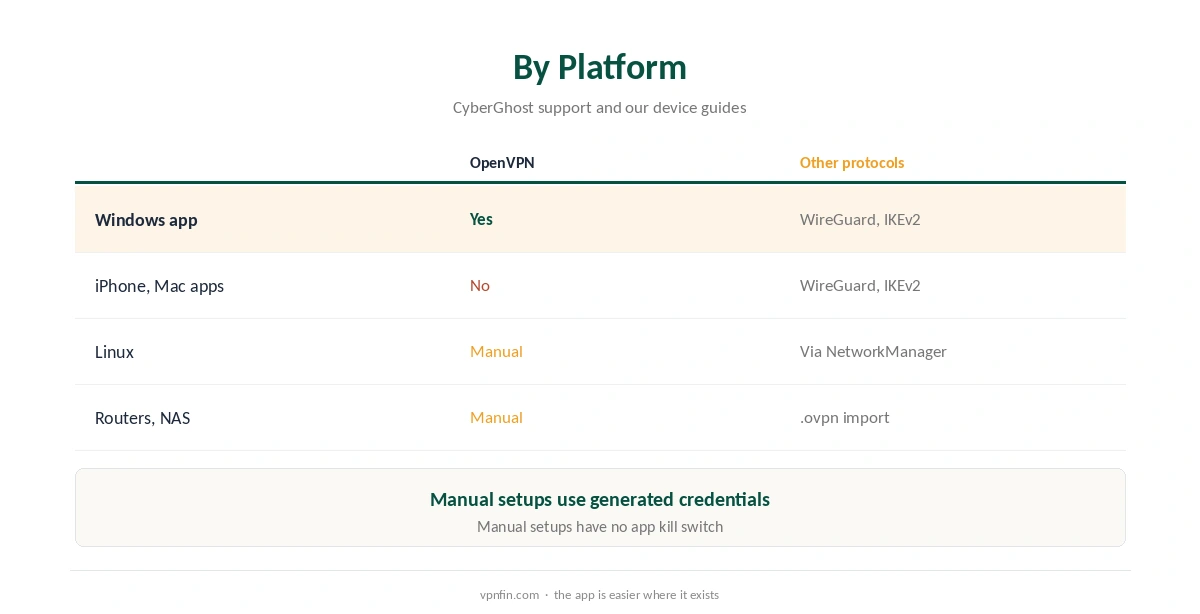
Does CyberGhost support OpenVPN? Yes, in two ways. The Windows app lists OpenVPN alongside WireGuard and IKEv2, according to CyberGhost’s support. Everywhere else it works through a manual setup, with generated credentials that CyberGhost says are not your account password. Our page on CyberGhost on Synology covers OpenVPN in DSM, generated credentials and IPv6.
Where CyberGhost OpenVPN Is Available
In the Windows app, the support article lists WireGuard, IKEv2 and OpenVPN; our Windows guide shows the setting. The iPhone and Mac apps offer WireGuard and IKEv2 only. Our iPhone guide and Mac guide explain those apps.
For Linux, routers and NAS units, NAT Checker describes the manual route, which covers devices that cannot run the app.
CyberGhost OpenVPN Manual Setup
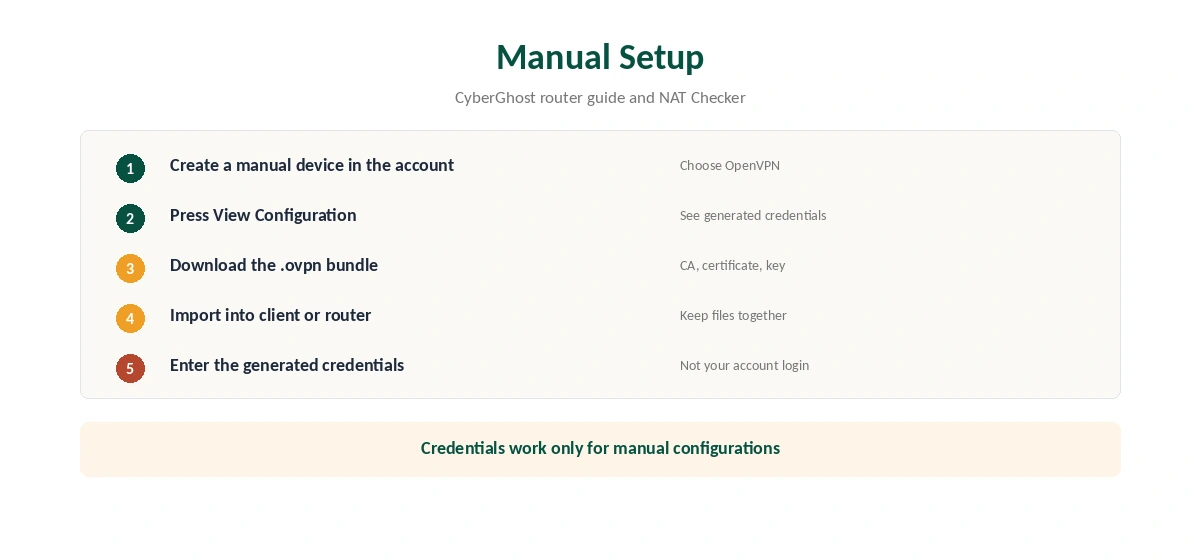
Create a manual device in the CyberGhost account and choose OpenVPN. CyberGhost’s router guide says to press View Configuration to see the generated credentials, which work only for manual configurations. Download the .ovpn bundle, which NAT Checker says includes the CA, client certificate and private key.
Import the bundle into the OpenVPN client, NetworkManager or router, and enter the generated username and password. Our router setup guide covers the router side.
Fixing CyberGhost OpenVPN Errors
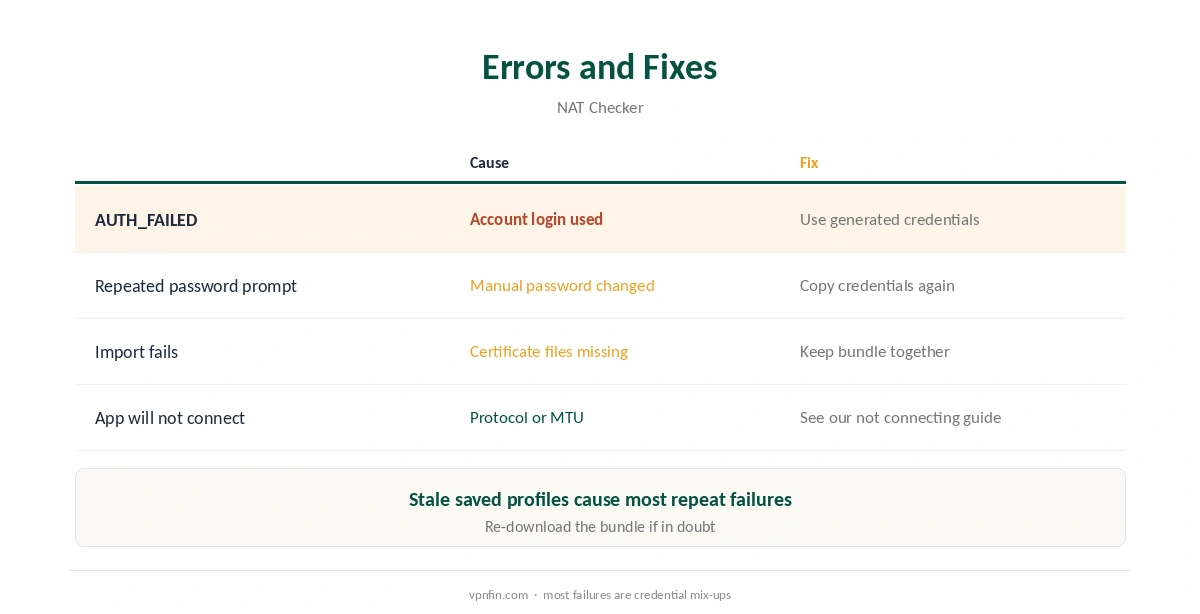
NAT Checker lists AUTH_FAILED or a repeated password prompt as the usual failure: the account login was used, or the manual password changed. Copy the generated credentials again. Keep the certificate files in the same folder as the .ovpn file when importing.
For app connection problems, our CyberGhost not connecting guide covers protocol changes and the Small MTU setting.
OpenVPN or WireGuard?
In the tests we read, WireGuard is faster, while OpenVPN offers the widest compatibility with routers and older systems. Our WireGuard vs OpenVPN page explains the trade-off. A manual setup also lacks the app’s kill switch, so test carefully.
For comparison, NordVPN calls its equivalent service credentials, as our NordVPN OpenVPN guide shows. CyberGhost belongs to Kape Technologies, which also owns ExpressVPN and Private Internet Access. Our CyberGhost review covers the wider service.
If the app suits you better, our speed guide and disconnection guide cover common issues. Our refund guide explains the 45-day window. Try the app before a manual setup.
Routers that support WireGuard may be the better target; our IKEv2 vs WireGuard page explains why. CyberGhost OpenVPN remains the most compatible option for older firmware.
Setting Up CyberGhost OpenVPN on Linux
NAT Checker names Linux NetworkManager as one of the main uses for manual CyberGhost OpenVPN. Download the .ovpn bundle for your manual device, keep the certificate and key files in the same folder. Import the .ovpn file in the network settings as a new VPN connection.
Enter the generated username and password when asked, not your account login. Then connect and check your address with our VPN test page. If the import fails, the certificate files are usually missing from the folder.
Routers and NAS Units
On routers, OpenVPN is often the only protocol the firmware supports, which is why CyberGhost’s router guide uses it. The same generated credentials apply, and the CA certificate and key go into the router’s OpenVPN fields. Our router setup guide explains which routers have an OpenVPN client.
A NAS follows the same pattern through its built-in VPN client. Our Synology VPN guide covers the steps on DSM. The warnings about default gateways and remote access apply here too.
What a Manual Setup Gives Up
The CyberGhost apps add a kill switch, automatic reconnection and easy server switching. A manual OpenVPN profile has none of them by default, so a dropped tunnel can expose traffic until it reconnects. Our kill switch guide explains the risk.
Each manual device also uses its own generated credentials and server files. Changing location means downloading a new file, which is slower than tapping a country in the app.
When to Use the App Instead
If the device can run CyberGhost’s app, use the app. Windows has OpenVPN built in, and the iPhone and Mac apps offer WireGuard and IKEv2. Manual OpenVPN is worth the effort only on Linux, routers, NAS units and other systems the apps do not cover.
Keeping Manual Profiles Up to Date
NAT Checker notes that a changed manual password or a stale saved profile causes repeated password prompts and AUTH_FAILED errors. If you regenerate credentials in the CyberGhost account, update every device that uses them, or each one will fail on its next connection.
Keep one manual device per router or computer, so you can revoke a single profile without breaking the others. CyberGhost plans cover seven devices, according to our device table. If a profile stops working after a server change, download a fresh bundle rather than editing the old file by hand.
Label each manual profile with its device. Then you know which one to revoke if a router or laptop is lost. It also helps when renaming devices in the account.
How We Research
This page draws on CyberGhost’s support articles on Windows protocols and router OpenVPN setup, as quoted by TP-Link, and NAT Checker’s CyberGhost OpenVPN guide. We cross-checked these sources against each other, and where they conflict or something can’t be verified, we say so in the text rather than guessing. We read every source on 5 October 2026. The main source we relied on is CyberGhost’s router OpenVPN guide. Our full approach lives on the About Us page.
CyberGhost OpenVPN FAQ
Yes. The Windows app includes it, and other devices can use a manual OpenVPN setup.
Generated manual-configuration credentials, not your account password, according to CyberGhost.
No. The iPhone and Mac apps offer WireGuard and IKEv2.
You used your account login or an outdated manual password, NAT Checker notes. Copy the generated credentials.
Linux, compatible routers and NAS units, according to NAT Checker.
The Verdict
CyberGhost OpenVPN is built into the Windows app and available manually elsewhere. Use the generated credentials, keep the certificate files together, and choose WireGuard where speed matters.