
Disclosure: VPNFin is reader-supported. If you buy a VPN through links on this page, we may earn a commission at no extra cost to you. This never affects our ratings — here’s our full disclosure.
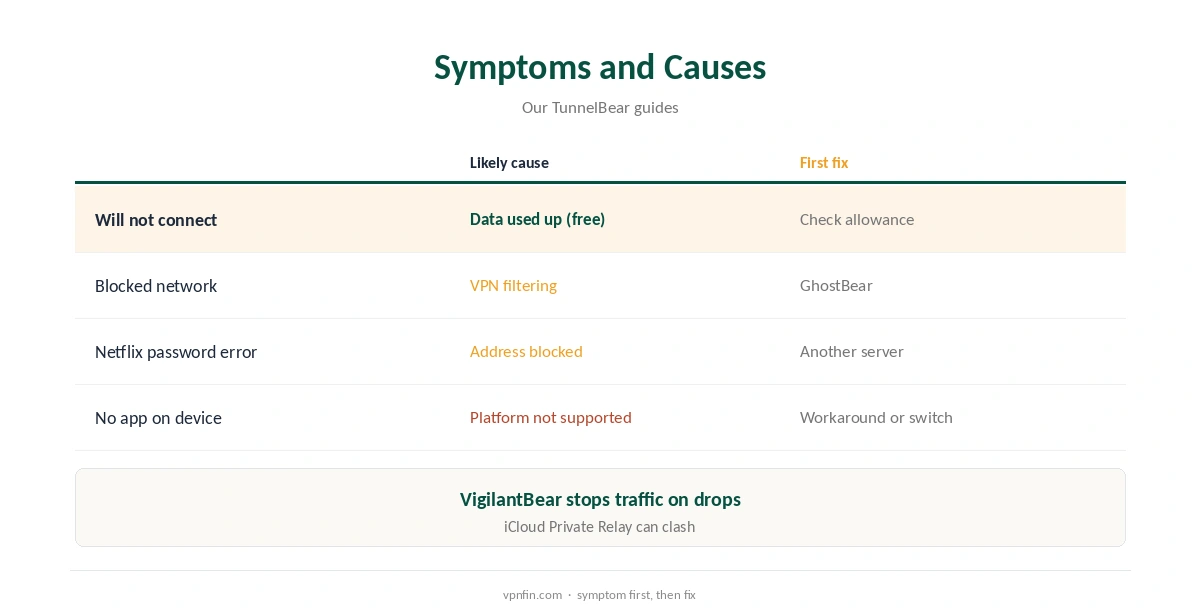
TunnelBear not working usually has a simple cause. On the free plan, the 2 GB monthly allowance may be used up. On blocked networks, GhostBear, its obfuscation mode, can help. A streaming service may block TunnelBear’s addresses, sometimes with a misleading incorrect password error on Netflix, Cloudwards found. And some devices, such as Fire TV sticks on Vega OS and smart TVs, simply have no TunnelBear app.
This guide works through the fixes in order, by symptom.
Common Symptoms
The app will not connect, it connects but nothing loads, a streaming service refuses you, or there is no app for your device. Match the symptom before changing settings.
TunnelBear Not Working? Check the Data Allowance
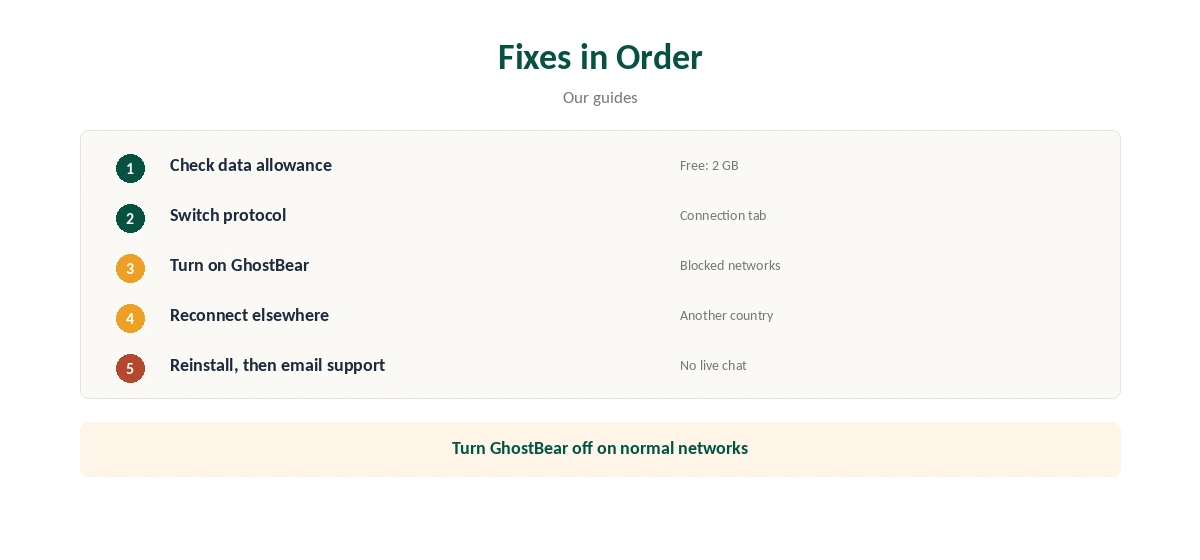
Free accounts get 2 GB a month. When it runs out, the free plan stops connecting until the allowance resets. Check the remaining data in the app, or upgrade to Unlimited. Our TunnelBear free guide covers the limits.
Fix Two: Switch Protocol
In settings, the Connection tab offers WireGuard, OpenVPN and IKEv2, WizCase notes. If one fails, try another. Our TunnelBear WireGuard guide explains when each fits.
Fix Three: Turn On GhostBear
On school, office or hotel networks that block VPNs, GhostBear disguises TunnelBear’s traffic. It can slow the connection, so turn it off again on normal networks. Our obfuscation guide explains the idea.
Fix Four: VigilantBear and Nothing Loading
If VigilantBear, the kill switch, is on and the tunnel drops, traffic stops by design. Reconnect, or pick another country. Then run our DNS leak guide.
Streaming Errors
Netflix may reject correct logins with an incorrect password error when it blocks TunnelBear’s addresses, Cloudwards found. Testers split on Netflix and Disney+ in 2026, as our TunnelBear Netflix guide explains. Try another server, then accept that some days it will not work.
No App for Your Device
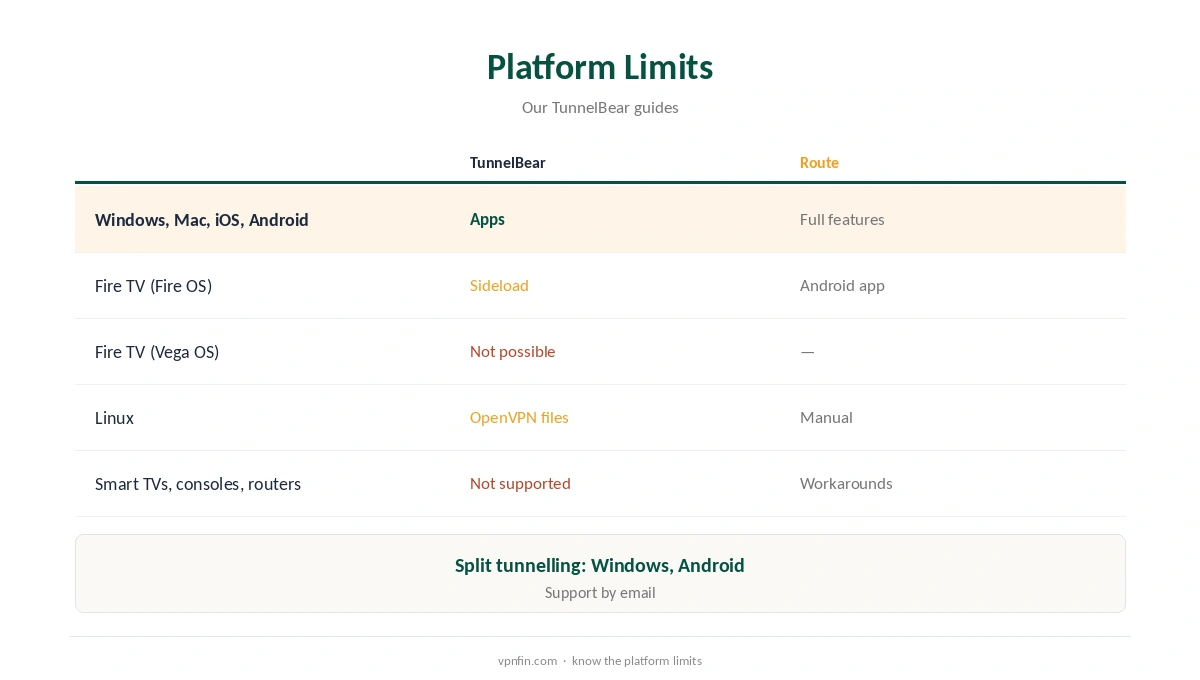
TunnelBear has no TV or console apps, no router support, and on Linux only OpenVPN files. Fire TV sideloading works only on Fire OS, not Vega OS. Our TunnelBear Firestick guide and TunnelBear Linux guide cover the routes.
Phones
On iPhone, iCloud Private Relay can clash with VPNs; turn it off while testing. Our iPhone VPN troubleshooting guide and Android VPN troubleshooting guide cover phone-specific fixes.
TunnelBear Not Working on Windows or Mac
Restart the app, then switch protocol. If the VPN adapter is missing after an update, reinstall TunnelBear. Security software can block the adapter; allow TunnelBear and restart. Our TunnelBear Windows guide covers the settings.
TunnelBear Not Working on Android
Check that no other VPN app is active, since Android allows one at a time. Our TunnelBear Android guide covers split tunnelling, which can leave an app outside the tunnel by mistake.
Slow Speeds
Pick a nearer country, use WireGuard, and turn GhostBear off on normal networks. Gizmodo found the free UK server slow, so paid plans may perform better.
Refunds
Where TunnelBear cannot work for your needs, our TunnelBear refund guide explains the rules for first-year annual plans.
Is TunnelBear Not Working, or Is the Network?
If TunnelBear not working happens only on one Wi-Fi network, the network is likely blocking VPNs; GhostBear should help. A failure on every network points to the data allowance or account; check those, then reinstall.
Checking After a Fix
Once connected, open our VPN test page to confirm the new address, then check VigilantBear is on.
Browser Extensions
The browser extensions work separately from the apps. An app failure alongside a working extension points to the app or adapter; when both fail, check your account and network. Our TunnelBear Chrome guide covers the extension.
Several Devices
Unlimited sets no device limit, so device limits are rarely the cause of TunnelBear not working on a paid plan. On the free plan, check data first.
Keeping It Updated
Allow app updates, then check that your protocol, GhostBear and VigilantBear settings stayed the same.
Linux Connections
On Linux, re-download the OpenVPN files if a connection that worked stops, since certificates and servers change.
Quick Check
After each fix, open our test page, then a normal website, then the service that failed. That shows which layer is the problem: the tunnel, the network or the service.
Kill Switch Reminder
Keep VigilantBear on once things work again, so a later drop does not expose your address.
Account Problems
If the app logs you out or refuses your password, reset it on TunnelBear’s website, then sign in again on each device.
Time and Date
A wrong system clock can break secure connections. Set the device to update its time automatically, then reconnect.
Another VPN Installed
Two VPN apps can clash. Quit or uninstall any other VPN before connecting TunnelBear, then restart the device.
Getting Help
WizCase notes TunnelBear has no live chat. Use its help centre and email support with the exact error.
How We Research
This page draws on Cloudwards’ and WizCase’s 2026 TunnelBear reviews, our TunnelBear platform guides and our TunnelBear tables. We cross-checked these sources against each other, and where they conflict or something can’t be verified, we say so in the text rather than guessing. We checked time-sensitive figures, including prices in US dollars, on 7 October 2026. The main source we relied on is WizCase’s TunnelBear review. Our full approach lives on the About Us page.
TunnelBear Not Working FAQ
On the free plan, the 2 GB monthly allowance may be used up.
Turn on GhostBear, or switch protocol.
Cloudwards found Netflix shows that error when it blocks TunnelBear.
There is no TV app; workarounds are limited.
No, per WizCase; use email support.
The Verdict
TunnelBear not working is usually the data cap, a blocked network or a blocked streaming address. Check data, switch protocol, try GhostBear, and accept that some devices have no app.