
Disclosure: VPNFin is reader-supported. If you buy a VPN through links on this page, we may earn a commission at no extra cost to you. This never affects our ratings — here’s our full disclosure.
A VPN and an antivirus have no overlap whatsoever. One encrypts traffic leaving your device; the other examines files already on it. Owning one tells you nothing about whether you need the other.
The complication is that VPN companies now sell antivirus in the same subscription — and independent testing found one of those bundled products detecting none of the file-based malware put in front of it, while blocking nine malicious websites in ten. Some antivirus bundles include a VPN, as our Total VPN review explains. A VPN sold alongside PC tools can lack basics, as our iolo VPN review shows. If you would rather keep them separate, our Total VPN alternatives guide lists audited picks.
What Each One Actually Does
A VPN works on traffic in transit. It encrypts what leaves your device and changes where it appears to come from. It moves who can see your activity rather than checking what that activity contains.
An antivirus works on your device. It scans files, watches running processes for suspicious behaviour, quarantines what it finds and removes it.
Neither can do the other’s job, and no amount of encryption prevents a file you downloaded from executing — which is where most documented VPN incidents actually begin.
⚠️ So the question “do I need both” answers itself. What a VPN hides and what an antivirus catches are different lists with nothing in common.
The Bundles Are Not What They Sound Like
Here is the part worth the page, and it is specific.
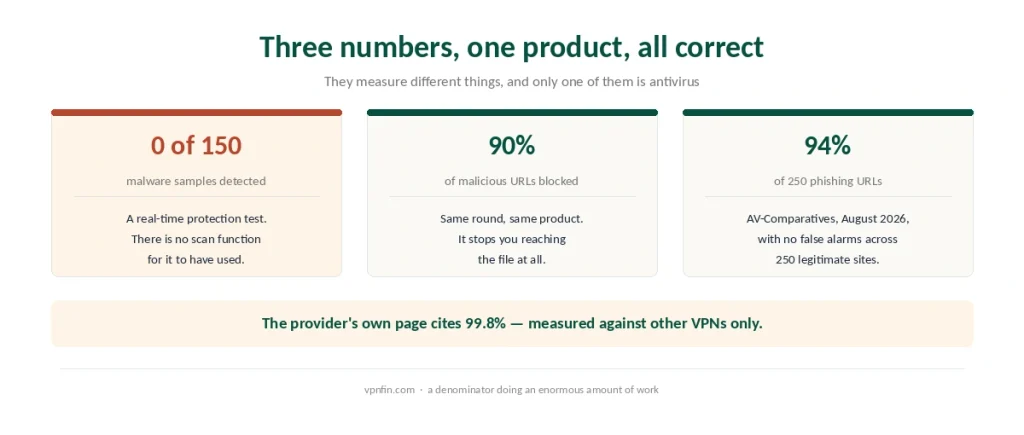
Independent testing put NordVPN’s built-in protection through a real-time malware test. It detected none of the 150 samples. In the same round it blocked 90% of malicious URLs before they could be reached.
Both results are correct, because the product is a network filter. It stops you arriving at dangerous places; it does not examine what is already on your disk. There is no quick scan, no full-device scan and no removal function.
In AV-Comparatives’ anti-phishing testing it blocked 94% of 250 phishing URLs with no false alarms against 250 legitimate sites — which is a strong result for what it actually is. Our page on the CyberGhost ad blocker covers what the apps and the free Chrome extension actually block. Our guide to PureVPN Ad Blocker covers tracker and ad blocker, platforms and the plan question.
⚠️ NordVPN’s own page cites a 99.8% detection rate, qualified as being among VPNs offering comparable functionality. That denominator is doing an enormous amount of work, and it is not the comparison a buyer has in mind.
Surfshark Is the Opposite Shape
Two bundles from two competitors, built the other way round.
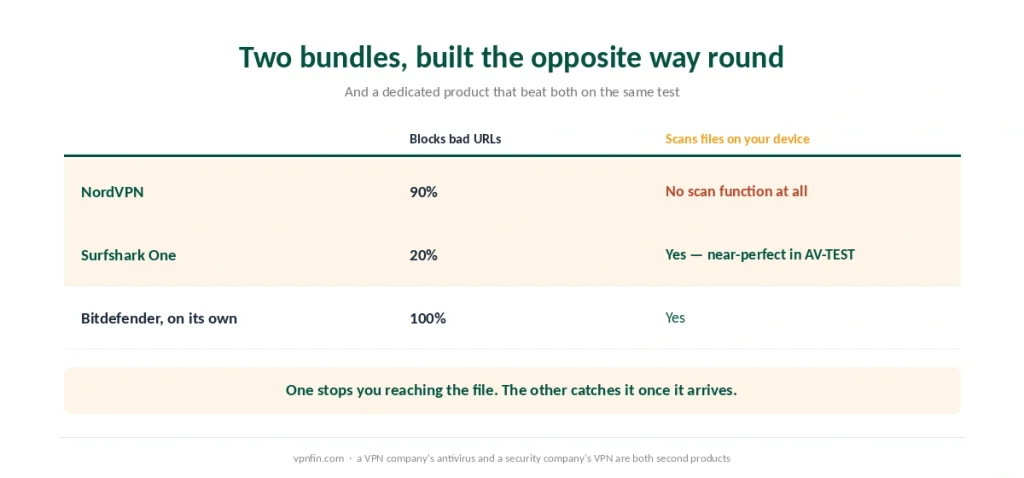
Surfshark One includes a genuine local antivirus. Reviewers report real-time scanning with a near-perfect catch rate in AV-TEST evaluations. Our page on the Surfshark ad blocker covers CleanWeb in the apps and CleanWeb 2.0 in the browser.
Its web filtering is the weaker half. In the same comparison where NordVPN blocked 90% of malicious URLs, Surfshark blocked 20%. Our page on NordVPN ad blocker covers Threat Protection and Threat Protection Pro compared.
⚠️ So the two products protect opposite ends of the same journey. One is better at stopping you reaching the file; the other is better at catching it once it has arrived. The reverse arrangement, an antivirus company selling a VPN, is Malwarebytes, which published its first independent audit in 2026.
And a dedicated antivirus beat both. Bitdefender blocked 100% of malicious URLs in that testing, which is the number worth remembering before treating a bundle as a replacement.
Who Else Bundles One
Private Internet Access and CyberGhost both sell antivirus as an add-on rather than as an integrated layer.
Norton VPN comes at it from the other direction — an antivirus company that added a VPN, where the security half is the mature product and the tunnel is the extra.
⚠️ That direction matters more than the price. A security company’s VPN and a VPN company’s antivirus are both second products, and in each case the second one is the weaker.
When the Bundle Is the Right Purchase
If you have no antivirus at all, a bundle is better than nothing and considerably better than the free tools that monetise you.
If your risk is web-based, which for most people it is — phishing links, malicious downloads, tracker-heavy sites — a network filter addresses the threat you actually meet.
If you want one subscription and one app, the administrative saving is real.
⚠️ But do not cancel a working antivirus for one. The bundled product may not scan files at all, which means you would be removing the layer you already had.
When It Is Not
If you handle files from unknown sources. Downloads, email attachments, shared drives, anything on removable media — that is file-scanning territory, and a URL filter never sees it.
If you are on Windows and rely on it. Windows ships with a competent antivirus already, and a network filter complements it rather than replacing it.
If the reason you are buying is compliance or a workplace requirement. Those specify products with published detection scores, and a VPN’s bundled layer is unlikely to qualify.
How to Read the Claims
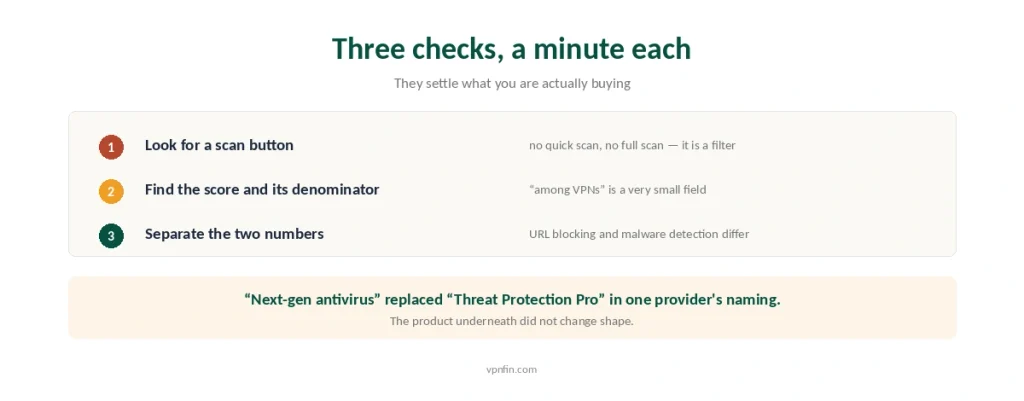
Three things to check, and they take a minute each.
Look for a file-scanning function in the interface. If there is no quick scan and no full scan, it is a filter regardless of the name on the box.
Find the independent score and its denominator. AV-TEST and AV-Comparatives publish results publicly. A figure qualified as “among VPNs” is measuring a small field.
Separate the two numbers. URL blocking and malware detection are different tests, and a product can be excellent at one while scoring zero on the other — as this year’s testing showed. Our guide to what VPNs actually do covers what they protect and what they cannot.
⚠️ And treat “next-gen” as a marketing word. It replaced “Threat Protection Pro” in one provider’s naming without the underlying product changing shape.
What This Means for Choosing a VPN
Do not let the bundle decide the VPN. The tunnel is what you are buying, and our main ranking scores it on speed, audits, price and coverage rather than on what is stapled to it.
If the bundle matters, NordVPN and Surfshark are the two to compare — and compare them on which half you need rather than on which sounds more complete.
And free antivirus is a different market from free VPNs. Reputable free antivirus exists; reputable free VPNs are rare, and the reasons are structural rather than incidental.
Replacing Kaspersky in the US? Our Kaspersky VPN alternatives guide explains the ban and the options.
How We Research
This guide draws on Cybernews for the independent testing that recorded zero detections among 150 malware samples alongside 90% blocking of malicious URLs, and for the AV-Comparatives anti-phishing figures of August 2026, on Security.org and VPNOverview for the AV-TEST results attributed to Surfshark’s antivirus component, and on provider documentation for the naming and structure of each bundle. Where a provider publishes its own figure, as NordVPN does with 99.8%, we have given the qualification attached to it rather than the number alone. Two sources making very specific claims about detection rates could not be corroborated elsewhere and are not used. We do not run our own tests. Our method lives on the About Us page.
VPN and Antivirus FAQ
Yes. They protect different things and do not overlap: a VPN encrypts traffic leaving your device, while antivirus examines files already on it. No amount of encryption prevents a downloaded file from running.
It depends what kind it is. Independent testing found NordVPN’s built-in protection detected none of 150 malware samples while blocking 90% of malicious URLs — it is a network filter rather than a file scanner. Surfshark One includes a genuine local antivirus with near-perfect AV-TEST results but weaker URL blocking.
No. Some providers add a filter that blocks known malicious websites before you reach them, which prevents some infections. The VPN function itself does nothing about malware, and neither addresses a file that is already on your device.
Not in the traditional sense. Renamed to next-gen antivirus, it blocks malicious sites, phishing pages, trackers and harmful downloads at the network level. It offers no quick scan, no full-device scan and no malware removal, so it complements a conventional antivirus rather than replacing one.
If you currently have no antivirus, yes — it is better than nothing and cheaper than two subscriptions. If you already run one that scans files, keep it: the bundled product may not do that at all, and cancelling would remove protection you already had.
The Verdict
They do not overlap, so the answer is both — but the second one may not be the product you think you are buying.
A VPN company’s antivirus is usually a network filter. Independent testing found one detecting none of the file-based malware presented to it while blocking nine malicious sites in ten, which is a good filter and not an antivirus.
Check for a scan button before you cancel anything. If the bundle cannot examine a file already on your machine, it is an addition to your protection rather than a replacement for it. Our page on NordVPN vs Norton VPN covers audits, devices, protocols and renewal compared.