
Disclosure: VPNFin is reader-supported. If you buy a VPN through links on this page, we may earn a commission at no extra cost to you. This never affects our ratings — here’s our full disclosure.
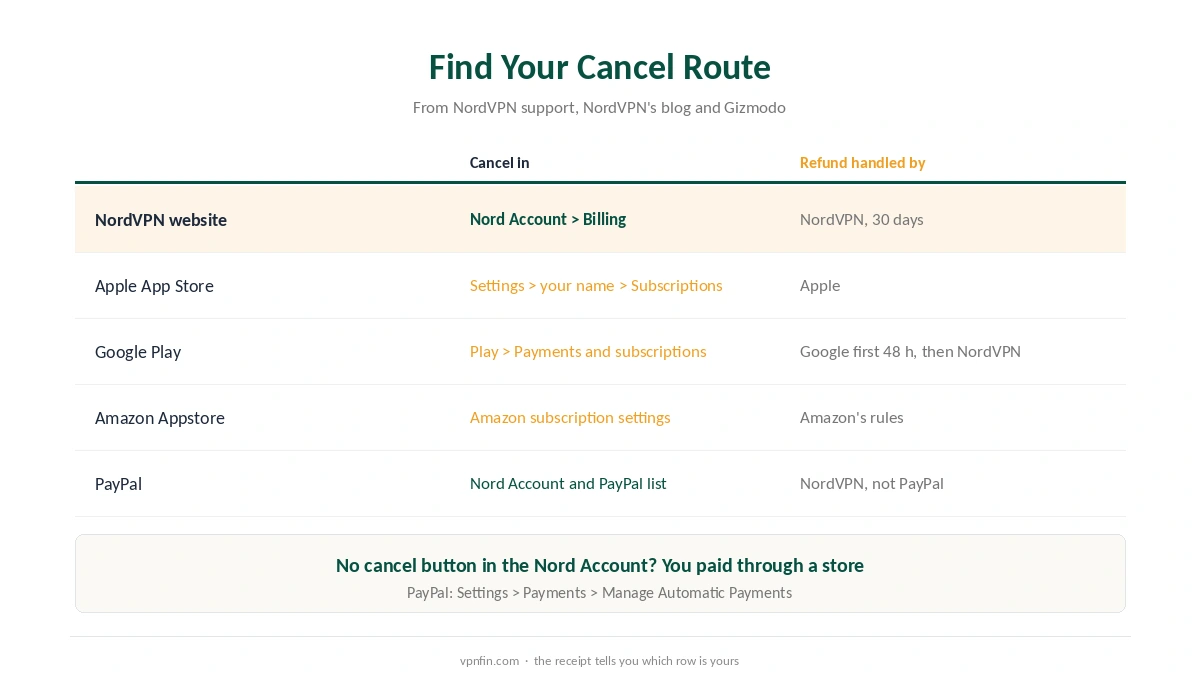
A NordVPN cancel takes about a minute, but only in the right place. If you paid on NordVPN’s website, you turn off auto-renewal in your Nord Account. If you paid through Apple, Google Play or Amazon, you cancel in that store instead, and the Nord Account cannot do it for you.
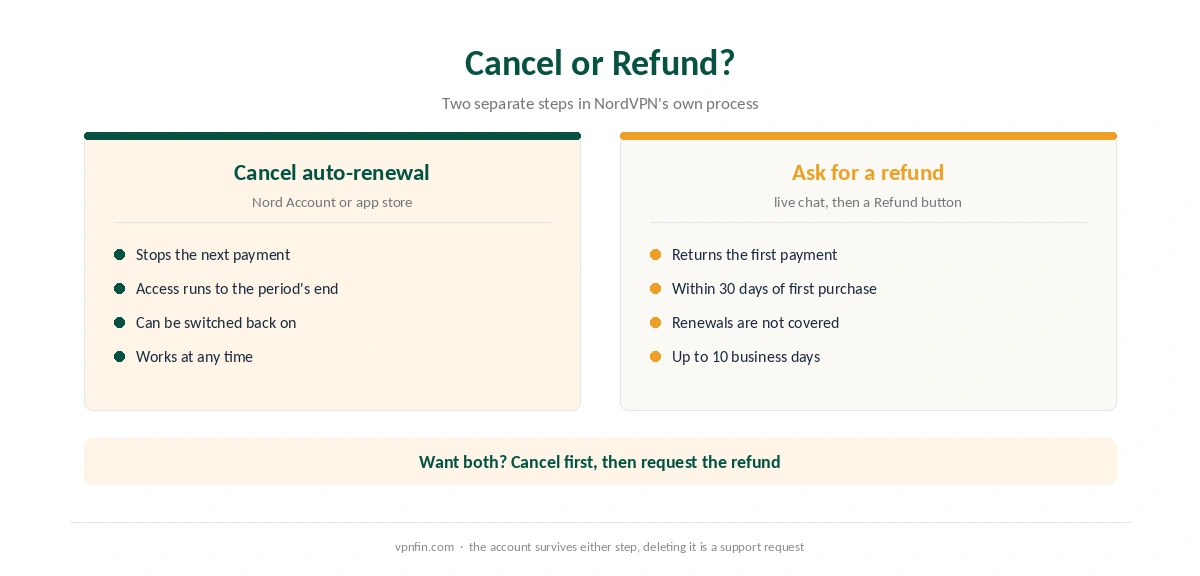
Cancelling also differs from a refund. It stops the next payment; it does not return the last one. For money back within 30 days, read our NordVPN refund guide. This page covers the cancellation itself.
Where Did You Pay? That Decides Where You Cancel
Check your receipt email first. It shows who billed you: NordVPN itself, or Apple, Google or Amazon. A store receipt means an in-app purchase, and the store holds the subscription.
PayPal adds one extra step. Gizmodo notes that PayPal keeps its own list of automatic payments, so check Settings, Payments, Manage Automatic Payments there as well. Refunds still go through NordVPN, not PayPal.
How to Cancel NordVPN on the Website
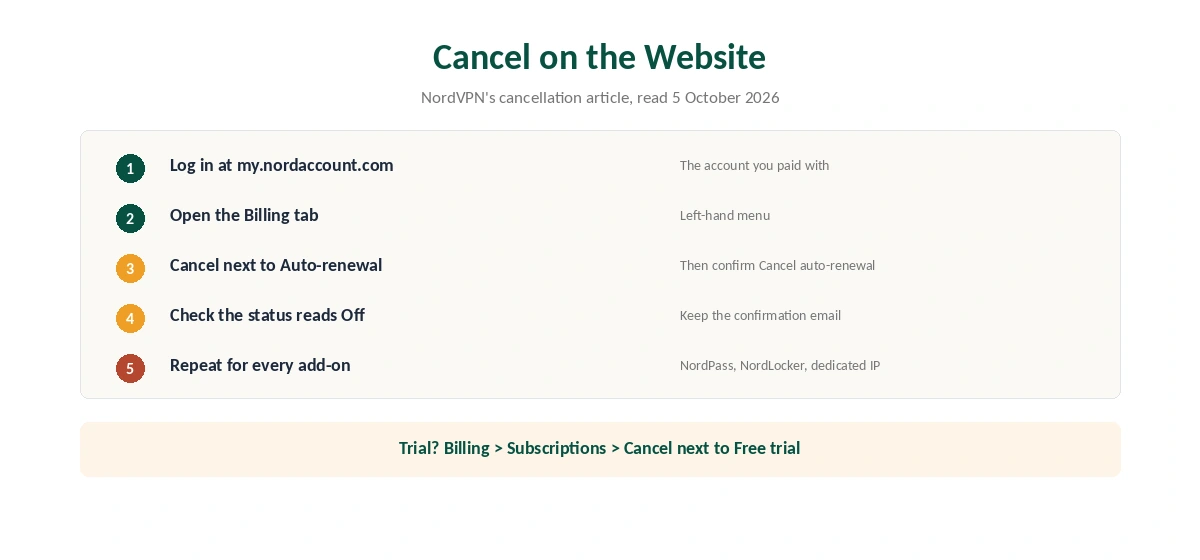
These steps come from NordVPN’s support article. First, log in to your Nord Account at my.nordaccount.com. Next, open the Billing tab. Then choose Cancel next to Auto-renewal, and confirm with Cancel auto-renewal.
The status then changes to Off, and NordVPN sends a confirmation email. Keep that email. If you see no email and the status still reads On, the cancellation did not go through.
NordVPN’s article adds that the same steps cancel NordPass, NordLocker, a dedicated IP or a bundle. Each service renews separately, so check every line under Billing. Our dedicated IP guide explains that add-on.
NordVPN Cancel Steps on iPhone, Android and Amazon
On an iPhone, open Settings, tap your name, then Subscriptions, choose NordVPN and tap Cancel Subscription. On Android, open Google Play, tap your profile, then Payments and subscriptions, Subscriptions, and cancel NordVPN there. NordVPN’s support has a separate article for Amazon Appstore buyers, who cancel through Amazon.
Refunds follow the store, too. NordVPN’s blog says Google handles refund requests in the first 48 hours, and NordVPN support handles them after that. For App Store purchases, the refund goes through Apple.
Cancelling During the Free Trial
NordVPN offers a 7-day trial on some 1-year and 2-year top-tier plans in 15 countries. If you do not cancel, the plan starts at the price shown when you began. To cancel, open Nord Account, Billing, Subscriptions, and choose Cancel next to Free trial.
The Android trial is different: it lasts 3 days and runs through Google Play, so you cancel it there. Our NordVPN free trial guide lists the countries and plans.
What Happens After You Cancel
Your access continues to the end of the period you paid for, according to NordVPN’s blog. Nothing disconnects on the day you cancel. You can also turn auto-renewal back on from the same Billing tab if you change your mind.
The account itself stays. According to Gizmodo, deleting the account and its data takes a request to NordVPN support. If you also want the apps gone, follow our NordVPN uninstall guide.
Why Cancel Before the Renewal Date
Renewal is where NordVPN gets expensive. The Basic 2-year plan costs $94.23 for the first 27 months, then renews at $139.08 a year. That works out to about 3.3× the intro monthly rate after 27 months. Complete renews at $219.48 a year and Prime at $296.28. Our guide to cancelling Proton VPN covers downgrade, credit and the refund step.
Also, NordVPN’s refund guarantee covers first purchases only, not renewals. So the guarantee will not return a renewal you forget to cancel. Our VPN renewal price comparison shows how other providers compare, and our NordVPN review weighs whether the renewal is worth it.
| Provider | Renewal price | Per month | Tier |
|---|---|---|---|
| NordVPN | $139.08/yr | ~$11.59 | Basic |
| Surfshark | ~$79/yr | ~$6.58 | Starter |
| ExpressVPN | $99.95/yr | ~$8.33 | Basic |
| CyberGhost | $56.94/yr | ~$4.75 | 2-year |
| PureVPN | $47.95/yr | ~$4.00 | Standard, 2-year (1-year renews $57.95) |
| IPVanish | $89.99/yr | ~$7.50 | Essential |
| Windscribe | ~$69/yr | ~$5.75 | Pro |
| Proton VPN | ~$83.88/yr | ~$6.99 | VPN Plus |
| Mullvad | ~$65/yr | ~$5.40 | flat, no tiers |
| Norton VPN | $79.99/yr | ~$6.67 | Standard |
| Hotspot Shield | ~$95.99/yr | ~$8.00 | Premium annual |
| Astrill | $300 every 2 yrs | ~$12.50 | 2-year, same at renewal |
Before You Leave: Fixes and Cheaper Alternatives
If a technical problem is the reason, a fix may be quicker than a new provider. Our guide to NordVPN disconnections and NordVPN speed guide cover two other reasons people leave. For a VPN that never connects, see our NordVPN not connecting guide.
If price is the reason, compare before you cancel. Proton VPN renews for less, as our NordVPN vs Proton VPN comparison shows. Surfshark belongs to the same parent company, Nord Security, and our NordVPN vs Surfshark page covers how the two differ. Our VPN ownership map shows which brands share an owner.
How We Research
This page draws on NordVPN’s cancellation, refund and trial articles, NordVPN’s blog on cancelling, and guides from Gizmodo and Cloudwards. We cross-checked these sources against each other, and where they conflict or something can’t be verified, we say so in the text rather than guessing. We checked time-sensitive figures, including prices in US dollars, on 5 October 2026. Renewal prices come from NordVPN’s pricing page, read on 25 September 2026. The main source we relied on is NordVPN’s cancellation article. Our full approach lives on the About Us page.
How to Cancel NordVPN FAQ
If you paid on the website, log in to your Nord Account, open Billing and choose Cancel next to Auto-renewal. If you paid through Apple, Google Play or Amazon, cancel in that store.
No. Cancelling stops the next payment. A refund needs a separate request through live chat within 30 days of the first purchase.
No. Access continues until the end of the period you paid for, according to NordVPN’s blog.
You probably paid through Apple, Google Play or Amazon. Those subscriptions live in the store account, so cancel there.
No. The plan renews even with the app removed. Turn off auto-renewal first, then uninstall.
The Verdict
To cancel NordVPN, find where you paid, then turn off auto-renewal there and keep the confirmation email. Check add-ons such as a dedicated IP separately. If you are within 30 days of your first purchase, ask for a refund as a second, separate step.