
Disclosure: VPNFin is reader-supported. If you buy a VPN through links on this page, we may earn a commission at no extra cost to you. This never affects our ratings — here’s our full disclosure.
A PureVPN Synology setup uses the VPN client built into DSM, Synology’s operating system. PureVPN’s own guide, updated on 25 March 2026, covers PPTP, L2TP/IPsec and OpenVPN, using manual credentials from the PureVPN Member Area. Two details decide whether it works well: the default gateway setting and IPv6, which DSM cannot route over a VPN.
This guide covers the protocol choice, the OpenVPN steps, the gateway trade-off and the IPv6 fix.
Before You Start a PureVPN Synology Setup
Log in to the PureVPN Member Area with your email and password. PureVPN’s guide says to note the username shown there and click the eye icon to reveal the password. Those manual credentials go into DSM, not your normal login.
For OpenVPN, download a .ovpn file for the location you want from PureVPN’s list. TorGuard’s general Synology guide notes that the VPN client is available on most models running DSM 6.0 or later.
Which Protocol to Choose
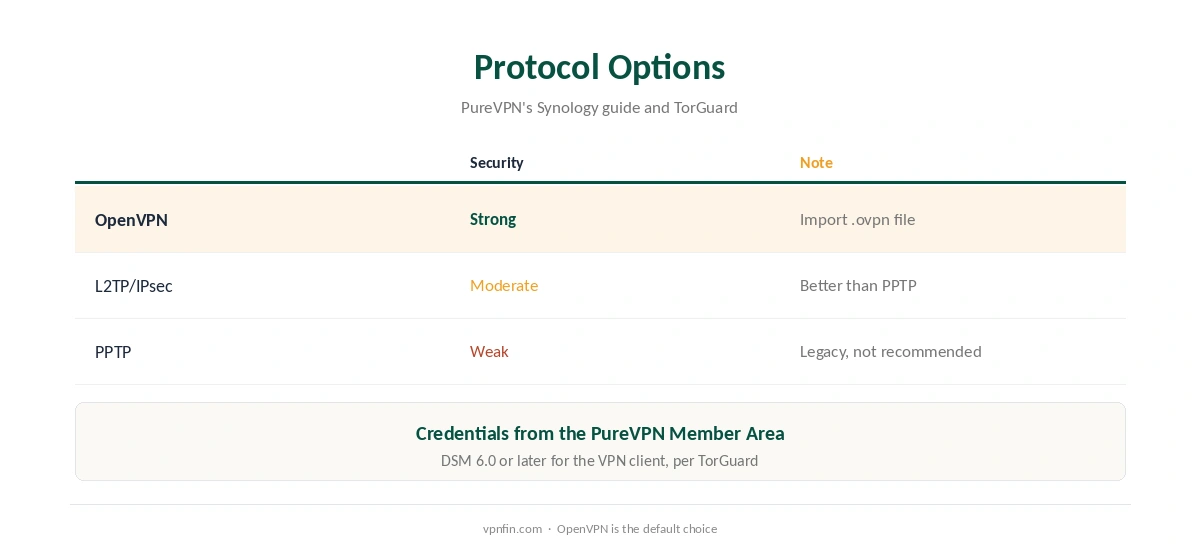
PureVPN’s guide offers three. PPTP is the oldest and weakest; TorGuard’s Synology guide calls it legacy and not recommended. L2TP/IPsec is better, and OpenVPN is the strongest option of the three that PureVPN documents for Synology.
Choose OpenVPN unless your setup has a specific reason not to. Our WireGuard vs OpenVPN page explains why OpenVPN remains a solid choice where WireGuard is not available.
PureVPN Synology OpenVPN Setup
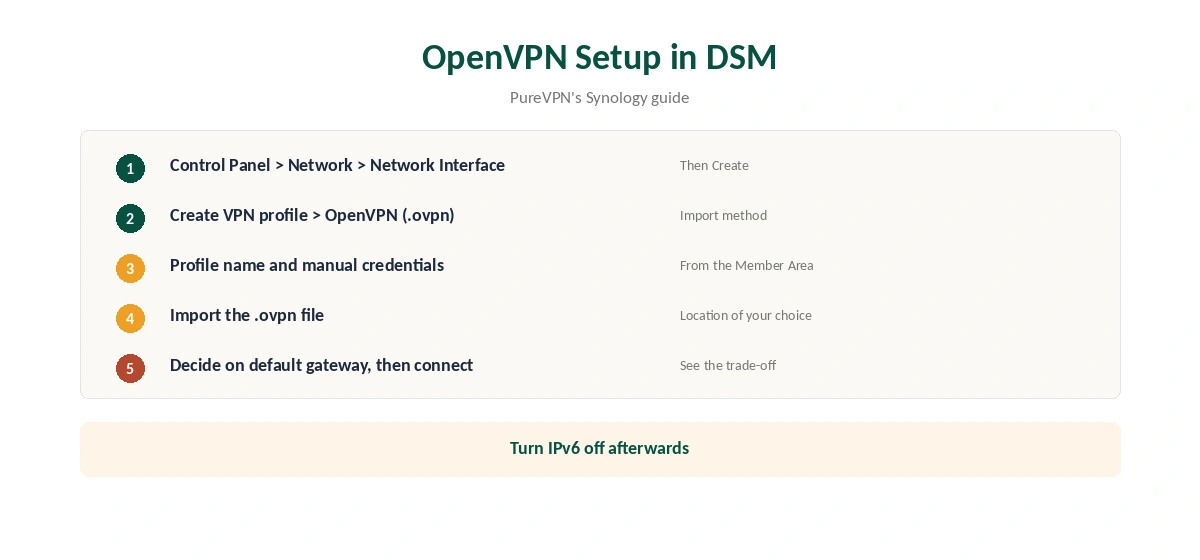
In DSM, open Control Panel, then Network, then the Network Interface tab. Click Create, then Create VPN profile, and select OpenVPN (via importing a .ovpn file). Enter a profile name, which appears in the Network Interfaces list, then your PureVPN manual username and password, and import the .ovpn file.
Finish the wizard, select the new profile and connect. The status should change to connected within a few seconds.
The Default Gateway Trade-Off
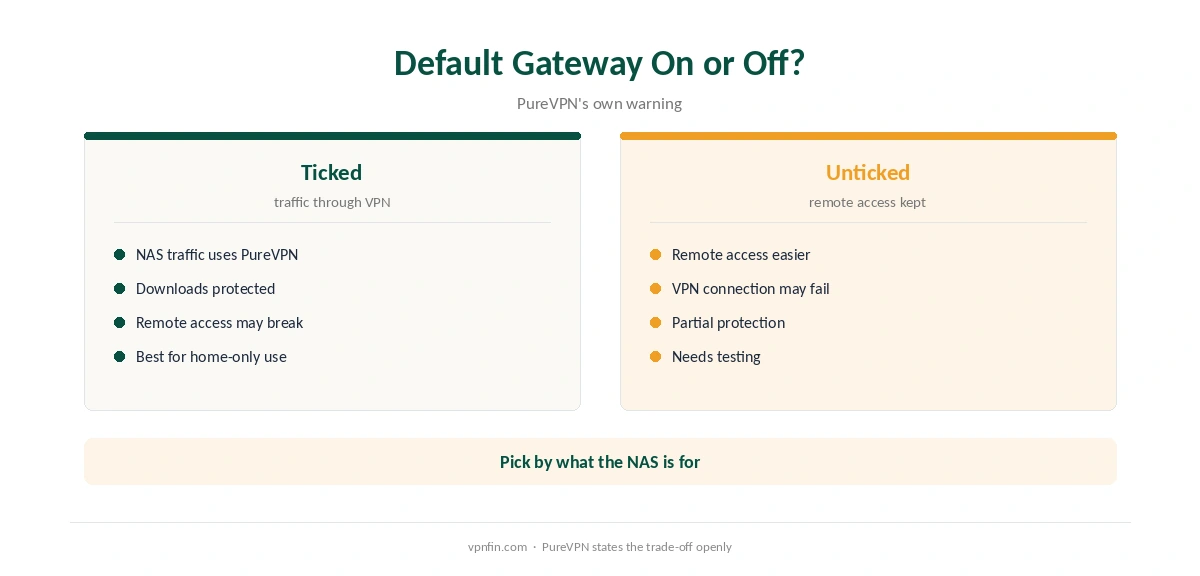
The last screen offers Use default gateway on remote network. PureVPN’s guide is frank about the catch: if you tick it, you may have trouble reaching your NAS from the internet. If you leave it unticked to keep remote access, the guide warns the VPN connection may fail.
In practice, decide what the NAS is for. If it downloads through the VPN and you reach it only at home, tick the option. If you need remote access, consider a different approach, such as reaching the NAS through a linked computer, as our Meshnet guide describes for NordVPN users.
Downloads, Reconnection and Testing
With the default gateway ticked, everything the NAS sends to the internet uses the tunnel, including Download Station and package updates. For many owners that is the point of a PureVPN Synology setup: downloads leave through PureVPN rather than your home address.
DSM’s VPN profile wizard also offers to reconnect when the VPN connection is lost; tick it, since a NAS often runs unattended. A DSM VPN profile has no app-style kill switch, so a drop can expose traffic until it reconnects. Our kill switch guide explains the risk.
To confirm the setup, check the NAS’s public IP from a browser on the NAS or a package that reports it. Our VPN test page explains what to look for.
Turn Off IPv6
PureVPN’s guide notes that DSM does not support IPv6 connections over a VPN, so IPv6 traffic can leak around the tunnel. Open Control Panel, switch to the IPv6 tab under network settings, and set IPv6 setup to Off. Our IPv6 leak guide explains why this matters.
What PureVPN Costs
On 5 October 2026, PureVPN’s order page listed the Standard 2-year plan at $58.20 for the first 27 months, renewing at $47.95 a year. A separate deals page showed $58.05 for the same term with a $54.95 renewal, so the page you buy from changes the renewal by seven dollars a year. Check the renewal line at checkout.
One plan covers 10 devices, and a NAS counts as one of them. PureVPN offers a 31-day money-back guarantee, as our PureVPN refund guide explains, so you can test the setup on your own hardware before committing.
| Provider | Renewal price | Per month | Tier |
|---|---|---|---|
| NordVPN | $139.08/yr | ~$11.59 | Basic |
| Surfshark | ~$79/yr | ~$6.58 | Starter |
| ExpressVPN | $99.95/yr | ~$8.33 | Basic |
| CyberGhost | $56.94/yr | ~$4.75 | 2-year |
| PureVPN | $47.95/yr | ~$4.00 | Standard, 2-year (1-year renews $57.95) |
| IPVanish | $89.99/yr | ~$7.50 | Essential |
| Windscribe | ~$69/yr | ~$5.75 | Pro |
| Proton VPN | ~$83.88/yr | ~$6.99 | VPN Plus |
| Mullvad | ~$65/yr | ~$5.40 | flat, no tiers |
| Norton VPN | $79.99/yr | ~$6.67 | Standard |
| Hotspot Shield | ~$95.99/yr | ~$8.00 | Premium annual |
| Astrill | $300 every 2 yrs | ~$12.50 | 2-year, same at renewal |
Checks and Related Guides
After connecting, check the NAS’s public IP from a browser or package on the NAS. Our DNS leak guide covers the resolver. If downloads use the VPN for torrenting, port forwarding is a paid PureVPN add-on, as our port forwarding guide explains.
For a whole-home setup instead, see our PureVPN router guide. Our Synology VPN guide and NordVPN Synology guide compare other providers. PureVPN belongs to Gaditek, which absorbed Ivacy in 2024.
Linux users will recognise the same OpenVPN files from our PureVPN Linux guide. The 31-day window lets you test a PureVPN Synology setup before committing, and our trial guide covers the 7-day paid trial. Test remote access and downloads separately before you rely on either.
How We Research
This page draws on PureVPN’s Synology NAS guide, updated 25 March 2026, TorGuard’s Synology VPN guide and PureVPN’s pricing pages. We cross-checked these sources against each other, and where they conflict or something can’t be verified, we say so in the text rather than guessing. We checked time-sensitive figures, including prices in US dollars, on 5 October 2026. PureVPN showed two price grids on different pages that day. The main source we relied on is PureVPN’s Synology guide. Our full approach lives on the About Us page.
PureVPN on Synology FAQ
Yes, through DSM’s built-in VPN client, with PPTP, L2TP/IPsec or OpenVPN, per PureVPN’s guide.
The manual username and password from the PureVPN Member Area, revealed with the eye icon.
Tick it to route NAS traffic through the VPN; PureVPN warns it can block remote access to the NAS.
DSM does not support IPv6 over a VPN, so IPv6 traffic could leak, PureVPN notes.
OpenVPN, of the three PureVPN documents. PPTP is legacy and weak.
The Verdict
A PureVPN Synology setup works well with OpenVPN, manual credentials and IPv6 turned off. Decide on the default gateway option by whether you need remote access to the NAS.