
Disclosure: VPNFin is reader-supported. If you buy a VPN through links on this page, we may earn a commission at no extra cost to you. This never affects our ratings — here’s our full disclosure.
Surfshark OpenVPN works in two ways. The Surfshark apps let you pick OpenVPN UDP or TCP in the protocol settings. For devices without an app, Surfshark’s support describes a manual setup: generate service credentials in your account, download a configuration file, and load it into the device or router. Those credentials are separate from your email and password.
This guide covers when to choose OpenVPN, the manual steps, UDP versus TCP, and the common errors.
When to Choose OpenVPN
WireGuard is Surfshark’s faster option on most connections, as our Surfshark WireGuard guide explains. OpenVPN earns its place in three cases. Gizmodo notes that Surfshark’s Camouflage Mode works with OpenVPN, which matters on networks that block VPNs. Older routers often support OpenVPN but not WireGuard. And Surfshark’s own speed advice tells phone users to try OpenVPN UDP first.
If none of those applies, start with WireGuard and keep OpenVPN as a fallback.
Switching to OpenVPN in the App
Open Settings, then VPN settings, then Protocol, and choose OpenVPN UDP or OpenVPN TCP. The app handles the rest, including the kill switch and Camouflage where available. That is the simplest way to use Surfshark OpenVPN on Windows, Mac, iPhone, Android and Android TV.
Surfshark OpenVPN Manual Setup
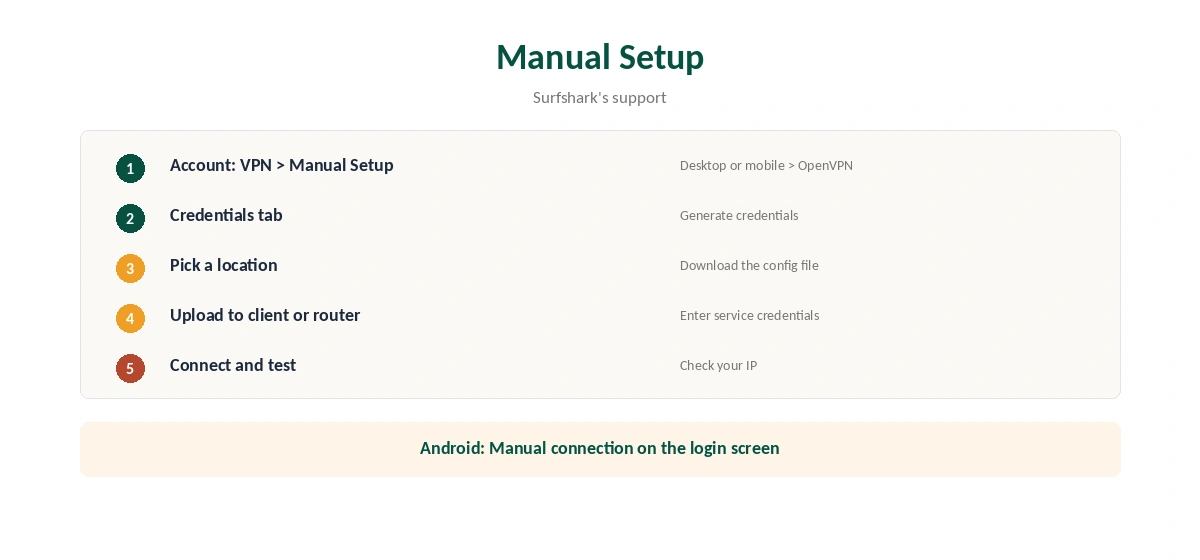
Surfshark’s support gives the steps. Log in to your account on the website, then open VPN, Manual Setup, Desktop or mobile, and OpenVPN. On the Credentials tab, choose Generate credentials. Note the service username and password it shows.
Then pick a server location and download its OpenVPN configuration file. Upload that file to the OpenVPN client or router, and enter the service credentials when asked. Surfshark says this works on Windows, iOS, Android, Linux and routers.
Manual Setup on Android Without Another App
Surfshark’s Android support describes a shortcut. On the app’s login screen, tap Manual connection, then OpenVPN UDP. Enter the service credentials and the server’s host name, and switch the protocol to TCP or IKEv2 if you need to. No separate OpenVPN client is required. Our page on Surfshark IKEv2 covers the app setting, the manual setup and the features it cannot run.
UDP or TCP?
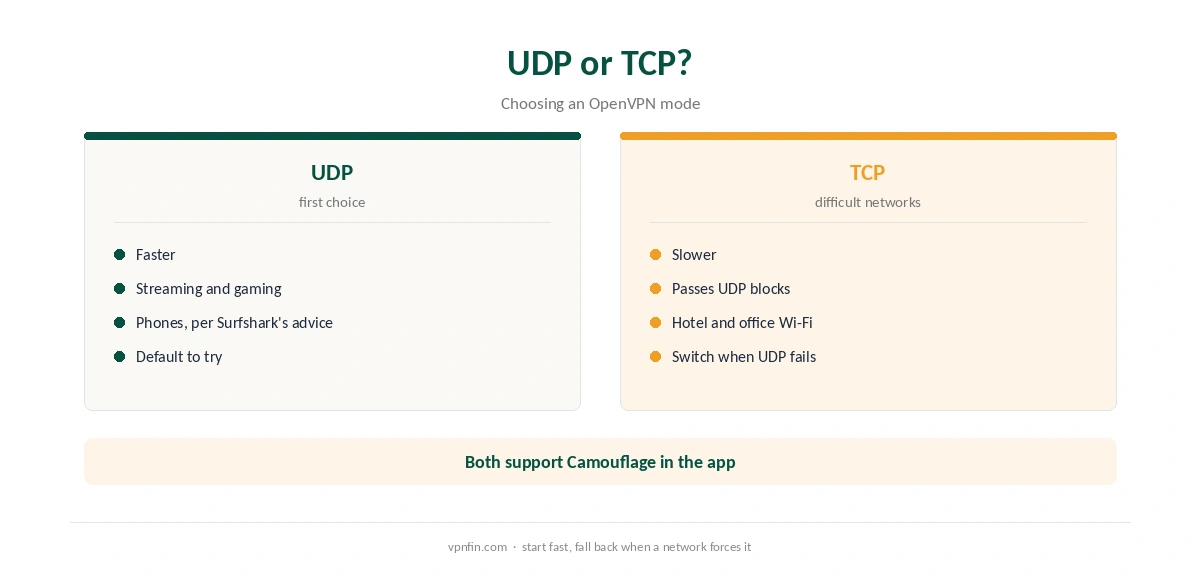
In the protocol guides we have read, UDP is faster and suits streaming and gaming. TCP is slower but gets through networks that disrupt UDP, such as some hotel and office Wi-Fi. Start with UDP, and switch to TCP when a network causes drops or refuses to connect.
Our WireGuard vs OpenVPN page explains the wider trade-off between the two protocols.
What a Manual Setup Gives Up
VPNAlert notes that a manual OpenVPN connection on Linux loses WireGuard and the app’s kill switch. The same applies on any device: no CleanWeb, no Bypasser, no automatic server switching. A dropped tunnel can expose traffic until it reconnects, as our kill switch guide explains.
Use manual OpenVPN where the app cannot run, such as routers, and the app everywhere else. Our Surfshark router guide covers the router side.
Fixing Surfshark OpenVPN Errors
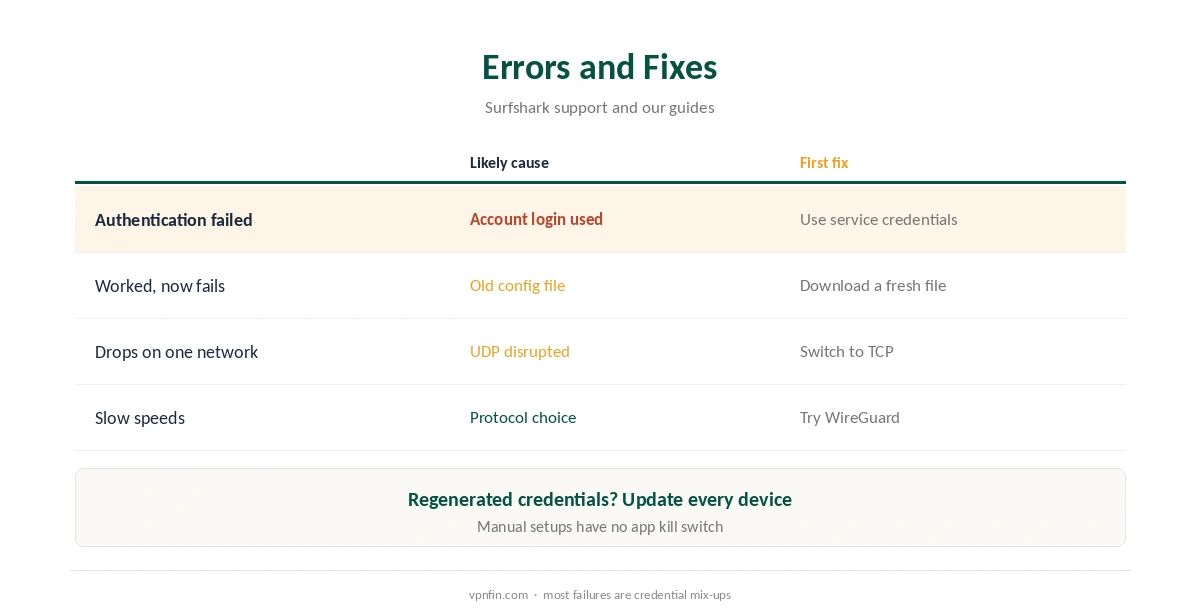
In a manual setup, an authentication failure points to the wrong credentials. Use the service username and password from the Credentials tab, not your account email. If you regenerate them, update every manual device.
When a file stops connecting, download a fresh one for the same location, since servers change. If the connection drops on one network only, switch from UDP to TCP. Our Surfshark disconnection guide covers further steps.
Surfshark OpenVPN on Restrictive Networks
OpenVPN matters most where VPNs are blocked. Gizmodo’s China guide says Surfshark needs OpenVPN with Camouflage and NoBorders there, as our Surfshark China guide explains. Hotel, school and office networks can also block WireGuard while letting OpenVPN TCP through. Our obfuscation guide explains how disguised traffic gets past filters.
Surfshark OpenVPN on Linux and Routers
On Linux, the Surfshark app offers WireGuard and keeps the kill switch, as our Surfshark Linux guide explains. Manual OpenVPN suits distributions the app does not cover. On routers, OpenVPN remains the most widely supported protocol, which is why many router guides start there.
After any manual setup, confirm the connection with our VPN test page. If speeds disappoint, our Surfshark speed guide covers the protocol order Surfshark recommends, starting with a nearby server and the right protocol for your platform.
What Surfshark Costs
On 25 September 2026, the Starter 2-year plan cost $67.23 for the first 27 months. Renewal sits at about $79 a year, according to Security.org and VPNOverview. Surfshark sets no device limit, so manual devices add nothing to the count. Our Surfshark price breakdown covers the plans.
| Provider | Renewal price | Per month | Tier |
|---|---|---|---|
| NordVPN | $139.08/yr | ~$11.59 | Basic |
| Surfshark | ~$79/yr | ~$6.58 | Starter |
| ExpressVPN | $99.95/yr | ~$8.33 | Basic |
| CyberGhost | $56.94/yr | ~$4.75 | 2-year |
| PureVPN | $47.95/yr | ~$4.00 | Standard, 2-year (1-year renews $57.95) |
| IPVanish | $89.99/yr | ~$7.50 | Essential |
| Windscribe | ~$69/yr | ~$5.75 | Pro |
| Proton VPN | ~$83.88/yr | ~$6.99 | VPN Plus |
| Mullvad | ~$65/yr | ~$5.40 | flat, no tiers |
| Norton VPN | $79.99/yr | ~$6.67 | Standard |
| Hotspot Shield | ~$95.99/yr | ~$8.00 | Premium annual |
| Astrill | $300 every 2 yrs | ~$12.50 | 2-year, same at renewal |
Related Guides
For comparison, NordVPN’s equivalent is covered in our NordVPN OpenVPN guide, and CyberGhost’s in our CyberGhost OpenVPN guide. Surfshark belongs to Nord Security, which also owns NordVPN.
How We Research
This page draws on Surfshark’s support articles on manual connections and its Android app, Gizmodo’s China guide, VPNAlert’s Linux notes and pricing from Surfshark, Security.org and VPNOverview. We cross-checked these sources against each other, and where they conflict or something can’t be verified, we say so in the text rather than guessing. We checked time-sensitive figures, including prices in US dollars, on 6 October 2026. Surfshark’s renewal table did not load, so renewal figures come from Security.org and VPNOverview. The main source we relied on is Surfshark’s manual connection guide. Our full approach lives on the About Us page.
Surfshark OpenVPN FAQ
Yes, as UDP and TCP in its apps, and through manual configuration files.
Service credentials from the Credentials tab, not your account email and password.
Yes. Tap Manual connection on the Surfshark app’s login screen.
Gizmodo notes Camouflage works with OpenVPN, which helps on restrictive networks.
UDP first for speed; TCP when a network blocks or disrupts UDP.
The Verdict
Surfshark OpenVPN is the fallback that gets through difficult networks and runs on older routers. Use it in the app when needed, and set it up manually only where the app cannot run.