
Disclosure: VPNFin is reader-supported. If you buy a VPN through links on this page, we may earn a commission at no extra cost to you. This never affects our ratings — here’s our full disclosure.
Surfshark WireGuard is the protocol Surfshark itself recommends on computers. The apps offer it in the protocol settings, and Surfshark’s own speed advice tells Windows and Mac users to switch from Automatic to WireGuard. For routers and other devices without an app, Surfshark’s support describes a manual setup built around a key pair. One detail catches people out: if you download a configuration file before generating the key pair, the file arrives without keys.
This guide covers the app settings, the manual steps, the key pair, and when OpenVPN is the better choice.
Surfshark WireGuard in the Apps
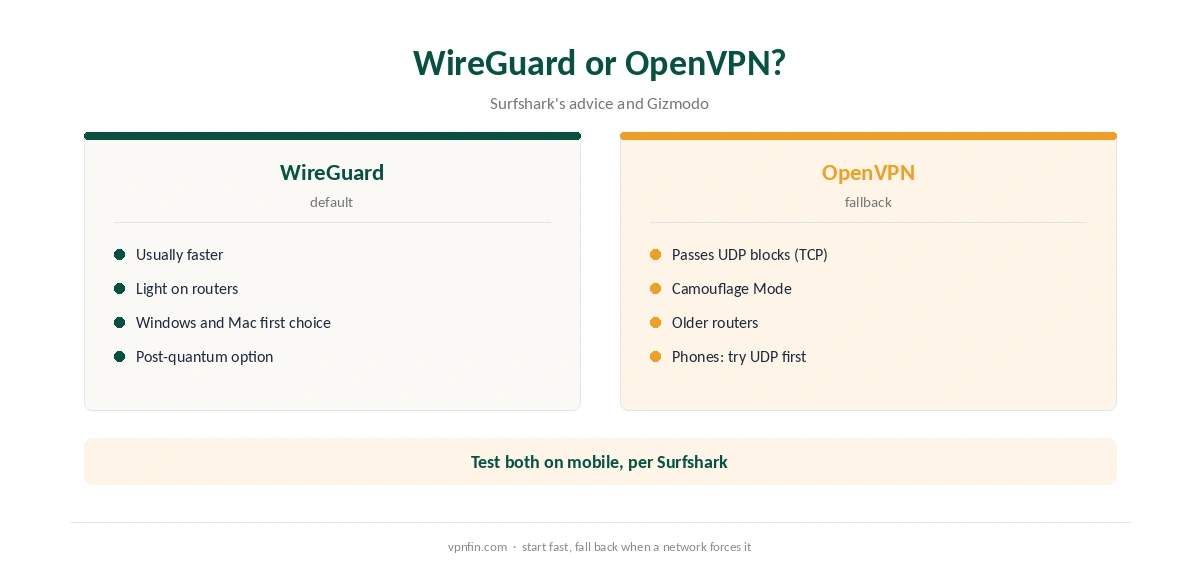
Open Settings, then VPN settings, then Protocol, and choose WireGuard. Surfshark’s speed advice recommends it on Windows and macOS. On phones, the same advice suggests OpenVPN UDP first, then WireGuard, so test both on mobile.
The Linux app supports WireGuard too, as our Surfshark Linux guide explains. Vpncentral notes Surfshark adds post-quantum protection on supported protocols, which our post-quantum VPN guide explains.
Why WireGuard Is Usually Faster
WireGuard uses a much smaller codebase than OpenVPN and modern cryptography, which keeps overhead low. In the speed tests we have read, it is faster than OpenVPN and IKEv2 on most connections. That makes it the natural default for streaming, gaming and large downloads. Our page on Surfshark IKEv2 covers the app setting, the manual setup and the features it cannot run.
Our WireGuard vs OpenVPN and IKEv2 vs WireGuard pages compare the protocols in more depth.
Surfshark WireGuard Manual Setup
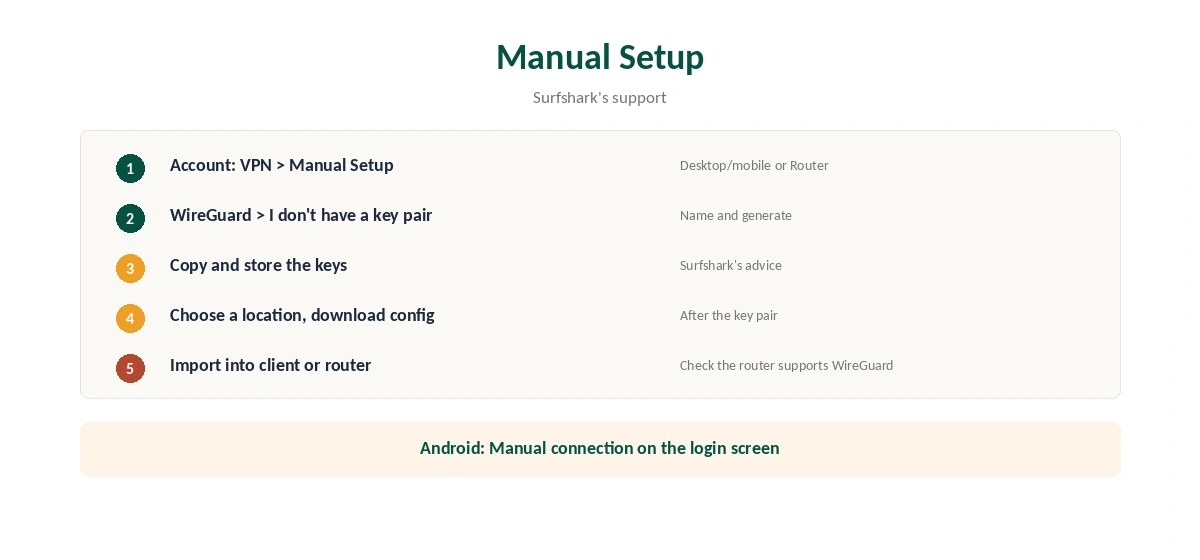
Surfshark’s support gives the steps. Log in on the website and open VPN, then Manual Setup. Choose Desktop or mobile, or Router, then WireGuard. If you have no key pair yet, choose I don’t have a key pair, name it, and generate a new one. Copy and store the keys on your device, as Surfshark advises.
Then choose a location and download the WireGuard configuration file. Import it into the WireGuard client or the router’s WireGuard settings. Surfshark notes that you should first check your router supports a WireGuard client.
The Key Pair Catch
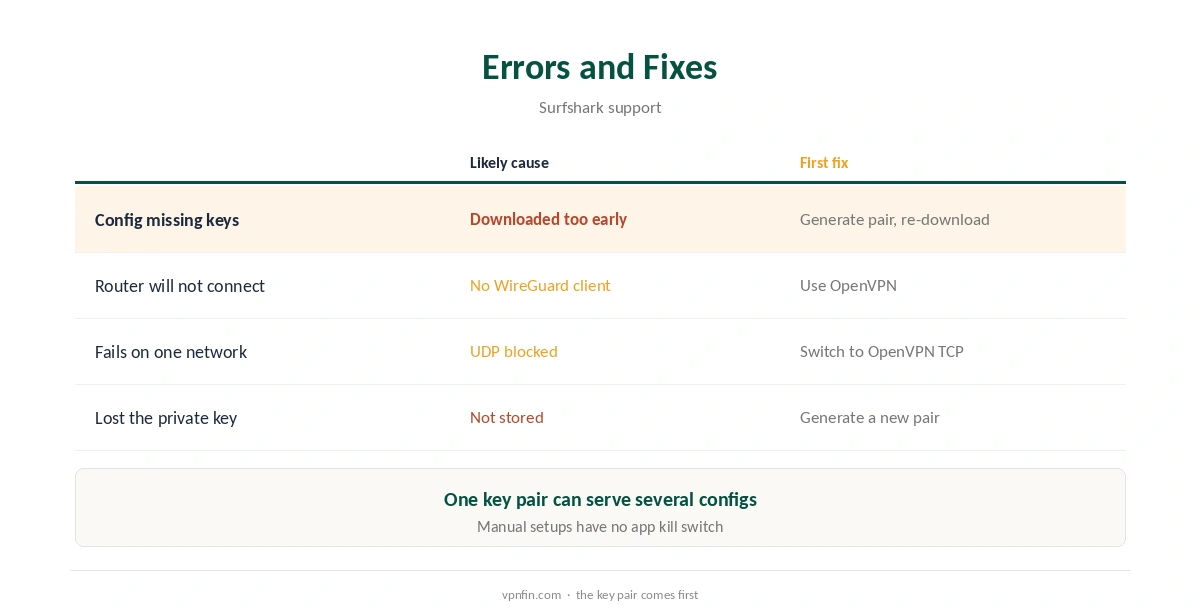
Surfshark’s router article is explicit: if you download the configuration file before generating the key pair, the file will be missing it. You would then need to generate a key separately and fill in the missing fields by hand.
Generate the key pair first, every time. If you already have one, choose I have a key pair, name it and enter your public key. The same pair can serve several configuration files.
Manual WireGuard on Android
Surfshark’s Android support describes a manual route inside its own app. On the login screen, tap Manual connection, then WireGuard. Generate a key pair, choose a location, download the configuration file and select Use config file. No separate WireGuard app is needed.
When OpenVPN Is Better
WireGuard runs over UDP, which some networks block or disrupt. Gizmodo notes Surfshark’s Camouflage Mode works with OpenVPN, so on restrictive networks OpenVPN is the better choice, as our Surfshark OpenVPN guide explains. Our Surfshark China guide shows a case where that matters.
Routers and WireGuard
WireGuard asks less of a router’s processor than OpenVPN, which matters on modest hardware. Check your firmware’s VPN menu for a WireGuard client before choosing. Our Surfshark router guide and router setup guide cover the options.
WireGuard on Phones
On iPhone and Android, Surfshark’s speed advice suggests trying OpenVPN UDP first, then WireGuard. Results vary by network, so test both on the connections you use most. Our Surfshark iPhone guide shows where the protocol setting sits on iOS.
In the app, WireGuard keeps the kill switch, CleanWeb and Bypasser. A manual WireGuard profile has none of them, so use the app wherever it runs. Keep manual profiles for routers and systems the apps do not cover, such as some Linux distributions. Store the private key safely, since anyone holding it can use that profile.
When Speeds Disappoint
If WireGuard is slower than expected, a busy or distant server is a common cause. Try a nearby location before switching protocol, and compare against your speed without the VPN on the same device and server. Our Surfshark speed guide lists Surfshark’s own steps in order.
What Surfshark Costs
On 25 September 2026, the Starter 2-year plan cost $67.23 for the first 27 months. Renewal sits at about $79 a year, according to Security.org and VPNOverview. Surfshark sets no device limit, so manual devices add nothing to the count. Our Surfshark price breakdown covers the plans.
| Provider | Renewal price | Per month | Tier |
|---|---|---|---|
| NordVPN | $139.08/yr | ~$11.59 | Basic |
| Surfshark | ~$79/yr | ~$6.58 | Starter |
| ExpressVPN | $99.95/yr | ~$8.33 | Basic |
| CyberGhost | $56.94/yr | ~$4.75 | 2-year |
| PureVPN | $47.95/yr | ~$4.00 | Standard, 2-year (1-year renews $57.95) |
| IPVanish | $89.99/yr | ~$7.50 | Essential |
| Windscribe | ~$69/yr | ~$5.75 | Pro |
| Proton VPN | ~$83.88/yr | ~$6.99 | VPN Plus |
| Mullvad | ~$65/yr | ~$5.40 | flat, no tiers |
| Norton VPN | $79.99/yr | ~$6.67 | Standard |
| Hotspot Shield | ~$95.99/yr | ~$8.00 | Premium annual |
| Astrill | $300 every 2 yrs | ~$12.50 | 2-year, same at renewal |
Testing the Connection
After connecting, check your IP with our VPN test page. A manual WireGuard tunnel has no app kill switch, so a drop exposes traffic until you reconnect, as our kill switch guide explains. Surfshark belongs to Nord Security, which also owns NordVPN.
How We Research
This page draws on Surfshark’s support articles on manual WireGuard connections, routers and its Android app, its speed advice, Gizmodo and vpncentral, plus pricing from Surfshark, Security.org and VPNOverview. We cross-checked these sources against each other, and where they conflict or something can’t be verified, we say so in the text rather than guessing. We checked time-sensitive figures, including prices in US dollars, on 6 October 2026. Surfshark’s renewal table did not load, so renewal figures come from Security.org and VPNOverview. The main source we relied on is Surfshark’s router WireGuard guide. Our full approach lives on the About Us page.
Surfshark WireGuard FAQ
Yes, in its apps and through manual configuration files with a key pair.
You downloaded it before generating the key pair. Generate the pair first.
In the tests we have read, yes. Surfshark recommends it on Windows and Mac.
Yes, if the router has a WireGuard client. Surfshark’s guide covers the steps.
On networks that block UDP, or when you need Camouflage Mode.
The Verdict
Surfshark WireGuard is the fast default in the apps and the best choice for capable routers. Generate the key pair before downloading any file, and keep OpenVPN for networks that block WireGuard.