
Disclosure: VPNFin is reader-supported. If you buy a VPN through links on this page, we may earn a commission at no extra cost to you. This never affects our ratings — here’s our full disclosure.
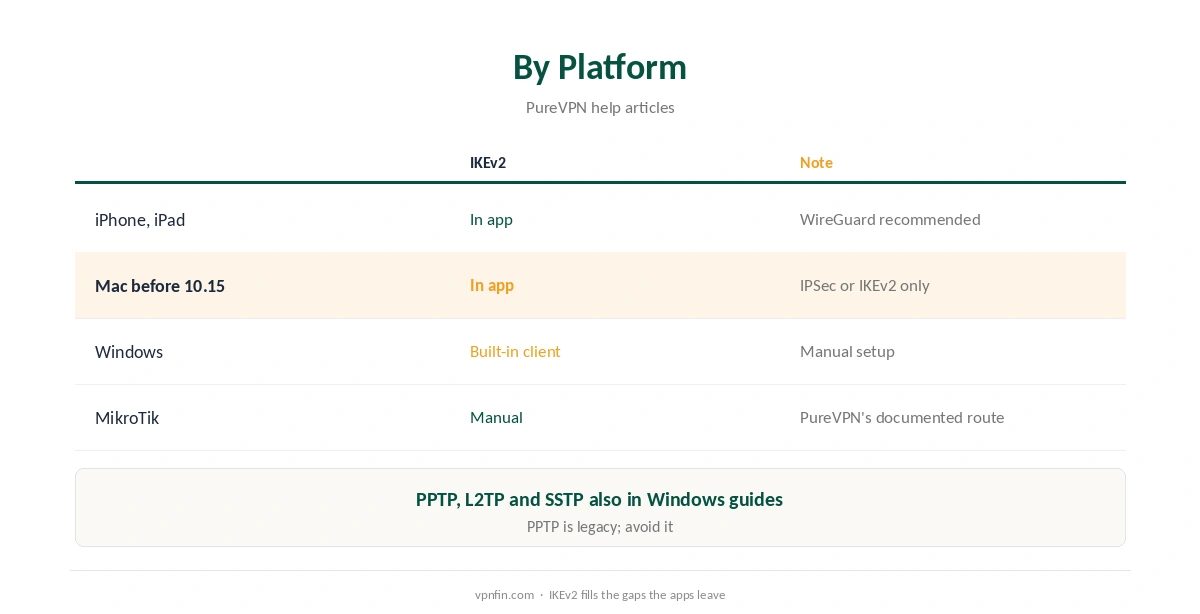
PureVPN IKEv2 is available in its iPhone app, on older Macs, and through manual setups. PureVPN’s help centre gives step-by-step guides for Windows’ built-in VPN client, and its MikroTik router guide uses IKEv2 rather than OpenVPN. On iOS, PureVPN recommends WireGuard but keeps IKEv2 among the options.
This guide covers where IKEv2 fits, the Windows manual steps, routers, and when to choose it over WireGuard.
Where PureVPN IKEv2 Is Available
PureVPN’s iPhone and iPad help lists IKEv2 alongside UDP, TCP and WireGuard. Macs older than macOS 10.15 get only IPSec and IKEv2 in the app, as our PureVPN Mac guide explains. On Windows, IKEv2 works through the system’s built-in client.
For routers, PureVPN’s MikroTik guide, updated in January 2026, uses IKEv2, as our PureVPN router guide shows.
Finding Your Manual Credentials
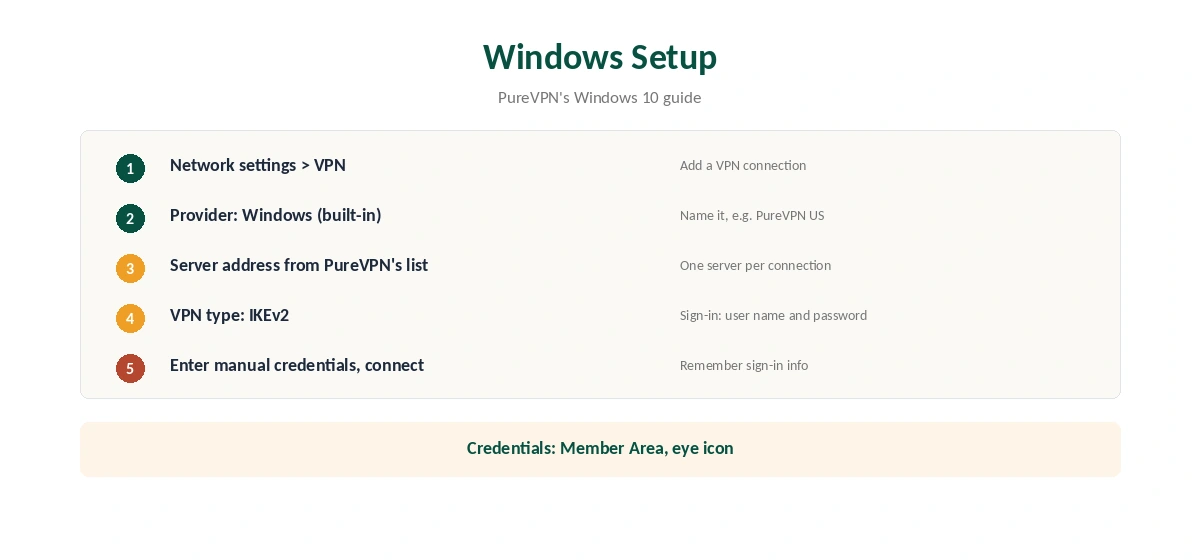
Every manual setup starts in the PureVPN Member Area. Log in with your email and password, note the VPN username shown there, and click the eye icon to reveal the VPN password, as PureVPN’s guides describe. Those manual credentials go into the device, not your email address.
PureVPN IKEv2 Setup on Windows
PureVPN’s Windows 10 guide gives the steps. Right-click the network icon, open Network settings, then VPN, and choose Add a VPN connection. Select Windows (built-in) as the provider, give the connection a name such as PureVPN US, and enter a server address from PureVPN’s server list.
Choose IKEv2 as the VPN type and User name and password as the sign-in type. Enter the manual credentials, tick Remember my sign-in info, and save. Then select the connection and click Connect. PureVPN’s Windows 11 guide, updated on 13 January 2026, follows the same pattern.
Why Choose IKEv2
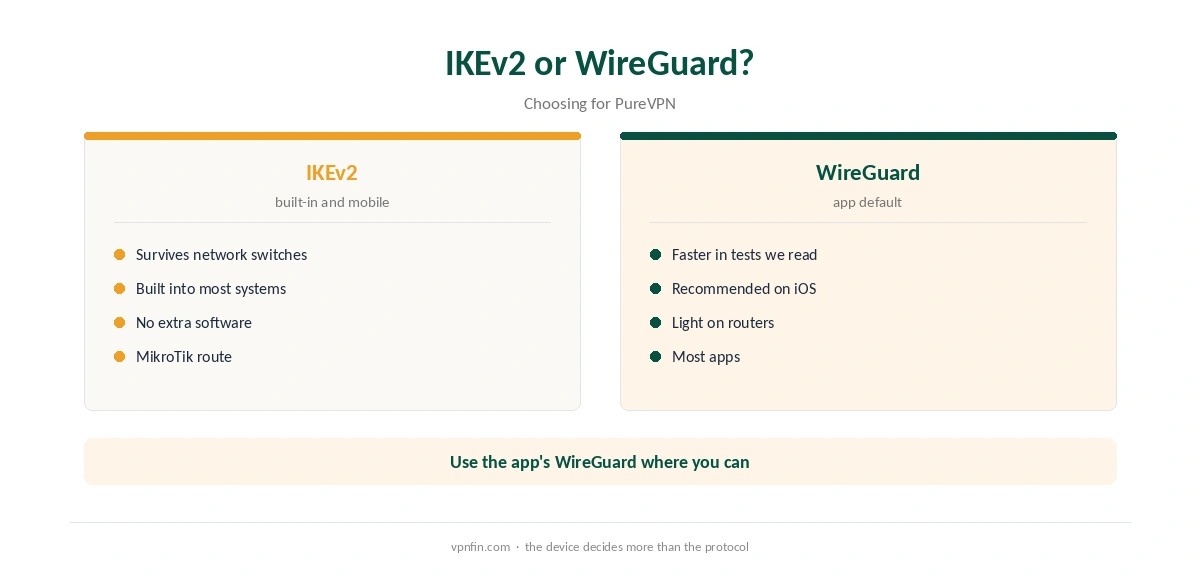
IKEv2 handles network changes well. Its MOBIKE extension keeps a session alive when a device moves between Wi-Fi and mobile data, as our IKEv2 vs WireGuard page explains. That suits phones and laptops on the move.
It is also built into Windows, macOS, iOS and ChromeOS, so a manual setup needs no extra software. That makes it useful on work computers where installing apps is not allowed.
When WireGuard Is Better
WireGuard is faster in the comparisons we have read, and PureVPN recommends it on iOS. Use WireGuard wherever the app offers it, as our PureVPN WireGuard guide explains, and keep IKEv2 for built-in clients, older Macs and MikroTik routers.
What a Manual Setup Gives Up
A Windows built-in IKEv2 connection lacks the PureVPN app’s kill switch, split tunnelling and server list. If the connection drops, traffic falls back to your normal connection, as our kill switch guide explains.
Each manual connection also points to one server. To change location, add another connection with a different server address, or use the app.
PureVPN IKEv2 on iPhone
In the iPhone app, open More, then VPN, Advanced and Connection Protocol, and choose IKEv2, as our PureVPN iPhone guide explains. PureVPN recommends WireGuard on iOS, so keep IKEv2 for networks where WireGuard struggles, or for travel days with constant switching between Wi-Fi and mobile data. Switch back to WireGuard at home, where the network stays the same and speed matters more than resilience.
IKEv2 on Restrictive Networks
IKEv2 uses fixed ports that some firewalls block, so it is not the protocol for heavily filtered networks. There, OpenVPN over TCP is the better fallback, as our PureVPN OpenVPN guide explains. Our WireGuard vs OpenVPN page covers the third option.
Several Locations on Windows
Each built-in connection points to a single server address. To switch countries quickly, create one connection per location, named by country, such as PureVPN US and PureVPN UK. Windows lists them all in the VPN menu, so changing location takes two clicks. Delete old connections you no longer use.
Other Built-In Protocols
PureVPN’s Windows 11 guide also covers PPTP, L2TP and SSTP through the built-in client. PPTP is a legacy protocol with known weaknesses, so avoid it unless nothing else connects. IKEv2 is the strongest of the built-in options.
What PureVPN Costs
On 5 October 2026, PureVPN’s order page listed the Standard 2-year plan at $58.20 for the first 27 months, renewing at $47.95 a year. A separate deals page showed $58.05 for the same term with a $54.95 renewal. The page you buy from changes the renewal by seven dollars a year, so check the renewal line at checkout.
One plan covers 10 devices, and PureVPN offers a 31-day money-back guarantee, as our PureVPN refund guide explains.
| Provider | Renewal price | Per month | Tier |
|---|---|---|---|
| NordVPN | $139.08/yr | ~$11.59 | Basic |
| Surfshark | ~$79/yr | ~$6.58 | Starter |
| ExpressVPN | $99.95/yr | ~$8.33 | Basic |
| CyberGhost | $56.94/yr | ~$4.75 | 2-year |
| PureVPN | $47.95/yr | ~$4.00 | Standard, 2-year (1-year renews $57.95) |
| IPVanish | $89.99/yr | ~$7.50 | Essential |
| Windscribe | ~$69/yr | ~$5.75 | Pro |
| Proton VPN | ~$83.88/yr | ~$6.99 | VPN Plus |
| Mullvad | ~$65/yr | ~$5.40 | flat, no tiers |
| Norton VPN | $79.99/yr | ~$6.67 | Standard |
| Hotspot Shield | ~$95.99/yr | ~$8.00 | Premium annual |
| Astrill | $300 every 2 yrs | ~$12.50 | 2-year, same at renewal |
Testing the Connection
After connecting, check your IP with our VPN test page and run a DNS test with our DNS leak guide. For NordVPN’s equivalent, see our NordVPN IKEv2 guide. PureVPN belongs to Gaditek, which absorbed Ivacy in 2024.
How We Research
This page draws on PureVPN’s manual setup guides for Windows 7, 8, 10 and 11, its MikroTik and iOS protocol articles, and PureVPN’s pricing pages. We cross-checked these sources against each other, and where they conflict or something can’t be verified, we say so in the text rather than guessing. We checked time-sensitive figures, including prices in US dollars, on 6 October 2026. PureVPN showed two price grids on different pages on 5 October 2026. The main source we relied on is PureVPN’s Windows IKEv2 guide. Our full approach lives on the About Us page.
PureVPN IKEv2 FAQ
Yes: in the iPhone app, on older Macs, and through manual setups on Windows and MikroTik routers.
The manual username and password from the Member Area, revealed with the eye icon.
Add a VPN connection, choose Windows (built-in), a server address, IKEv2 and your manual credentials.
Not in the comparisons we have read. IKEv2’s strength is handling network changes.
No. The app’s kill switch is not available on built-in connections.
The Verdict
PureVPN IKEv2 is the right choice for built-in clients, older Macs and MikroTik routers. Use the manual credentials, prefer WireGuard in the apps, and remember a manual setup has no kill switch.