
Disclosure: VPNFin is reader-supported. If you buy a VPN through links on this page, we may earn a commission at no extra cost to you. This never affects our ratings — here’s our full disclosure.
The PureVPN iPhone app keeps a protocol that CyberGhost and Proton VPN do not offer on iOS: OpenVPN, in both UDP and TCP form, next to WireGuard and IKEv2. That matters on hotel and campus networks that block newer protocols. On the other hand, the app has no split tunnelling, and its free trial bills through the App Store.
This guide covers setup, the four protocols, the trial trap and the iOS settings that stop a VPN from connecting.
Is PureVPN Good on iPhone?
For protocol choice, yes. PureVPN’s iOS support article, updated in January 2026, lists WireGuard as the recommended option, plus UDP, TCP and IKEv2. A Connect to Fallback switch tries the next option when one fails. However, PureVPN offers split tunnelling only on Windows, Android, Android TV and Firestick, so the iPhone sends everything through the tunnel.
How to Set Up PureVPN on iPhone
First, open the App Store, search for PureVPN and install the first result. Then open the app and sign in, or start a trial. Next, iOS asks you to allow a VPN configuration; approve it with Face ID or your passcode.
After that, tap Connect or pick a location. PureVPN’s iOS guide also describes shortcuts in the location list, which open a chosen streaming app straight from PureVPN. Finally, confirm the new address on our VPN test page.
The Four PureVPN iPhone Protocols
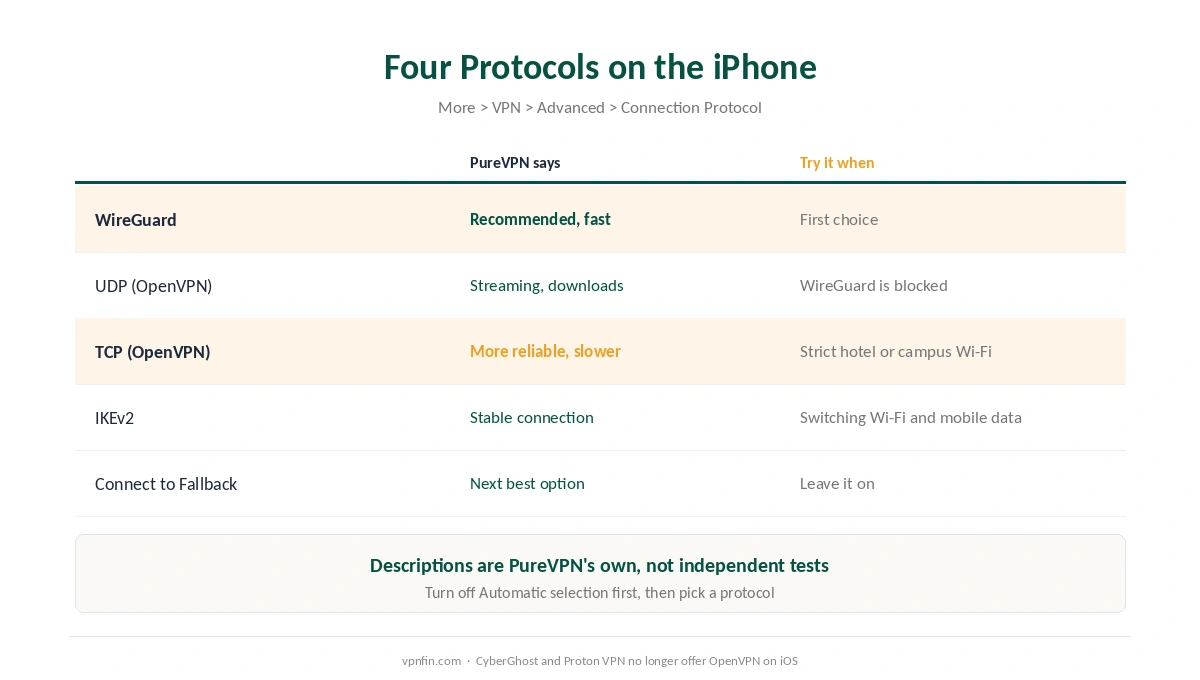
To change protocol, tap the More icon, then VPN, then Advanced, then Connection Protocol. Turn off automatic selection and pick one. PureVPN describes each option briefly: WireGuard for browsing and streaming, UDP for streaming and downloads, TCP for reliability, and IKEv2 for a stable connection.
Those labels are PureVPN’s own, not test results. In practice, start with WireGuard. If a network blocks it, try TCP, which uses OpenVPN and can pass firewalls that block other protocols. Our WireGuard vs OpenVPN page explains the difference.
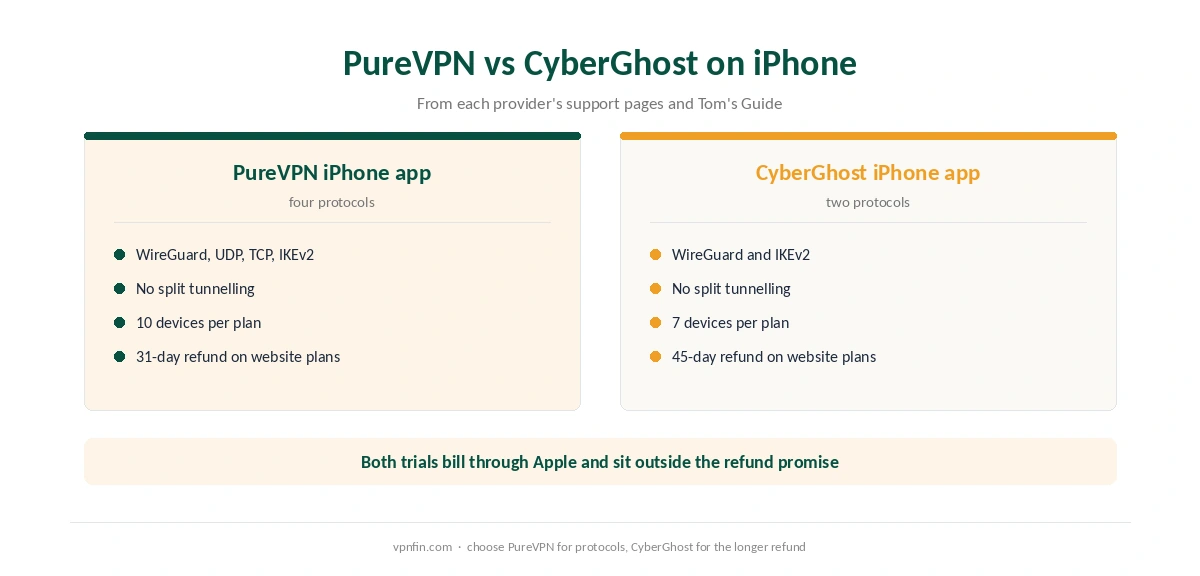
This is where PureVPN differs from CyberGhost. CyberGhost’s iPhone app offers only WireGuard and IKEv2, as our CyberGhost iPhone guide notes. Proton VPN also removed OpenVPN from its iOS app, as our Proton VPN iPhone guide explains.
The PureVPN iPhone Trial and Its Refund Catch
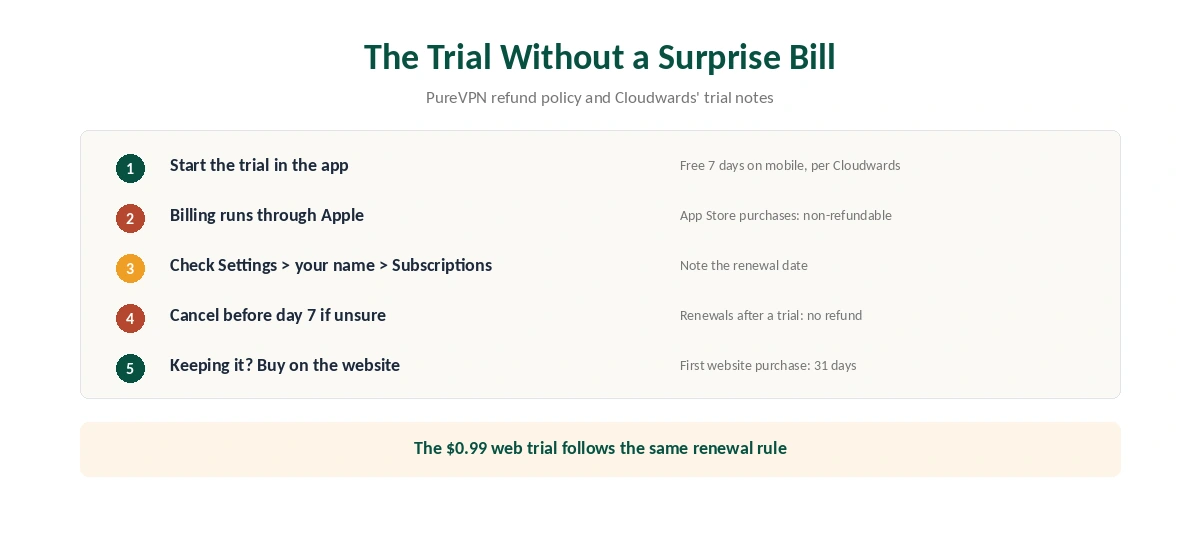
Cloudwards reports a free 7-day trial when you sign up on a phone. On the website, by contrast, PureVPN sells a 7-day trial for $0.99. Both roll into a paid plan unless you cancel.
The refund rules then bite twice. PureVPN’s policy marks App Store purchases as non-refundable, and it excludes renewals after a trial. So PureVPN will not refund a trial that you started in the app and left running. To cancel, open Settings, tap your name, then Subscriptions, before day 7.
If you want the 31-day guarantee, buy on PureVPN’s website and sign in on the phone. Our PureVPN refund guide explains the email request.
Why PureVPN Won’t Connect on iPhone
Start with iOS itself. iCloud Private Relay conflicts with any VPN, so turn it off with our Private Relay guide. Next, PureVPN’s iOS troubleshooting page suggests disabling Wi-Fi Assist, which can switch traffic to mobile data mid-connection.
Then change the protocol, as described above, and keep Connect to Fallback on. Also, remove spare VPN profiles under General, VPN and Device Management. If nothing works, PureVPN’s guide covers Reset Network Settings, which erases saved Wi-Fi passwords.
Our iPhone VPN troubleshooting page lists these checks in order, and turning the VPN off is the quickest way to test the app.
Manual Setup and Dedicated IP
PureVPN also documents manual iOS setups for IKEv2, OpenVPN, IPsec and L2TP, plus a proxy option. These help on managed phones where an employer restricts app installs. A dedicated IP is a paid add-on, and PureVPN has a separate guide for setting it up manually on iOS. Our dedicated IP guide explains when one helps.
What PureVPN Costs on iPhone
On 5 October 2026, the Standard 2-year plan cost $2.15 a month on PureVPN’s order page, billed $58.20 for 27 months. It renews at $47.95 a year. A separate deal page, however, showed $58.05 renewing at $54.95.
The monthly plan costs $12.95, and one plan covers 10 devices, so an iPhone, an iPad and a Mac share it with room to spare. Our PureVPN price breakdown compares every term.
| Provider | Renewal price | Per month | Tier |
|---|---|---|---|
| NordVPN | $139.08/yr | ~$11.59 | Basic |
| Surfshark | ~$79/yr | ~$6.58 | Starter |
| ExpressVPN | $99.95/yr | ~$8.33 | Basic |
| CyberGhost | $56.94/yr | ~$4.75 | 2-year |
| PureVPN | $47.95/yr | ~$4.00 | Standard, 2-year (1-year renews $57.95) |
| IPVanish | $89.99/yr | ~$7.50 | Essential |
| Windscribe | ~$69/yr | ~$5.75 | Pro |
| Proton VPN | ~$83.88/yr | ~$6.99 | VPN Plus |
| Mullvad | ~$65/yr | ~$5.40 | flat, no tiers |
| Norton VPN | $79.99/yr | ~$6.67 | Standard |
| Hotspot Shield | ~$95.99/yr | ~$8.00 | Premium annual |
| Astrill | $300 every 2 yrs | ~$12.50 | 2-year, same at renewal |
Who Should Use PureVPN on iPhone
PureVPN on iPhone suits travellers who meet restrictive Wi-Fi, since OpenVPN over TCP stays available. It also suits households with many devices. For public Wi-Fi, automatic protocol selection with a fallback keeps setup simple.
Who Should Pick Another App
Pick another app if you need split tunnelling on the phone. CyberGhost and Proton VPN lack it on iOS too, so read our split tunnelling guide first. Ownership matters too: PureVPN belongs to GZ Systems Limited, registered in the British Virgin Islands and part of the Gaditek group, which also absorbed Ivacy in 2024. Our iPhone VPN guide compares other options.
How We Research
This page draws on PureVPN’s iOS support articles, iOS troubleshooting page and refund policy. We also read Cloudwards’ trial notes. We cross-checked these sources against each other, and where they conflict or something can’t be verified, we say so in the text rather than guessing. We checked time-sensitive figures, including prices in US dollars, on 5 October 2026. PureVPN’s order page and its separate 2-year deal page showed different Standard prices that day. The main source we relied on is PureVPN’s iOS protocol guide. Our full approach lives on the About Us page.
PureVPN on iPhone FAQ
Yes. PureVPN’s iOS guide lists UDP and TCP alongside WireGuard and IKEv2. Turn off automatic selection under More, VPN, Advanced, Connection Protocol to choose one.
No. PureVPN offers split tunnelling on Windows, Android, Android TV and Firestick, according to its support pages.
Cloudwards reports a free 7-day trial on mobile. On the website, the trial costs $0.99. Both turn into a paid plan unless you cancel before day 7.
Not through PureVPN. Its policy marks App Store purchases as non-refundable and excludes renewals after a trial. Website purchases get 31 days.
Try turning off Wi-Fi Assist and iCloud Private Relay, then switch protocol with Connect to Fallback on. PureVPN’s iOS troubleshooting page covers these steps.
The Verdict
PureVPN on iPhone stands out for protocol choice, with OpenVPN still on board. It lacks split tunnelling, and the in-app trial sits outside PureVPN’s refund promise. Test briefly, cancel in time, then buy on the website. For a Mac, our PureVPN Mac guide covers that app.