
Disclosure: VPNFin is reader-supported. If you buy a VPN through links on this page, we may earn a commission at no extra cost to you. This never affects our ratings — here’s our full disclosure.
The PureVPN Mac app hides its two fastest protocols behind an extra step. WireGuard and UDP appear only on macOS 10.15 or later, and only after you install a protocol extension, according to PureVPN’s support article. Until then, the app runs on IPSec or IKEv2. Knowing that saves a puzzled first evening.
This guide covers setup, the protocol extension, what the Mac app lacks next to Windows, and the price after the first term.
Is PureVPN Good on Mac?
It is a flexible Mac VPN once set up. The app offers four protocols, automatic selection and a long list of manual setups for older Macs. However, PureVPN does not offer split tunnelling on macOS. So if you need one app outside the tunnel, the Mac version will not do it.
How to Set Up PureVPN on Mac
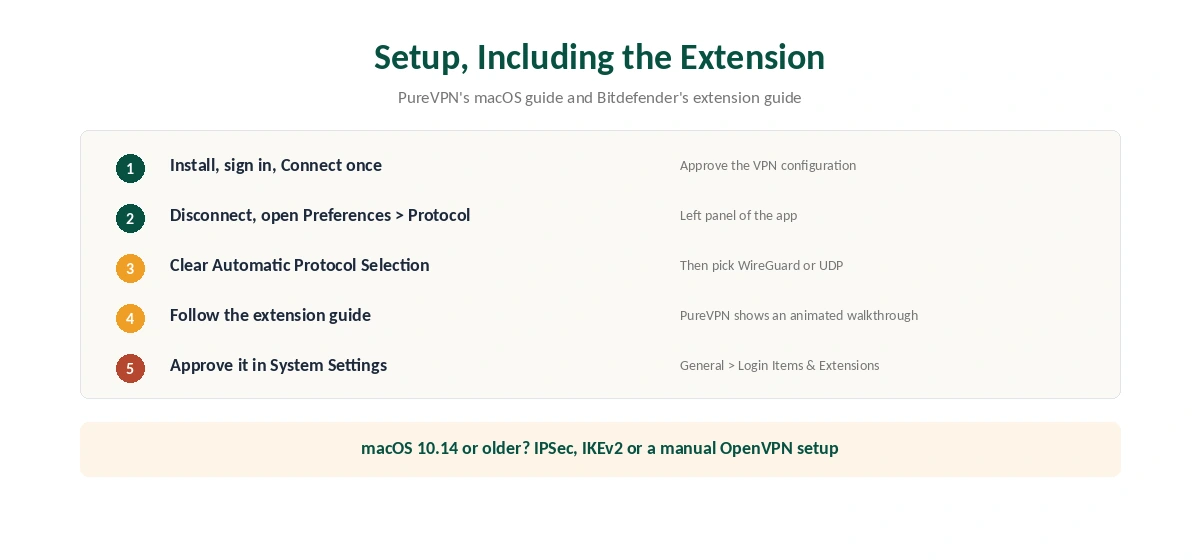
First, download the PureVPN app and open it. Then sign in with your account, or start the $0.99 7-day trial on the website. When you press Connect the first time, macOS asks to add a VPN configuration, so approve it.
Next, unlock the faster protocols. Disconnect, open Preferences in the left panel, then the Protocol tab. Clear the Automatic Protocol Selection box and pick WireGuard or UDP. The app then shows an animated guide for installing the protocol extension; follow it and approve the extension in System Settings.
On Sequoia and Tahoe, that switch lives under General, then Login Items and Extensions, then Network Extensions, according to Bitdefender’s support guide. Afterwards, connect again and check the result on our VPN test page.
The PureVPN Mac Protocols
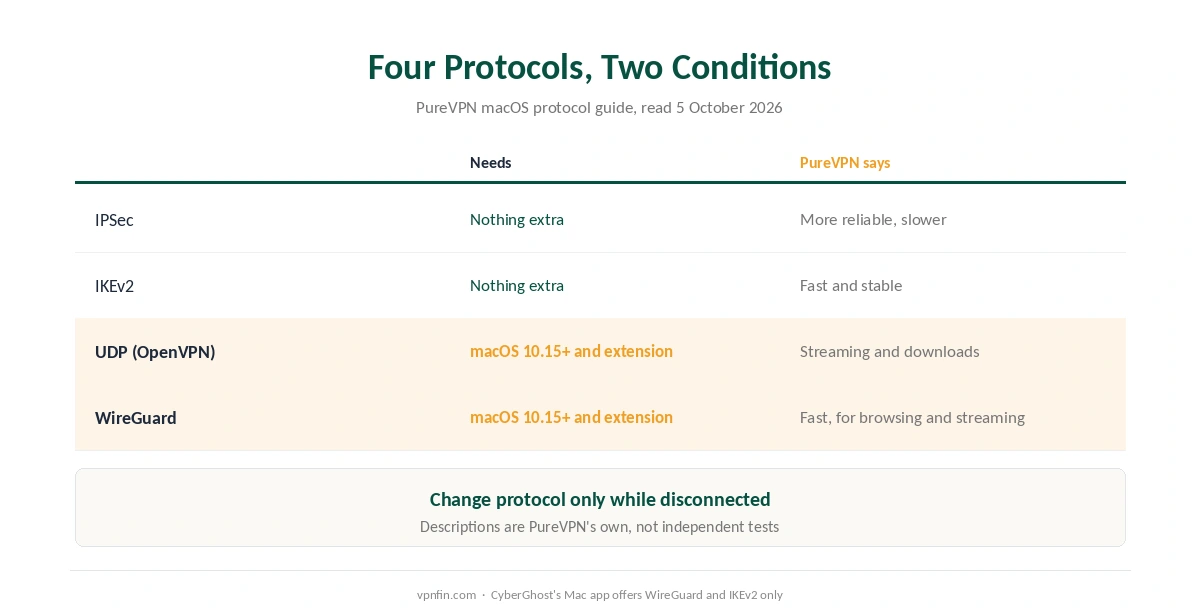
PureVPN’s macOS guide, updated in September 2025, lists four protocols. IPSec and IKEv2 work without extra software. UDP and WireGuard need macOS 10.15 or later plus the extension. PureVPN describes IPSec as more reliable but slower, and IKEv2 as fast and stable.
Those are PureVPN’s own descriptions, not test results. WireGuard is the usual first choice, and UDP, an OpenVPN mode, helps where a network blocks WireGuard. Our WireGuard vs OpenVPN page explains the trade-off. Unlike CyberGhost, whose Mac app offers only WireGuard and IKEv2, PureVPN keeps an OpenVPN option; our CyberGhost Mac guide covers that app.
For Macs that cannot run the app, PureVPN documents manual setups. These include OpenVPN through Tunnelblick, Viscosity or Shimo, as well as IPSec, L2TP, IKEv2 and WireGuard.
PureVPN Mac App vs the Windows App
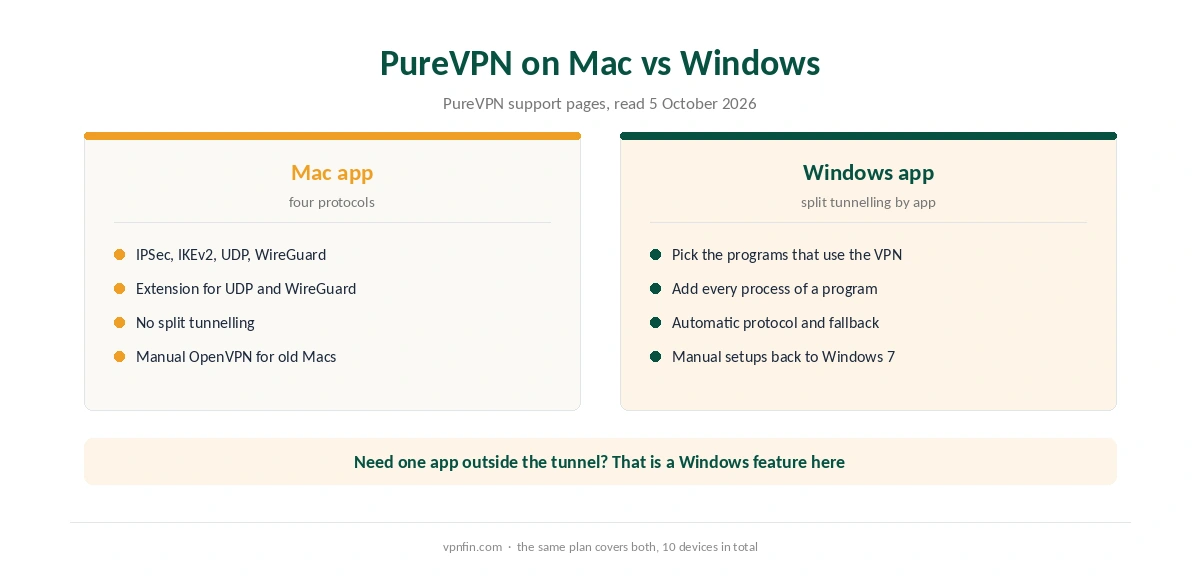
The biggest gap is split tunnelling. PureVPN’s support pages list it for Windows, Android, Android TV and Firestick, not macOS. On Windows, you pick the programs that use the tunnel, as our PureVPN Windows guide shows. On a Mac, every app shares the tunnel.
Both desktop apps offer automatic protocol selection. Our split tunnelling explainer covers why the feature is rarer on Apple systems.
PureVPN Mac Problems and Fixes
If WireGuard or UDP is missing from the list, check two things. First, the Mac must run macOS 10.15 or later. Second, you must install and approve the protocol extension. Without both, the app offers only IPSec and IKEv2.
If the app connects but sites fail, PureVPN’s support pages cover flushing the DNS cache and checking the macOS firewall. Also, remove leftover network filters from other apps under System Settings, Network, VPN and Filters. Our Mac VPN troubleshooting page lists these steps in order.
If you suspect a leak, run our DNS leak test. To rule the app out, turn the VPN off and compare.
What PureVPN Costs on a Mac
On 5 October 2026, PureVPN’s order page listed the Standard 2-year plan at $2.15 a month, billed $58.20 for 27 months. It then renews at $47.95 a year, about $4.00 a month. A separate deal page showed $58.05 renewing at $54.95, so check the renewal line before paying.
The 1-year plan costs $40.80 for 16 months, and the monthly plan $12.95. One plan covers 10 devices, so a MacBook and an iPhone share it easily; our PureVPN iPhone guide covers the phone. Our PureVPN price breakdown runs the longer totals.
| Provider | Renewal price | Per month | Tier |
|---|---|---|---|
| NordVPN | $139.08/yr | ~$11.59 | Basic |
| Surfshark | ~$79/yr | ~$6.58 | Starter |
| ExpressVPN | $99.95/yr | ~$8.33 | Basic |
| CyberGhost | $56.94/yr | ~$4.75 | 2-year |
| PureVPN | $47.95/yr | ~$4.00 | Standard, 2-year (1-year renews $57.95) |
| IPVanish | $89.99/yr | ~$7.50 | Essential |
| Windscribe | ~$69/yr | ~$5.75 | Pro |
| Proton VPN | ~$83.88/yr | ~$6.99 | VPN Plus |
| Mullvad | ~$65/yr | ~$5.40 | flat, no tiers |
| Norton VPN | $79.99/yr | ~$6.67 | Standard |
| Hotspot Shield | ~$95.99/yr | ~$8.00 | Premium annual |
| Astrill | $300 every 2 yrs | ~$12.50 | 2-year, same at renewal |
The Trial and the Refund Rules
PureVPN’s web trial costs $0.99 for 7 days and rolls into a paid plan. Its refund policy gives 31 days on first purchases, with renewals excluded, and that exclusion covers a plan that starts after a trial. App Store purchases are non-refundable as well. So cancel the trial in time, and buy on the website if you want the 31-day window. Our PureVPN trial guide lists the cancel steps.
Who Should Use PureVPN on Mac
PureVPN on Mac suits users who want OpenVPN as a fallback and manual setups for older machines. It also suits households with many devices, since a plan covers 10 of them.
Who Should Choose Another Mac VPN
Choose another app if you need split tunnelling on macOS. Our NordVPN Mac guide covers one alternative. Ownership matters too: PureVPN belongs to GZ Systems Limited, registered in the British Virgin Islands and part of the Gaditek group, which also absorbed Ivacy in 2024.
PureVPN does have an audit record. Our VPN audit tracker lists its four KPMG audits. For a broader comparison, see our Mac VPN guide.
How We Research
This page draws on PureVPN’s macOS support articles and refund policy, and Bitdefender’s macOS extension guide. We cross-checked these sources against each other, and where they conflict or something can’t be verified, we say so in the text rather than guessing. We checked time-sensitive figures, including prices in US dollars, on 5 October 2026. PureVPN’s order page and its separate 2-year deal page showed different Standard prices that day. The main source we relied on is PureVPN’s macOS protocol guide. Our full approach lives on the About Us page.
PureVPN on Mac FAQ
WireGuard and UDP need macOS 10.15 or later and a protocol extension. Disconnect, open Preferences, Protocol, clear Automatic Protocol Selection, then follow the extension guide.
No. PureVPN lists split tunnelling for Windows, Android, Android TV and Firestick only.
IPSec, IKEv2, UDP and WireGuard. The last two need macOS 10.15 or later and the protocol extension.
PureVPN documents manual setups, including OpenVPN through Tunnelblick or Viscosity. That route helps where the app or the extension will not install.
The $0.99 trial turns into a paid plan, and PureVPN excludes renewals after a trial from refunds. Cancel before day 7 if you are unsure.
The Verdict
On a Mac, PureVPN gives more protocol choice than CyberGhost’s Mac app once the extension is in place. The missing split tunnelling is the real limit, and the trial needs a timely cancel. Install the extension, buy on the website and the app should serve well.