
Disclosure: VPNFin is reader-supported. If you buy a VPN through links on this page, we may earn a commission at no extra cost to you. This never affects our ratings — here’s our full disclosure.
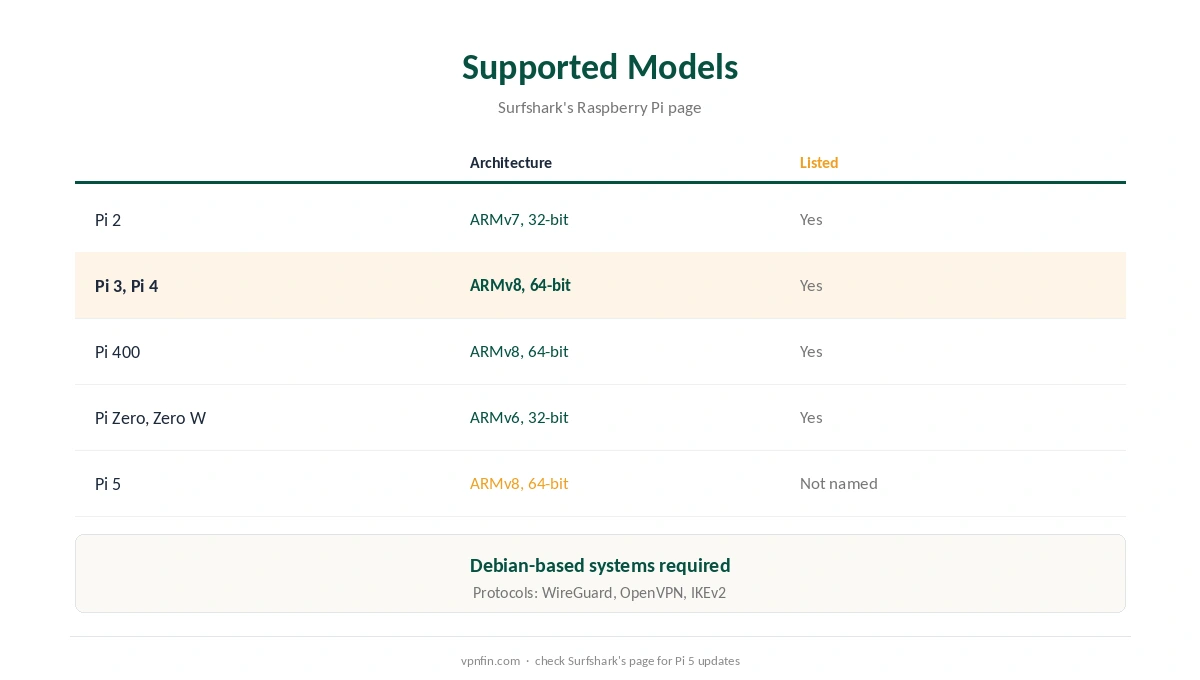
Raspberry Pi Surfshark setup is documented on Surfshark’s own site, with support guides for both WireGuard and OpenVPN. Surfshark’s Raspberry Pi page says manual setup works on Pi models running Debian-based systems, naming the Pi 2, 3, 4, Zero and Zero W, and Pi 400. WireGuard is the faster choice, and one command starts it at boot.
This guide covers the WireGuard steps, the OpenVPN fallback, supported models and keeping SSH access.
Supported Models
Surfshark’s page lists the Pi 2 on ARMv7, the Pi 3, 4 and 400 on 64-bit ARMv8, and the Pi Zero and Zero W on ARMv6. The Pi 5 is not named on that page. It runs the same Debian-based Raspberry Pi OS, so the same steps are likely to work, but check Surfshark’s page for updates.
Surfshark lists WireGuard, OpenVPN and IKEv2 among its protocols for the Pi.
Raspberry Pi Surfshark Setup With WireGuard
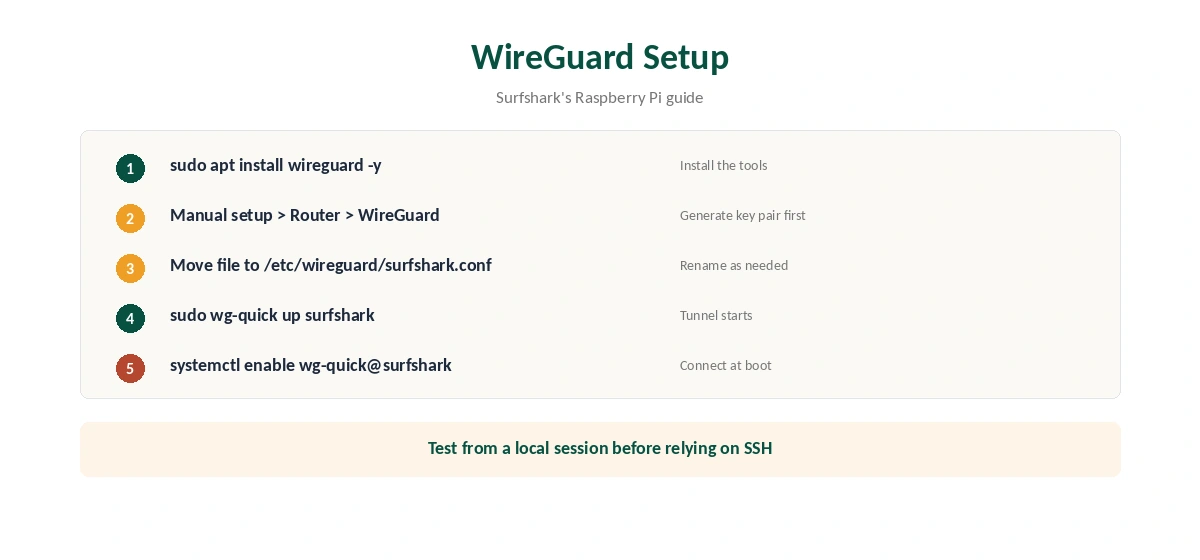
Surfshark’s WireGuard guide gives the steps. Install the tools with sudo apt install wireguard -y. Then log in on Surfshark’s website and open VPN, Manual setup, Router, WireGuard. Generate a key pair first, as our Surfshark WireGuard guide explains, then download a configuration file.
Move the file to /etc/wireguard/surfshark.conf. Start the tunnel with sudo wg-quick up surfshark and stop it with sudo wg-quick down surfshark. To connect at every boot, Surfshark’s guide enables the service with sudo systemctl enable wg-quick@surfshark.
OpenVPN as a Fallback
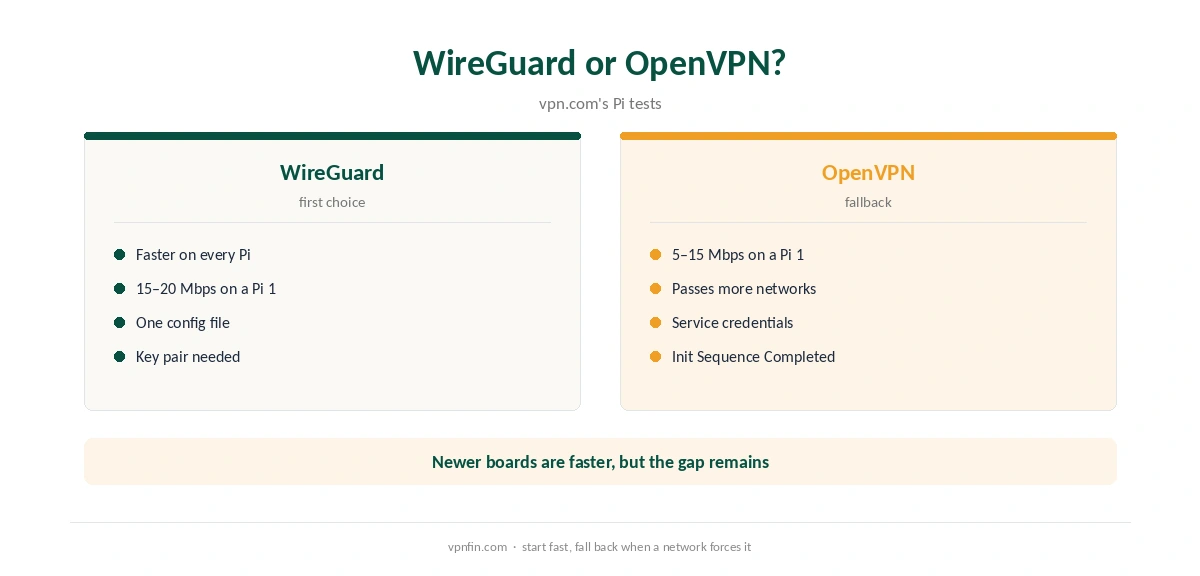
Surfshark’s OpenVPN guide for the Pi uses service credentials from the Credentials tab under VPN, Manual Setup, OpenVPN. Surfshark notes these are not your email and password. Install openvpn and unzip, change to /etc/openvpn, download Surfshark’s configuration files, and connect with sudo openvpn followed by a file name.
When you see Initialization Sequence Completed, the connection works. PiMyLifeUp adds that copying an .ovpn file to a .conf name in the same folder lets OpenVPN start it automatically. Our Surfshark OpenVPN guide covers the credentials.
WireGuard or OpenVPN on a Pi
Vpn.com reports that WireGuard outperforms OpenVPN on every Pi model. On an original Pi 1, it measured OpenVPN at 5 to 15 Mbps and WireGuard at 15 to 20 Mbps. Newer boards are faster, but the gap remains, so start with WireGuard.
Keep OpenVPN for networks that block WireGuard’s traffic. Our WireGuard vs OpenVPN page explains the trade-off.
Keeping SSH Access
If you manage the Pi over SSH, test the tunnel from a local session first. Bringing up a VPN can change routing and cut the SSH connection you are using. Keep a keyboard and screen nearby, or another way in, until the setup proves stable. Test a reboot with the boot service enabled before leaving the Pi unattended.
Client or Server?
The Surfshark setup makes the Pi a VPN client: its traffic leaves through Surfshark. Surfshark’s page notes that PiVPN turns a Pi into a VPN server instead, a different job explained in our Raspberry Pi VPN server guide. Surfshark has no port forwarding, so a Pi behind it cannot accept connections from outside.
Using the Pi as a Gateway
A Pi running Surfshark can route other devices through it, much like a VPN router, but that takes extra Linux networking work beyond Surfshark’s guides. For most homes, a router with a VPN client is simpler, as our Surfshark router guide explains.
Keeping the Setup Current
Keep the Pi’s packages current with the usual apt commands; WireGuard updates arrive through the system, not Surfshark. If a server stops responding, download a fresh configuration file for the same location. Your key pair can serve the new file, so there is no need to generate a new one.
On a desktop Linux machine, Surfshark’s own app is easier and keeps the kill switch, as our Surfshark Linux guide explains. For another provider’s Pi steps, see our PureVPN Raspberry Pi guide.
What Surfshark Costs
On 25 September 2026, the Starter 2-year plan cost $67.23 for the first 27 months. Renewal sits at about $79 a year, according to Security.org and VPNOverview. Surfshark sets no device limit, so a Raspberry Pi adds nothing to the count. Our Surfshark price breakdown covers the plans, and our Surfshark refund guide explains the 30-day window.
| Provider | Renewal price | Per month | Tier |
|---|---|---|---|
| NordVPN | $139.08/yr | ~$11.59 | Basic |
| Surfshark | ~$79/yr | ~$6.58 | Starter |
| ExpressVPN | $99.95/yr | ~$8.33 | Basic |
| CyberGhost | $56.94/yr | ~$4.75 | 2-year |
| PureVPN | $47.95/yr | ~$4.00 | Standard, 2-year (1-year renews $57.95) |
| IPVanish | $89.99/yr | ~$7.50 | Essential |
| Windscribe | ~$69/yr | ~$5.75 | Pro |
| Proton VPN | ~$83.88/yr | ~$6.99 | VPN Plus |
| Mullvad | ~$65/yr | ~$5.40 | flat, no tiers |
| Norton VPN | $79.99/yr | ~$6.67 | Standard |
| Hotspot Shield | ~$95.99/yr | ~$8.00 | Premium annual |
| Astrill | $300 every 2 yrs | ~$12.50 | 2-year, same at renewal |
Testing and Related Guides
After connecting, check the Pi’s public IP with a command-line request to an IP service, and compare it with our VPN test page. A manual tunnel has no app kill switch, as our kill switch guide explains.
Our Raspberry Pi VPN guide compares providers, and our NordVPN Raspberry Pi guide covers the sister brand’s Linux app. Surfshark belongs to Nord Security, which also owns NordVPN.
How We Research
This page draws on Surfshark’s Raspberry Pi page and its WireGuard and OpenVPN support guides, PiMyLifeUp’s guide, vpn.com’s Raspberry Pi tests and pricing from Surfshark, Security.org and VPNOverview. We cross-checked these sources against each other, and where they conflict or something can’t be verified, we say so in the text rather than guessing. We checked time-sensitive figures, including prices in US dollars, on 6 October 2026. Surfshark’s renewal table did not load, so renewal figures come from Security.org and VPNOverview. The main source we relied on is Surfshark’s Raspberry Pi WireGuard guide. Our full approach lives on the About Us page.
Raspberry Pi Surfshark FAQ
Yes, through manual WireGuard or OpenVPN setups that Surfshark documents.
Its page names the Pi 2, 3, 4, Zero, Zero W and 400 on Debian-based systems.
Run sudo systemctl enable wg-quick@surfshark, per Surfshark’s guide.
Service credentials from the Credentials tab, not your email and password.
Yes, on every model in vpn.com’s tests.
The Verdict
Raspberry Pi Surfshark setup is quick with WireGuard: install the tools, generate a key pair, move the file and run one command. Keep OpenVPN as a fallback, protect SSH access, and test a reboot before relying on it.