
Disclosure: VPNFin is reader-supported. If you buy a VPN through links on this page, we may earn a commission at no extra cost to you. This never affects our ratings — here’s our full disclosure.
Apple TV PureVPN setup used to need a VPN router, because tvOS had no VPN support. That changed when Apple added VPN support to tvOS, and PureVPN released a native Apple TV app soon after, TechRadar reports. The app recorded 859 downloads in its first 12 hours. Today you install it from the App Store on the Apple TV itself.
This guide covers the setup, what the app is good for, the older router route for earlier models, and the usual problems.
Before You Start
You need an Apple TV model that runs a tvOS version with VPN support; older models without it still need the router route covered below. You also need a PureVPN account, since the app does not sell plans on the TV.
PureVPN’s help centre lists a dedicated Apple TV section with setup articles, which is the place to check for the latest screens. The app shares the account with PureVPN’s other apps, so it counts as one of your 10 devices.
How to Install the Apple TV PureVPN App
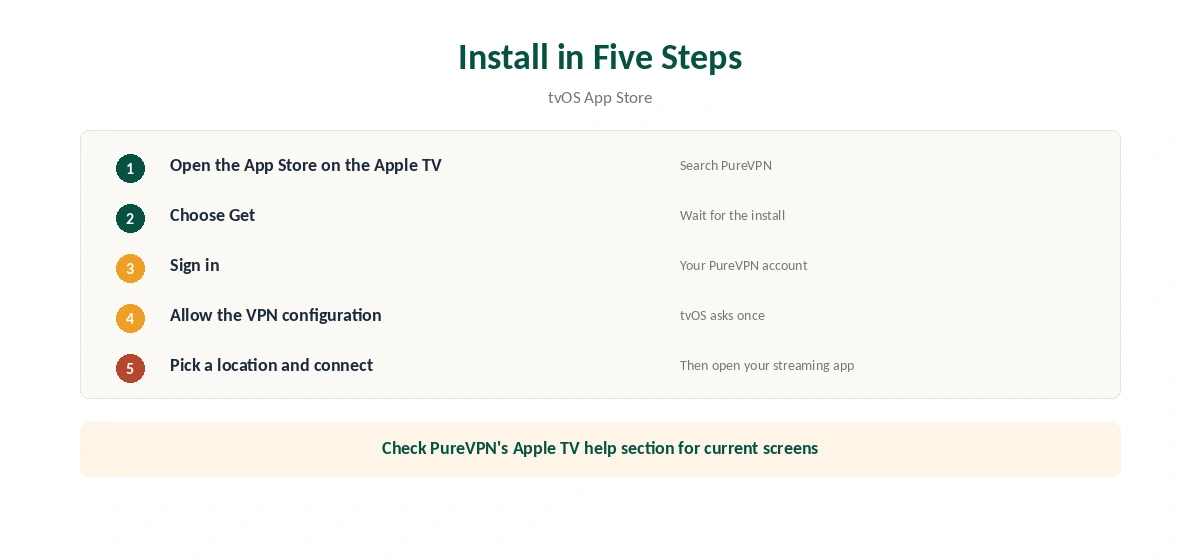
On the Apple TV, open the App Store and search for PureVPN. Select the app and choose Get. When it finishes, open the app and sign in with your PureVPN account.
tvOS then asks permission to add a VPN configuration; allow it. Pick a location from the list and connect. Once the status shows connected, open your streaming app and check the catalogue. TechRadar notes PureVPN designed the app to install and run without the workarounds earlier Apple TV users relied on.
What the Apple TV PureVPN App Is Good For
The main use is streaming while travelling: connect to your home country and your usual catalogue returns. A VPN also hides your viewing from the hotel or café network. Our Netflix VPN guide explains how streaming services treat VPN addresses.
A VPN cannot change your Apple ID region, payment country or a service’s account rules. Some services also block VPN servers they detect, so expect to switch locations sometimes. Our Apple TV VPN guide compares other providers’ apps.
Choosing a Location on Apple TV
Pick the location by what you want to watch. For your home catalogue while travelling, choose your home country. For speed, pick the nearest city inside that country rather than the first server on the list. A distant server adds delay, which shows up as slower start times and lower picture quality.
If one location stops working with a service, switch to another city in the same country before trying anything else. Streaming services block individual addresses, not whole countries, so a second city often works. Keep a note of the locations that work for the services you use most.
Remember that the VPN affects only the Apple TV. Phones casting to it, or AirPlay from a Mac, follow their own connection, so set the VPN on the device that actually fetches the stream.
Older Apple TV Models: The Router Route
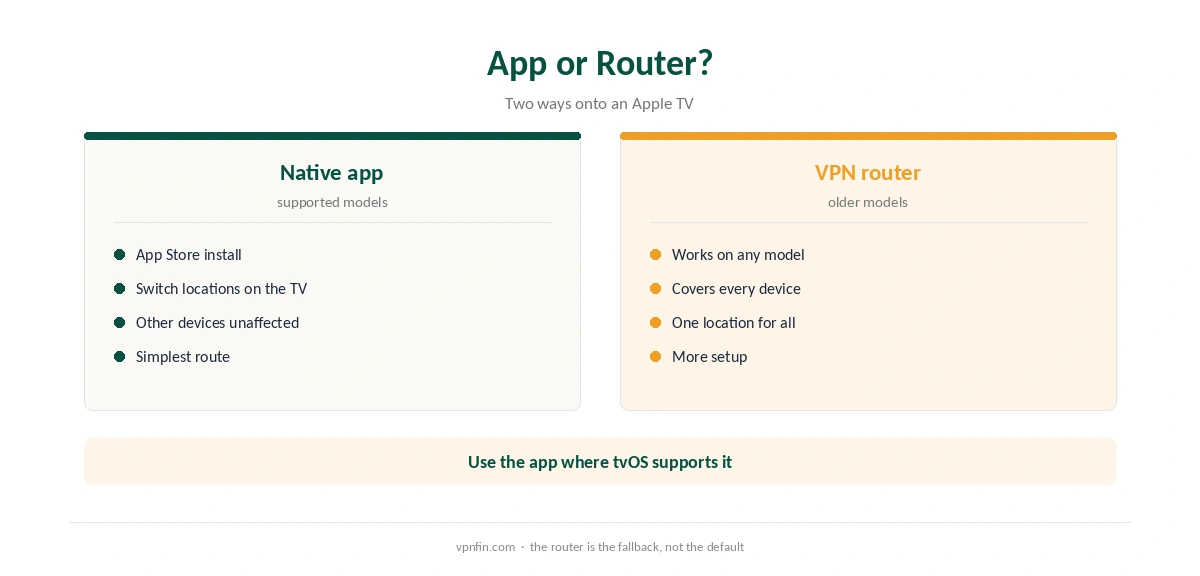
Models that cannot run the app still work through a VPN router. The router connects to PureVPN, and every device behind it, including the Apple TV, uses the tunnel. Our router setup guide explains which routers support OpenVPN or WireGuard.
The router route has a trade-off: everything on that network shares one location. Some people run a second router just for the TV to keep phones and laptops on their normal connection.
What PureVPN Costs
On 5 October 2026, PureVPN’s order page listed the Standard 2-year plan at $58.20 for the first 27 months, renewing at $47.95 a year. A separate deals page showed $58.05 for the same term but a $54.95 renewal, so the page you buy from changes the renewal by seven dollars a year. Check the renewal line at checkout.
PureVPN covers 10 devices on one plan and offers a 31-day money-back guarantee, as our PureVPN refund guide explains. The 7-day paid trial is covered in our PureVPN trial guide. For a TV used alongside phones and laptops, 10 devices is usually enough for one household.
| Provider | Renewal price | Per month | Tier |
|---|---|---|---|
| NordVPN | $139.08/yr | ~$11.59 | Basic |
| Surfshark | ~$79/yr | ~$6.58 | Starter |
| ExpressVPN | $99.95/yr | ~$8.33 | Basic |
| CyberGhost | $56.94/yr | ~$4.75 | 2-year |
| PureVPN | $47.95/yr | ~$4.00 | Standard, 2-year (1-year renews $57.95) |
| IPVanish | $89.99/yr | ~$7.50 | Essential |
| Windscribe | ~$69/yr | ~$5.75 | Pro |
| Proton VPN | ~$83.88/yr | ~$6.99 | VPN Plus |
| Mullvad | ~$65/yr | ~$5.40 | flat, no tiers |
| Norton VPN | $79.99/yr | ~$6.67 | Standard |
| Hotspot Shield | ~$95.99/yr | ~$8.00 | Premium annual |
| Astrill | $300 every 2 yrs | ~$12.50 | 2-year, same at renewal |
Troubleshooting the Apple TV App
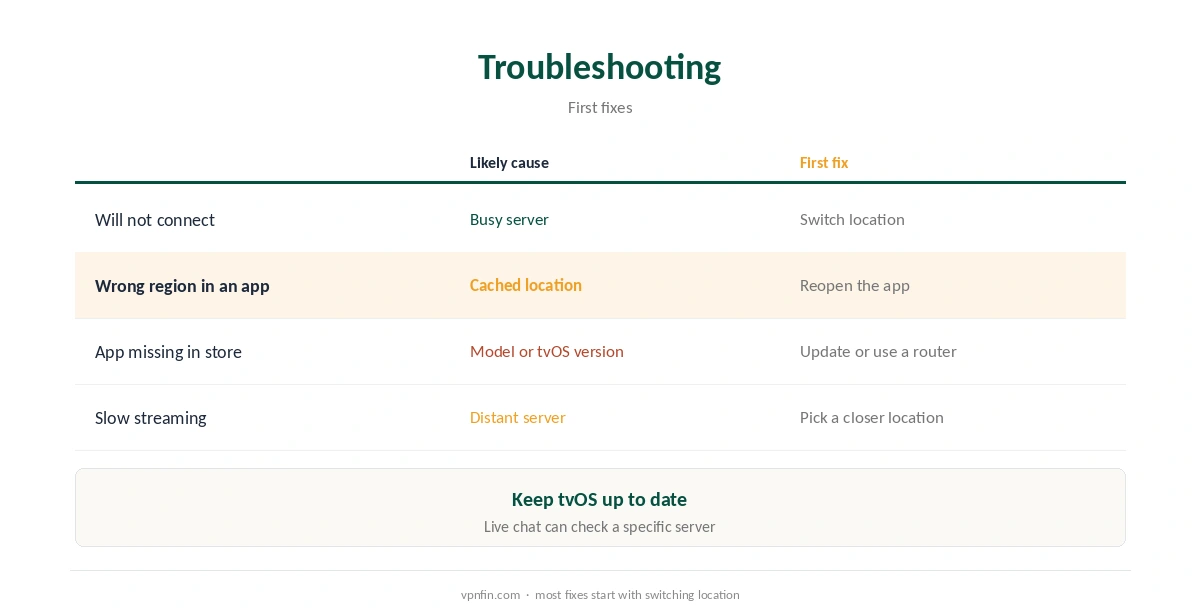
If the app will not connect, switch locations first, then restart the Apple TV. If a streaming app still shows the wrong region, close it fully and reopen it after the VPN connects, since apps can cache location. Make sure the tvOS software is current.
If problems persist, PureVPN’s live chat can check the server. Our VPN test page explains how to confirm a working tunnel from another device on the same network. Our DNS leak guide covers a second check worth running once.
Related Guides
NordVPN also has a native app, covered in our NordVPN Apple TV guide. For PureVPN on other screens, see our Firestick guide and Android TV guide. PureVPN belongs to Gaditek, which absorbed Ivacy in 2024.
On phones, our PureVPN iPhone guide covers the iOS app, which shares the same account. Our PureVPN review covers audits and features.
How We Research
This page draws on TechRadar’s report on PureVPN’s Apple TV launch, PureVPN’s help centre index and its pricing pages. We cross-checked these sources against each other, and where they conflict or something can’t be verified, we say so in the text rather than guessing. We checked time-sensitive figures, including prices in US dollars, on 5 October 2026. PureVPN showed two price grids on different pages that day. The main source we relied on is TechRadar’s report on the Apple TV app. Our full approach lives on the About Us page.
PureVPN on Apple TV FAQ
Yes. PureVPN released a native app after Apple added VPN support to tvOS, TechRadar reports. Install it from the App Store on the Apple TV.
Through a VPN router, since older models cannot run the app.
Yes. It is one of the 10 devices on a PureVPN plan.
No. A VPN changes your network location, not your Apple ID region or payment country.
It may have cached your location. Close it fully and reopen it after the VPN connects.
The Verdict
Apple TV PureVPN setup is now a simple App Store install on supported models. Use it to keep your home catalogue while travelling, and fall back on a VPN router for older Apple TVs.