
Disclosure: VPNFin is reader-supported. If you buy a VPN through links on this page, we may earn a commission at no extra cost to you. This never affects our ratings — here’s our full disclosure.
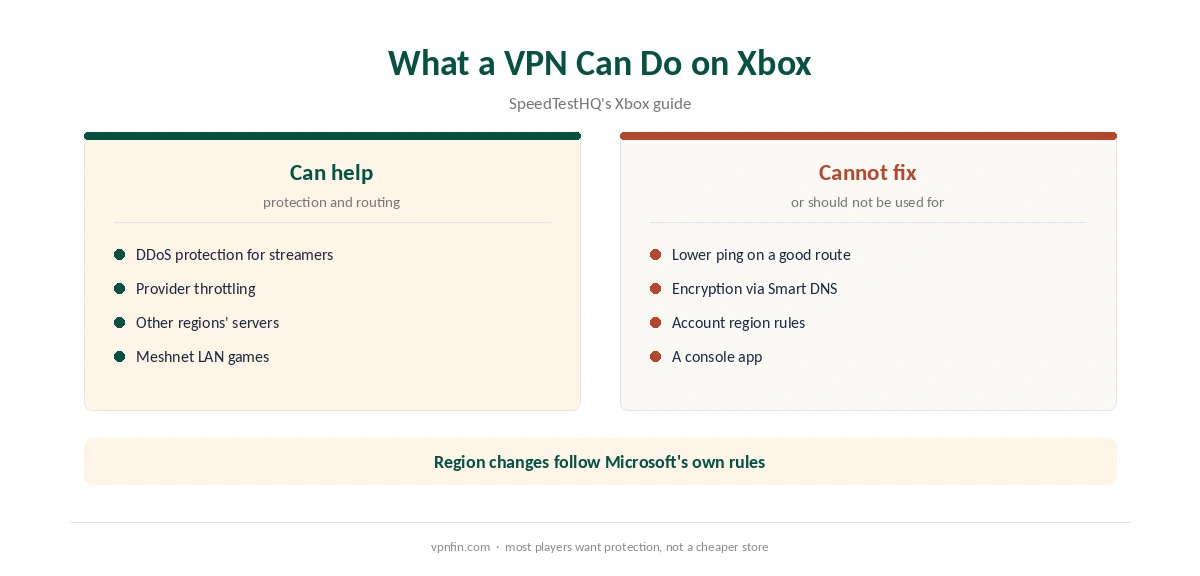
NordVPN for Xbox needs a workaround: Xbox Series X, Series S and Xbox One cannot install VPN apps, SpeedTestHQ notes, because Microsoft’s console system is closed. The routes are the same as on PlayStation, but Windows makes one of them easier, since a Windows PC can share its NordVPN connection with the console.
Why Xbox Players Use a VPN
SpeedTestHQ lists four reasons: DDoS protection for streamers, avoiding provider throttling of Xbox Live traffic, routing to servers in other regions, and regional Game Pass pricing. The first two are about protection and stability. The last can clash with Microsoft’s account rules, and changing an account’s region is a separate process.
SpeedTestHQ also states that using a VPN for performance or DDoS protection does not breach Xbox terms. Our Xbox VPN guide compares providers.
NordVPN for Xbox Through a Windows PC
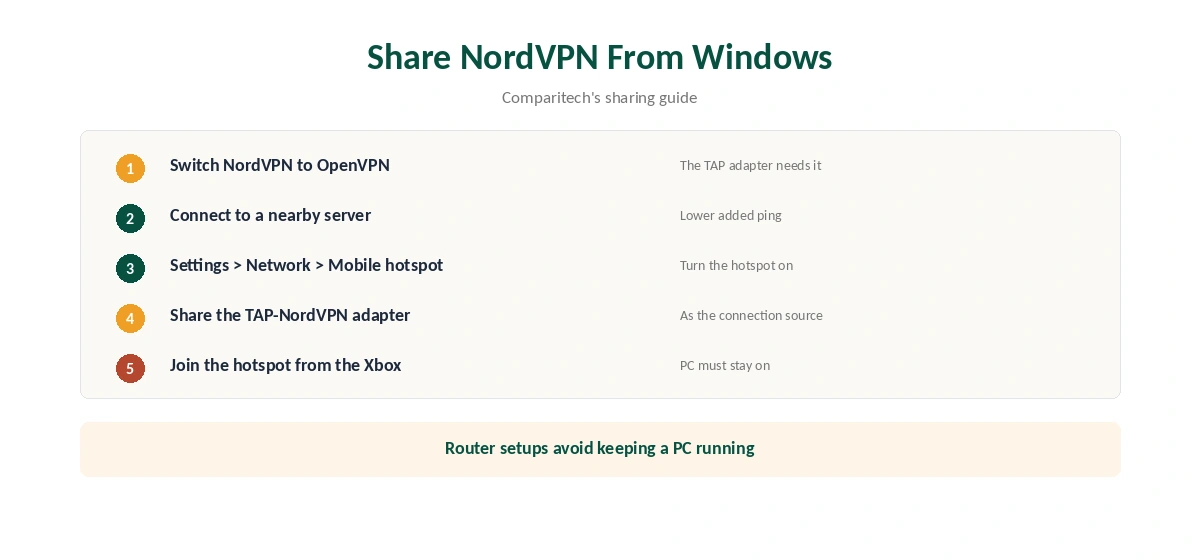
Comparitech describes the Windows route. Connect NordVPN on the PC, open Settings, Network and Internet, Mobile hotspot, and share the TAP-NordVPN adapter. That adapter belongs to OpenVPN, so switch NordVPN’s protocol to OpenVPN first. Then connect the Xbox to the PC’s hotspot.
The PC must stay on while you play. Our NordVPN Windows guide shows the protocol setting.
Router or Smart DNS
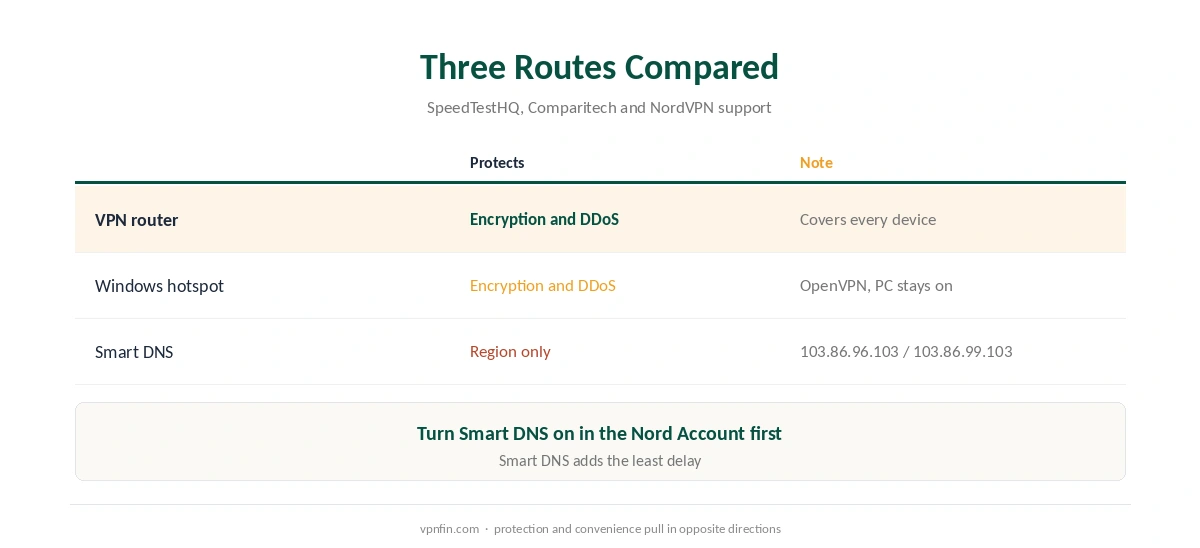
A VPN router covers the Xbox and everything else at home, and keeps NordLynx available for lower overhead. Our NordVPN router guide explains the setup.
Smart DNS changes the console’s DNS to NordVPN’s addresses, 103.86.96.103 and 103.86.99.103, after you turn it on in the Nord Account. It gives no encryption or DDoS protection, and SpeedTestHQ calls it less reliable for Game Pass than a full VPN. Our Smart DNS vs VPN page explains why.
Ping and Meshnet
A VPN usually adds 5 to 20 ms of ping, SpeedTestHQ notes, so choose the nearest server. Meshnet, NordVPN’s free private network, lets friends play LAN-style games while masking each other’s real IPs, according to SpeedTestHQ. It runs on the PC or router, not the console.
Our NordVPN gaming guide covers ping in depth, and our NordVPN PS5 guide covers the PlayStation side.
Testing NordVPN for Xbox
Measure ping in-game with and without the VPN. If matches drop, our disconnection guide helps. Our refund guide explains the 30-day window for testing. NordVPN belongs to Nord Security, which also owns Surfshark.
More on NordVPN for Xbox Setups
NordVPN for Xbox through a router keeps the console covered even when the PC is off. Our router setup guide explains router compatibility, and our IKEv2 vs WireGuard page explains why WireGuard suits routers.
Leak tests still matter on a shared connection; our DNS leak guide shows the test. Streaming on the console follows our NordVPN streaming hub.
Ping on Xbox
SpeedTestHQ notes a VPN usually adds 5 to 20 ms of ping. Security.org measured 43 ms on a console in its test. Choose the closest server and measure in-game before relying on the setup for ranked play.
If the increase is too large, leave the Xbox outside the VPN and protect other devices instead. A guest network without the VPN on the same router makes that easy.
Game Pass and Account Region
SpeedTestHQ lists regional Game Pass pricing as one reason players use a VPN, and calls Smart DNS less reliable for it. Microsoft’s own rules govern account region and payments. A VPN does not change your account country, and region changes follow Microsoft’s process.
We do not recommend using a VPN to bend store pricing, since the account risk falls on you.
Meshnet for Xbox Players
Meshnet links devices into a private network and masks each player’s real IP, SpeedTestHQ notes. It runs on a PC or router rather than the console. Friends can play LAN-style games through a PC running Meshnet. Our NordVPN Meshnet guide covers the setup.
Testing the Windows Hotspot
After sharing the connection from Windows, check the Xbox’s network test in its settings. Then confirm the public IP from a phone on the same hotspot with our VPN test page. If it shows a NordVPN address, the Xbox uses the tunnel.
Streaming Apps on Xbox
Xbox consoles also run streaming apps. Through a router or hotspot with NordVPN, those apps see the server’s country. Close an app fully and reopen it after changing servers, since console apps cache location. Our NordVPN streaming hub explains each service’s rules, and our Xbox VPN guide compares providers.
Whichever route you use, test it before an important session. A short check prevents a lost match or a party chat that will not connect. Our guide to NordVPN for Warzone covers DDoS protection, and why lobby tricks are at your own risk.
How We Research
This page draws on SpeedTestHQ’s Xbox and gaming guides, Comparitech’s guide to sharing a NordVPN connection, and NordVPN’s Smart DNS support. We cross-checked these sources against each other, and where they conflict or something can’t be verified, we say so in the text rather than guessing. We read every source on 5 October 2026. The main source we relied on is SpeedTestHQ’s Xbox VPN guide. Our full approach lives on the About Us page. Our page on TunnelBear on Xbox covers sharing a PC connection and the gaming trade-offs.
NordVPN on Xbox FAQ
No. Xbox consoles do not support VPN apps. Use a router, a shared Windows PC or Smart DNS.
Switch NordVPN to OpenVPN, then share the TAP-NordVPN adapter through Windows Mobile hotspot.
No. It changes your region but gives no encryption or DDoS protection.
SpeedTestHQ says using one for performance or DDoS protection does not breach Xbox terms. Region changes follow Microsoft’s own rules.
Usually not; a VPN typically adds 5 to 20 ms. It helps only against throttling or DDoS.
The Verdict
NordVPN for Xbox works best through a router, with a shared Windows PC as the quick alternative. Smart DNS is simplest but protects nothing. Choose by what you need the VPN for.