
Disclosure: VPNFin is reader-supported. If you buy a VPN through links on this page, we may earn a commission at no extra cost to you. This never affects our ratings — here’s our full disclosure.
Kodi PureVPN use works the same way as with any VPN: Kodi has no VPN of its own, so you install PureVPN on the device that runs Kodi. That might be a Fire TV Stick, an Android TV box, a Windows PC or a Mac. Once PureVPN connects, every Kodi add-on uses the tunnel.
This guide covers each device, the Fire TV setup in detail, split tunnelling, and the legal line Kodi users should keep in mind.
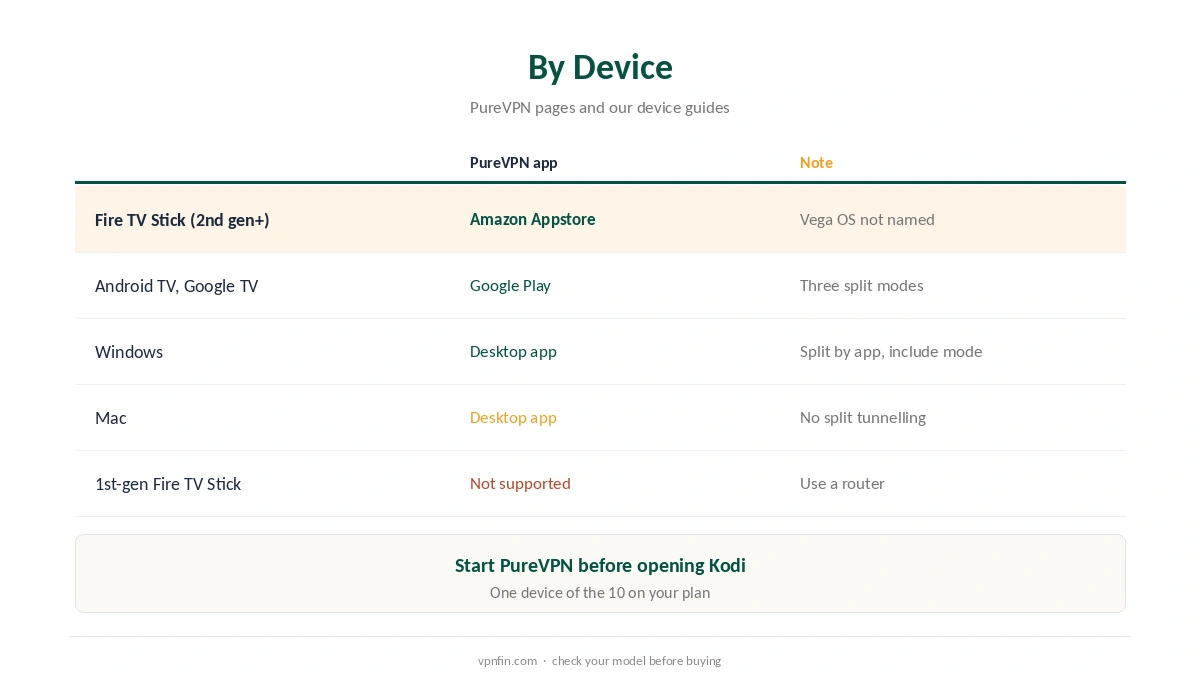
Kodi PureVPN by Device
On a Fire TV Stick, PureVPN’s own page lists the 2nd-generation Stick, the 4K, the 4K Max and the Fire TV Cube; the 1st-generation Stick is not supported, and Vega OS models are not named. Our PureVPN Firestick guide covers the details.
On Android TV and Google TV boxes, the PureVPN app installs from Google Play, as our PureVPN Android TV guide explains. Sign-in uses a six-digit code shown on the TV.
On computers, run the desktop app before opening Kodi. Our Windows guide and Mac guide show the apps. The Mac app has no split tunnelling, so Kodi and everything else share the tunnel there.
Setting Up Kodi PureVPN on a Fire TV Stick
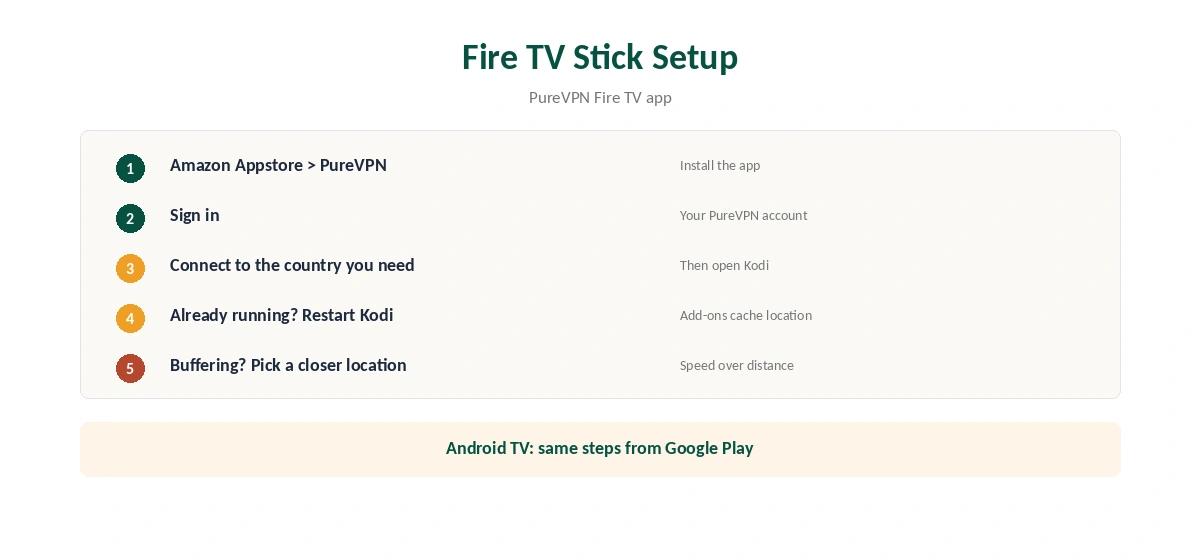
Install PureVPN from the Amazon Appstore, sign in, and connect to the country whose content you need. Then open Kodi. Its add-ons now reach the internet through PureVPN.
If Kodi was already running, close it fully and reopen it, since some add-ons cache location or connections. If a stream buffers, switch to a closer PureVPN location.
Split Tunnelling for Kodi
PureVPN’s Android TV app offers three split tunnelling modes, as our Android TV guide notes. That lets you send Kodi through the VPN while a local streaming app uses your normal connection. Our split tunnelling guide explains the modes.
On Windows, PureVPN’s split tunnelling works by app in include mode, as our Windows guide explains, so you can choose Kodi as the one app that uses the tunnel.
Choosing a PureVPN Location for Kodi
Kodi itself does not care where you connect; the add-ons and the services behind them do. For a service tied to your home country, connect there. For general privacy, the nearest location gives the best speed.
Live streams are the most sensitive to distance. If a live add-on stutters while on-demand video plays fine, the server is probably too far away or too busy, so try a closer city. Switching protocol to WireGuard in the PureVPN app is also worth testing, since protocols perform differently on each network.
Keep Kodi and its add-ons updated as well. Outdated add-ons can cause playback errors that look like VPN problems.
Unsupported Devices: The Router Route
A 1st-generation Fire TV Stick cannot run PureVPN, and some Kodi boxes run systems with no VPN app at all. For those, a VPN router is the answer: the router connects to PureVPN, and the Kodi box behind it uses the tunnel without any app.
The trade-off is that every device on that router shares one location. Our router setup guide explains which routers support OpenVPN or WireGuard, and how to keep phones and laptops on a separate network if you need to.
Kodi Add-Ons and the Law
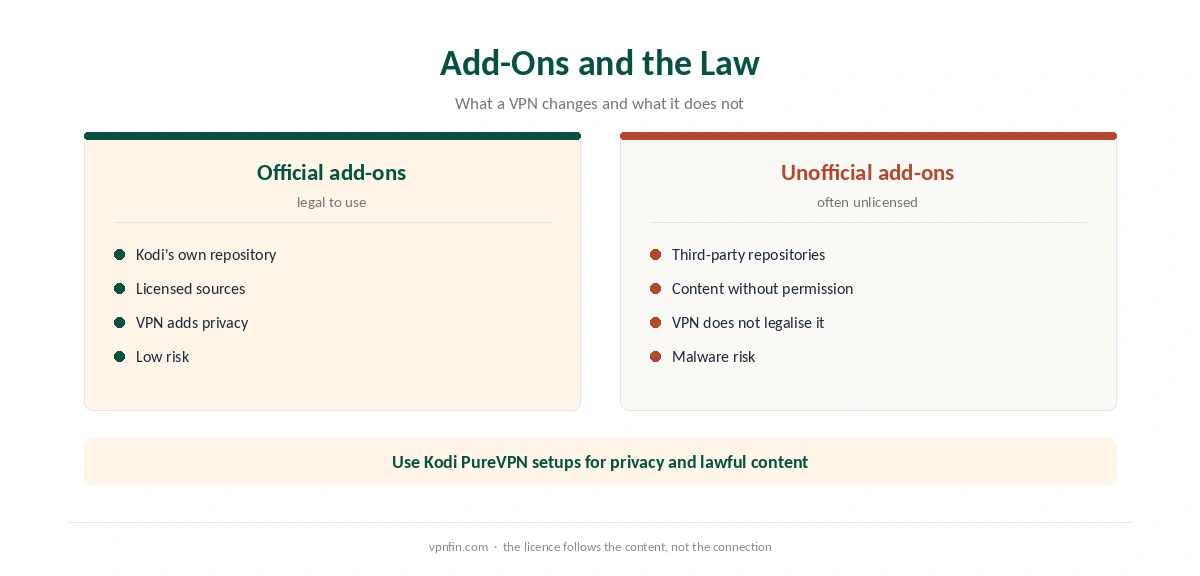
Kodi itself is legal, and so are its official add-ons from the Kodi repository. Some unofficial add-ons stream content without the rights holder’s permission, and a VPN does not make that legal. Use Kodi PureVPN setups for privacy and for services you have the right to watch.
Unofficial repositories also carry a malware risk, so stick to trusted sources. Our Kodi VPN guide covers other providers, and our NordVPN Kodi guide shows the same approach with another service.
What PureVPN Costs
On 5 October 2026, PureVPN’s order page listed the Standard 2-year plan at $58.20 for the first 27 months, renewing at $47.95 a year. A separate deals page showed $58.05 for the same term but a $54.95 renewal, so the page you buy from changes the renewal by seven dollars a year. Check the renewal line at checkout.
PureVPN covers 10 devices on one plan and offers a 31-day money-back guarantee, as our PureVPN refund guide explains. The 7-day paid trial is covered in our PureVPN trial guide. For a Kodi box used alongside phones and laptops, 10 devices is usually enough for one household.
| Provider | Renewal price | Per month | Tier |
|---|---|---|---|
| NordVPN | $139.08/yr | ~$11.59 | Basic |
| Surfshark | ~$79/yr | ~$6.58 | Starter |
| ExpressVPN | $99.95/yr | ~$8.33 | Basic |
| CyberGhost | $56.94/yr | ~$4.75 | 2-year |
| PureVPN | $47.95/yr | ~$4.00 | Standard, 2-year (1-year renews $57.95) |
| IPVanish | $89.99/yr | ~$7.50 | Essential |
| Windscribe | ~$69/yr | ~$5.75 | Pro |
| Proton VPN | ~$83.88/yr | ~$6.99 | VPN Plus |
| Mullvad | ~$65/yr | ~$5.40 | flat, no tiers |
| Norton VPN | $79.99/yr | ~$6.67 | Standard |
| Hotspot Shield | ~$95.99/yr | ~$8.00 | Premium annual |
| Astrill | $300 every 2 yrs | ~$12.50 | 2-year, same at renewal |
Checks and Fixes
After connecting, confirm the tunnel with our VPN test page from a browser on the same device. Our DNS leak guide covers one more test.
If PureVPN drops while Kodi streams, enable the kill switch where the app offers it; our kill switch guide explains why. PureVPN belongs to Gaditek, which absorbed Ivacy in 2024.
How We Research
This page draws on our PureVPN device research for Fire TV, Android TV and Windows, and PureVPN’s pricing pages. We cross-checked these sources against each other, and where they conflict or something can’t be verified, we say so in the text rather than guessing. We checked time-sensitive figures, including prices in US dollars, on 5 October 2026. PureVPN showed two price grids on different pages that day. The main source we relied on is PureVPN’s Fire TV page. Our full approach lives on the About Us page.
PureVPN on Kodi FAQ
You do not need one. Install PureVPN on the device that runs Kodi, and every add-on uses the tunnel.
The 2nd-generation Stick, 4K, 4K Max and Fire TV Cube, according to PureVPN. Vega OS models are not named.
Yes, with split tunnelling on Android TV, or include mode on Windows.
Kodi and its official add-ons are legal. A VPN does not make unlicensed streams legal.
An add-on may have cached it. Close Kodi fully and reopen it after PureVPN connects.
The Verdict
Kodi PureVPN setup means installing the VPN on the device beneath Kodi. Use split tunnelling for local services, check your Fire TV model, and stick to content you have the right to watch. Test it inside the 31-day refund window on the device you actually use.