
Disclosure: VPNFin is reader-supported. If you buy a VPN through links on this page, we may earn a commission at no extra cost to you. This never affects our ratings — here’s our full disclosure.
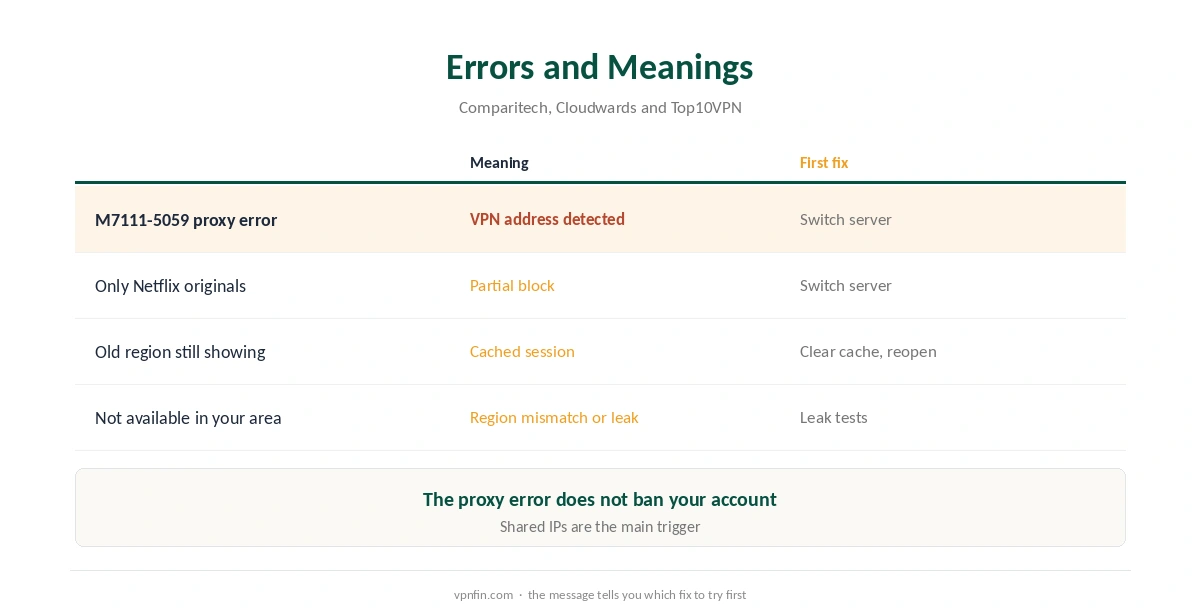
When PureVPN Netflix not working shows up as an error, it is almost always the same one: M7111-5059, with the message that you seem to be using an unblocker or proxy. Netflix detects and blocks IP addresses that many people share, which describes most VPN servers, Cloudwards explains. Your Netflix account is not banned for it, and the fixes are quick.
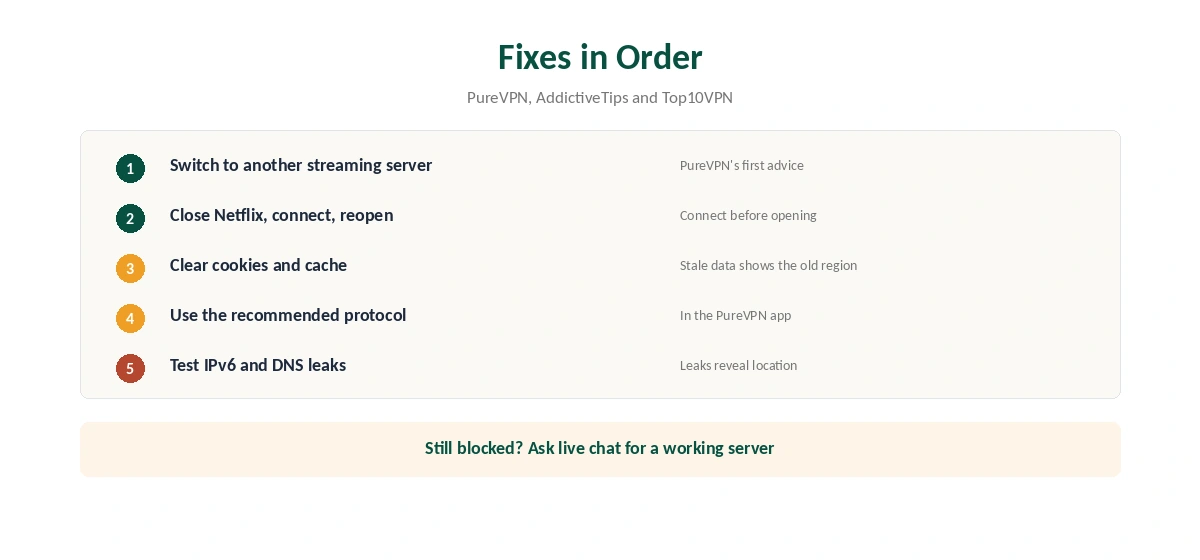
PureVPN’s own February 2026 guide gives its first answer: switch to another streaming-optimised server, and connect before you open Netflix. This page puts that and the other fixes in order.
Why PureVPN Netflix Not Working Happens
Netflix keeps lists of addresses known to belong to VPN servers. Because a VPN server carries many users on one address, it looks unlike a home connection, and Netflix flags it. Cloudwards names shared IPs as the main reason for the proxy error.
Two other causes are on your side. AddictiveTips notes that stale session or location data in the browser or app can keep showing the old region. Top10VPN adds IPv6: if your device uses IPv6 and the VPN does not cover it, Netflix can see your real location.
PureVPN Netflix Not Working: Fixes in Order
First, switch servers. PureVPN’s guide says to connect to a different streaming-optimised server inside the app, and AddictiveTips notes PureVPN has thousands of servers and many addresses to try. Second, close Netflix fully, connect PureVPN, then reopen Netflix, as PureVPN advises.
Third, clear the browser’s cookies and cache, or the app’s cache on a TV or phone. Fourth, change protocol to the one PureVPN recommends in the app. Fifth, test for IPv6 and DNS leaks with our IPv6 leak guide and DNS leak guide.
When the Fixes Fail
If every server you try is blocked, ask PureVPN’s live chat which servers currently work for your Netflix region, as Top10VPN recommends. Server availability changes often. Give support your Netflix region and the device you use, so they can suggest the right server.
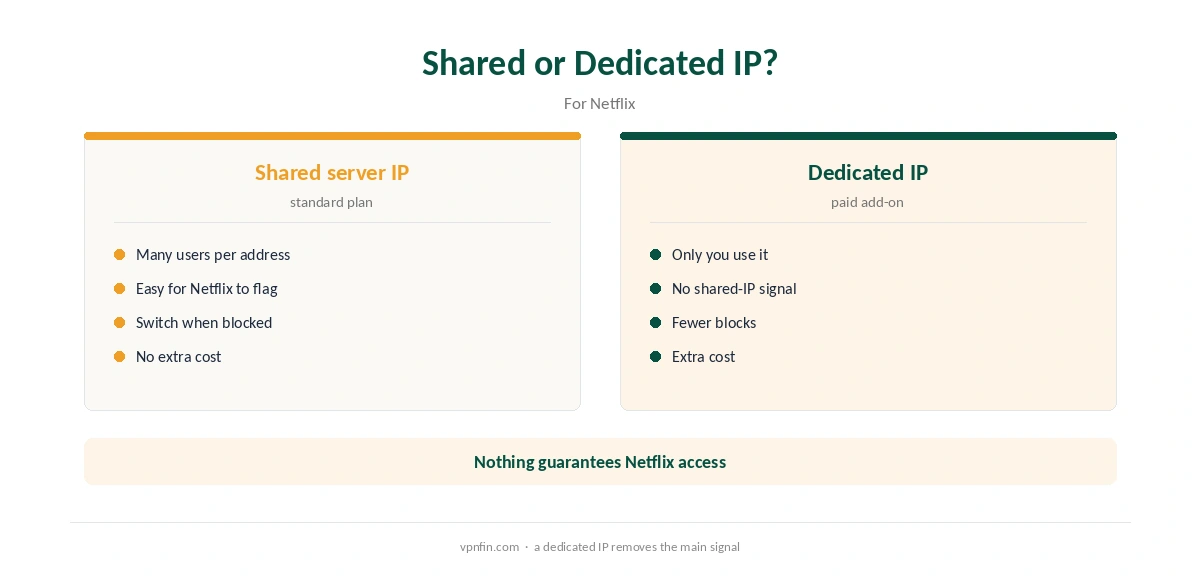
A dedicated IP, a PureVPN add-on, gives you an address no one else uses, which removes the shared-IP signal Netflix looks for. Our dedicated IP guide explains the cost and the trade-off.
Netflix on TVs, Sticks and Roku
On a TV, the order of steps matters even more, because TV apps cache location stubbornly. Connect PureVPN on the device first, then force-close the Netflix app before reopening it. On Android TV and Fire TV, clearing the Netflix app’s cache in the system settings can settle a stuck region.
Devices without a PureVPN app, such as Roku and Samsung TVs, rely on a router or hotspot, as our PureVPN Roku guide and smart TV guide explain. If PureVPN Netflix not working appears only on one device, compare it with a phone on the same connection. That tells you whether the server or the device is the problem.
On the TV app itself, our PureVPN Android TV guide shows where to switch servers and protocols with a remote.
Buffering Rather Than Errors
If Netflix plays but buffers, the problem is speed rather than a block. Pick a server closer to you within the country whose library you want, and try another protocol. A router setup adds its own limit, since a router’s processor handles all the encryption.
Test your plain connection without the VPN too. If it is already slow, no server change will fix Netflix; if it is fast, the VPN route is the bottleneck and a different server or protocol should help.
PureVPN Not Working at All
If PureVPN will not connect to anything, Netflix is not the problem. Start with the device guide for your platform: our Windows guide, Mac guide and Firestick guide cover the apps.
On Linux, PureVPN’s help centre suggests disabling IPv6 and adjusting the MTU, as our PureVPN Linux guide explains. Confirm the tunnel works with our VPN test page before testing Netflix again.
What PureVPN Costs
On 5 October 2026, PureVPN’s order page listed the Standard 2-year plan at $58.20 for the first 27 months, renewing at $47.95 a year; a deals page showed a $54.95 renewal for the same term. If Netflix is your reason to buy, use the 31-day refund window to test your region, as our PureVPN refund guide explains.
| Provider | Renewal price | Per month | Tier |
|---|---|---|---|
| NordVPN | $139.08/yr | ~$11.59 | Basic |
| Surfshark | ~$79/yr | ~$6.58 | Starter |
| ExpressVPN | $99.95/yr | ~$8.33 | Basic |
| CyberGhost | $56.94/yr | ~$4.75 | 2-year |
| PureVPN | $47.95/yr | ~$4.00 | Standard, 2-year (1-year renews $57.95) |
| IPVanish | $89.99/yr | ~$7.50 | Essential |
| Windscribe | ~$69/yr | ~$5.75 | Pro |
| Proton VPN | ~$83.88/yr | ~$6.99 | VPN Plus |
| Mullvad | ~$65/yr | ~$5.40 | flat, no tiers |
| Norton VPN | $79.99/yr | ~$6.67 | Standard |
| Hotspot Shield | ~$95.99/yr | ~$8.00 | Premium annual |
| Astrill | $300 every 2 yrs | ~$12.50 | 2-year, same at renewal |
Other Providers
Every VPN faces the same Netflix blocks; the difference is how quickly a provider rotates addresses. Our Netflix VPN guide compares providers, and our NordVPN Netflix guide covers one alternative. PureVPN belongs to Gaditek, which absorbed Ivacy in 2024. Whichever provider you use, the same five fixes apply in the same order.
Which Netflix Libraries PureVPN Opens
Results vary by tester and date. Comparitech reached Netflix US on PureVPN’s desktop and Android apps, and opened the UK and Japan libraries. Wizcase’s 2026 review found working addresses for the UK, India, Italy, Japan, Canada and Germany. Wizcase did not rank PureVPN among the best for Netflix US, though.
TheBestVPN’s 2026 testing lists Japan, the US and the UK. So the UK and Japan appear in every source we read, while the US splits opinion. If one library fails, try another server in the same country before the fixes above.
How We Research
This page draws on PureVPN’s February 2026 Netflix proxy guide and troubleshooting guides from Cloudwards, Comparitech, Top10VPN and AddictiveTips. We cross-checked these sources against each other, and where they conflict or something can’t be verified, we say so in the text rather than guessing. We checked time-sensitive figures, including prices in US dollars, on 5 October 2026. PureVPN showed two price grids on different pages that day. The main source we relied on is PureVPN’s Netflix proxy guide. Our full approach lives on the About Us page.
PureVPN and Netflix FAQ
Netflix blocked the server’s shared IP address, or your device leaked its real location. Switch servers first.
The proxy error: Netflix thinks you are using an unblocker or proxy.
No. Cloudwards notes the proxy error does not ban your account.
It changes often. Ask PureVPN’s live chat for currently working servers.
It removes the shared-IP signal Netflix looks for, though nothing guarantees access.
The Verdict
In the guides we read, PureVPN Netflix not working usually means a blocked shared server. When PureVPN Netflix not working persists across several servers, the cause is more likely on your device. Switch servers, connect before opening Netflix, clear the cache and test for leaks. Ask support or consider a dedicated IP if blocks persist.