
Disclosure: VPNFin is reader-supported. If you buy a VPN through links on this page, we may earn a commission at no extra cost to you. This never affects our ratings — here’s our full disclosure.
A PureVPN Chromebook setup works best through PureVPN’s Android app from Google Play, VPNAlert notes. The app protects the whole Chromebook. PureVPN’s Chrome extension is the second option, but it covers only the browser. A router is the third, for households that want every device covered.
This guide covers the three routes, the app’s settings, the extension’s limits, and the common problems.
Installing the PureVPN Chromebook App
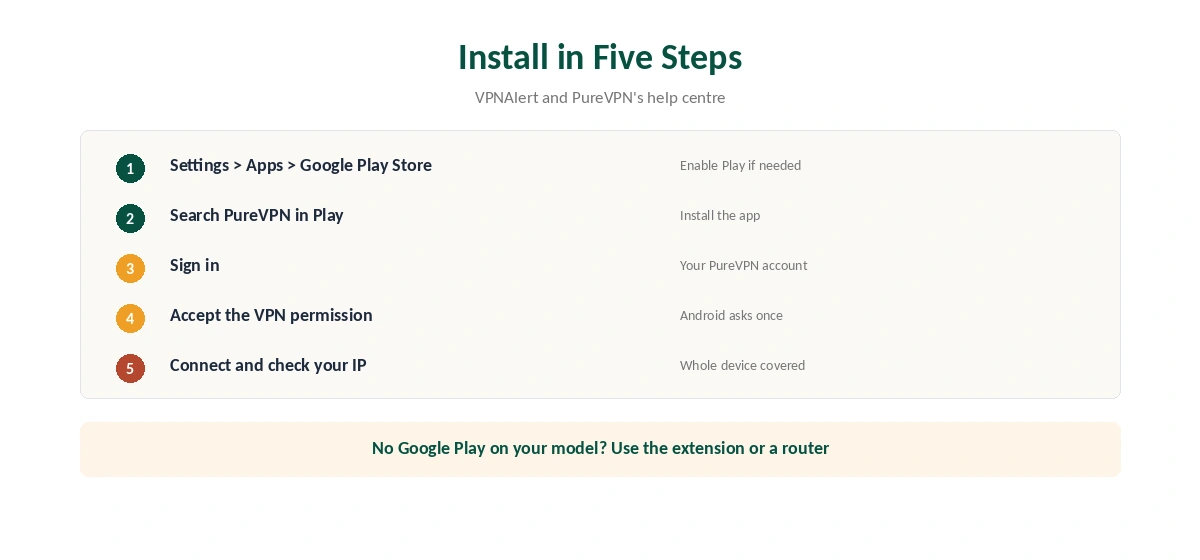
Check that Google Play is on: Settings, Apps, Google Play Store, Enable. Open the Play Store, search for PureVPN and install it. Open the app, sign in, and accept the Android VPN permission. Then pick a location and connect.
PureVPN’s help centre has a dedicated article on setting up the app on a Chromebook. PureVPN’s Chrome Web Store listing also names Chromebook among its supported app platforms.
App or Extension?
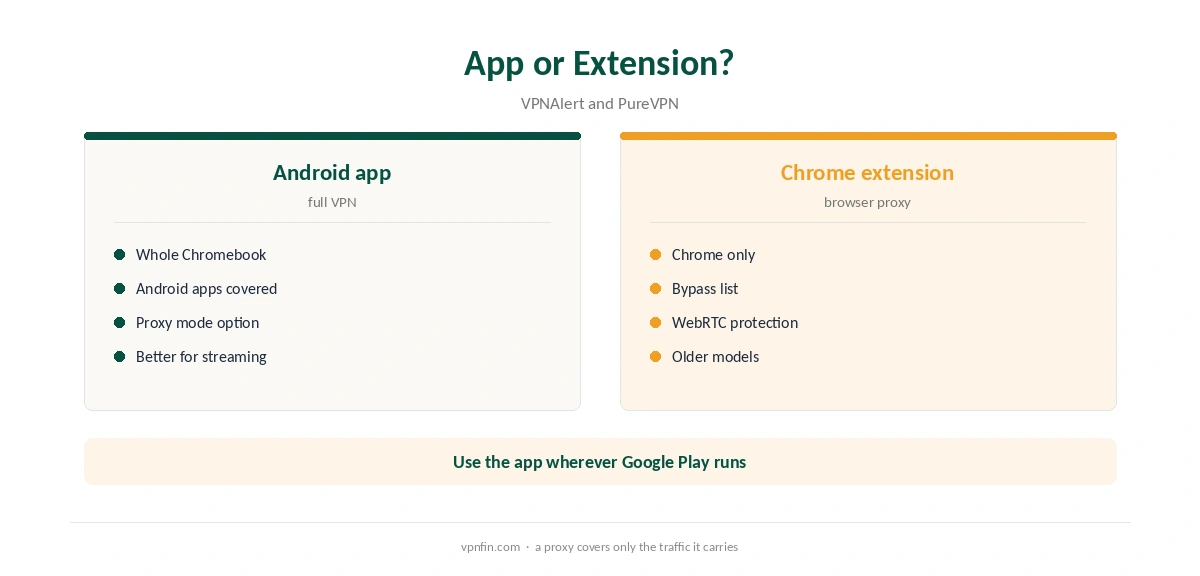
In full VPN mode, the Android app encrypts all traffic on the Chromebook, including Android apps and system traffic. The extension is a proxy for Chrome only, as our PureVPN Chrome guide explains. VPNAlert found streaming sites unblocked more reliably through the app than through the extension.
Use the app as the default. Keep the extension for quick location changes in the browser, or for older Chromebooks that cannot run Android apps.
Proxy Mode in the Android App
TechRadar reports that PureVPN added a proxy mode to its Android apps, including on ChromeOS and smart TVs. It suits people already on a secure network who only want to change location quickly. It is lighter than the full VPN but does not give the same protection.
On public Wi-Fi, use the full VPN mode. Keep proxy mode for trusted networks at home or work.
A Known Extension Quirk
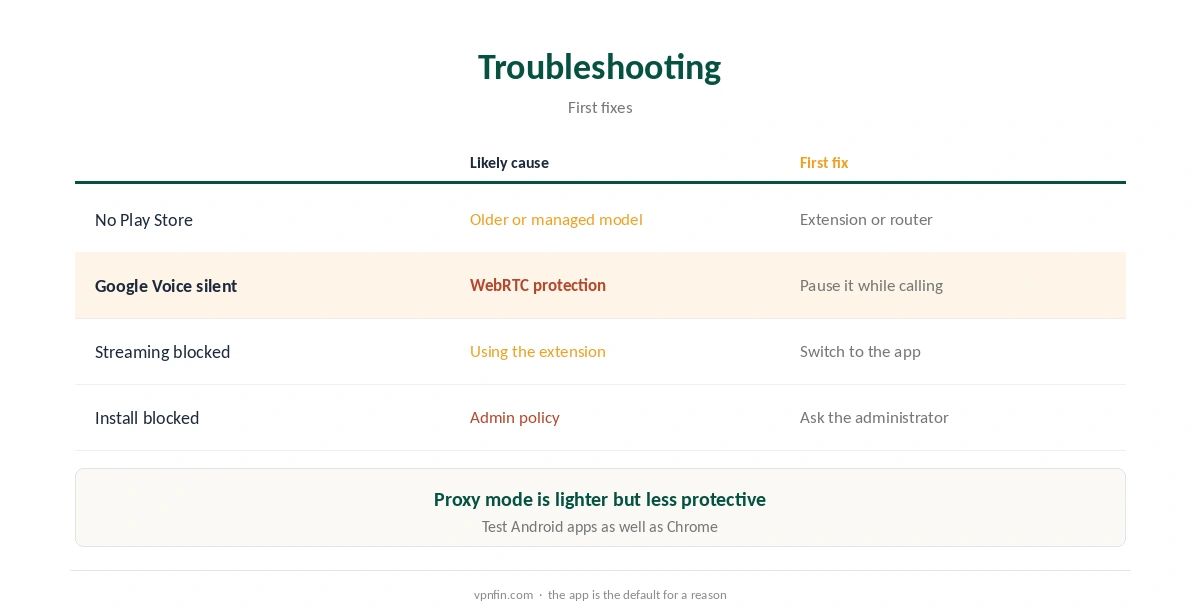
A user review in the Chrome Web Store reports that the extension’s WebRTC leak protection broke audio in Google Voice calls, and PureVPN acknowledged it. If browser calls lose audio, pause WebRTC protection while calling and turn it back on afterwards. Our WebRTC leak guide explains what the protection does.
Split Tunnelling on a Chromebook
PureVPN’s help centre lists split tunnelling on Android, Android TV, Firestick and Windows. Because a Chromebook runs the Android app, the same feature applies to Android apps there. You can keep a banking or local app outside the VPN while everything else stays protected.
Keep the list short, since excluded apps use your real address. Our split tunnelling guide explains the trade-off.
Streaming on a Chromebook
VPNAlert found that streaming sites unblocked more reliably through the Android app than through the extension. Connect the app first, then open the streaming site in Chrome or the service’s Android app. If the catalogue does not change, clear the site’s cookies and reload. Our PureVPN Netflix guide covers the proxy error.
Battery and Performance
A VPN adds some processing work, which can shorten battery life slightly on low-power Chromebooks. Proxy mode is lighter for quick location changes on trusted networks. If the VPN drops when the lid closes, check the battery settings for the PureVPN app and allow it to run in the background.
Kill Switch and Auto-Connect
Turn on the app’s kill switch if it is available, so traffic stops when the connection drops. Android also has its own setting: in the system’s VPN section, mark PureVPN as always-on and block connections without a VPN. Together they give the strongest protection on a Chromebook. Our kill switch guide explains why it matters on public Wi-Fi.
Older and Managed Chromebooks
Older Chromebooks without Google Play cannot run Android apps. On those, the extension or a router is the option. School and work Chromebooks follow the administrator’s rules, and administrators can block VPN apps. Ask before installing anything on a managed device.
Our Chromebook VPN off guide covers switching any VPN off again.
What PureVPN Costs
On 5 October 2026, PureVPN’s order page listed the Standard 2-year plan at $58.20 for the first 27 months, renewing at $47.95 a year. A separate deals page showed $58.05 for the same term with a $54.95 renewal. The page you buy from changes the renewal by seven dollars a year, so check the renewal line at checkout.
One plan covers 10 devices, and a Chromebook counts as one of them. PureVPN offers a 31-day money-back guarantee, as our PureVPN refund guide explains.
| Provider | Renewal price | Per month | Tier |
|---|---|---|---|
| NordVPN | $139.08/yr | ~$11.59 | Basic |
| Surfshark | ~$79/yr | ~$6.58 | Starter |
| ExpressVPN | $99.95/yr | ~$8.33 | Basic |
| CyberGhost | $56.94/yr | ~$4.75 | 2-year |
| PureVPN | $47.95/yr | ~$4.00 | Standard, 2-year (1-year renews $57.95) |
| IPVanish | $89.99/yr | ~$7.50 | Essential |
| Windscribe | ~$69/yr | ~$5.75 | Pro |
| Proton VPN | ~$83.88/yr | ~$6.99 | VPN Plus |
| Mullvad | ~$65/yr | ~$5.40 | flat, no tiers |
| Norton VPN | $79.99/yr | ~$6.67 | Standard |
| Hotspot Shield | ~$95.99/yr | ~$8.00 | Premium annual |
| Astrill | $300 every 2 yrs | ~$12.50 | 2-year, same at renewal |
Testing the Setup
After connecting, check your IP in Chrome with our VPN test page. Then open an Android app that shows location, to confirm Android traffic uses the tunnel too. Our DNS leak guide covers one more test.
For other providers on ChromeOS, our Chromebook VPN guide compares the options. PureVPN belongs to Gaditek, which absorbed Ivacy in 2024.
Phones use the same Android app; our PureVPN iPhone guide covers iOS. Before buying, our PureVPN trial guide explains the 7-day paid trial.
How We Research
This page draws on VPNAlert’s PureVPN Chromebook guide, PureVPN’s help centre and Chrome Web Store listing, TechRadar’s report on PureVPN’s proxy mode, and PureVPN’s pricing pages. We cross-checked these sources against each other, and where they conflict or something can’t be verified, we say so in the text rather than guessing. We checked time-sensitive figures, including prices in US dollars, on 6 October 2026. PureVPN showed two price grids on different pages on 5 October 2026. The main source we relied on is VPNAlert’s PureVPN Chromebook guide. Our full approach lives on the About Us page.
PureVPN Chromebook FAQ
Yes, through its Android app from Google Play, which protects the whole device.
It covers Chrome only. Android apps and system traffic stay on your real IP.
A lighter mode in the Android apps that changes location without the full VPN, TechRadar reports.
A Web Store review links it to WebRTC leak protection. Pause it while calling.
Only if the administrator allows VPN apps. Ask first.
The Verdict
A PureVPN Chromebook setup is simple with the Android app, which covers the whole device. Keep the extension for browser-only use, and use full VPN mode on public Wi-Fi.