
Disclosure: VPNFin is reader-supported. If you buy a VPN through links on this page, we may earn a commission at no extra cost to you. This never affects our ratings — here’s our full disclosure.
CyberGhost for Roku works without an app, because Roku devices cannot run VPN apps or change DNS themselves. There are three routes. CyberGhost’s Smart DNS can be set on your router, a router can run the full CyberGhost VPN, or a Windows PC can share its CyberGhost connection. CyberGhost’s own PlayStation guide lists Smart DNS for Germany, Japan, the Netherlands, the UK and the US.
This guide covers each route, the Google DNS quirk on some Roku models, and what a VPN can and cannot change on Roku.
Why Roku Needs a Workaround
Roku OS has no VPN client and no way to change DNS on the device, as Gizmodo notes. VPNAlert adds that Roku TVs have the same limits as Roku sticks. Every CyberGhost route therefore sits upstream of the Roku: on the router, or on a computer that shares its connection.
CyberGhost for Roku With Smart DNS on the Router
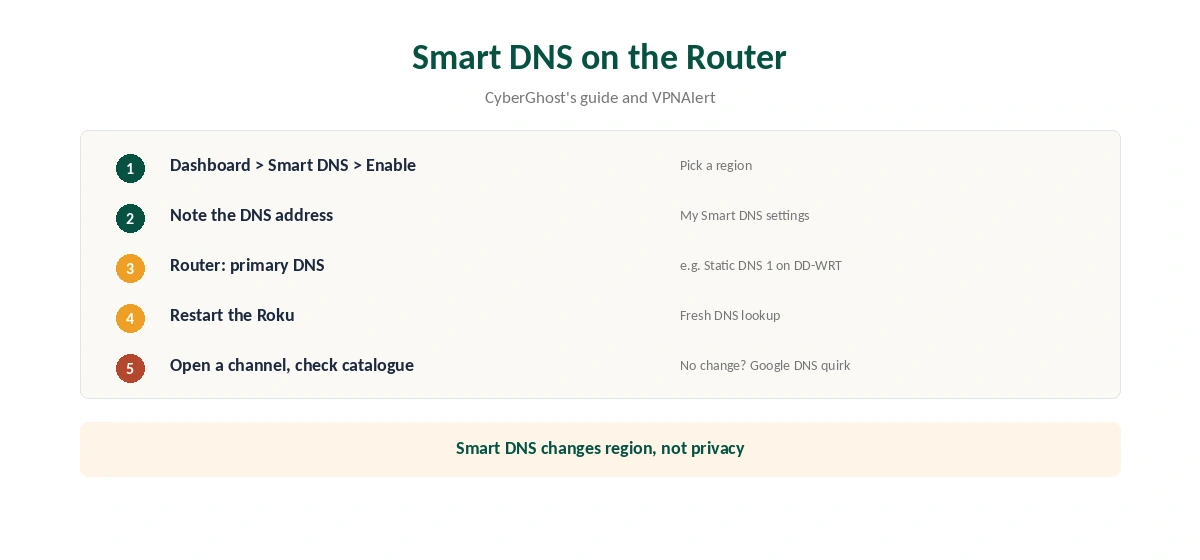
Enable Smart DNS in the CyberGhost account dashboard, as CyberGhost’s guide describes: open the Smart DNS tab and choose Enable Smart DNS. Note the DNS address for the region you want. Then log in to your router and enter that address as the primary DNS. VPNAlert’s DD-WRT example uses the Static DNS 1 field in the router’s basic setup.
Restart the Roku and open a channel to check the catalogue. Smart DNS changes only DNS, not your IP, and adds no encryption, as CyberGhost’s support explains. Our Smart DNS vs VPN page covers the difference.
The Google DNS Quirk
VPNAlert notes that some Roku devices use Google’s DNS servers by default and ignore the router’s DNS. On those models, Smart DNS does nothing until you block Google’s DNS with firewall rules on the router. That is advanced router work, so if your Roku ignores Smart DNS, the full router VPN is the simpler fix.
CyberGhost for Roku With a Router VPN
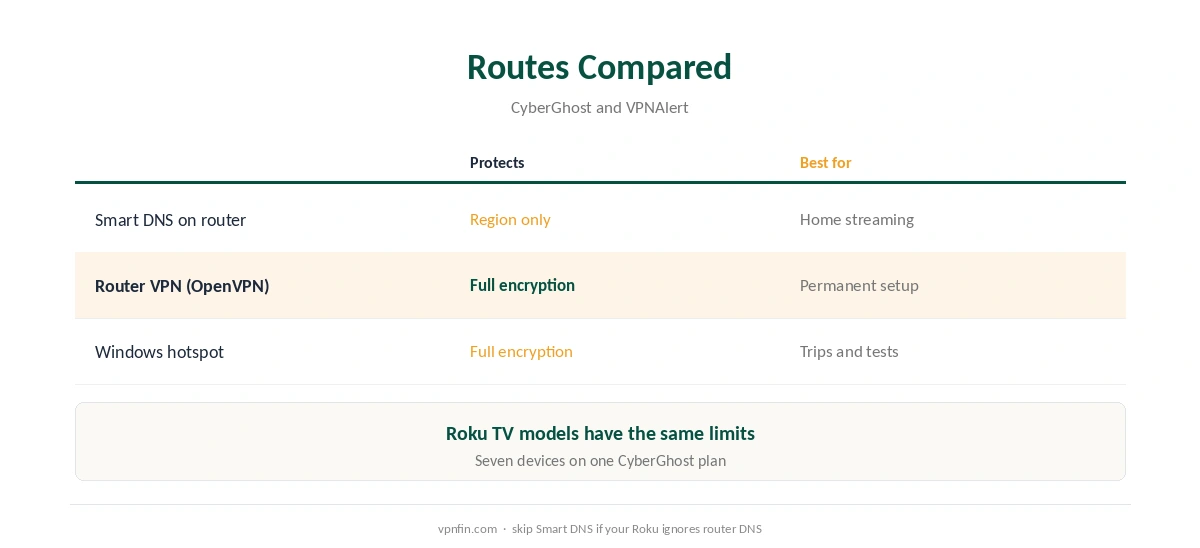
CyberGhost provides OpenVPN configuration files for routers, its PlayStation guide notes. A router running CyberGhost covers the Roku with full encryption, plus every other device behind it. Our CyberGhost OpenVPN guide explains the generated credentials, and our router setup guide covers compatible routers.
CyberGhost for Roku With a Windows Hotspot
A Windows PC can share its CyberGhost connection, as both CyberGhost’s PlayStation guide and VPNAlert describe. Connect CyberGhost on the PC, turn on Mobile hotspot in Settings, and connect the Roku to that network. VPNAlert’s Roku steps share the CyberGhost network adapter. The PC must stay on while you watch. Our CyberGhost Windows guide covers the app.
What a VPN Changes on Roku
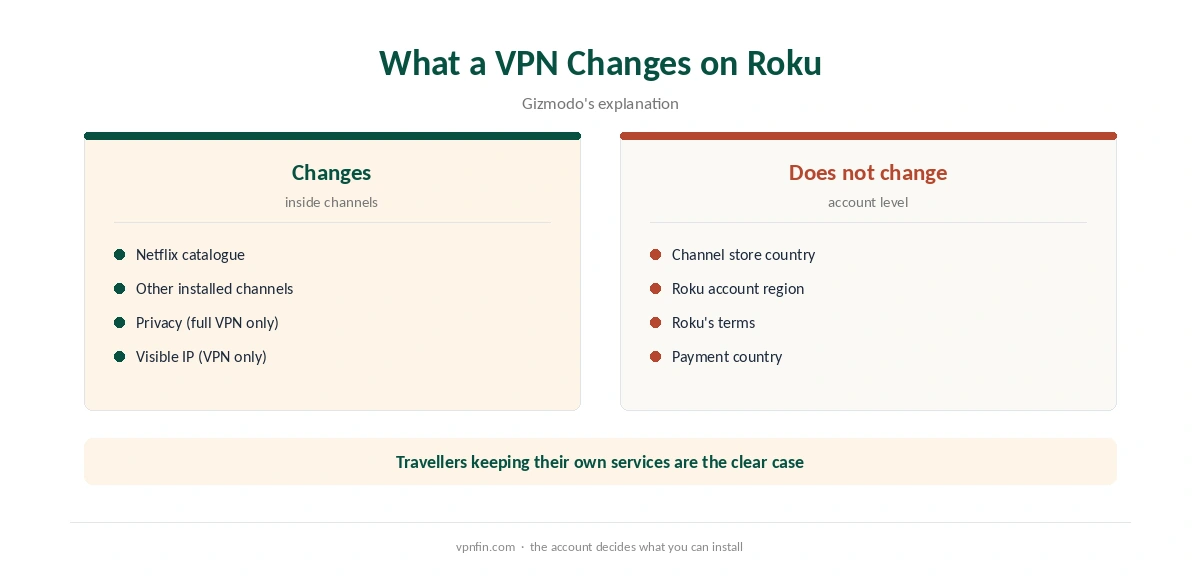
Gizmodo explains that the Roku channel store follows your Roku account country. A VPN or Smart DNS changes the catalogue inside channels you already have, such as Netflix, but does not add channels from another region. Roku’s terms also prohibit accessing other regions’ content, Gizmodo notes.
The clean use is a traveller keeping access to their own services, or privacy on a shared network through the full VPN routes.
When Smart DNS Stops Working
Smart DNS services often work only from your registered home IP address. If your connection gets a new IP, for example after a router restart, check the CyberGhost dashboard and re-enable Smart DNS. Some internet providers also intercept DNS requests, which stops Smart DNS entirely; the router VPN avoids that.
To confirm a router VPN or hotspot setup, check the public IP from a phone on the same network with our VPN test page.
A Streaming Stick With an App
If you want an app on the TV itself, a Fire TV Stick can run CyberGhost directly, as our CyberGhost Firestick guide explains. Some households keep the Roku for local channels and use the stick for travel or privacy, which avoids changing the whole home network.
Choosing a Route
Smart DNS is quickest for streaming at home but covers only the regions CyberGhost lists and protects nothing. The router VPN is the permanent, private option. The Windows hotspot suits trips and tests. If your Roku ignores the router’s DNS, skip Smart DNS and go straight to the router VPN.
What CyberGhost Costs
CyberGhost renews at $56.94 a year on its 2-year plan, according to our renewal table. It covers seven devices. The 45-day money-back guarantee applies to website purchases, as our CyberGhost refund guide explains.
| Provider | Renewal price | Per month | Tier |
|---|---|---|---|
| NordVPN | $139.08/yr | ~$11.59 | Basic |
| Surfshark | ~$79/yr | ~$6.58 | Starter |
| ExpressVPN | $99.95/yr | ~$8.33 | Basic |
| CyberGhost | $56.94/yr | ~$4.75 | 2-year |
| PureVPN | $47.95/yr | ~$4.00 | Standard, 2-year (1-year renews $57.95) |
| IPVanish | $89.99/yr | ~$7.50 | Essential |
| Windscribe | ~$69/yr | ~$5.75 | Pro |
| Proton VPN | ~$83.88/yr | ~$6.99 | VPN Plus |
| Mullvad | ~$65/yr | ~$5.40 | flat, no tiers |
| Norton VPN | $79.99/yr | ~$6.67 | Standard |
| Hotspot Shield | ~$95.99/yr | ~$8.00 | Premium annual |
| Astrill | $300 every 2 yrs | ~$12.50 | 2-year, same at renewal |
Related Guides
Our Roku VPN guide compares providers, and our PureVPN Roku guide covers another provider without Smart DNS. Our CyberGhost smart TV guide covers Smart DNS on LG and Samsung TVs. The same Smart DNS addresses work on any device that lets you set DNS by hand.
For plan details, see our CyberGhost price guide, and for Apple TV, our CyberGhost Apple TV guide. CyberGhost belongs to Kape Technologies, which also owns ExpressVPN and Private Internet Access.
How We Research
This page draws on CyberGhost’s PlayStation guide and Smart DNS support article, VPNAlert’s CyberGhost and NordVPN Roku guides, Gizmodo’s Roku guide and our renewal table. We cross-checked these sources against each other, and where they conflict or something can’t be verified, we say so in the text rather than guessing. We checked time-sensitive figures, including prices in US dollars, on 6 October 2026. Renewal from our renewal table. The main source we relied on is CyberGhost’s console setup guide. Our full approach lives on the About Us page.
CyberGhost for Roku FAQ
No. Roku cannot run VPN apps. Use Smart DNS on the router, a router VPN or a Windows hotspot.
No. Roku does not allow DNS changes, so set it on the router.
CyberGhost’s guide lists Germany, Japan, the Netherlands, the UK and the US.
Some Roku models use Google’s DNS regardless of the router, VPNAlert notes. Use the router VPN instead.
No. The Roku channel store follows your account country, Gizmodo notes.
The Verdict
CyberGhost for Roku runs through Smart DNS on the router for quick streaming, or a router VPN for full protection. Check for the Google DNS quirk first, and remember the channel store stays tied to your Roku account.