
Disclosure: VPNFin is reader-supported. If you buy a VPN through links on this page, we may earn a commission at no extra cost to you. This never affects our ratings — here’s our full disclosure.
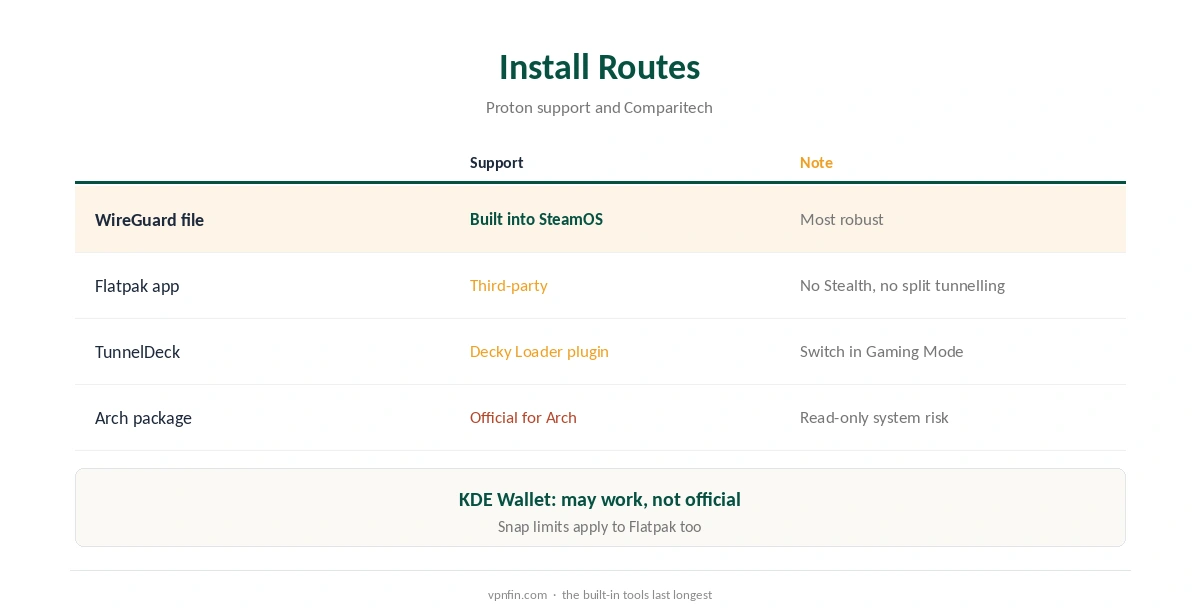
Proton VPN Steam Deck support is unofficial but workable. Proton’s Linux app officially targets Debian, Ubuntu, Fedora and Arch on GNOME, while the Steam Deck runs SteamOS with a KDE Plasma desktop and a read-only system. Proton’s support page says a Flatpak version exists but that third parties maintain it, and that the app may work with KDE Wallet without official support. A WireGuard configuration file is the most robust route.
This guide compares the three routes, walks through the WireGuard setup, and explains how Desktop Mode and Gaming Mode interact.
Why the Steam Deck Is Different
SteamOS keeps its system files read-only, and Ars Technica reports Valve’s warning that updates can wipe changes made inside that image. The desktop is KDE Plasma 6, tech-insider notes, while Proton’s app is built for GNOME and its keyring. That combination is why Proton’s native packages are not the obvious choice here.
Route One: The Flatpak App
In Desktop Mode, the Discover software centre can install the Flatpak build of Proton VPN, as Lemmy users describe. Proton says that build works well in reports but that third parties maintain it, so support may be limited, and shares the Snap version’s limits: no Stealth or Smart Protocol and no split tunnelling.
Lemmy users add that you may need to return to Desktop Mode after a restart to reconnect.
Route Two: A WireGuard File
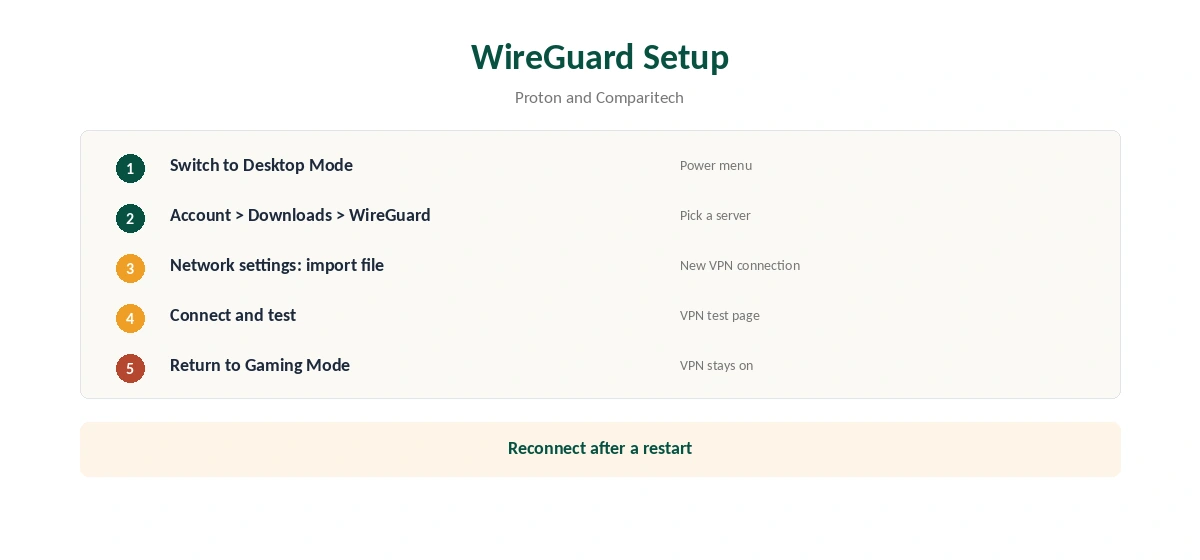
Comparitech describes setting up a VPN on the Steam Deck through NetworkManager in Desktop Mode, using a configuration file. Proton provides WireGuard files from your account dashboard under Downloads, WireGuard configuration. This route avoids the app entirely and survives SteamOS updates because it uses the built-in network manager.
Proton VPN Steam Deck Setup With WireGuard
Switch to Desktop Mode. In a browser, sign in to your Proton account, open Downloads, and download a WireGuard configuration for the server you want. Open the network settings, add a new connection from the downloaded file, and connect.
Then confirm the new address with our VPN test page and run a DNS check with our DNS leak guide.
Route Three: TunnelDeck
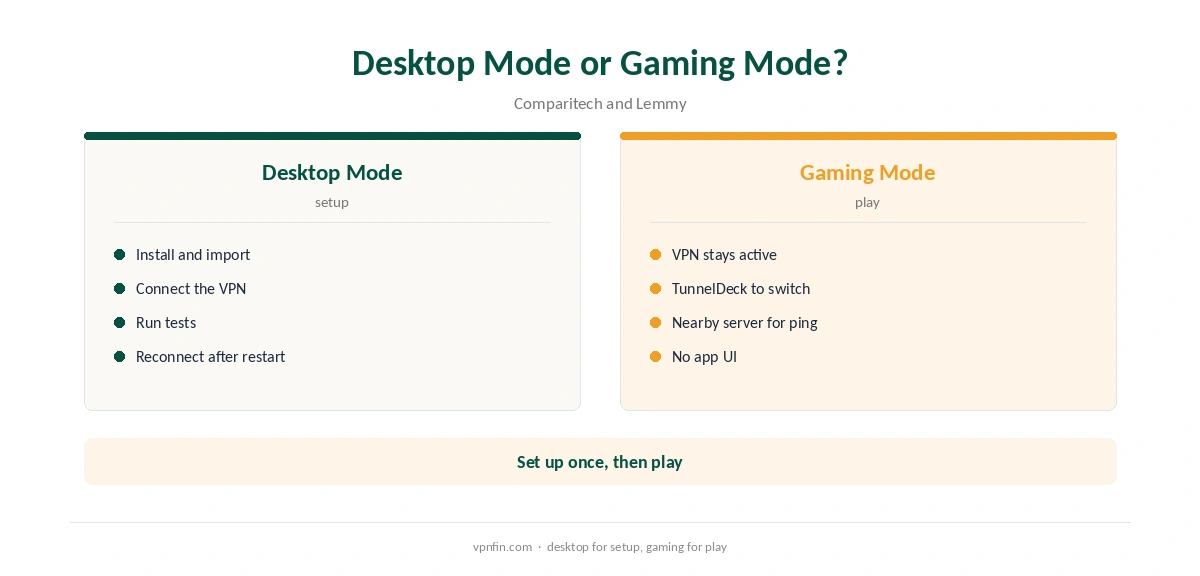
Comparitech also mentions TunnelDeck, a plugin for the Decky Loader that lets you switch VPN connections from Gaming Mode. It controls connections you have already set up, so pair it with the WireGuard route above.
Desktop Mode and Gaming Mode
Comparitech notes that a VPN started in Desktop Mode stays active when you switch to Gaming Mode. Connect in Desktop Mode, return to Gaming Mode, and play. After a restart, reconnect, either in Desktop Mode or through TunnelDeck.
Proton VPN Steam Deck Tips
Keep a WireGuard file for two or three nearby servers, so you can switch if one is busy. Name each connection clearly in the network settings. If a connection fails after a SteamOS update, re-import the file; the network manager settings usually survive, but checking takes a minute.
Proton’s Stealth protocol, useful on restrictive networks, needs the full app, which the Flatpak and Snap builds lack, Proton notes. On hotel networks that block VPNs, try a different server or port first. Our Proton VPN vs Windscribe page covers each provider’s tools for restrictive networks.
Using the Steam Deck on Public Wi-Fi
Handhelds spend a lot of time on hotel, train and café networks. A Proton VPN Steam Deck connection keeps other users on those networks from seeing your traffic, as our public Wi-Fi guide explains. Connect in Desktop Mode before you leave home so the Proton VPN Steam Deck profile is ready.
Is a Proton VPN Steam Deck Setup Worth It?
For privacy on shared networks, yes, and the free plan makes it cheap to try. For lower ping, no: a VPN rarely helps there. Our kill switch guide explains why to keep the network manager’s VPN settings strict on public Wi-Fi.
The Free Plan on a Steam Deck
Proton’s Snap store listing describes a free plan with servers in 10 countries and no bandwidth restrictions, which suits a handheld for privacy on hotel and café Wi-Fi. Paid plans unlock more than 20,000 servers in 145 countries. Our Proton VPN free guide covers the limits.
Gaming Expectations
A VPN adds a step between you and game servers, so expect slightly higher ping rather than lower. Use a server close to you for online play. Our gaming VPN guide explains what a VPN can and cannot do for games.
What Proton VPN Costs
Proton VPN Plus renews at about $83.88 a year, according to our renewal table, and Proton’s terms allow a full refund within 30 days. Our Proton VPN price guide covers the plans.
| Provider | Renewal price | Per month | Tier |
|---|---|---|---|
| NordVPN | $139.08/yr | ~$11.59 | Basic |
| Surfshark | ~$79/yr | ~$6.58 | Starter |
| ExpressVPN | $99.95/yr | ~$8.33 | Basic |
| CyberGhost | $56.94/yr | ~$4.75 | 2-year |
| PureVPN | $47.95/yr | ~$4.00 | Standard, 2-year (1-year renews $57.95) |
| IPVanish | $89.99/yr | ~$7.50 | Essential |
| Windscribe | ~$69/yr | ~$5.75 | Pro |
| Proton VPN | ~$83.88/yr | ~$6.99 | VPN Plus |
| Mullvad | ~$65/yr | ~$5.40 | flat, no tiers |
| Norton VPN | $79.99/yr | ~$6.67 | Standard |
| Hotspot Shield | ~$95.99/yr | ~$8.00 | Premium annual |
| Astrill | $300 every 2 yrs | ~$12.50 | 2-year, same at renewal |
Related Guides
Our Steam Deck VPN guide compares providers, and our NordVPN Steam Deck guide covers another option.
If official Linux support matters most, our Proton VPN alternatives guide lists other providers worth comparing, and our NordVPN vs Proton VPN page compares Linux support across two providers.
How We Research
This page draws on Proton’s Linux GUI support page and Snap store listing, Comparitech’s Steam Deck VPN guide, Ars Technica on SteamOS updates, tech-insider on SteamOS 3.8, Lemmy user reports and our renewal table. We cross-checked these sources against each other, and where they conflict or something can’t be verified, we say so in the text rather than guessing. We checked time-sensitive figures, including prices in US dollars, on 6 October 2026. Proton renewal from our renewal table. The main source we relied on is Proton’s Linux app guide. Our full approach lives on the About Us page.
Proton VPN Steam Deck FAQ
Not officially. A third-party Flatpak exists, and WireGuard files work through the built-in network settings.
A WireGuard file in NetworkManager, since it uses SteamOS’s own tools.
Yes, if started in Desktop Mode, per Comparitech.
Yes, with servers in 10 countries and no bandwidth cap.
Possibly not; Valve warns updates can wipe changes to the read-only system.
The Verdict
Proton VPN Steam Deck use works best through a WireGuard file in Desktop Mode, with TunnelDeck for switching in Gaming Mode. The Flatpak app is convenient but unofficial, and the free plan covers privacy on the go.