
Disclosure: VPNFin is reader-supported. If you buy a VPN through links on this page, we may earn a commission at no extra cost to you. This never affects our ratings — here’s our full disclosure.
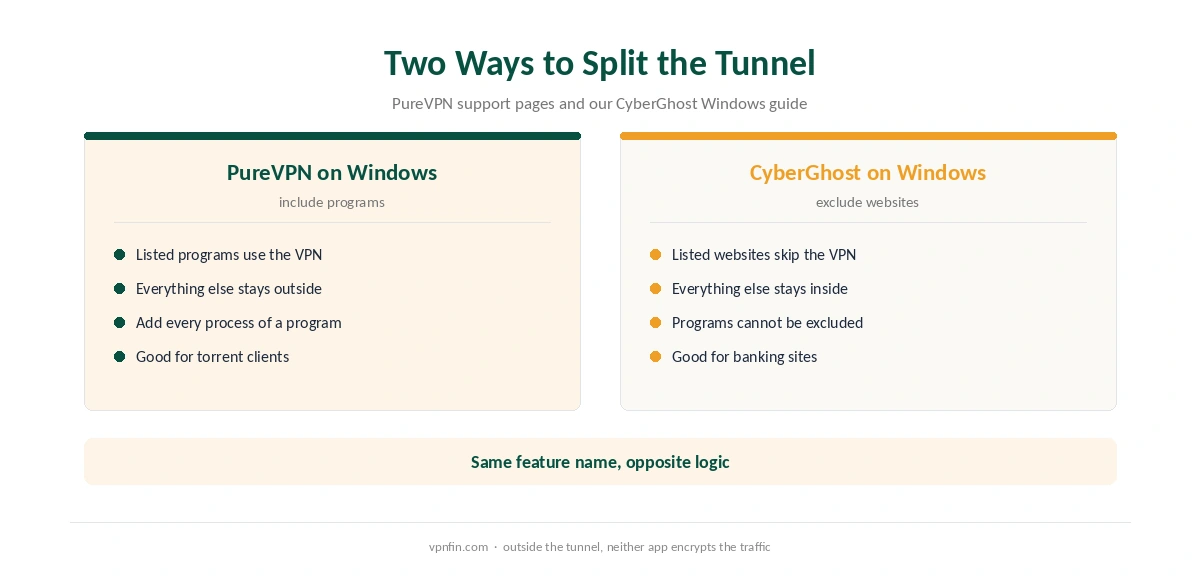
The PureVPN Windows app handles split tunnelling the opposite way to CyberGhost’s. Instead of excluding websites, you pick the programs that should use the VPN. PureVPN’s support article adds a detail that is easy to miss: you must add every process of a program, or part of its traffic escapes the tunnel.
This guide covers setup, split tunnelling, protocol switching, port forwarding and the price after the first term.
Is PureVPN Good on Windows?
For control over which programs use the VPN, yes. The Windows app offers split tunnelling by program, automatic protocol selection with a fallback and manual setups going back to Windows 7. However, the plan tiers and add-ons need care, because port forwarding is not part of every plan by default.
How to Set Up PureVPN on Windows
First, download the installer from PureVPN’s site and run it. Then sign in, or start the $0.99 7-day trial on the website. Windows may ask to allow network changes, so approve the prompt.
Next, open Locations in the left panel and choose the recommended server or a country. Finally, check the new address on our VPN test page. If Windows still shows your real IPv6 address, PureVPN’s support pages explain how to disable IPv6, and our IPv6 leak guide covers the background.
PureVPN Windows Split Tunnelling
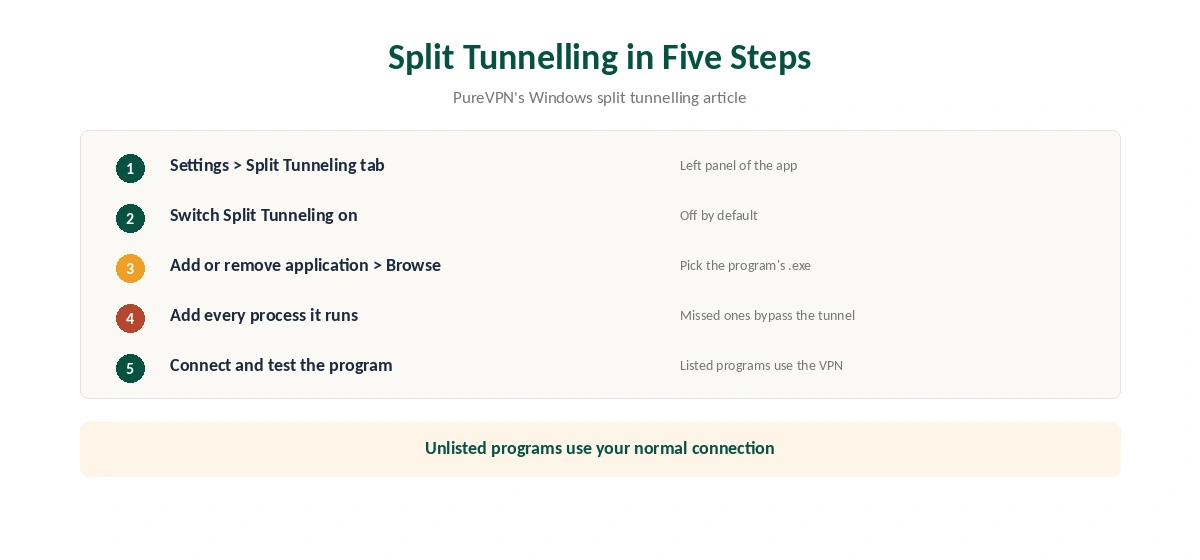
PureVPN’s support article walks through the steps. Open Settings in the left panel, then the Split Tunneling tab, and switch the feature on. Then choose Add or remove application, browse to a program and add it to the list.
The listed programs send their traffic through the VPN, while the rest of the PC uses your normal connection. That makes the feature useful for a torrent client or a browser you want protected while a game stays local. PureVPN warns that some programs run several processes. Add all of them, or part of the program’s traffic will bypass the tunnel.
CyberGhost’s Windows app works the other way, excluding websites rather than including programs, as our CyberGhost Windows guide explains. Our split tunnelling explainer covers both approaches.
Protocols and the Fallback Switch
To change protocol, disconnect first. Then open Settings, the Protocol tab, and turn off Automatic Protocol Selection. Pick a protocol from the drop-down menu, and keep Connect to Fallback on so the app tries the next option if yours fails.
One gap remains: the support excerpts we read did not list the Windows protocols by name. On iOS, PureVPN offers WireGuard, UDP, TCP and IKEv2, but we could not confirm the same set on Windows. Check the drop-down during the trial. Our WireGuard vs OpenVPN page explains the choice.
Port Forwarding: Add-On or Included?
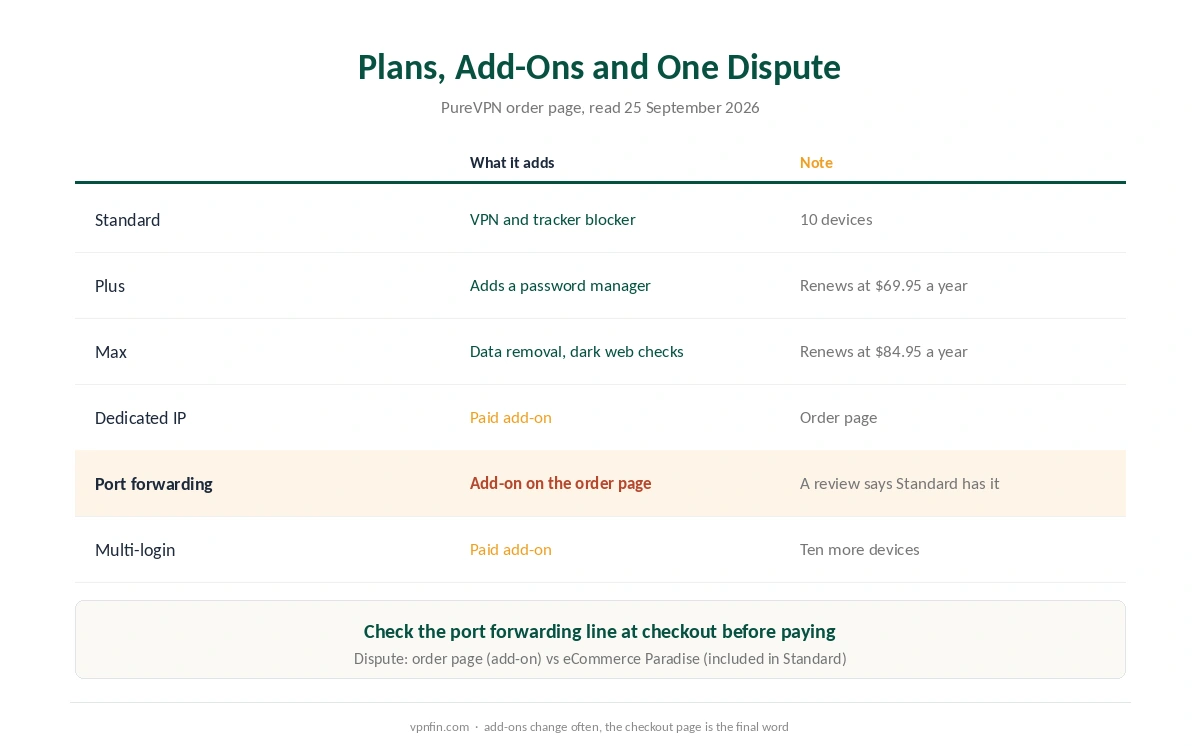
Sources disagree here. PureVPN’s order page, read in September 2026, lists port forwarding among its add-ons, next to a dedicated IP and extra logins. A review on eCommerce Paradise, by contrast, says the Standard plan includes port forwarding. We print both versions, so check the checkout page before paying.
Port forwarding matters mainly for torrent seeding and some game servers. Our port forwarding guide explains why, and our torrenting guide covers the wider setup.
PureVPN Windows Problems and Fixes
PureVPN’s Windows troubleshooting page starts with the protocol. Turn off automatic selection, try another protocol, then connect to the recommended server. If that fails, its support pages cover disabling the Windows firewall briefly and changing DNS settings.
Also, close any second VPN client, since two tunnels clash. Our Windows VPN troubleshooting page covers adapter resets in order, and turning the VPN off helps tell whether PureVPN causes a fault.
What PureVPN Costs on Windows
On 5 October 2026, PureVPN’s order page listed the Standard 2-year plan at $2.15 a month, billed $58.20 for 27 months. It renews at $47.95 a year, about $4.00 a month. A separate deal page showed $58.05 renewing at $54.95.
The 1-year plan costs $40.80 for 16 months but renews higher, at $57.95. The monthly plan costs $12.95. One plan covers 10 devices, so a PC and a Mac share it easily; our PureVPN Mac guide covers the Mac app. Our PureVPN price breakdown compares every term.
| Provider | Renewal price | Per month | Tier |
|---|---|---|---|
| NordVPN | $139.08/yr | ~$11.59 | Basic |
| Surfshark | ~$79/yr | ~$6.58 | Starter |
| ExpressVPN | $99.95/yr | ~$8.33 | Basic |
| CyberGhost | $56.94/yr | ~$4.75 | 2-year |
| PureVPN | $47.95/yr | ~$4.00 | Standard, 2-year (1-year renews $57.95) |
| IPVanish | $89.99/yr | ~$7.50 | Essential |
| Windscribe | ~$69/yr | ~$5.75 | Pro |
| Proton VPN | ~$83.88/yr | ~$6.99 | VPN Plus |
| Mullvad | ~$65/yr | ~$5.40 | flat, no tiers |
| Norton VPN | $79.99/yr | ~$6.67 | Standard |
| Hotspot Shield | ~$95.99/yr | ~$8.00 | Premium annual |
| Astrill | $300 every 2 yrs | ~$12.50 | 2-year, same at renewal |
The Trial and the Refund Rules
The $0.99 trial lasts 7 days and then becomes a paid plan. PureVPN’s refund policy gives 31 days on first purchases, with renewals excluded, and that exclusion covers a plan that follows a trial. So cancel before day 7 if you are unsure. Our PureVPN refund guide explains the email request for first purchases.
Who Should Use PureVPN on Windows
PureVPN on Windows suits PC owners who want chosen programs inside the tunnel and the rest outside. It also suits households with up to 10 devices. In addition, the low renewal rate helps long-term users.
Who Should Pick Another Windows VPN
Pick another app if you want to exclude websites rather than include programs, or need port forwarding without an add-on question. Our NordVPN Windows guide covers one alternative. Also, PureVPN belongs to GZ Systems Limited, registered in the British Virgin Islands and part of the Gaditek group, which also absorbed Ivacy in 2024. Our VPN ownership map and Windows VPN guide give the wider picture.
How We Research
This page draws on PureVPN’s Windows support articles, troubleshooting page, order page and refund policy, plus eCommerce Paradise’s pricing review. We cross-checked these sources against each other, and where they conflict or something can’t be verified, we say so in the text rather than guessing. We checked time-sensitive figures, including prices in US dollars, on 5 October 2026. PureVPN’s order page and its separate 2-year deal page showed different Standard prices that day. The main source we relied on is PureVPN’s Windows protocol guide. Our full approach lives on the About Us page.
PureVPN on Windows FAQ
You add programs under Settings, Split Tunneling, and those programs use the VPN. PureVPN advises adding every process a program runs, or some of its traffic bypasses the tunnel.
Sources disagree. PureVPN’s order page lists it as an add-on, while eCommerce Paradise says the Standard plan includes it. Check the checkout page before paying.
Disconnect, open Settings, the Protocol tab, and turn off Automatic Protocol Selection. Pick a protocol and keep Connect to Fallback on.
The website trial costs $0.99 for 7 days and then becomes a paid plan. PureVPN does not refund renewals after a trial, so cancel in time.
PureVPN’s support pages include manual setup guides for Windows 7, 8, 10 and 11. We could not find a stated minimum version for the app itself.
The Verdict
PureVPN on Windows gives fine control through split tunnelling by program, and it renews cheaply. Its rough edges are the unclear port forwarding terms and an unlisted protocol set. Use the trial to check both, add every process to split tunnelling, and cancel before day 7 if it does not fit.