
Disclosure: VPNFin is reader-supported. If you buy a VPN through links on this page, we may earn a commission at no extra cost to you. This never affects our ratings — here’s our full disclosure.
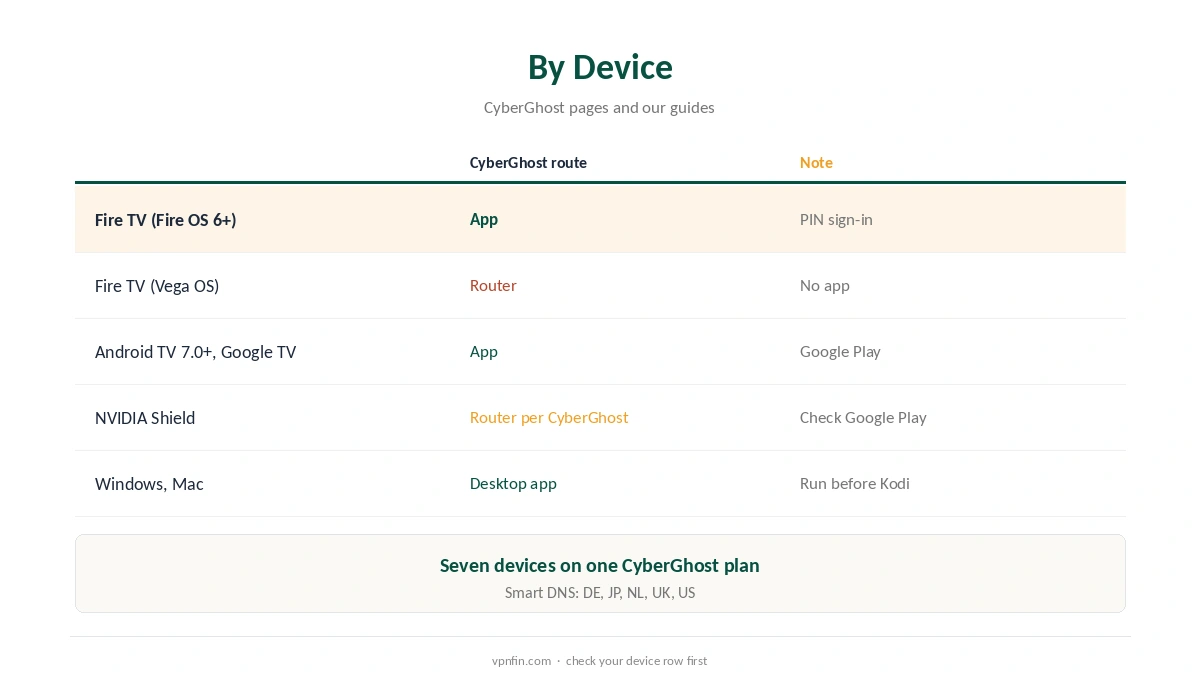
CyberGhost for Kodi works the same way as any VPN: Kodi has no VPN of its own, so CyberGhost goes on the device that runs Kodi. CyberGhost’s apps cover Fire TV sticks from the second generation on, Android TV and Google TV, and computers. Vega OS Fire TV sticks have no CyberGhost app, Gizmodo and Security.org report, so those need a router.
This guide covers each device, the Fire TV setup, the router and Smart DNS fallbacks, and the legal line Kodi users should keep in mind.
CyberGhost for Kodi by Device
CyberGhost’s Fire TV support lists Fire OS 6 and later, on second-generation sticks and newer, as our CyberGhost Firestick guide explains. Its Android TV page lists Android TV 7.0 and later, including Google TV, covered in our CyberGhost Android TV guide.
On a Windows PC or Mac, run CyberGhost before opening Kodi; our CyberGhost Windows guide covers the app. One quirk: CyberGhost’s Android TV page lists NVIDIA Shield and Chromecast with Google TV as router devices, even though both run Android TV. Check Google Play on your device before choosing a route.
Setting Up CyberGhost for Kodi on a Fire TV Stick
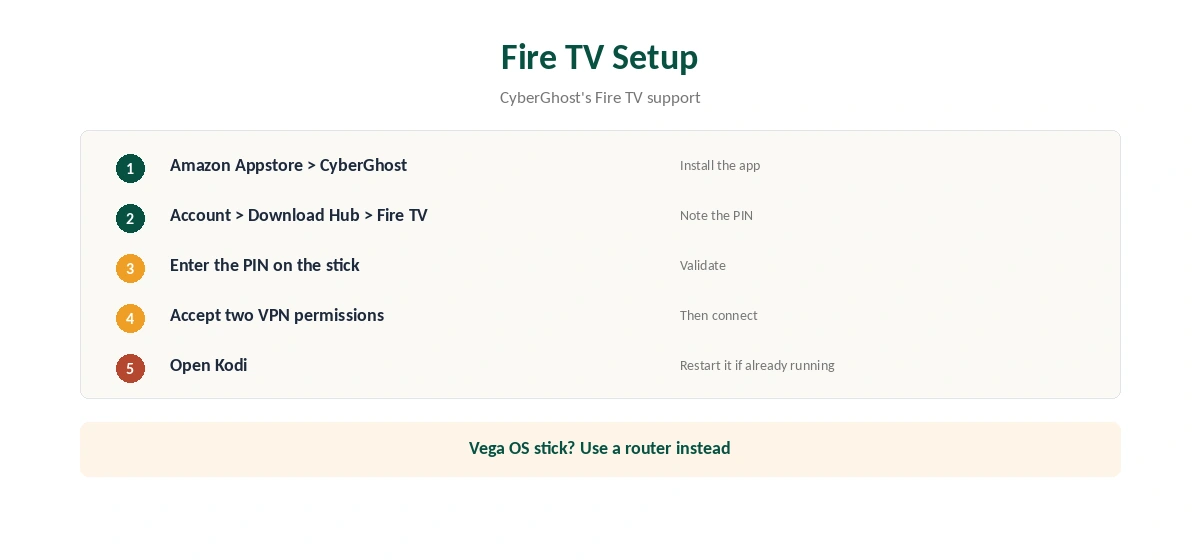
CyberGhost’s Fire TV support gives the sign-in steps. Install CyberGhost from the Amazon Appstore. In your CyberGhost account, open the Download Hub, choose Connect next to Fire TV and note the PIN. Enter the PIN on the stick and accept the two VPN permissions.
Connect to the country you need, then open Kodi. If Kodi was already running, close it fully and reopen it, since some add-ons cache location or connections.
Streaming Profiles in the TV App
Gizmodo notes that CyberGhost’s TV app includes profiles for specific services, such as Netflix US, BBC iPlayer and Hulu. They help with add-ons that pull from those services. For general privacy, pick the nearest location instead, since distance costs speed.
Routers and Smart DNS for Unsupported Boxes
For a Vega OS stick or a box without the app, a router running CyberGhost covers the device without any app. ASUS routers include CyberGhost in VPN Fusion, as our CyberGhost router guide explains, and you can choose which devices use the VPN.
CyberGhost’s Smart DNS, offered for Germany, Japan, the Netherlands, the UK and the US, is another option for streaming. It changes only DNS and adds no encryption, as our CyberGhost smart TV guide explains.
Kodi Add-Ons and the Law
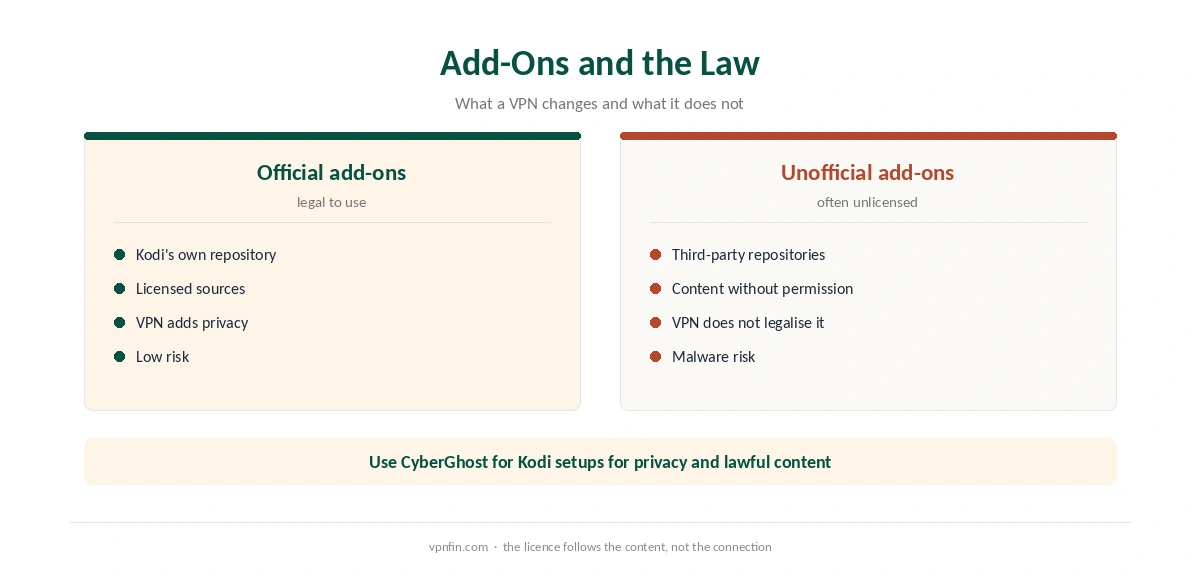
Kodi itself is legal, and so are its official add-ons from the Kodi repository. Some unofficial add-ons stream content without the rights holder’s permission, and a VPN does not make that legal. Unofficial repositories also carry a malware risk.
Use CyberGhost for Kodi setups for privacy and for services you have the right to watch. Our Kodi VPN guide compares other providers.
Testing Before You Commit
Test CyberGhost for Kodi setups on the device you actually use, within the 45-day refund window for website purchases. Try the add-ons you rely on most, note which locations work, and keep two as favourites for when one is busy.
Choosing a Location
Kodi itself does not care where you connect; the add-ons and the services behind them do. For a service tied to your home country, connect there. For general privacy, the nearest location gives the best speed. Live streams are the most sensitive to distance, so try a closer city if a live add-on stutters.
Buffering and Drops
If a stream buffers, a distant or busy server is a common cause. Try a closer city, then another protocol, as our CyberGhost speed guide explains. If the connection drops while Kodi streams, our CyberGhost disconnection guide covers the fixes, including the smaller MTU setting.
Keep Kodi and its add-ons updated as well. Outdated add-ons can cause playback errors that look like VPN problems.
Leak Checks
Run a DNS test once after connecting, with our DNS leak guide. A leaking request can reveal your real location to an add-on’s source even with CyberGhost on. Repeat the test after app updates, and if it fails, switch protocol in the CyberGhost app and test again before changing anything else in Kodi.
What CyberGhost Costs
CyberGhost renews at $56.94 a year on its 2-year plan, according to our renewal table. It covers seven devices. The 45-day money-back guarantee applies to website purchases, as our CyberGhost refund guide explains.
| Provider | Renewal price | Per month | Tier |
|---|---|---|---|
| NordVPN | $139.08/yr | ~$11.59 | Basic |
| Surfshark | ~$79/yr | ~$6.58 | Starter |
| ExpressVPN | $99.95/yr | ~$8.33 | Basic |
| CyberGhost | $56.94/yr | ~$4.75 | 2-year |
| PureVPN | $47.95/yr | ~$4.00 | Standard, 2-year (1-year renews $57.95) |
| IPVanish | $89.99/yr | ~$7.50 | Essential |
| Windscribe | ~$69/yr | ~$5.75 | Pro |
| Proton VPN | ~$83.88/yr | ~$6.99 | VPN Plus |
| Mullvad | ~$65/yr | ~$5.40 | flat, no tiers |
| Norton VPN | $79.99/yr | ~$6.67 | Standard |
| Hotspot Shield | ~$95.99/yr | ~$8.00 | Premium annual |
| Astrill | $300 every 2 yrs | ~$12.50 | 2-year, same at renewal |
Checks and Related Guides
After connecting, confirm the tunnel with our VPN test page from a browser on the same device. Our NordVPN Kodi guide and Surfshark Kodi guide show the same approach with other providers; both belong to Nord Security. CyberGhost belongs to Kape Technologies, which also owns ExpressVPN and Private Internet Access.
How We Research
This page draws on CyberGhost’s Fire TV support article and Android TV page, Gizmodo and Security.org on Vega OS, CyberGhost’s PlayStation guide for Smart DNS regions, and our renewal table. We cross-checked these sources against each other, and where they conflict or something can’t be verified, we say so in the text rather than guessing. We checked time-sensitive figures, including prices in US dollars, on 6 October 2026. Renewal from our renewal table. The main source we relied on is CyberGhost’s Android TV page. Our full approach lives on the About Us page.
CyberGhost for Kodi FAQ
You do not need one. Install CyberGhost on the device that runs Kodi, and every add-on uses the tunnel.
Second generation and newer on Fire OS 6 and later. Vega OS sticks have no CyberGhost app.
CyberGhost’s page lists Shield as a router device. Check Google Play on yours before choosing.
Kodi and its official add-ons are legal. A VPN does not make unlicensed streams legal.
It can change region for streaming, but it adds no encryption or privacy.
The Verdict
CyberGhost for Kodi setup means installing CyberGhost on the device beneath Kodi. Check your Fire TV model, use a router for unsupported boxes, and stick to content you have the right to watch.