
Disclosure: VPNFin is reader-supported. If you buy a VPN through links on this page, we may earn a commission at no extra cost to you. This never affects our ratings — here’s our full disclosure.
P2P PureVPN use is permitted, and PureVPN labels servers for P2P in its apps, Comparitech and Unite.AI report. The catch for heavy torrent users is port forwarding: PureVPN sells it as a paid add-on, and ProPrivacy notes it does not work on shared IP addresses. Comparitech suggests heavy users may prefer providers that include it.
This guide covers the setup, the add-on question, the kill switch and privacy.
Setting Up P2P PureVPN Downloads
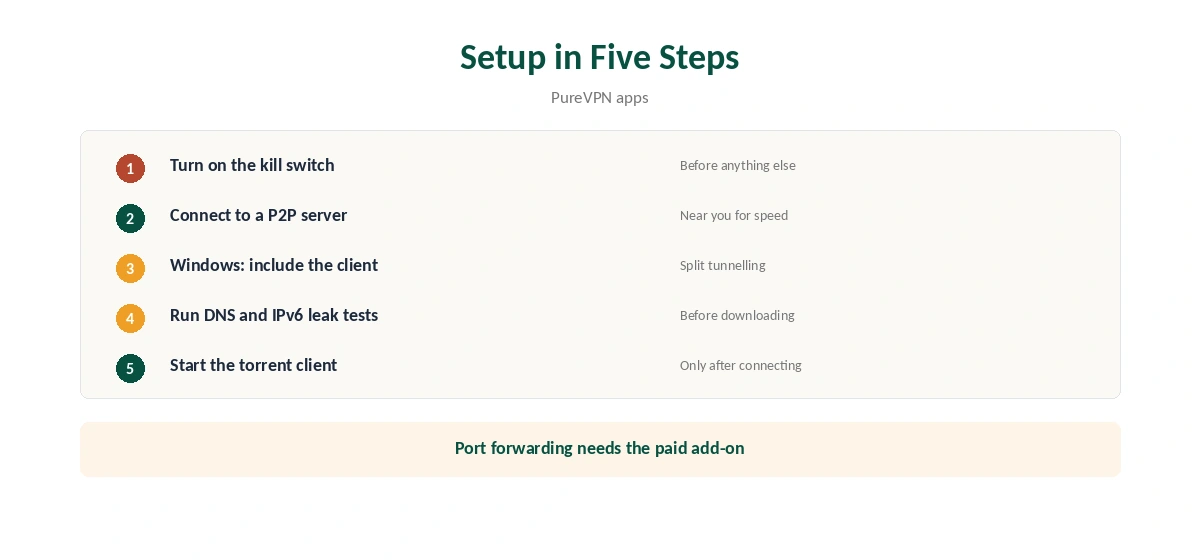
Turn on the kill switch in the app first, so a dropped connection cannot expose your IP to peers. Then connect to a server marked for P2P, close to you for speed. Start your torrent client only after the VPN connects.
On Windows, PureVPN’s split tunnelling works by app in include mode, as our PureVPN Windows guide explains, so you can send only the torrent client through the tunnel. PureVPN’s help centre lists split tunnelling on Windows, Android, Android TV and Firestick.
P2P PureVPN and Port Forwarding
Port forwarding lets other peers start connections to you, which helps seeding and slow swarms. PureVPN offers it only as an add-on. ProPrivacy explains that it does not work on shared IPs, so in practice it pairs with a dedicated IP. Our port forwarding guide explains when you need it.
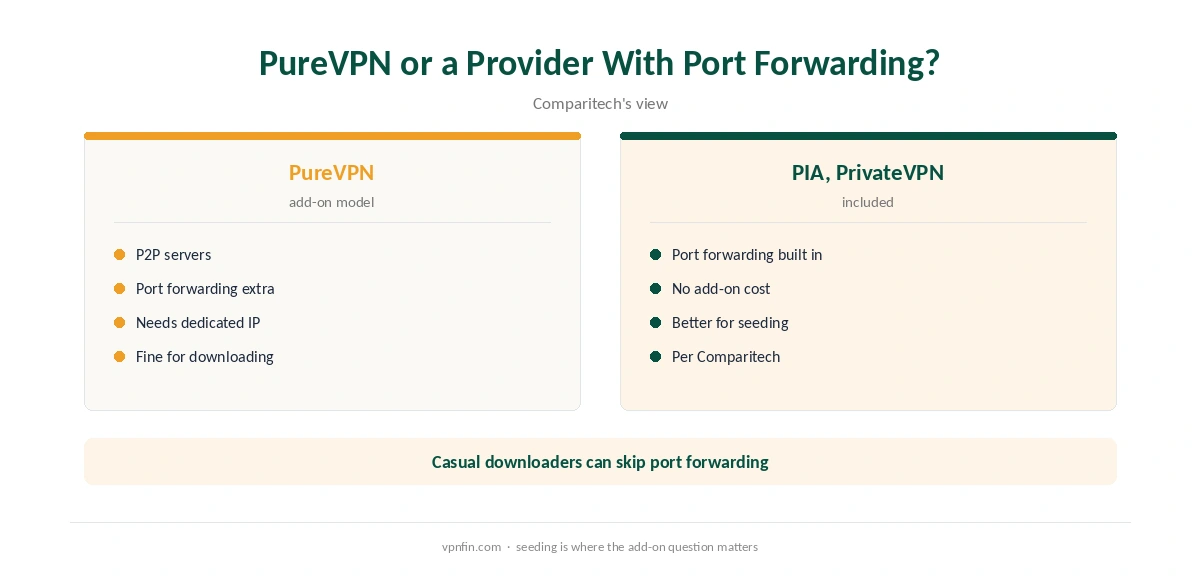
Comparitech calls the extra charge annoying and suggests heavy torrent users may prefer Private Internet Access or PrivateVPN, which include port forwarding. For casual downloading, you can manage without it.
What the Add-Ons Cost
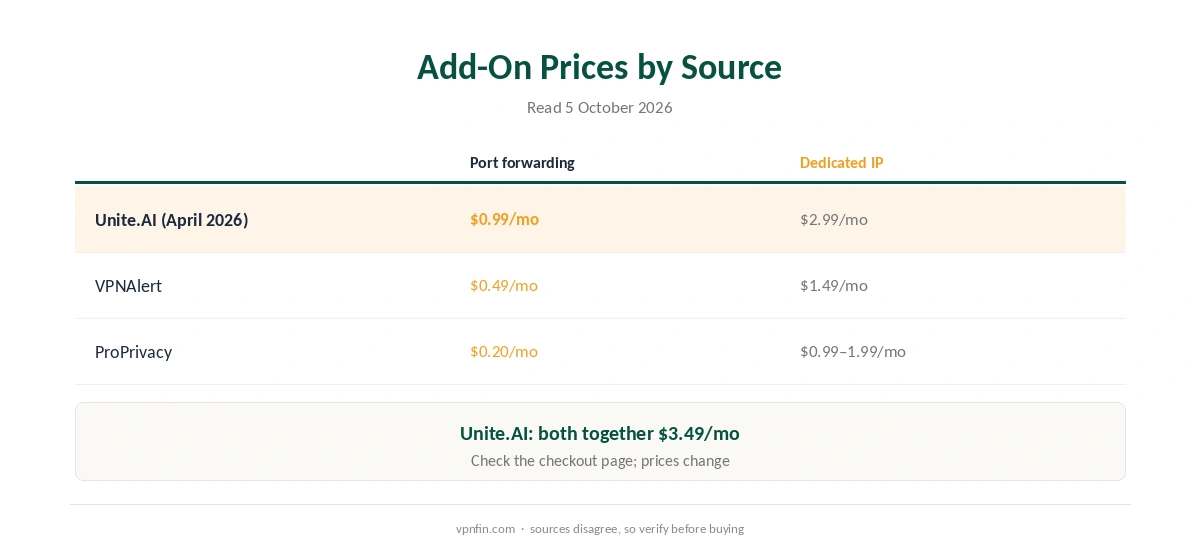
Sources disagree, so check the checkout page. Unite.AI’s April 2026 review lists port forwarding at $0.99 a month, a dedicated IP at $2.99, and both together at $3.49. VPNAlert lists $0.49 for port forwarding and $1.49 for a dedicated IP, while ProPrivacy lists lower figures still. Our PureVPN dedicated IP guide covers the IP side.
Privacy for Torrent Users
PureVPN’s no-logs policy has been audited by KPMG, our audit table records. Unite.AI notes the audits found PureVPN does not log users’ origin or assigned VPN IPs. Run leak tests before downloading; our DNS leak guide and IPv6 leak guide show how.
Torrenting copyrighted material without permission is illegal in many countries, VPN or not. PureVPN belongs to Gaditek, which absorbed Ivacy in 2024.
P2P PureVPN privacy also depends on your client settings. Bind the torrent client to the VPN interface where it offers that option, so it cannot use your normal connection if the tunnel drops. Disable features that announce your real address, such as UPnP on the client, when you rely on the VPN.
What PureVPN Costs
On 5 October 2026, PureVPN’s order page listed the Standard 2-year plan at $58.20 for the first 27 months, renewing at $47.95 a year; a deals page showed a $54.95 renewal for the same term. Our PureVPN price guide explains both grids, and our refund guide covers the 31 days.
| Provider | Renewal price | Per month | Tier |
|---|---|---|---|
| NordVPN | $139.08/yr | ~$11.59 | Basic |
| Surfshark | ~$79/yr | ~$6.58 | Starter |
| ExpressVPN | $99.95/yr | ~$8.33 | Basic |
| CyberGhost | $56.94/yr | ~$4.75 | 2-year |
| PureVPN | $47.95/yr | ~$4.00 | Standard, 2-year (1-year renews $57.95) |
| IPVanish | $89.99/yr | ~$7.50 | Essential |
| Windscribe | ~$69/yr | ~$5.75 | Pro |
| Proton VPN | ~$83.88/yr | ~$6.99 | VPN Plus |
| Mullvad | ~$65/yr | ~$5.40 | flat, no tiers |
| Norton VPN | $79.99/yr | ~$6.67 | Standard |
| Hotspot Shield | ~$95.99/yr | ~$8.00 | Premium annual |
| Astrill | $300 every 2 yrs | ~$12.50 | 2-year, same at renewal |
Other Options
Our torrenting VPN guide compares providers, and our NordVPN torrenting guide covers a rival without port forwarding.
For a kill switch primer, see our kill switch guide. It explains why the switch matters most during long downloads. Turn it on once and leave it on.
P2P PureVPN on Other Devices
Torrent clients run mostly on computers, but the same rules apply elsewhere. On Mac, PureVPN has no split tunnelling, so the whole Mac uses the tunnel; our PureVPN Mac guide covers the app. On Linux, the command-line app suits seedboxes and home servers, as our PureVPN Linux guide explains.
A NAS running downloads can use PureVPN through DSM’s VPN client, as our PureVPN Synology guide describes. Remember that DSM’s VPN profile lacks an app kill switch, so a drop can expose traffic until it reconnects.
Checking Your Torrent IP
Torrent-specific IP checks show the address your client reports to the swarm, which can differ from the browser’s address shown on a normal IP test page. Run one after connecting, with the client open, to confirm it shows a PureVPN address rather than your own. If it shows your home IP, stop the client and check the kill switch and binding settings.
Repeat the check after app updates and network changes. A quick test takes less time than repairing a leak, and it confirms the kill switch and binding settings still hold.
Choosing a Protocol for Torrents
WireGuard is the faster protocol in the comparisons we read, which matters for large downloads; our PureVPN WireGuard guide shows how to switch. If a network throttles or blocks UDP traffic, OpenVPN TCP is the fallback, at some cost in speed.
For P2P PureVPN use, also pick a server close to you. Distance adds delay, and torrent speeds depend on many peer connections at once, so a nearby P2P server usually performs better than a distant one.
How We Research
This page draws on PureVPN reviews from Comparitech, ProPrivacy, Unite.AI and VPNAlert, PureVPN’s help centre and its pricing pages. We cross-checked these sources against each other, and where they conflict or something can’t be verified, we say so in the text rather than guessing. We checked time-sensitive figures, including prices in US dollars, on 5 October 2026. PureVPN showed two plan grids on different pages, and add-on prices differed between sources. The main source we relied on is Comparitech’s PureVPN review. Our full approach lives on the About Us page.
PureVPN Torrenting FAQ
Yes. P2P is permitted and PureVPN labels P2P servers, according to Comparitech and ProPrivacy.
No. It is a paid add-on, and ProPrivacy notes it does not work on shared IPs.
Sources differ: $0.99 a month per Unite.AI, $0.49 per VPNAlert. Check the checkout page.
Comparitech suggests heavy users may prefer providers that include port forwarding.
On Windows, yes, with split tunnelling in include mode.
The Verdict
P2P PureVPN use works well for downloading, with labelled servers and a kill switch. Heavy seeders should weigh the paid port forwarding add-on against providers that include it.