
Disclosure: VPNFin is reader-supported. If you buy a VPN through links on this page, we may earn a commission at no extra cost to you. This never affects our ratings — here’s our full disclosure.
Almost every guide to the best VPN for streaming ranks providers by speed. That is the wrong criterion, and the numbers show why: Netflix needs 15 Mbps for 4K, YouTube 20, and Disney+ 25. The slowest VPN on this page still delivers roughly 200 Mbps on a normal home connection — more than thirteen times what the most demanding platform asks for. What separates a good streaming VPN from a bad one is which libraries it opens and how many devices it covers, not whether it retains 97% or 79% of your bandwidth — and on Netflix specifically, that comes down to a list of blocked addresses rather than anything about your connection. If you’re not sure a VPN is worth it for you at all, we answer that separately.
The Short Answer
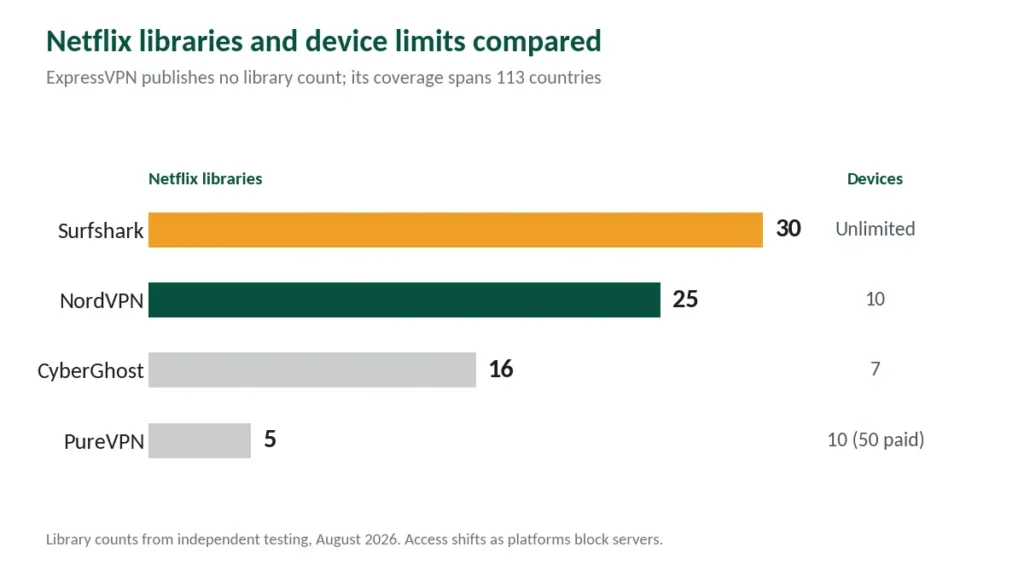
NordVPN is the best overall pick: independent testers consistently rank it first for unblocking, it opens around 25 Netflix libraries, and it retains the most speed of any provider we reviewed. Some regional catalogues need no VPN at all, which is worth checking before subscribing, and the Mexican catalogue has grown enough that the US library isn’t automatically the upgrade. our ExpressVPN and Netflix page sets out what this year’s tests found.
Surfshark is the better buy for households. It opens more Netflix regions than anything else we found — roughly 30 — and covers unlimited devices, so the TV, tablet and two phones can all stream at once. The two are compared directly in our NordVPN vs Surfshark breakdown.
What Streaming Actually Requires
Here is the table that should open every streaming VPN guide and never does.
| Platform | 4K requirement |
|---|---|
| Netflix | 15 Mbps |
| YouTube | 20 Mbps |
| Disney+ | 25 Mbps |
| Apple TV+ | 25 Mbps |
| HBO Max | 25 Mbps (50 recommended) |
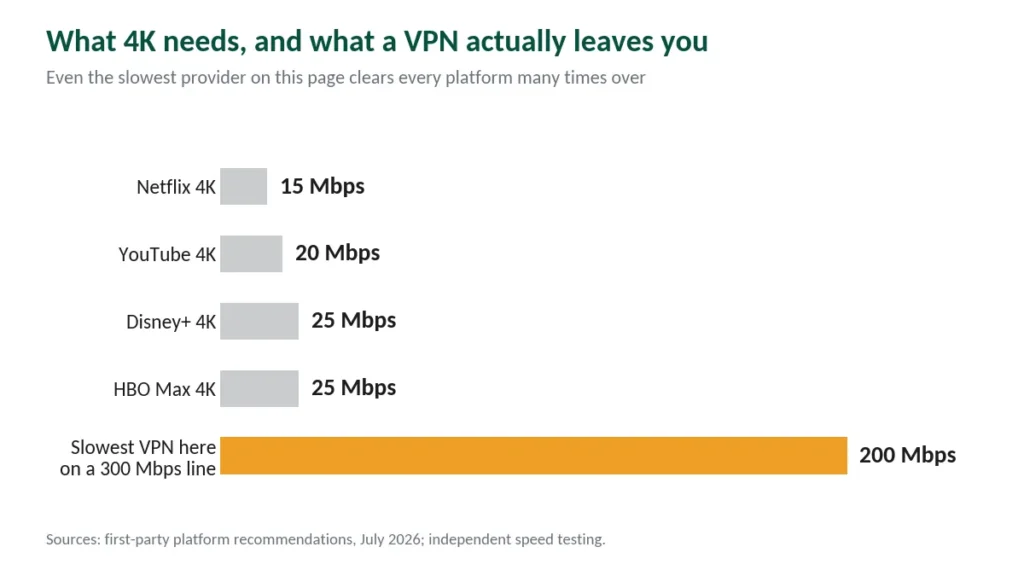
Netflix’s own help centre lists 3 Mbps for HD 720p, 5 for Full HD, and 15 for Ultra HD 4K. Older guides still quote 25 as the Netflix minimum — that figure predates the platform’s move to AV1 and VP9 encoding, which cut 4K bandwidth requirements substantially.
Now apply a VPN. On a 300 Mbps home line, the fastest provider here leaves you around 290 Mbps and the slowest around 200. Both clear every number in that table many times over.
The exception is real but narrow. If several people stream 4K simultaneously, requirements stack — two Disney+ streams need 50 Mbps before anything else touches the network. And HBO Max recommends 50 Mbps for its best 4K experience regardless. On a slow base connection, VPN overhead can matter. On a normal one, it does not.
The Five Best Streaming VPNs
1. NordVPN — Best Overall
The consensus first choice among independent testers, and the data supports it. One lab measured 86% average speed retention, the highest in a 15-VPN field. Another recorded 228 Mbps on US East servers — 91% of their baseline — with zero failures across four Netflix regions. Library coverage runs to roughly 25 Netflix catalogues.
SmartPlay, which combines Smart DNS with VPN encryption, handles geo-blocks without manual configuration and works on devices that cannot run VPN apps. Ten simultaneous connections covers most single users comfortably.
The catch: ten devices is a real ceiling for a busy household, and renewal costs $139.08 a year. Full detail in our NordVPN review.
2. Surfshark — Best for Households
Surfshark opens more Netflix regions than any provider we examined — around 30 catalogues, against NordVPN’s 25 — with officially supported access across the US, UK, Canada, Australia, Germany, France, Japan, South Korea, Singapore and more. Netflix Japan is the one worth targeting specifically — it holds the largest anime library of any region.
The unlimited device policy is what makes it the household pick. Every plan allows unlimited simultaneous connections, so nobody gets disconnected when a fourth person starts watching. It also renews at roughly $79 a year, about half of NordVPN’s rate.
The catch: CNET measured 21% speed loss, the weakest of the five. As established above, that still leaves far more bandwidth than any platform needs. Full detail in our Surfshark review.
3. ExpressVPN — Most Reliable
CNET named ExpressVPN the best VPN for streaming in its March 2026 review, and its reputation rests on consistency: where other providers occasionally fail a regional library, ExpressVPN tends to work first time. Coverage spans 113 countries, the widest here, which matters for regional services like Crave in Canada or SBS in Australia.
The catch: the steepest renewal in the category at $99.95 a year for the entry plan, and the device limit varies by tier — 10, 12, or 14. Full detail in our ExpressVPN review.
4. CyberGhost — Best Server Selection
CyberGhost solves a problem the others ignore. Instead of listing cities and letting you guess which still works with Netflix, it labels servers by platform — you pick Netflix, Disney+, Hulu, HBO Max or BBC iPlayer from a menu, though the last of those blocks harder than the rest. For anyone tired of cycling through servers, this alone justifies the choice.
Testers verified access across 16 Netflix libraries. The 45-day money-back guarantee is the longest available, and free trials require no payment card.
The catch: one tester unblocked six of eight platforms attempted, with Peacock and DAZN the failures, and speed loss runs 31–38%. Full detail in our CyberGhost review.
5. PureVPN — Cheapest That Works
Over 30 days of testing across 12 servers, one reviewer reliably reached Netflix libraries in the US, UK, Japan, Canada and Germany, plus Disney+, BBC iPlayer, Prime Video and HBO Max. Ten devices are included, expandable to 50 through a paid add-on, and renewal is the cheapest here at $47.95 a year.
The catch: Hotstar and some ITVX servers failed, speed varies sharply between individual servers, and the provider has a documented 2017 logging incident that we cover honestly in our PureVPN review.
Head to Head
| NordVPN | Surfshark | ExpressVPN | CyberGhost | PureVPN | |
|---|---|---|---|---|---|
| Netflix libraries | ~25 | ~30 | Wide | 16 verified | 5 verified |
| Devices | 10 | Unlimited | 10–14 | 7 | 10 (50 paid) |
| Speed loss | 2.9% | 21% | 18% | 31–38% | Varies |
| Refund window | 30 days | 30 days | 30 days | 45 days | 30 days |
| Renewal/year | $139.08 | ~$79 | $99.95 | $56.94 | $47.95 |
What Actually Matters When Choosing
Library count over raw speed. More regional catalogues means more content. This is the criterion that varies most between providers and gets discussed least. Our guide to Surfshark for Streaming covers results by service, TV apps and the gaps.
Device limit, honestly counted. A modern household runs two phones, two laptops, a tablet, a smart TV and a console before guests arrive. That is seven devices — at NordVPN’s limit and past CyberGhost’s. Televisions are their own category — half of them can’t run a VPN at all. Streaming sticks add another wrinkle — Amazon’s newest ones only run apps from its own store.
Server switching that isn’t painful. Platforms block individual servers constantly. What matters is how quickly you can find one that works, which is exactly what CyberGhost’s platform labels solve. On devices that can’t run VPN apps at all, like Roku, the setup is different entirely.
A refund window long enough to test properly. Every provider here offers at least 30 days. Buy, test your specific libraries in your first week, and take the money back if they fail. If you have not installed one before, our setup guide covers the process and the checks that follow it. Hulu is the exception that needs its own approach — it checks three things, not one.
The Honest Caveat
No VPN guarantees permanent access to anything. Using a VPN for streaming is legal — accessing another region’s library breaches the platform’s terms of service, not the law, as our legality guide explains. Platforms and providers trade moves every month: a server that opens US Netflix today may fail in October, and every unblocking claim in this guide — including ours — is a snapshot rather than a warranty. Globoplay is the most stubborn of them — it blocks providers for weeks rather than hours.
This is why we weight the refund window as heavily as the library count. Any provider that will not let you test for a month is asking you to trust a claim nobody can guarantee. Which trials are genuinely free, and which need your card first. Live TV services are stricter still — YouTube TV checks three signals rather than one, and Google says outright that VPN traffic will not stream.
Two countries now remove domains at the provider rather than at the site. French courts ordered NordVPN, Surfshark, ExpressVPN, CyberGhost and Proton VPN to block a list of piracy sites for users there — what that covers and who it binds is a separate page.
Italy went further and faster. Its regulator obliges VPN and DNS providers to execute blocking orders within thirty minutes, and one provider stopped accepting Italian customers rather than comply.
Watching Italian television is a separate question. The answer changes depending on whether you are inside the country or outside it, and only one of those two situations involves the blocklist at all.
Regional broadcasters are their own category. France, Italy and the rest each geo-block their free national channels, and what stands in the way differs by country — sometimes only an address, sometimes an account as well. Live sport is a category again: it reads your local market rather than your country, and refuses you at home. Spotify is the outlier: the only platform we cover where the consequence lands on your account rather than the session.
How We Research
This guide draws on our full reviews of all five providers, published testing from named independent labs including CNET, Cybernews and Security.org, and first-party speed requirements from the streaming platforms themselves — cross-checked against one another and verified at publication. Where sources conflicted, notably on Netflix’s stated 4K minimum, we explain the discrepancy rather than picking one number. Our full approach lives on the About Us page. These five are ranked here for streaming specifically, which is a different question from our overall top five.
Streaming VPN FAQ
Yes, but almost never enough to matter. Netflix needs 15 Mbps for 4K and Disney+ needs 25. Even the slowest provider in this guide leaves roughly 200 Mbps on a 300 Mbps line. The exception is a slow base connection or several simultaneous 4K streams, where requirements stack.
Surfshark, at roughly 30 regional catalogues, with NordVPN close behind at about 25. Both officially support the major regions including the US, UK, Canada, Australia, Japan and Germany. Library access shifts as Netflix blocks individual servers, so treat any count as approximate. K-dramas are a special case — some sit in the US library rather than the Korean one.
Almost never. Free services impose data caps and speed limits that make 4K impossible, and streaming platforms block their limited server ranges quickly. Some free providers also monetise by logging and selling browsing data — the opposite of what a VPN is for. Our free VPN guide covers the three exceptions and what they still can’t do.
Licensing. Netflix pays for content rights country by country, and those agreements require it to restrict each catalogue geographically. Detecting and blocking VPN servers is how it demonstrates compliance, which is why the blocking never permanently stops.
Switch servers within the same country first — platforms block individual servers, not entire providers. If several fail, clear your browser cache and cookies, or try the provider’s dedicated streaming servers where available. CyberGhost’s platform-labelled servers exist specifically to shortcut this process.
Depends on the provider. Surfshark allows unlimited simultaneous connections, NordVPN and ExpressVPN allow 10 on entry plans, and CyberGhost caps at 7. Count your devices honestly before choosing — two phones, two laptops, a tablet, a TV and a console is already seven.
The Verdict
For most people, NordVPN — it unblocks the most reliably, retains the most speed, and one click connects. For households, Surfshark — more Netflix libraries than anything else and no device ceiling to hit. If you are tired of hunting for a working server, CyberGhost’s platform-labelled servers plus a 45-day window make it the low-risk option. Our page on NordVPN for streaming covers service-by-service and device-by-device streaming setup.
And whichever you choose, remember the number that started this guide: 4K Netflix needs 15 Mbps. You are not buying speed. You are buying access. Torrenting is the opposite case, where speed genuinely does matter — our torrenting guide covers why.