Disclosure: VPNFin is reader-supported. If you buy a VPN through links on this page, we may earn a commission at no extra cost to you. This never affects our ratings — here’s our full disclosure.
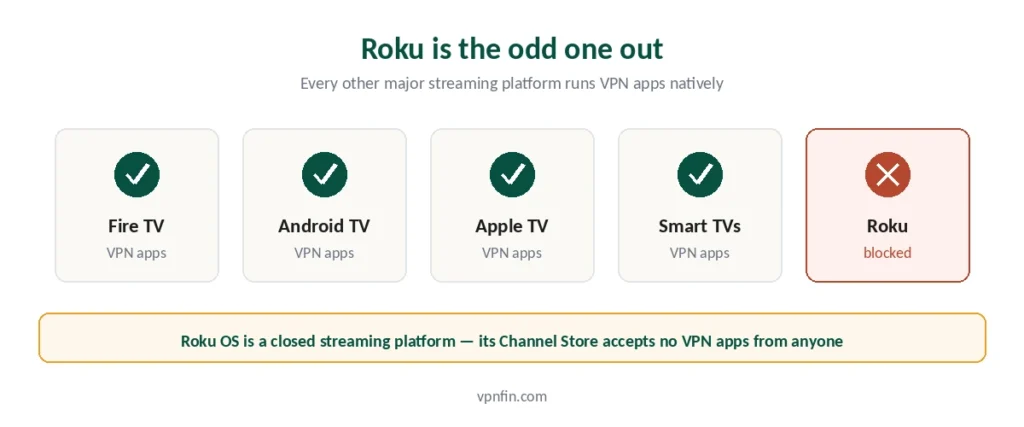
Start with the part most guides bury: you cannot install a VPN on a Roku device. Not with NordVPN, not with ExpressVPN, not with any provider. Roku’s operating system is a closed streaming platform rather than a general-purpose OS, and its Channel Store does not accept VPN apps at all.
That makes Roku the odd one out. Fire TV and Android TV run VPN apps natively, though Samsung and LG televisions cannot either. Games consoles share the same limitation — our gaming guide covers the workarounds for PlayStation and Xbox. Roku is the only major streaming platform that blocks them entirely.
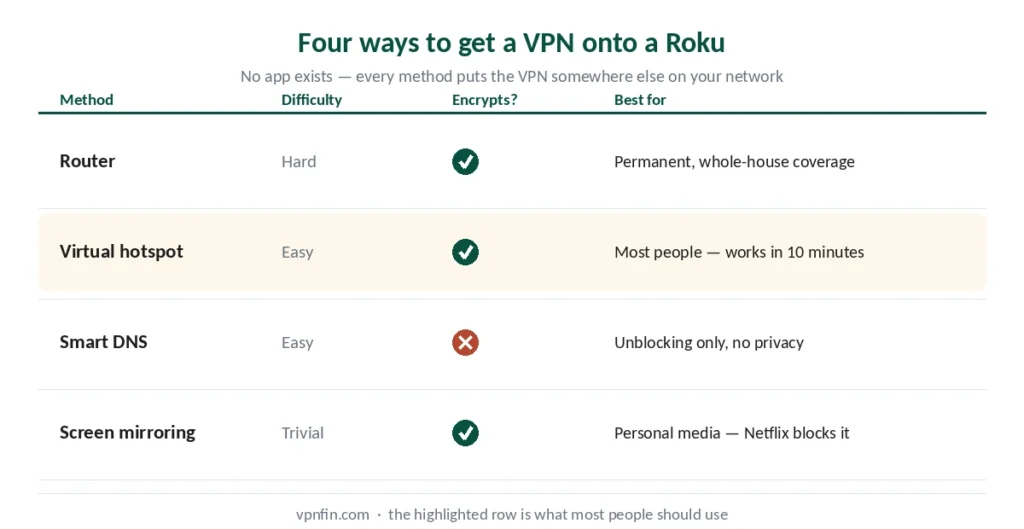
What works instead: four methods that put the VPN somewhere else on your network and route Roku through it. They differ substantially in difficulty and in what they actually protect.
The Four Methods at a Glance
Router — the complete solution. Every device on your network is covered, and Roku needs no configuration at all. Hardest to set up, and carries real risk if done manually.
Virtual hotspot from a computer — your PC or Mac shares its VPN-protected connection. Much easier than the router, but the computer has to stay on. Our page on TunnelBear on Roku covers the two workarounds and the providers that make it easier.
Smart DNS — changes what region streaming services think you’re in. Fastest and simplest, but no encryption and no privacy benefit. our Smart DNS and VPN comparison covers that choice in detail.
Screen mirroring — cast from a phone or laptop that’s already on a VPN. Simplest of all, and the most limited.
Method 1: Router
The most thorough approach. Configure a VPN on your router and everything connected to it — Roku, consoles, smart speakers, guests’ phones — runs through the tunnel automatically.
Two routes to get there.
Buy a pre-configured router. Several providers sell routers with their VPN already flashed, and ExpressVPN sells Fortify, built with GL.iNet, which replaced its Aircove routers in September 2026. Costs more, works out of the box.
Configure your existing router manually. Free, and requires your router to support OpenVPN or WireGuard — many ISP-supplied routers do not. You’ll need your provider’s configuration files and access to the router admin panel. Our router guide covers all three approaches and which one your hardware allows. Our Aircove review covers that router, including its price and the subscription it needs.
⚠️ The warning nobody selling routers gives you: manual firmware flashing can permanently disable your router if done incorrectly. If you’re not confident, buy pre-configured or use the hotspot method instead.
One more consideration: a router connection usually counts as a single device against your VPN’s connection limit. With CyberGhost, for instance, that means one of seven slots covers the entire house. Our page on CyberGhost on Roku covers Smart DNS, a router VPN and the hotspot route.
Method 2: Virtual Hotspot
Your computer connects to the VPN, then shares that connection over Wi-Fi. Roku joins that network instead of your normal one.
On Windows: connect your VPN, then Settings → Network & Internet → Mobile hotspot. Turn it on, note the network name and password, and connect your Roku to it in Roku’s network settings.
On Mac: System Settings → General → Sharing → Internet Sharing. ⚠️ Your Mac must be connected to the router by Ethernet rather than Wi-Fi for this to work — it cannot share the same Wi-Fi adapter it’s receiving on.
Trade-off: the computer has to stay powered on and connected the whole time you’re watching. Fine for evenings, awkward as a permanent arrangement.
Method 3: Smart DNS — and the Confusion Around It
This is where published guides contradict each other, so here is the accurate version.
Smart DNS does not encrypt anything. It changes how streaming services determine your location, nothing more. No privacy benefit, no security benefit — but also no speed penalty, which is why people like it.
You cannot set it up on the Roku itself. Roku provides no option to change DNS settings on the device. Some guides describe entering DNS servers into Roku, and that path does not exist.
Where it actually goes: your router’s DNS settings, or in some cases your Roku account region settings. Both are steps removed from the device. Our guide to IPVanish on Roku covers why there is no app, and the two routes that work.
⚠️ Two current caveats. Surfshark discontinued its SmartDNS feature in February 2026, so guides recommending it are out of date. And streaming platforms have got considerably better at detecting DNS manipulation, making the method less reliable than it was.
ExpressVPN’s version is called MediaStreamer and remains available to subscribers. It’s not a privacy tool at all, which matters if that’s what you came for.
Method 4: Screen Mirroring
The simplest option and the most limited. Connect your phone or laptop to the VPN, then mirror or cast to the Roku.
Works with: AirPlay from Apple devices to compatible Roku models, or screen mirroring from Windows and Android.
Doesn’t work with: most major streaming apps. Netflix, Disney+ and others block mirroring through DRM protection, which is precisely the content most people want this for. Our guide to Windscribe on Roku covers why there is no app, two workarounds and a free way to test.
Useful for personal media and some services. Not a general solution.
⚠️ This is where the network mismatch bites — a VPN on the casting device hides the target device from it.
Which VPN Works Best for Roku
Since no provider has a Roku app, the question is which one handles the workarounds well. Three things matter.
Router support. Does the provider publish router configuration files and guides? All five we rank do, and ExpressVPN additionally sells its own router.
Smart DNS availability. ExpressVPN offers MediaStreamer, NordVPN has SmartPlay built in. Surfshark discontinued its version in February 2026.
| Provider | Simultaneous | Notes |
|---|---|---|
| NordVPN | 10 | — |
| Surfshark | Unlimited | no cap in terms |
| ExpressVPN | 10/12/14 | by tier |
| CyberGhost | 7 | router counts as one |
| PureVPN | 10 | up to 50 with paid add-on |
| IPVanish | Unlimited | no cap on any plan |
| Windscribe | Unlimited | including Build a Plan |
| Private Internet Access | Unlimited | no tier gating |
| Mullvad | 5 | no paid add-on |
| TunnelBear | Unlimited | no cap on any plan |
| Norton VPN | 5 | 10 on Ultimate, US only |
| Hotspot Shield | Disputed | sources give five and ten |
| IVPN | 5 | 10 on Pro Suite |
| PrivadoVPN | 10 | 1 on the free tier |
| StrongVPN | 12 | more than either market leader |
| PrivateVPN | 10 | free dedicated IP on one plan |
| VyprVPN | Disputed | sources give five and ten |
| Astrill | 5 or unlimited | sources disagree; Astrill's page says unlimited in the household |
| TorGuard | 8, 12 or 30 | by plan |
| ZoogVPN | 10 | 1 on the free tier; some reviews say unlimited |
| FastestVPN | 10 | 15 on the PRO lifetime plan |
| Hide.me | 10 | 1 on the free tier |
Streaming reliability. The whole point is unblocking, and this varies month to month — our streaming guide covers which providers open the most libraries.
One practical note on device limits: if you’re using the hotspot method, both your computer and the connection count. Surfshark’s unlimited connections remove that arithmetic entirely.
If It Doesn’t Work
Test one layer at a time rather than changing everything at once.
Step 1: confirm the VPN works on a laptop — load a site that shows your IP and check the location changed.
Step 2: confirm the router or hotspot is passing that connection through. Connect a phone to it and check the IP again. Our page on VyprVPN on Roku covers router setups and the Windows hotspot route.
Step 3: only then reconnect the Roku and test the streaming app.
This isolates whether the problem is the VPN server, the network setup, your Roku account region, or the streaming app itself. We also have a separate guide to Proton VPN on Roku.
⚠️ One Roku-specific gotcha: your Roku account has its own region setting, separate from your network location. If the account is registered in one country and the VPN says another, some apps get confused. Check it in your Roku account settings on the web. Streaming apps add their own checks on top — Hulu is the strictest of them.
Using one of the big three? Our provider guides walk through setup and the usual faults step by step: NordVPN on Roku, Surfshark on Roku and ExpressVPN on Roku.
How We Research
This guide draws on published documentation from Roku and VPN providers, technical guides from named sources including Security.org, Top10VPN and TheBestVPN, and our own full reviews of the providers we rank — cross-checked and verified at publication. Where published guides contradicted each other, as they did on whether Smart DNS can be configured on Roku itself, we say so and explain the discrepancy. Our full approach lives on the About Us page.
Roku VPN FAQ
No. Roku’s operating system is a closed streaming platform, and its Channel Store does not accept VPN applications from any provider. This is a platform restriction rather than something a particular VPN could solve — Fire TV and Android TV allow VPN apps, Roku does not.
The virtual hotspot method. Connect your computer to the VPN, then share that connection over Wi-Fi through Windows Mobile hotspot or macOS Internet Sharing, and connect the Roku to it. No hardware to buy, no firmware to flash, and it works in about ten minutes. The trade-off is that your computer has to stay on.
No — Roku provides no option to change DNS settings on the device, despite what some guides suggest. Smart DNS has to be configured on your router or through your Roku account region settings instead. Note also that Surfshark discontinued its SmartDNS feature in February 2026.
Somewhat, since all traffic passes through the VPN server. In practice it rarely matters: 4K streaming needs 15 to 25 Mbps depending on platform, and even providers that lose a third of your speed leave far more than that on a normal connection. Choosing a nearby server minimises the impact.
Usually not. Netflix, Disney+ and most major streaming apps block screen mirroring through DRM protection, which is exactly the content most people want this for. Mirroring works for personal media and some smaller services, but it is not a general solution.
None has a Roku app, so the question is which handles the workarounds well. ExpressVPN offers MediaStreamer Smart DNS and sells a router with the VPN built into the firmware. NordVPN includes SmartPlay. Surfshark’s unlimited device limit helps if you’re using the hotspot method, since both the computer and connection count elsewhere.
The Short Version
No VPN app exists for Roku and none is coming — the platform blocks them at the OS level.
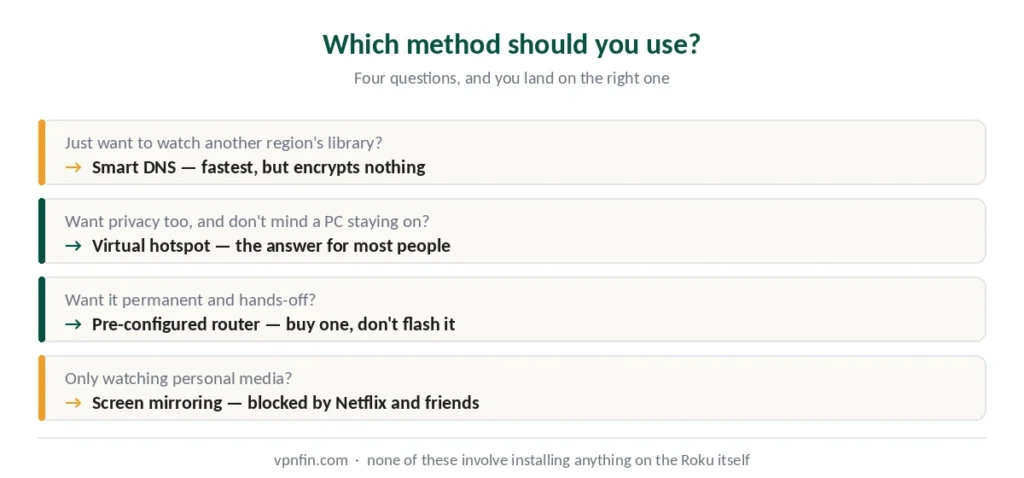
For most people the virtual hotspot is the right answer: no hardware to buy, no risk of breaking anything, works in ten minutes. The computer staying on is the only cost.
Buy a pre-configured router if you want it permanent and hands-off, and you’d rather not risk flashing firmware yourself.
Use Smart DNS only if unblocking is the goal and privacy isn’t — it encrypts nothing.
Skip screen mirroring unless you’re watching personal media, because the major streaming apps block it. Our page on PureVPN on Roku covers router and hotspot routes and Roku’s account rule.