
Disclosure: VPNFin is reader-supported. If you buy a VPN through links on this page, we may earn a commission at no extra cost to you. This never affects our ratings — here’s our full disclosure.
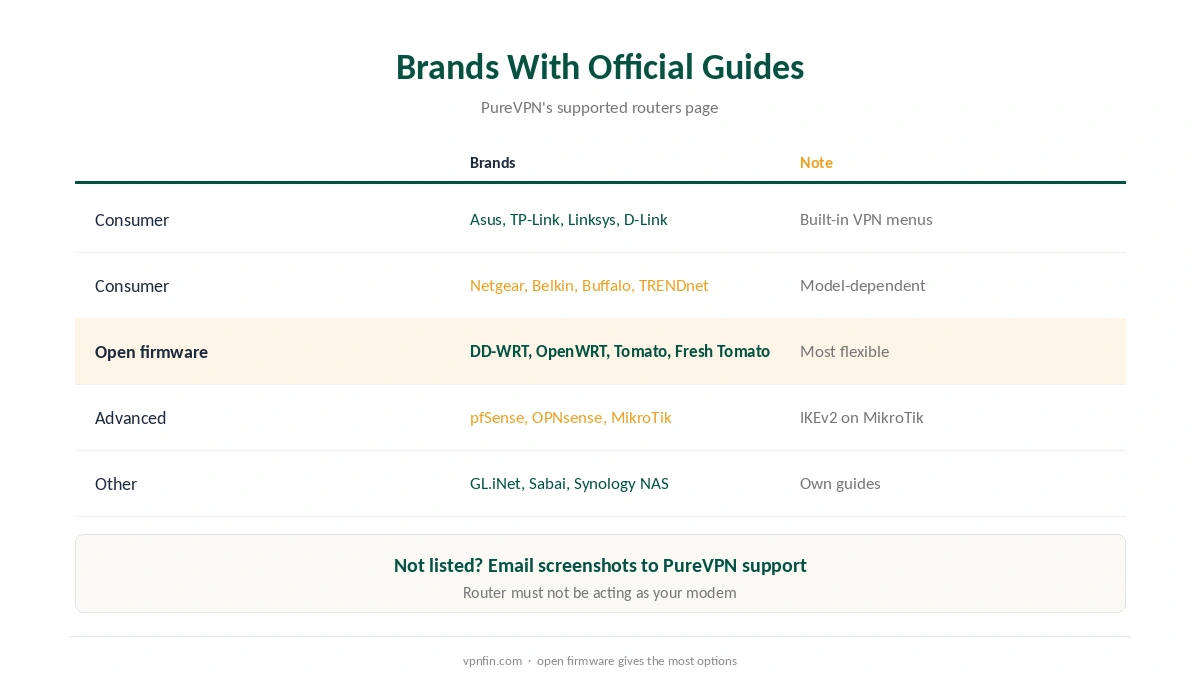
A PureVPN router setup covers every device in the home, including TVs and consoles that cannot run VPN apps. PureVPN’s help centre lists official guides for about 19 router brands and firmwares, from Asus and TP-Link to DD-WRT, OpenWRT, pfSense and MikroTik. Each uses manual credentials from the PureVPN Member Area, not your app login screen. Our page on PureVPN on PS4 covers the router and Windows PC routes, NAT and ping.
This guide covers what your router needs, where the credentials live, the main firmwares, and the MikroTik case, which PureVPN handles through IKEv2.
What Your Router Needs
PureVPN’s support article sets two conditions. The router must not be working as your modem, and it must include a WireGuard or OpenVPN client. Many ISP-supplied combined units fail the first test, so a separate router behind the modem is often needed. For where it works and how to switch, see our page on PureVPN WireGuard.
If your router is not on the list, PureVPN asks you to email screenshots of its VPN settings to its support team, which will help with the configuration. Our router setup guide explains how to check what your router supports.
Finding Your Manual Credentials
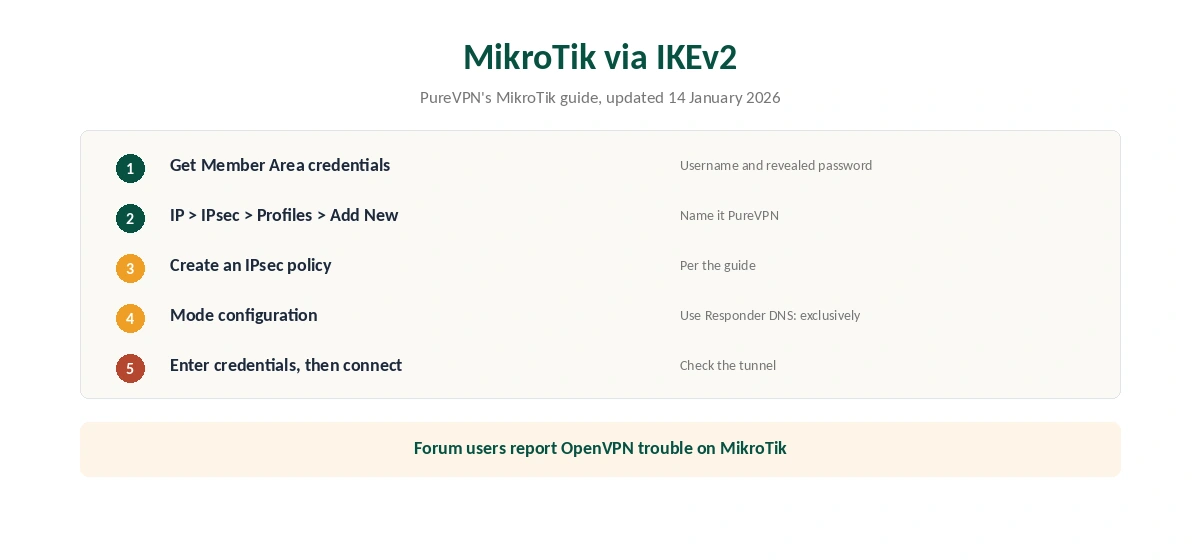
Log in to the PureVPN Member Area and find the manual configuration section. PureVPN’s guides say to note the username shown there and click the eye icon to reveal the password. Those are the values the router needs.
Then download the configuration files for your protocol. OpenVPN setups need the CA certificate and TLS key from PureVPN’s file bundle; WireGuard setups need the private key, address and DNS values from a WireGuard config.
DD-WRT, Asus and OpenWRT
For DD-WRT, PureVPN’s guide requires v24 build 13309 or newer, an OpenVPN, Big, Mega or Giga build, and at least 8 MB of flash memory. It covers OpenVPN, with the TLS key and CA certificate pasted in, and WireGuard, with values copied from the config file.
On Asus routers, open VPN in the left menu, choose OpenVPN, upload the file and enter the credentials. PureVPN notes that Asus sometimes shows an X on the status even when the connection works. OpenWRT, pfSense and OPNsense each have their own guides in the help centre.
PureVPN Router Setup on MikroTik
PureVPN’s MikroTik guide, updated on 14 January 2026, uses IKEv2 rather than OpenVPN. You add a profile under IP, IPsec, Profiles, and create an IPsec policy. Then add a mode configuration with Use Responder DNS set to exclusively, and enter your PureVPN credentials.
That choice matters. A user on MikroTik’s forum reported that OpenVPN with a PureVPN dedicated IP would not connect on MikroTik, and another suggested WireGuard instead. If IKEv2 does not suit you, a recent RouterOS with WireGuard support is the other option. Our IKEv2 vs WireGuard page explains the difference.
PureVPN Router Troubleshooting
Most failed router connections come down to three things. First, the credentials: the router needs the manual username and password from the Member Area, not your email address. Second, the firmware: an old build may lack a working OpenVPN or WireGuard client, so update it. Third, the modem: if the router is also the modem, PureVPN says it is not supported.
If the tunnel connects but devices have no internet, check the DNS values from the configuration file. DD-WRT users can pull error logs, which PureVPN’s help centre explains how to retrieve. For anything else, PureVPN’s support accepts screenshots of the router’s VPN settings. Our guide to PureVPN on Synology covers OpenVPN in DSM, the Gateway trade-off and IPv6.
A dedicated IP, sold as a PureVPN add-on, can help where shared addresses get blocked, as our dedicated IP guide explains. Port forwarding is another add-on; our port forwarding guide covers when it matters.
Choosing a Protocol for a PureVPN Router
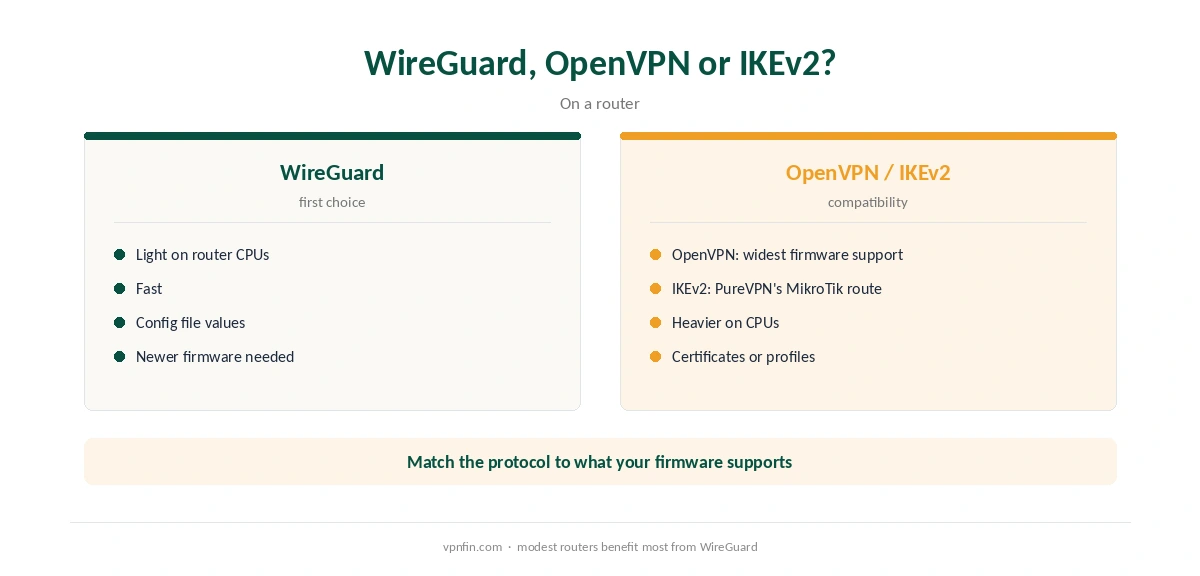
In the comparisons we have read, WireGuard is lighter on router processors and faster, which matters on modest hardware. OpenVPN has the widest firmware support. IKEv2 is the route PureVPN documents for MikroTik. Our WireGuard vs OpenVPN page covers the trade-offs.
What PureVPN Costs
On 5 October 2026, PureVPN’s order page listed the Standard 2-year plan at $58.20 for the first 27 months, renewing at $47.95 a year. A separate deals page showed $58.05 for the same term with a $54.95 renewal, so the page you buy from changes the renewal by seven dollars a year. Check the renewal line at checkout. Our guide to PureVPN on Roku covers router or Windows hotspot, and Roku’s account Rule.
One plan covers 10 devices, and a router counts as one of them. PureVPN offers a 31-day money-back guarantee, as our PureVPN refund guide explains.
| Provider | Renewal price | Per month | Tier |
|---|---|---|---|
| NordVPN | $139.08/yr | ~$11.59 | Basic |
| Surfshark | ~$79/yr | ~$6.58 | Starter |
| ExpressVPN | $99.95/yr | ~$8.33 | Basic |
| CyberGhost | $56.94/yr | ~$4.75 | 2-year |
| PureVPN | $47.95/yr | ~$4.00 | Standard, 2-year (1-year renews $57.95) |
| IPVanish | $89.99/yr | ~$7.50 | Essential |
| Windscribe | ~$69/yr | ~$5.75 | Pro |
| Proton VPN | ~$83.88/yr | ~$6.99 | VPN Plus |
| Mullvad | ~$65/yr | ~$5.40 | flat, no tiers |
| Norton VPN | $79.99/yr | ~$6.67 | Standard |
| Hotspot Shield | ~$95.99/yr | ~$8.00 | Premium annual |
| Astrill | $300 every 2 yrs | ~$12.50 | 2-year, same at renewal |
After Setup
Test from a device behind the router with our VPN test page. A router has no app kill switch, so if the tunnel drops, traffic may leave unprotected unless the firmware blocks it; our kill switch guide explains why that matters.
PureVPN’s help centre also lists a Synology NAS guide, which our Synology VPN guide puts in context.
Our PureVPN smart TV guide explains why a router is the permanent fix for Samsung and LG TVs. PureVPN belongs to Gaditek, which absorbed Ivacy in 2024.
For alternatives, our NordVPN router guide and Surfshark router guide cover two rivals. Both belong to Nord Security, so they share an owner.
How We Research
This page draws on PureVPN’s router help pages, including its supported-router list and its DD-WRT, Asus and MikroTik guides, a MikroTik forum thread and PureVPN’s pricing pages. We cross-checked these sources against each other, and where they conflict or something can’t be verified, we say so in the text rather than guessing. We checked time-sensitive figures, including prices in US dollars, on 5 October 2026. PureVPN showed two price grids on different pages that day. The main source we relied on is PureVPN’s supported routers page. Our full approach lives on the About Us page.
PureVPN on a Router FAQ
Its help centre has guides for Asus, DD-WRT, GL.iNet, Linksys, MikroTik, Netgear, OpenWRT, pfSense, OPNsense, TP-Link and more.
In the PureVPN Member Area: note the username and click the eye icon to reveal the password.
PureVPN’s guide uses IKEv2 through IP, IPsec, Profiles, a policy and a mode configuration.
Only if it is not acting as your modem and has a WireGuard or OpenVPN client, PureVPN says.
Not like the apps. Check whether your firmware blocks traffic when the tunnel drops.
The Verdict
A PureVPN router setup protects every device at home, with official guides for most popular firmwares. Use the Member Area credentials, prefer WireGuard where supported, and follow the IKEv2 guide on MikroTik.