
Disclosure: VPNFin is reader-supported. If you buy a VPN through links on this page, we may earn a commission at no extra cost to you. This never affects our ratings — here’s our full disclosure.
Surfshark torrenting is allowed on every server, VPNAlert and Comparitech report, and Top10VPN adds that Surfshark also runs P2P-optimised servers in 48 countries. The kill switch works well in tests but is off by default. The gap for heavy users is port forwarding, which Surfshark does not offer. Our guide to Surfshark Servers covers 4,500+ in 100 countries and how to pick one.
This guide covers the setup, the kill switch modes, binding your client, Bypasser and what the missing port forwarding means for seeding.
Which Servers to Use
VPNAlert notes that every Surfshark server is P2P-friendly, so any location works for torrents. Top10VPN reports P2P-optimised servers in 48 countries, though it adds they are harder to find in the app than before. Pick a server close to you for speed; distance matters more than the label.
Torrent clients open many connections at once, so a busy server slows downloads. If speeds drop, try another nearby city before changing protocol.
Surfshark Torrenting Setup
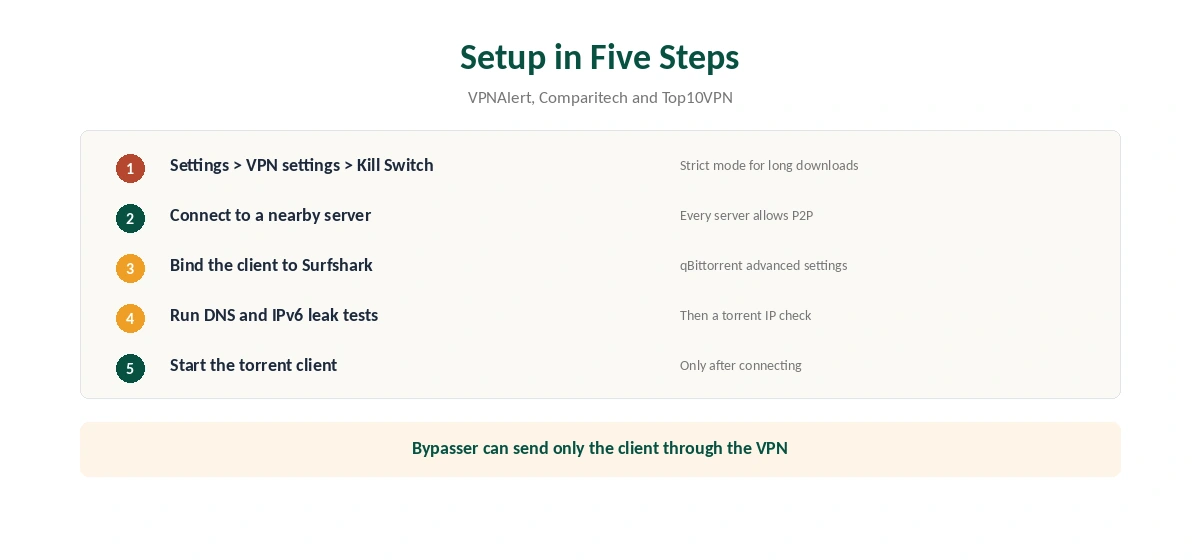
First, turn on the kill switch in Settings, then VPN settings. Next, connect to a nearby server. Only then open your torrent client. VPNAlert confirms Surfshark works with uTorrent, BitTorrent and qBittorrent.
Before the first download, run a leak test. Our DNS leak guide and IPv6 leak guide show how. Then check the address your client reports with a torrent-specific IP test.
The Kill Switch and Strict Mode
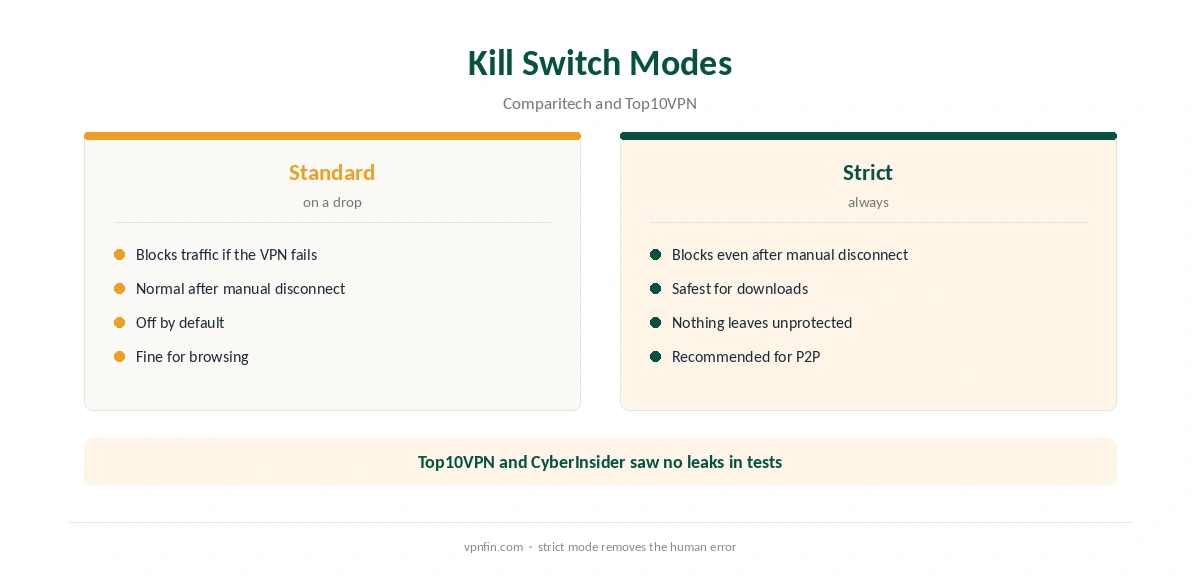
Top10VPN notes the kill switch is not on by default, and that it cut the connection correctly in its test. CyberInsider also found no leaks when testing it. Turn it on before every torrenting session.
Comparitech describes a strict option that blocks traffic even after you disconnect manually. That is the safest setting for long downloads, because nothing leaves your device unless the VPN is up. Our kill switch guide explains the trade-off.
Binding qBittorrent to Surfshark
Comparitech shows how to bind qBittorrent to Surfshark’s network interface in the client’s advanced settings. A bound client cannot use your normal connection, even if the tunnel drops. That works alongside the kill switch as a second layer.
After binding, disconnect the VPN once as a test. Downloads should stop rather than continue on your real address.
Bypasser for Torrent Clients
Surfshark’s split tunnelling, Bypasser, works on desktop and Android, Betanews notes. VPNAlert suggests using it to send only your torrent client through the VPN, leaving streaming and gaming on your normal connection. Our split tunnelling guide explains the modes.
No Port Forwarding
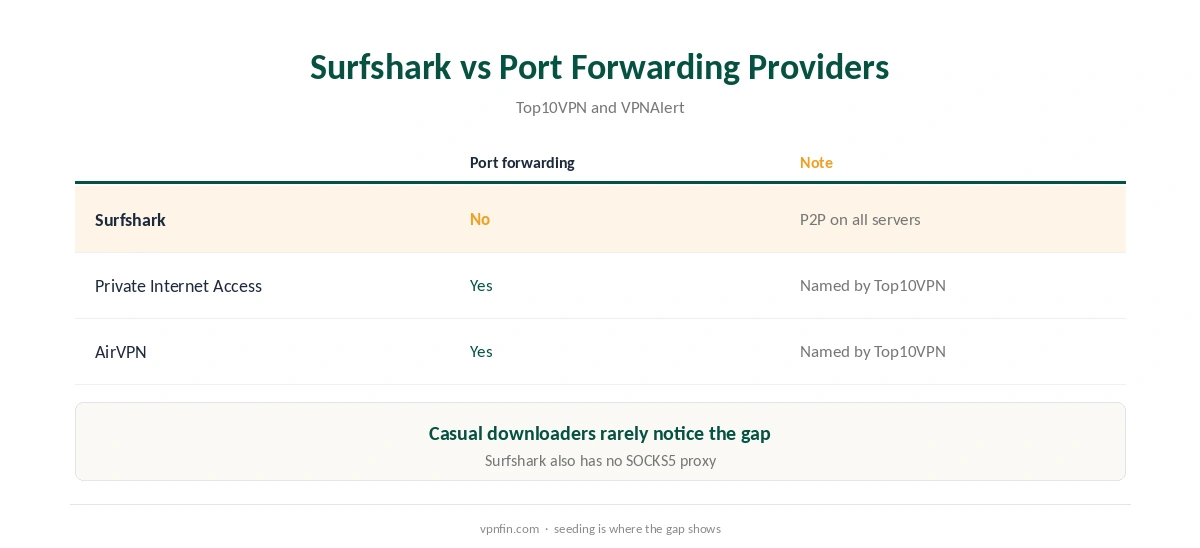
Every source we read agrees: Surfshark does not offer port forwarding. Top10VPN links that to slower seeding, since other peers cannot start connections to you. VPNAlert adds that Surfshark has no SOCKS5 proxy either. For its SOCKS5 proxy and how to set it up, see our page on Surfshark and SOCKS5.
For casual downloading, you will rarely notice. Heavy seeders and private-tracker users should consider providers with port forwarding, which Top10VPN names as AirVPN and Private Internet Access. Our port forwarding guide explains when it matters.
Protocol Choice for Torrents
Top10VPN’s Surfshark torrenting advice includes selecting the OpenVPN protocol. In the tests we read, WireGuard is faster, so test both on your own line and keep the one that holds steady over long downloads. A protocol that drops often is worse than a slightly slower one that stays connected.
Seeding Without Port Forwarding
Without port forwarding, you can still seed to peers that connect out to you. Leaving the client running longer gives more peers a chance to connect. On private trackers with ratio rules, expect slower progress than on a provider with port forwarding.
If ratio matters to you, test Surfshark on your tracker during the refund window. If uploads stay low, switch providers before the 30 days run out.
Torrenting on Linux and a NAS
Surfshark’s Linux app covers Debian, Ubuntu and Mint, with the kill switch, as our Surfshark Linux guide explains. That suits a home server running a torrent client. For a NAS without the app, a router running Surfshark covers it instead.
MultiHop for Extra Privacy
CyberInsider highlights MultiHop, which routes traffic through two Surfshark servers. It adds privacy but costs speed, so it suits small, sensitive transfers more than large downloads. See also our double VPN explainer.
What Surfshark Costs
On 25 September 2026, the Starter 2-year plan cost $67.23 for the first 27 months. Renewal sits at about $79 a year, according to Security.org and VPNOverview, since Surfshark’s own renewal table did not load. Surfshark sets no device limit. Our Surfshark price breakdown covers the plans, and our Surfshark refund guide explains the 30-day window.
| Provider | Renewal price | Per month | Tier |
|---|---|---|---|
| NordVPN | $139.08/yr | ~$11.59 | Basic |
| Surfshark | ~$79/yr | ~$6.58 | Starter |
| ExpressVPN | $99.95/yr | ~$8.33 | Basic |
| CyberGhost | $56.94/yr | ~$4.75 | 2-year |
| PureVPN | $47.95/yr | ~$4.00 | Standard, 2-year (1-year renews $57.95) |
| IPVanish | $89.99/yr | ~$7.50 | Essential |
| Windscribe | ~$69/yr | ~$5.75 | Pro |
| Proton VPN | ~$83.88/yr | ~$6.99 | VPN Plus |
| Mullvad | ~$65/yr | ~$5.40 | flat, no tiers |
| Norton VPN | $79.99/yr | ~$6.67 | Standard |
| Hotspot Shield | ~$95.99/yr | ~$8.00 | Premium annual |
| Astrill | $300 every 2 yrs | ~$12.50 | 2-year, same at renewal |
Related Guides
For other providers, see our torrenting VPN guide. The sister brand, which offers SOCKS5, appears in our NordVPN torrenting guide. Surfshark belongs to Nord Security, which also owns NordVPN.
Torrenting copyrighted material without permission is illegal in many countries, VPN or not. If downloads are slow, our Surfshark speed guide helps.
How We Research
This page draws on Surfshark torrenting guides from VPNAlert, Comparitech, Top10VPN, CyberInsider and Betanews, and pricing from Surfshark, Security.org and VPNOverview. We cross-checked these sources against each other, and where they conflict or something can’t be verified, we say so in the text rather than guessing. We checked time-sensitive figures, including prices in US dollars, on 6 October 2026. Surfshark’s renewal table did not load, so renewal figures come from Security.org and VPNOverview. The main source we relied on is Top10VPN’s Surfshark torrenting guide. Our full approach lives on the About Us page.
Surfshark Torrenting FAQ
Yes, on every server, according to VPNAlert and Comparitech.
No, Top10VPN notes. Turn it on in Settings, then VPN settings.
No. Top10VPN suggests AirVPN or Private Internet Access if you need it.
Yes, with Bypasser on desktop and Android.
A mode that blocks traffic even after a manual disconnect, Comparitech explains.
The Verdict
Surfshark torrenting works well for downloading: every server allows P2P, and the kill switch holds in tests. Turn the kill switch on, bind your client, and look elsewhere only if you seed heavily.