
Disclosure: VPNFin is reader-supported. If you buy a VPN through links on this page, we may earn a commission at no extra cost to you. This never affects our ratings — here’s our full disclosure.
A CyberGhost for router setup covers every device in the home, including TVs and consoles that cannot run VPN apps. The easiest route today is on ASUS routers: ASUS’s own support page shows CyberGhost built into its VPN Fusion feature on recent firmware. Other routers use CyberGhost’s OpenVPN configuration files with generated credentials, including routers running DD-WRT.
This guide covers the ASUS route, the OpenVPN route, what you gain and what you give up compared with the apps.
What Your Router Needs
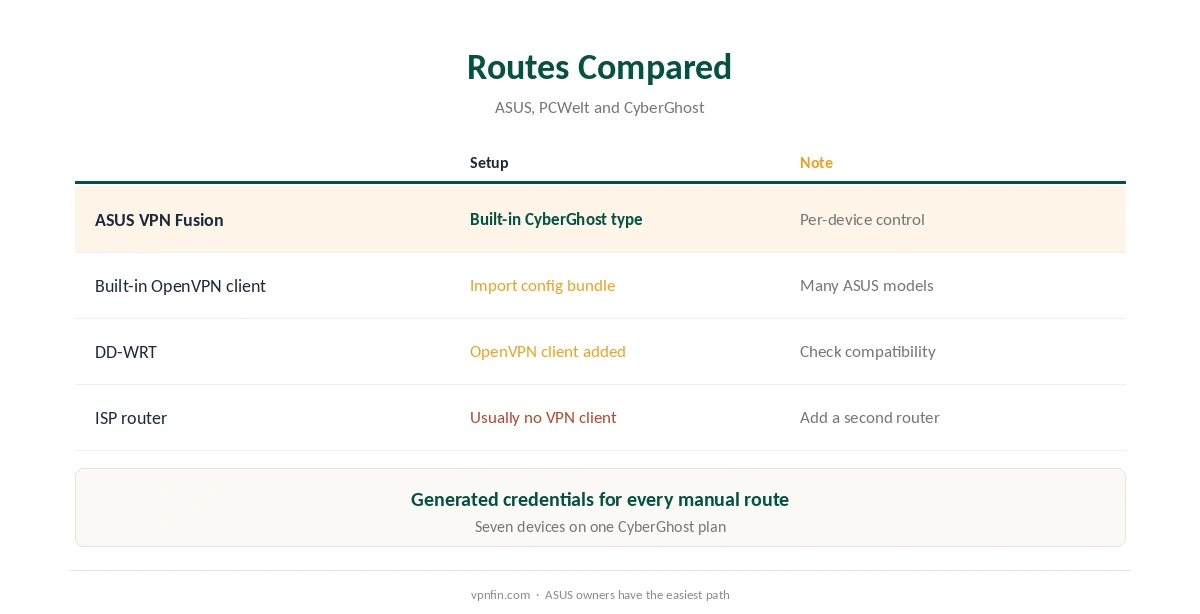
The router must include a VPN client, not just a VPN server. Many ASUS models have an OpenVPN client built in, PCWelt notes, naming the RT-AC68U and RT-AC88U. Others can run DD-WRT, which adds one. Many ISP routers have no VPN client at all, so a second router behind them is often needed.
Our router setup guide explains how to check what your router supports.
CyberGhost for Router Setup on ASUS
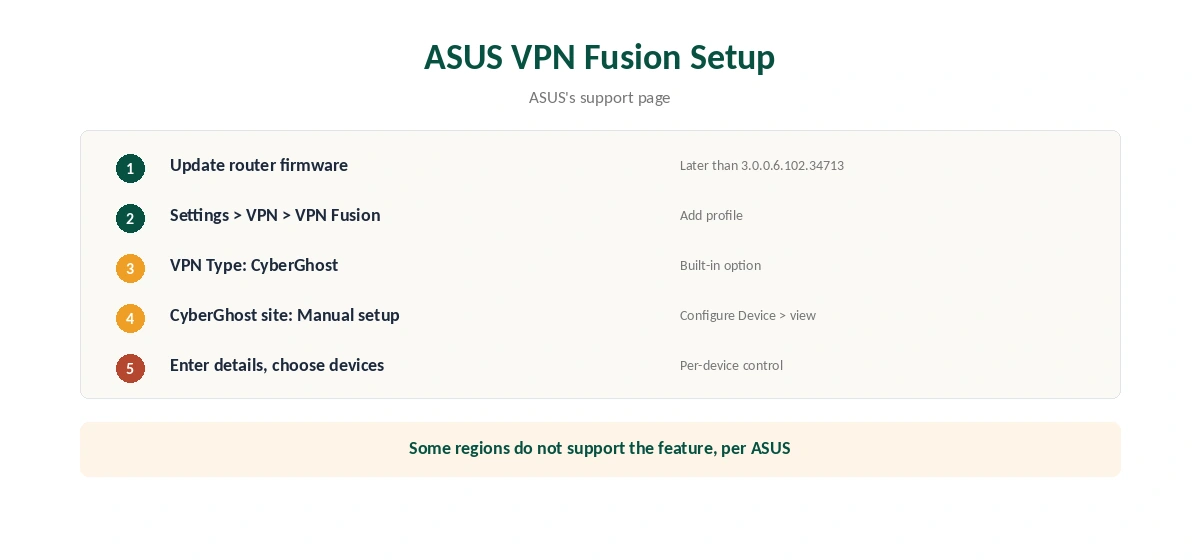
ASUS’s support page gives the steps. Update the router’s firmware first: VPN Fusion’s CyberGhost option needs firmware later than 3.0.0.6.102.34713, or later than 3.0.0.6.102.44669 on ExpertWiFi models. ASUS adds that some regions do not support the feature.
In the ASUS router app or web interface, open Settings, VPN, VPN Fusion, and add a profile. Choose CyberGhost as the VPN type. Then, on CyberGhost’s website, open VPN, Manual setup, Configure Device, and click view to see the setup details to enter on the router.
VPN Fusion’s Per-Device Control
VPN Fusion lets you choose which devices use the VPN, ASUS explains, so you manage VPN settings for several devices from one router. A smart TV and console can use CyberGhost while a work laptop stays on the normal connection. That avoids the usual router trade-off where every device shares one location.
The OpenVPN Route on Other Routers
For routers with an OpenVPN client, create a manual device in the CyberGhost account and choose OpenVPN. CyberGhost’s router guide says to click View Configuration to see generated credentials, which work only for manual setups. Download the configuration bundle, which NAT Checker says contains the CA, client certificate and private key.
Import the bundle into the router’s OpenVPN client and enter the generated username and password. Our CyberGhost OpenVPN guide covers the credentials and the AUTH_FAILED error.
DD-WRT and Custom Firmware
DD-WRT turns many routers into OpenVPN clients, PCWelt notes. CyberGhost’s own DD-WRT guide follows the OpenVPN steps above. Flashing custom firmware can void warranties and occasionally fails, so check your router’s compatibility list and keep the original firmware file before starting.
What a Router Setup Gains and Gives Up
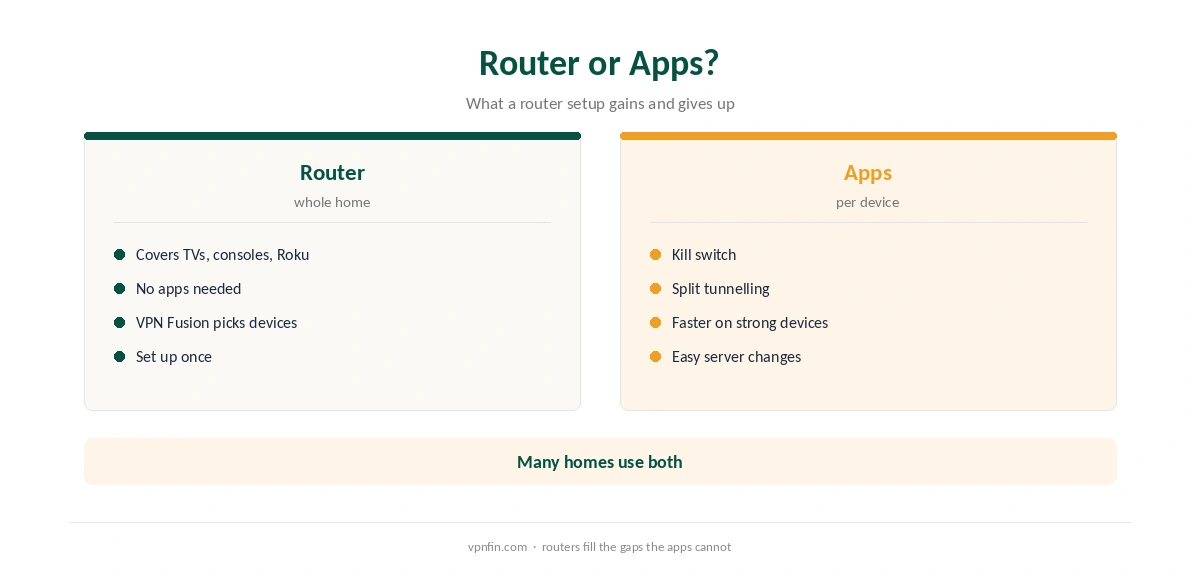
A router covers devices that cannot run apps, such as Samsung and LG TVs and Roku, as our CyberGhost smart TV guide and Roku guide explain.
The trade-offs are speed, since the router’s processor handles all encryption, and features: no app kill switch and no per-app split tunnelling outside VPN Fusion. Our router vs device VPN guide weighs the options.
Choosing a Server on the Router
A router connects to one CyberGhost location at a time, unless VPN Fusion splits devices between profiles. Pick the country most of your devices need, and the nearest city within it for speed. Changing location means loading a different configuration or profile, which is slower than tapping a country in an app.
If the router mainly serves a TV, choose the country of the catalogue you watch most. Our smart TV VPN guide covers which TVs need a router at all, and our NordVPN router guide shows another provider’s router options; NordVPN and Surfshark both belong to Nord Security.
When the Router Is Too Slow
Router processors vary widely, and OpenVPN asks a lot of them. If speeds drop sharply, test CyberGhost on a single computer first. If the computer is fast and the router slow, the router’s processor is the limit. A newer router, or VPN Fusion with only the devices that need the VPN, eases the load.
Devices That Benefit Most
Apple TV, Roku and consoles gain the most from a router setup, since none runs the CyberGhost app. Our CyberGhost Apple TV guide compares the router with Smart DNS for that device. Phones and laptops can run the apps instead, which add a kill switch and quick server changes, as our CyberGhost Windows guide shows.
What CyberGhost Costs
CyberGhost renews at $56.94 a year on its 2-year plan, according to our renewal table. It covers seven devices. The 45-day money-back guarantee applies to website purchases, as our CyberGhost refund guide explains.
| Provider | Renewal price | Per month | Tier |
|---|---|---|---|
| NordVPN | $139.08/yr | ~$11.59 | Basic |
| Surfshark | ~$79/yr | ~$6.58 | Starter |
| ExpressVPN | $99.95/yr | ~$8.33 | Basic |
| CyberGhost | $56.94/yr | ~$4.75 | 2-year |
| PureVPN | $47.95/yr | ~$4.00 | Standard, 2-year (1-year renews $57.95) |
| IPVanish | $89.99/yr | ~$7.50 | Essential |
| Windscribe | ~$69/yr | ~$5.75 | Pro |
| Proton VPN | ~$83.88/yr | ~$6.99 | VPN Plus |
| Mullvad | ~$65/yr | ~$5.40 | flat, no tiers |
| Norton VPN | $79.99/yr | ~$6.67 | Standard |
| Hotspot Shield | ~$95.99/yr | ~$8.00 | Premium annual |
| Astrill | $300 every 2 yrs | ~$12.50 | 2-year, same at renewal |
Testing the Setup
After connecting, check the public IP from a phone on the router’s network with our VPN test page. A router has no app kill switch, so a dropped tunnel can expose traffic until it reconnects, as our kill switch guide explains. For comparison, our Surfshark router guide covers another provider. CyberGhost belongs to Kape Technologies, which also owns ExpressVPN and Private Internet Access.
How We Research
This page draws on ASUS’s VPN Fusion support page for CyberGhost, PCWelt’s router guide, CyberGhost’s router and DD-WRT guides as quoted, NAT Checker’s OpenVPN guide and our renewal table. We cross-checked these sources against each other, and where they conflict or something can’t be verified, we say so in the text rather than guessing. We checked time-sensitive figures, including prices in US dollars, on 6 October 2026. Renewal from our renewal table. The main source we relied on is ASUS’s CyberGhost VPN Fusion guide. Our full approach lives on the About Us page.
CyberGhost for Router FAQ
Yes, if it has a VPN client. ASUS routers support it through VPN Fusion; others use OpenVPN files.
Firmware later than 3.0.0.6.102.34713, or later than 3.0.0.6.102.44669 on ExpertWiFi models, per ASUS.
Generated manual credentials from View Configuration, not your account login.
Not like the apps. Check whether your firmware blocks traffic when the tunnel drops.
On ASUS VPN Fusion, yes. You choose which devices use the VPN.
The Verdict
A CyberGhost for router setup is easiest on recent ASUS firmware through VPN Fusion, with per-device control. Other routers use OpenVPN files and generated credentials. Either way, every device without an app gains protection.